Hello! Welcome back to our module on AI-Powered Video Marketing Strategy.
In our last session, you created a detailed "video blueprint" by deconstructing top-performing competitor videos. You've identified your target keyword, a winning format, a hook strategy, and—most importantly—a "content gap" that your video will fill. You have the architectural plan; now it's time to write the code.
Today's lesson focuses on turning that blueprint into a compelling, ready-to-record script. Our learning outcome is to apply a proven video scripting framework (e.g., PAS, AIDA) to generate a script for a product demo using ChatGPT.
While a blueprint provides structure, a great script breathes life into it with persuasive language. We'll explore timeless marketing frameworks that create emotional resonance and then use AI to apply them at scale. Your background in computer science will be an asset here, as we'll approach communication not as a vague art but as a structured system with inputs, frameworks, and optimized outputs.
The Power of Persuasive Frameworks: AIDA & PAS
Before we ask an AI to write for us, we need to understand the principles of effective copywriting. Two of the most powerful and time-tested frameworks are AIDA and PAS.

- AIDA: Attention, Interest, Desire, Action. This framework is great for building excitement and leading a viewer toward a specific goal.
- PAS: Problem, Agitate, Solve. This framework is incredibly effective for B2B and SaaS because it focuses on the customer's pain point, makes them feel understood, and then presents your product as the ideal solution.
To get a clear understanding of how these work in practice, let's watch a short, insightful video.
Marketing Messaging Frameworks - AIDA and PAS
The video 'Marketing Messaging Frameworks - AIDA and PAS' from Colin Scotland offers a brilliant explanation of these two core concepts. He breaks down the psychology behind why they work so well.
Please watch the following two segments: The AIDA Framework (01:27 - 03:02): Pay attention to how the presenter deconstructs his own video intro to explain each step of AIDA. The PAS Framework (03:02 - 09:12): This is a deep dive into PAS. Notice how he first identifies a problem, then 'agitates' it by exploring the emotional consequences, before finally introducing the solution. This is a crucial technique for product demos.
As you can see, these frameworks provide a roadmap for your narrative. For a typical SaaS product demo, the PAS (Problem, Agitate, Solve) framework is often the most effective starting point because it directly addresses the user's pain, which is the reason they are searching for a solution in the first place.
The article below reinforces this and shows clear examples of how to generate hooks using these frameworks in ChatGPT.
ChatGPT for Explainer Videos: Scripts, Hooks & Storytelling
The article 'ChatGPT for Explainer Videos' by ContentBeta provides excellent, practical examples of using these frameworks with ChatGPT.
Read the section titled '2. How to Use ChatGPT for Hooks That Hold Attention'. Focus on the example prompts for the CRM software. See how the same product can be framed differently using PAS vs. AIDA.
Engineering the Perfect Prompt for Your Script
Now that you know what to ask for (a script following the PAS framework), let's focus on how to ask for it. Simply prompting ChatGPT with "Write me a video script" will yield generic results. To get a high-quality output, you need to provide clear, structured instructions.
Think of this as defining the parameters for a function. The more specific your parameters, the more predictable and useful the return value. This video provides an excellent formula for structuring your prompts.
Master the Perfect ChatGPT Prompt Formula (in just 8 minutes)!
The video 'Master the Perfect ChatGPT Prompt Formula' from Jeff Su breaks down prompt engineering into six key components. This systematic approach is perfect for getting consistent, high-quality results from AI.
Watch the entire video (it's short!). Pay close attention to the six building blocks: Task, Context, Exemplars, Persona, Format, and Tone. We will use every one of these to build our script prompt.
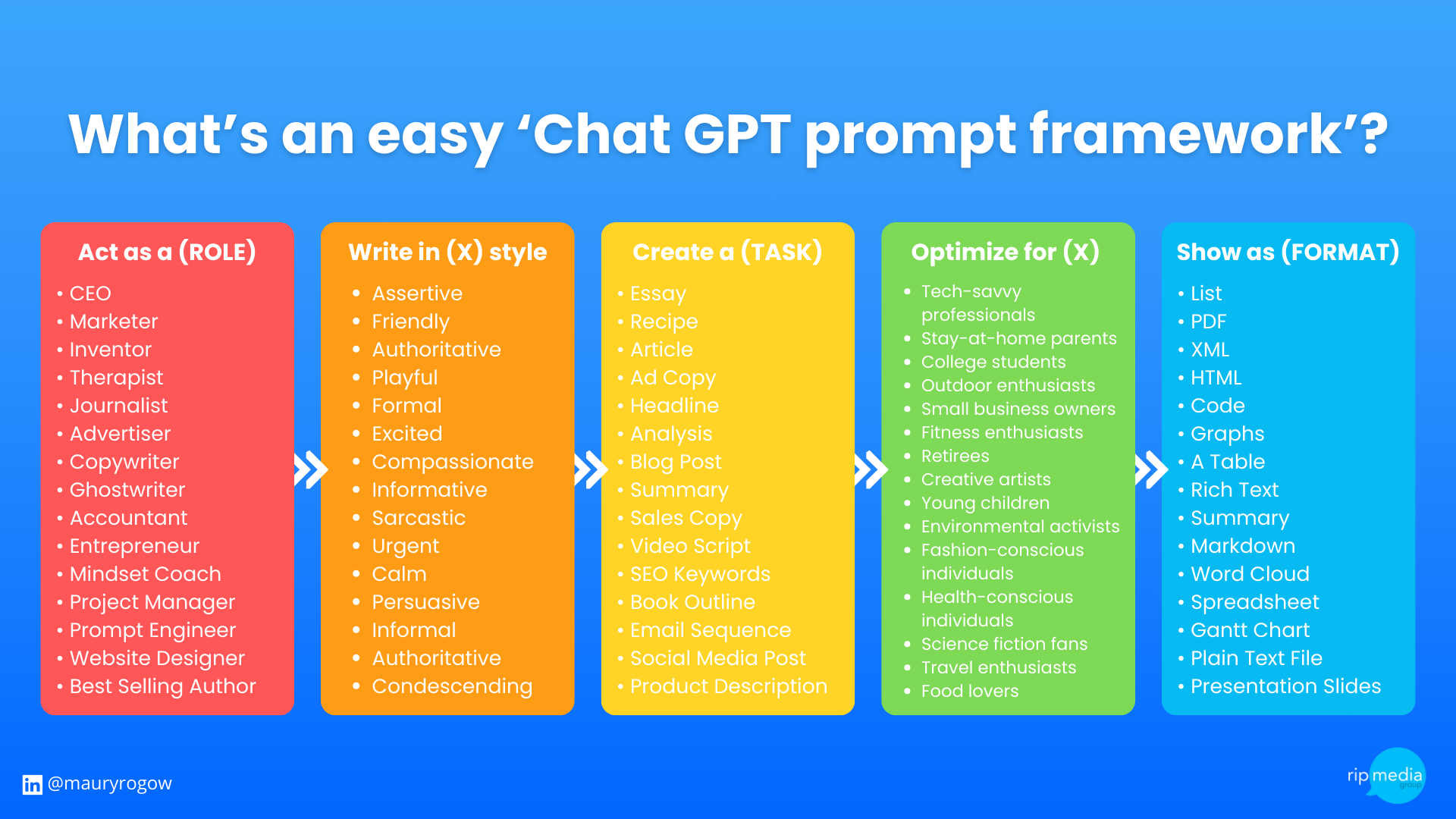
Here is a visual summary of a similar prompting framework that can serve as a quick reference.
Practical Application: Scripting Your ScribeAI Demo
Let's put all this together. We will now craft a detailed prompt to generate a script for our hypothetical SaaS product, "ScribeAI," using the video blueprint from the last lesson as our source of Context.
Here’s a 5-step process, inspired by the article "using ChatGPT to create demo videos" by Peter Preston.
Step 1: Define the Prompt Components
Let's break down our prompt using the formula from the Jeff Su video.
- Persona: "You are an expert video scriptwriter specializing in clear, concise product demos for B2B SaaS companies."
- Context: (This comes from your video blueprint) "I need a script for a 90-second product demo video for a SaaS product called 'ScribeAI'. ScribeAI is a tool that automatically creates step-by-step documentation and guides from a screen recording. The target audience is team leads and project managers who are tired of manually writing onboarding documents and 'how-to' guides. The key 'content gap' we need to fill is showing the one-click export to Confluence, which competitors don't cover well."
- Task: "Generate a complete video script."
- Exemplar (Framework): "The script must follow the Problem-Agitate-Solve (PAS) framework."
- Format: "The output should be a table with three columns:
Scene/Visual,Voiceover, andOn-Screen Text(for key callouts)." - Tone: "The tone should be enthusiastic, helpful, and confident, but not overly 'salesy'. It should sound like an expert helping a colleague."
Step 2: Assemble the Full Prompt
Now, let's combine these into a single, powerful prompt you can paste into ChatGPT.
You are an expert video scriptwriter specializing in clear, concise product demos for B2B SaaS companies.
Context: I need a script for a 90-second product demo video for a SaaS product called 'ScribeAI'. ScribeAI is a tool that automatically creates step-by-step documentation and guides from a screen recording. The target audience is team leads and project managers who are tired of manually writing onboarding documents and 'how-to' guides. The key value proposition is saving hours of tedious work. A crucial part of the demo must be to show the one-click export to Confluence, as this is a major pain point for our users and a gap in competitor videos.
Task: Generate a complete video script based on this context. The script must follow the Problem-Agitate-Solve (PAS) framework. The total video length should be approximately 90 seconds.
Format: Please structure the output as a table with three columns:
Scene/Visual,Voiceover, andOn-Screen Text.Tone: The tone should be enthusiastic, helpful, and confident. It should sound like an expert helping a colleague, not a salesperson.
Step 3: Generate and Review
Paste this prompt into ChatGPT (or Claude, if you prefer). The AI will generate a structured first draft. It won't be perfect, but it will be a remarkably strong starting point that has saved you hours of work.
Step 4: Refine with Customer Language
This is a crucial step that many people skip. The AI will use standard marketing language like "streamline your workflows." Your job is to make it sound human. As the ContentBeta article mentioned, you need to use the language your customers actually use.
Test your understanding!
ChatGPT generates the following line in your script: "ScribeAI optimizes your documentation process, increasing team efficiency."
Based on the principles of using customer language, how would you rewrite this line to be more specific and impactful for your target audience of project managers?
Show answer
A better version would be: "With ScribeAI, you can stop spending hours writing 'how-to' guides and get your new team members onboarded in minutes."
This revised line replaces vague terms ("optimizes," "efficiency") with concrete outcomes ("stop spending hours," "get new team members onboarded in minutes"). It speaks directly to the pain and desired result of a project manager.
Step 5: Add Your Personal Touch
Finally, read the script out loud. Does it sound like you? As founder and creator, your voice and perspective are a key part of your brand. Don't be afraid to tweak the wording to match your personal style.
As author Peter Preston notes, "The script will need your touch. Don’t let ChatGPT write everything for you. Your tone, your voice, and your point of view has to come through."
Conclusion
You now have a powerful, repeatable workflow for creating high-quality video scripts. By combining timeless persuasive frameworks with modern AI tools and a structured prompting methodology, you can produce compelling scripts in a fraction of the time it would take manually.
Key Takeaways:
- Frameworks First: Use proven frameworks like PAS (Problem, Agitate, Solve) to structure your narrative around the customer's pain point.
- Prompt with Precision: A well-engineered prompt with Persona, Context, Task, Exemplar, Format, and Tone will produce a vastly superior result compared to a simple request.
- AI is Your Co-Pilot, Not the Pilot: Use ChatGPT to generate a strong first draft, but always refine it with customer-centric language and your own unique voice.
- The Process: Your workflow is now Blueprint -> Framework -> Prompt -> Script -> Refinement.
Preview of the Next Lesson:
With a finalized script in hand, the next step is to bring it to life with audio. In the next lesson, you will learn how to generate a natural-sounding voiceover for your video script using ElevenLabs. We will explore how to use this powerful AI tool to create broadcast-quality audio for your product demo.