
Hello! In our previous lessons, we built a full suite of CRUD functionalities, culminating in a live search feature. A common thread through all these interactions was that a single action updated a single, specific area of the page, directed by the hx-target attribute.
Today, we'll move beyond that limitation. In many real-world applications, a single action needs to trigger updates in multiple, unrelated parts of the user interface. For example, adding an item to a shopping cart should not only update the cart list but also a separate cart icon/counter in the header and perhaps display a confirmation toast. In a React application, this is typically managed through global state causing several components to re-render. In this lesson, we will explore the elegant, hypermedia-native solution to this problem: Out-of-Band (OOB) swaps.
This lesson addresses the first outcome in our "Advanced Interactivity and UX" module: you will learn how to update multiple disjoint page regions in a single response using out-of-band (OOB) swaps.
The Problem: One Action, Multiple Updates
Imagine you have a form to add a new contact to a list. When the form is submitted, HTMX can easily handle updating the contact list itself. The server responds with the HTML for the newly added contact, and hx-target places it correctly.
But what if you also want to display a success message (a "flash" or "toast" notification) in a completely different part of the page, like the top of the screen? Using hx-target to point to a common parent of both the list and the message area would force a re-render of everything inside, which is inefficient and can destroy unrelated state. We need a way for a single server response to carry instructions for updating multiple, independent targets.
The Solution: Out-of-Band Swaps
Out-of-band swaps are HTMX's solution to this exact problem. The core idea is that a server's response can contain the main content intended for the hx-target, but also include additional HTML fragments that are marked as "out-of-band". HTMX will find these marked fragments and swap them into the DOM based on their ID, separately from the main content swap.
The hx-swap-oob attribute is the key. An element in the response with this attribute will be swapped with an element in the current page that has the same id.
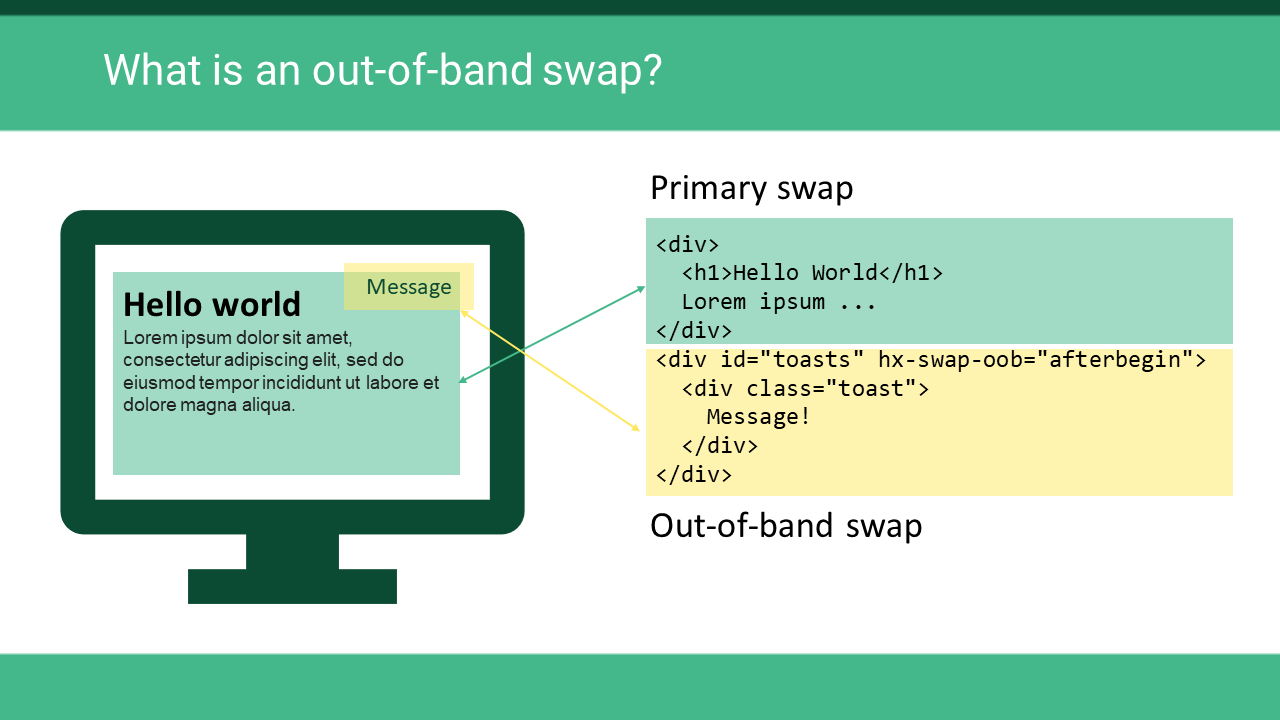
This image provides a perfect visual summary. The server sends back a block of HTML. Part of it is the "Primary swap" content that will go into the main target. The other part is marked for an "Out-of-band swap" and will be placed in a separate location.
A Conceptual Model: The Dashboard Example
To build a strong mental model for OOB swaps, let's watch a short video from the hypermedia-tv channel. It presents a compelling use case: a live dashboard with multiple, independently refreshing widgets. While your goal is migrating CRUD apps, the underlying principle of updating disjoint elements is identical and this example demonstrates the power of the pattern very clearly.
The video sets up a polling mechanism on the <body> tag that fetches the entire page's HTML every few seconds but with hx-swap="none", which tells HTMX to throw away the main response. The magic happens next, using OOB swaps to update only the specific widgets that are marked for it.
The power of htmx's hx-swap-oob
This video explains the core concept of OOB swaps with a clear, practical example.
Watch the segment from this first part, where the instructor adds hx-swap-oob="true" to a single widget and shows it updating live. Then, watch the explanation of the mechanism. The "traffic cop" analogy is helpful: HTMX scans the response for any elements marked for an OOB swap, pulls them out, and swaps them into the DOM based on their id.
Practical Implementation: Flash Messages & Multi-Content Updates
Now, let's translate this concept into the Express.js stack you're using. A fantastic tutorial on SitePoint walks through building a contact manager, providing perfect examples of OOB swaps for common CRUD operations.
We'll focus on two use cases from this article:
- Adding a contact updates the contact list (primary target) and shows a flash message (OOB target).
- Editing a contact updates the sidebar list (primary target) and the main content area (OOB target), which itself contains a flash message.
Build a Full-stack App with Node.js and htmx - SitePoint
This article provides excellent code examples for implementing OOB swaps in a Node.js/Express application.
First, read the section "Adding flash messages". Pay close attention to the Express route handler. You'll see that it renders the sidebarHtml and then manually concatenates it with another string of HTML for the flash message. This second piece of HTML contains id="content" and hx-swap-oob="afterbegin". This tells HTMX to find the element with id="content" on the page and insert the flash message at the beginning of it. Next, examine the more advanced case in the "Editing a Contact" section. Find the router.put('/update/:id', ...) route handler. Notice how the response is assembled by rendering two separate templates (sidebar and contact) and then combining them. The main response body is the sidebarHtml. Then, an OOB fragment for <main id="content" hx-swap-oob="true"> is concatenated. This single response updates the sidebar with the new contact list and replaces the entire main content area with the updated contact details and a success message. This is a very powerful and efficient pattern. The code for this is right here.
The key takeaway from the SitePoint article is the server-side pattern: your Express handler is responsible for constructing a single string response that includes the primary HTML fragment plus one or more OOB-marked fragments.
Reinforcing the Pattern: The TodoMVC Example
Let's look at another classic example: updating a list and a separate item counter at the same time. Ryan Dsouza's blog post on building a TodoMVC app with HTMX runs into this exact problem. Initially, when the list of todos is swapped in, the separate "todo count" element is rendered in the wrong place.
TodoMVC with HTMX and Hyperscript - Part 1
This article demonstrates a common OOB use case: updating a main list and a separate counter simultaneously.
Please read the section that starts just after the first screenshot. The author describes the problem: "the count isn’t" displayed correctly. Then, study the solution. The TodoCount component in the response is given the attribute <tf start="hx-swap-oob="innerHTML:#todo-count"" end="displayed correctly">hx-swap-oob. This demonstrates a more advanced syntax for hx-swap-oob. Instead of just true, you can provide a swap style (like innerHTML) and a CSS selector for the target (#todo-count), overriding the default behavior of matching by ID and doing an outerHTML swap.
This pattern is extremely useful for dashboards, shopping carts, notifications, and any scenario where an action in one component has logical side effects in another, visually separate component.
To see one more variation, the BugBytes channel demonstrates this with a Django backend. While the backend language is different, the HTMX and HTML are identical, which reinforces the universality of the pattern.
Django and HTMX #17 - Updating Other Content - Out-Of-Band Swaps and Custom Events
This short clip provides a final reinforcement of the concept, showing both a button and a text counter being updated via OOB swaps.
Watch how the subscribe button is updated from this timestamp. The server returns a new button with the same ID and hx-swap-oob="true". See the same principle applied to the attendee count from this second clip.
Conclusion
You now have a powerful tool for orchestrating complex UI updates while adhering to the simplicity of the hypermedia model. Instead of managing shared client-side state and synchronizing re-renders, you can design your server to emit a single, coherent response that precisely describes all necessary changes to the DOM.
Key Takeaways:
- Out-of-Band (OOB) swaps allow a single HTMX request to update multiple, disjoint elements in the DOM.
- The core mechanism is the
hx-swap-oobattribute on an element within the server's HTML response. - HTMX matches the
idof the OOB element in the response with an element in the current DOM to perform the swap. - On the server, you construct the response by concatenating the HTML for the primary target with one or more HTML fragments marked with
hx-swap-oob. - This pattern is ideal for updating counters, showing global notifications, or refreshing multiple widgets in response to a single user action.
In our next lesson, we will continue enhancing the user experience by tackling another common requirement in modern web applications: managing the browser's URL. We'll learn how to use hx-push-url to update the URL in the address bar during HTMX-driven navigation, ensuring that your application states are bookmarkable and shareable.
Can't find a good explanation? Sign up and we'll make it for you
Sign up