
Hello! Welcome to your next lesson in our journey toward becoming a penetration testing expert.
In our last session, we focused on post-exploitation enumeration—what to do after you've gained a shell to understand the compromised system. You learned how to gather critical information about users, services, and system configuration.
Today, we'll leverage that enumeration mindset to find some of the easiest and most common entry points into a system: default credentials and service misconfigurations. Your goal for this lesson is to learn how to identify and exploit these weaknesses in common network services to gain initial access. These are the "low-hanging fruit" that often provide the quickest path to a foothold on a target network.
Let's begin by understanding what we're looking for.
1. The Anatomy of Easy Wins: Credentials and Misconfigurations
Many security breaches don't start with a sophisticated zero-day exploit. They start with something much simpler: a mistake.
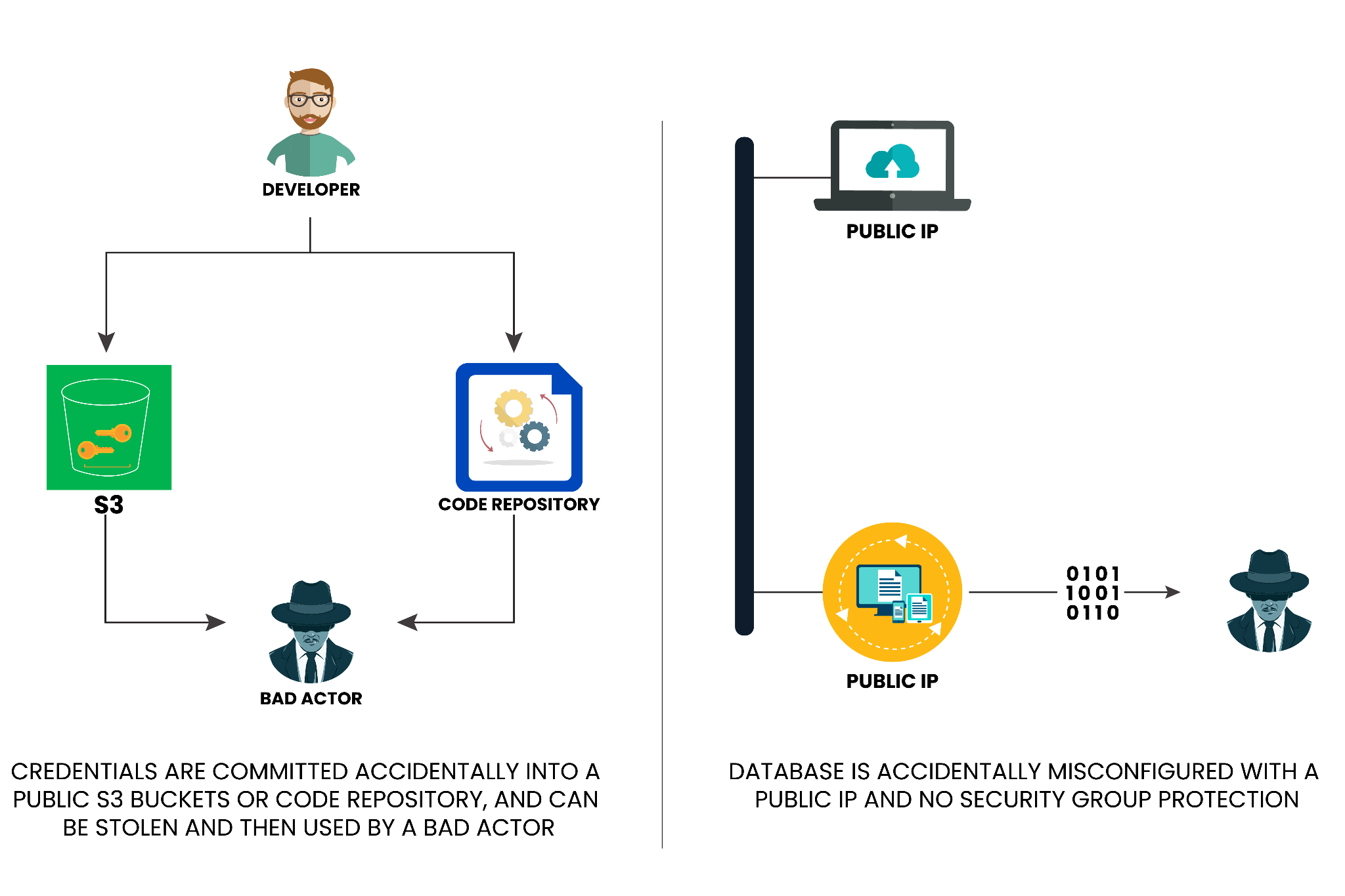
These mistakes generally fall into two categories:
- Default Credentials: Many software applications and hardware devices (routers, cameras, printers) are shipped with factory-set usernames and passwords like
admin:admin,root:password, orguest:guest. System administrators sometimes forget to change these, leaving a wide-open door for an attacker. - Common Misconfigurations: These are errors in how a service is set up. They can range from allowing anonymous or unauthenticated access to giving users far more permissions than they need.
Our job as penetration testers is to systematically hunt for these flaws. Let's look at how to do this for several common network services.
2. Exploiting File Share Services: SMB, FTP, and NFS
File sharing services are treasure troves of information and, frequently, misconfigurations. We'll examine three of the most common: SMB, FTP, and NFS.
Case Study 1: SMB (Server Message Block)
SMB is the protocol behind Windows file sharing. A very common misconfiguration is allowing "anonymous" or "null session" access, which lets anyone connect and list—or even read—shared folders without a password.
To get a solid technical overview of how to enumerate SMB, please review the following guide. It provides a great reference for the tools and commands used.
SMB (Server Message Block) Pentesting
The 'SMB (Server Message Block) Pentesting' guide from Hackviser is an excellent cheat sheet for SMB enumeration. Focus on the sections that detail how to check for anonymous access.
Read the sections 'Enumeration' and 'Attack Vectors'. Pay close attention to the commands for 'Share Enumeration' using smbclient with the anonymous user, and the rpcclient or smbclient -N commands for establishing a 'SMB Null Session'.
Now, let's see this in action. The following video demonstrates a complete exploitation chain starting with an anonymous SMB share.
TryHackMe - Network Services Walkthrough (CompTIA PenTest+)
This clip from the 'TryHackMe - Network Services Walkthrough' by Carpa Security shows exactly how a misconfigured SMB share leads to a shell.
Watch from 02:49 to 11:56. Observe how the tester: Uses enum4linux to discover shares and confirms anonymous access is allowed on the 'profiles' share. Connects to the share anonymously using smbclient. Discovers an interesting file, which reveals that a user has SSH access. Navigates to that user's .ssh directory and downloads their private SSH key (id_rsa). Uses the key to log in to the server via SSH.
This is a classic example. The misconfiguration (anonymous read access) didn't give a shell directly, but it exposed sensitive information (an SSH key) that did.
Case Study 2: FTP (File Transfer Protocol)
FTP is another common file transfer service that often suffers from the same anonymous access issue.
This next video demonstrates a two-stage attack: first using anonymous access to gather intelligence, and then using that intelligence to perform a brute-force attack.
TryHackMe - Network Services Walkthrough (CompTIA PenTest+)
Let's return to the 'Network Services Walkthrough' video to see how to exploit a vulnerable FTP server.
Watch from 26:21 to 33:59. Pay attention to the workflow: The tester confirms anonymous FTP login is allowed. They log in as the user anonymous with a blank password. They find a public_notice.txt file which hints at a potential username: mike. Using this username, they launch a brute-force attack with Hydra (which you used in a previous lesson) to find the password. They log in with the discovered credentials (mike:password) to capture the flag.
This workflow is fundamental to penetration testing: Enumerate -> Find Clue -> Escalate/Exploit.
Case Study 3: NFS (Network File System)
NFS is common in Linux/Unix environments. It has a specific and very dangerous misconfiguration called no_root_squash.
- Root Squashing (Default & Secure): If a remote
rootuser tries to access the NFS share, the server "squashes" their privileges, treating them as a low-privilegenfsnobodyuser. This prevents the remote root user from owning files on the share. no_root_squash(Insecure): The server trusts the remoterootuser. If a remote user with UID 0 (root) creates a file on the share, that file is owned by root on the server.
This allows a clever attack. If we have root access on our own machine, we can mount the share, create an executable file, assign it the SUID permission, and then have a low-privilege user on the target execute it to become root. Your computer science background will help you appreciate the mechanics of file permissions and the SUID bit here.
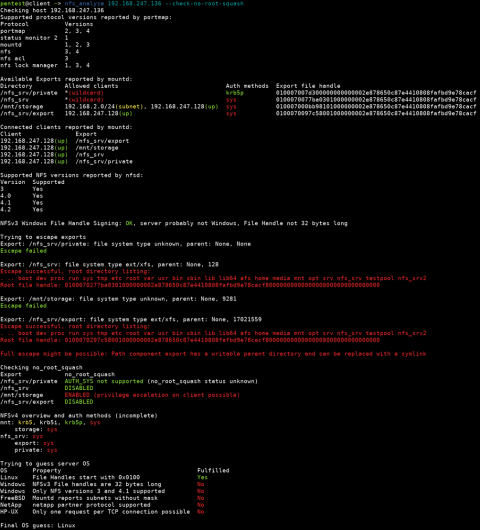
Let's watch a full demonstration of this attack.
TryHackMe - Network Services 2 Walkthrough (CompTIA PenTest+)
The 'Network Services 2 Walkthrough' by Carpa Security provides a step-by-step guide to exploiting no_root_squash.
Watch from 02:43 to 13:27. This is a multi-step process, so follow closely: The tester enumerates and mounts an NFS share. They find an SSH key, which gives them low-privilege access as the user cappuccino. Now, from their own attacker machine (where they are root), they download a bash executable into the mounted share. They change its ownership to root and add the SUID permission: chmod +s bash. They log back into the target via SSH as the low-privilege user and execute the modified bash program with bash -p. The -p flag respects the SUID bit, granting them a root shell.
Test your understanding!
You run an Nmap scan and find ports 21 (FTP), 139/445 (SMB), and 2049 (NFS) are open. What are the first three checks you would perform—one for each service—to look for common misconfigurations or default credentials?
Show answer
- FTP (Port 21): Try to log in with the username
anonymousand a blank password. (ftp TARGET_IP) - SMB (Ports 139/445): Use a tool like
smbclientto list shares anonymously. The command would besmbclient -L //TARGET_IP -N. - NFS (Port 2049): Use
showmount -e TARGET_IPto list the exported file systems and check their permissions in the output, looking for overly permissive settings like(everyone).
3. Exploiting Application Services: Databases and Backdoors
The same principles apply to application-level services.
- Databases: Services like MySQL, PostgreSQL, and MSSQL are often installed with default administrator credentials (e.g.,
root:password,sa:password). Gaining access can reveal sensitive user data, including password hashes that can be cracked. - Hidden Services: Sometimes, developers or administrators leave backdoors or management services running on non-standard ports. Enumeration scans that cover all 65,535 ports (like
nmap -p-) are crucial for finding these.
The following video clips demonstrate exploits against both of these scenarios.
TryHackMe - Network Services 2 Walkthrough (CompTIA PenTest+)
These final two examples from the walkthroughs show how to exploit a database with default credentials and a hidden backdoor service.
First, watch the MySQL exploitation from 24:57 to 32:47. See how the tester connects to a MySQL database with assumed default credentials (root:password), dumps password hashes for other users, cracks one, and uses it to gain SSH access.
TryHackMe - Network Services Walkthrough (CompTIA PenTest+)
Next, let's look at exploiting a hidden service.
Now, watch the Telnet exploitation from 13:37 to 24:08. The tester finds a Telnet service on a non-standard port (8012), identifies it as a backdoor that executes system commands, and uses it to deploy a reverse shell payload for root access.
Conclusion
You have now seen how some of the most impactful and common vulnerabilities are not complex software bugs, but simple human errors in configuration. As you begin your career in bug bounty and penetration testing, checking for these issues should become second nature.
Key Takeaways:
- Always check for anonymous or guest access on file-sharing protocols like SMB and FTP.
- Test for common default usernames and passwords on all discovered services, especially databases and administrative interfaces.
- Understand and look for service-specific misconfigurations, such as
no_root_squashon NFS shares. - Intelligence gathered from one misconfigured service (e.g., a username from an FTP server) can be the key to exploiting another (e.g., brute-forcing SSH).
- Thorough enumeration across all ports is essential to find hidden or non-standard services that may be misconfigured.
Next Lesson Preview:
We have now concluded our module on initial network exploitation. We've covered finding exploits, using Metasploit, brute-forcing, post-exploitation, and now, misconfigurations.
In the next module, we will pivot entirely to the world of web applications. Our first lesson will equip you with the single most important tool for a web application tester: an interception proxy. You will learn how to configure a browser to proxy web traffic through Burp Suite, allowing you to intercept, analyze, and manipulate HTTP/S requests to find vulnerabilities.