
Hello! Welcome back to our module on "Network Exploitation & Initial Access."
In our last lesson, you learned how to gain and stabilize remote shells after an exploit. That approach works well when you can find a vulnerability in the software itself. But what happens when the software is patched and secure? Often, the weakest link isn't the code, but the credentials used to access it.
Today, we shift our focus from exploiting software flaws to breaking authentication. Our goal is to perform brute-force attacks against network service authentication (e.g., SSH, FTP) using Hydra. This is a fundamental technique for gaining initial access when you suspect weak or default passwords are in use.
1. The Anatomy of a Brute-Force Attack
A brute-force attack is conceptually simple: it's a systematic, exhaustive search that tries numerous username and password combinations until the correct one is found. Given your background in computer science, you can think of it as a search algorithm applied to the problem space of credentials.
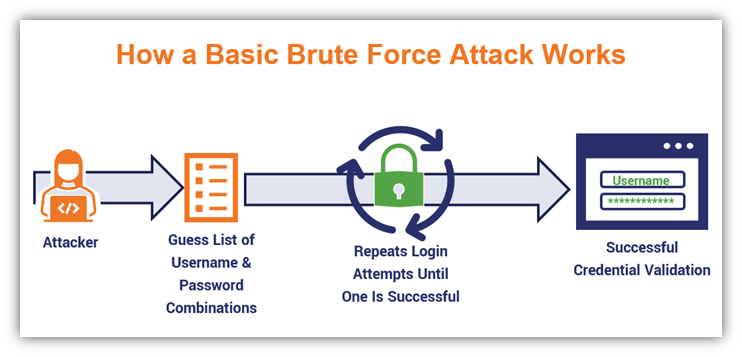
The effectiveness of this attack hinges on two factors:
- The target's password policy: Weak, common, or default passwords make the search space much smaller.
- The attacker's wordlists: The quality and size of the username and password lists are paramount.
2. Introducing Hydra: The Multi-Headed Beast of Brute-Forcing
To perform these attacks efficiently, we need a specialized tool. Enter Hydra. Hydra is a fast and flexible network login cracker that can perform rapid, parallelized attacks against dozens of protocols, including SSH, FTP, Telnet, SMB, and many more. Its ability to run multiple login attempts concurrently (using threads) makes it a standard tool in every penetration tester's arsenal.
This brief article gives a concise overview of what Hydra is and its basic syntax.
Day 5. simulate an SSH brute force attack
The article 'Day 5. simulate an SSH brute force attack' provides a great, quick definition of Hydra and its most common command-line flags.
Read the section titled 'What is Hydra?'. Pay attention to the distinction between -l/-p for single entries and -L/-P for files (lists), as well as the -t and -vV flags.
The Power of Wordlists
As mentioned, the success of Hydra depends on the lists you provide it. These lists can range from small, target-specific files to massive compilations of previously leaked passwords. One of the most famous wordlists, rockyou.txt, is included by default in Kali Linux and contains over 14 million passwords.
The following video segment explains the concept of wordlists and why a shorter, more targeted list is often used for demonstrations.
Brute Force SSH & Build a Honeypot Now (Hydra and Cowrie Demo)
In this clip from David Bombal's channel, the presenter discusses the role of wordlists in a brute-force attack.
Watch from 01:27 to 02:32. This will give you a practical sense of what a wordlist is and the trade-off between using a massive list like rockyou.txt versus a smaller, custom list.
3. Practical Attack 1: Brute-Forcing SSH
Secure Shell (SSH) is a cornerstone of remote server administration. If you can brute-force an SSH login, you gain direct command-line access to the target system. Let's see how to do this with Hydra.
The video below provides a clear, step-by-step demonstration.
Brute Force SSH & Build a Honeypot Now (Hydra and Cowrie Demo)
We'll now watch the core demonstration from the David Bombal video, where Hydra is used to crack an SSH password.
Watch from 02:32 to 04:35. Pay close attention to the Hydra command and its components: hydra -l admin: Specifies a single login/username. -P /path/to/wordlist.txt: Provides the path to the password list. -t 4: Sets the number of parallel tasks (threads) to 4. 192.168.1.111 ssh: Specifies the target IP and the protocol (ssh). Note that some versions of Hydra use the format ssh://192.168.1.111.
Hydra is renowned for its speed, which comes from its multi-threaded nature. Another video from Null Byte compares Hydra to other tools and effectively demonstrates why it's a preferred choice.
How Hackers Could Brute-Force SSH Credentials to Gain Access to Servers
This clip from Null Byte reinforces the Hydra syntax for SSH and highlights its superior performance.
Watch from 13:03 to 15:52. Notice the use of -L for a user list (instead of -l for a single user) and the -t 8 flag for eight threads. The presenter's reaction to the speed says it all.
Test your understanding!
You are tasked with testing the SSH service on a server at 10.20.30.40. You have a list of potential usernames in a file named users.txt and a list of passwords in pass.txt. You want to run the attack using 16 parallel threads for maximum speed.
What Hydra command would you use?
Show answer
The correct command would be:hydra -L users.txt -P pass.txt -t 16 ssh://10.20.30.40
or
hydra -L users.txt -P pass.txt -t 16 10.20.30.40 ssh
The key components are -L for the user list, -P for the password list, and -t 16 for the number of threads.
4. Practical Attack 2: Brute-Forcing FTP
File Transfer Protocol (FTP) is another common service vulnerable to brute-force attacks. The process with Hydra is nearly identical to attacking SSH; you just change the specified protocol.
This guide provides a complete walkthrough, from setting up a test environment to executing the attack. While you don't need to set up the FTP server right now, reviewing the attack execution step is crucial.
Attack FTP Services with Hydra
The guide 'Attack FTP Services with Hydra' provides detailed instructions for brute-forcing FTP. We will focus on the final step where the attack is executed.
Read the section 'Execute Hydra Attack on FTP Service'. Focus on step 2, which shows the basic Hydra command for FTP: hydra -L <user_list> -P <password_list> ftp://localhost. Notice how similar the syntax is to the SSH attack. The only significant change is specifying the ftp:// protocol.
5. Professional Technique: Saving and Resuming Attacks
Brute-force attacks against a large keyspace can take hours or even days. What if your connection drops, or you need to pause the attack? A professional tester doesn't start over. Hydra has a built-in mechanism to save and resume sessions.

Here's how it works:
- Saving Output (
-o): When you run a long attack, it's good practice to save the results directly to a file using the-oflag. For example:-o found_creds.txt. - Automatic Restore File: When Hydra runs, it automatically creates a file named
hydra.restore. If the process is interrupted, this file saves the session's state. - Resuming (
-R): To resume the last interrupted session, simply add the-Rflag to your Hydra command. Hydra will read thehydra.restorefile and continue the attack from where it left off.
This is an indispensable technique for any serious, time-consuming brute-force engagement.
Conclusion
You now have the practical knowledge to wield one of the most common tools for attacking authentication services. By finding a single weak password, you can often gain the initial foothold needed to compromise an entire network.
Key Takeaways:
- Brute-force attacks are a methodical process of trying many credential combinations to find a valid one.
- Hydra is the industry-standard tool for this, valued for its speed, flexibility, and multi-protocol support.
- The core syntax involves specifying users (
-l/-L), passwords (-P), threads (-t), and the target service. - The quality of your wordlists is just as important as the tool itself.
- For professional use, knowing how to save and resume (
-R) long-running attacks is essential.
Next Lesson Preview:
Let's say your brute-force attack is successful. You've guessed the right password for an SSH account and now have a shell. What's next? You're on the inside, but you know nothing about the system. In our next lesson, we will cover the crucial first steps after gaining access: performing basic post-exploitation enumeration on a compromised host to gather system information.