
Good to see you again. In the previous lesson, you shaped a clear reporting query: select only the fields required, calculate measures with readable aliases, and use ORDER BY to make the output sequence intentional.
Now we add the clause that determines which rows are allowed into that output: WHERE. This is essential for Snowflake reporting and data QA. A dashboard metric can be perfectly calculated but still wrong if its filter accidentally includes cancelled orders, excludes a boundary date, or applies OR logic too broadly.
By the end of this lesson, you will be able to translate business requirements into reliable WHERE conditions using comparisons, Boolean logic, IN, BETWEEN, and LIKE.
WHERE: decide whether each row belongs
The basic query pattern is:
SELECT
    order_id,
    order_date,
    region,
    quantity * unit_price AS gross_revenue
FROM PORTFOLIO_DB.RAW.SALES_ORDER
WHERE order_status = 'COMPLETED'
ORDER BY gross_revenue DESC;
WHERE evaluates a condition for each row in the source table:
- If the condition is true, the row remains.
- If the condition is false, the row is excluded.
- If the result is unknown because a relevant value is
NULL, the row is not returned. You will examineNULLbehavior carefully in the next lesson.
Conceptually, SQL:
- identifies the source table in
FROM; - applies the row filters in
WHERE; - produces the requested fields in
SELECT; - sorts the surviving rows with
ORDER BY.
This matters because filtering happens before the final output is displayed. In particular, you generally cannot use a SELECT alias inside WHERE.
This will not work:
SELECT
    order_id,
    quantity * unit_price AS gross_revenue
FROM PORTFOLIO_DB.RAW.SALES_ORDER
WHERE gross_revenue > 1000;
Instead, repeat the calculation in the filter:
SELECT
    order_id,
    quantity * unit_price AS gross_revenue
FROM PORTFOLIO_DB.RAW.SALES_ORDER
WHERE quantity * unit_price > 1000;
Later, common table expressions will give you a clean way to calculate a value once and then filter on its alias.
WHERE Clause (SQL) - Filtering Records
Watch “WHERE Clause (SQL) - Filtering Records” by Cody Baldwin for a compact visual overview of the condition types you will use below. Notice that each condition narrows the result set rather than changing the underlying table.
Watch basic filtering for the WHERE structure and the difference between numeric and text values. Continue with Boolean logic, focusing on the different meanings of AND, OR, and NOT. Then watch range filtering, membership lists, and text patterns. Keep the inclusive endpoints of BETWEEN and the placement of % in LIKE patterns in mind.
Comparison conditions: exact values and thresholds
Comparison operators compare one value or expression with another.
| Operator | Meaning | Example business rule |
|---|---|---|
= | equals | Completed orders only |
<> or != | not equal to | Exclude cancelled orders |
> | greater than | Revenue above 1,000 |
>= | greater than or equal to | Revenue of at least 1,000 |
< | less than | Discount below 20% |
<= | less than or equal to | Stock of 10 or fewer units |
For example:
SELECT
    order_id,
    region,
    quantity * unit_price AS gross_revenue
FROM PORTFOLIO_DB.RAW.SALES_ORDER
WHERE quantity * unit_price >= 1000
ORDER BY gross_revenue DESC;
A few syntax rules prevent many beginner errors:
- Put text values in single quotes:
'COMPLETED','UK','East'. - Do not quote ordinary numeric values:
1000,0.15. - Use
=for comparison, not==. - Prefer
<>for “not equal”; it is standard SQL and works in Snowflake. Snowflake also accepts!=.
For example, an operations request to exclude orders that are cancelled could be written as:
WHERE order_status <> 'CANCELLED'
Be precise about the requirement. “Above 1,000” means > 1000; an order worth exactly 1,000 does not qualify. “At least 1,000” means >= 1000, and it does qualify.
That single equality sign is often the difference between a correct KPI and a quietly incorrect one.
Boolean logic: combining conditions safely
Business requirements commonly contain words such as and, or, and not. SQL has the same operators:
AND: every connected condition must be true.OR: at least one connected condition must be true.NOT: reverses a condition.
Suppose the requirement is:
Return completed orders from the East region with revenue of at least 1,000.
All three conditions are mandatory:
SELECT
    order_id,
    region,
    order_status,
    quantity * unit_price AS gross_revenue
FROM PORTFOLIO_DB.RAW.SALES_ORDER
WHERE order_status = 'COMPLETED'
  AND region = 'East'
  AND quantity * unit_price >= 1000
ORDER BY gross_revenue DESC;
A row must satisfy every AND condition. An East-region order worth 1,500 but marked CANCELLED is excluded.
Now change the requirement:
Return completed orders from either the East or West region.
WHERE order_status = 'COMPLETED'
  AND (region = 'East' OR region = 'West')
The parentheses are not decorative. They make the intended logic explicit:
- The order must be completed.
- Its region may be East or West.
Without parentheses, this query has a subtle logic bug:
WHERE order_status = 'COMPLETED'
  AND region = 'East'
   OR region = 'West'
SQL evaluates AND before OR. Its actual meaning is:
Return completed East orders, or return any West order, including cancelled West orders.
For analytics QA, this is a common source of inflated counts and revenue. When a requirement combines AND and OR, use parentheses around the alternatives unless there is a strong reason not to.
NOT is useful when you want the inverse of a condition:
WHERE NOT (region = 'East' OR region = 'West')
However, when a simpler expression communicates the same logic, prefer it:
WHERE region NOT IN ('East', 'West')
IN: one field, several accepted values
Use IN when a value must match one member of a defined list.
These two filters return the same rows:
WHERE region = 'East'
   OR region = 'West'
   OR region = 'Central'
WHERE region IN ('East', 'West', 'Central')
The IN version is shorter, easier to review, and safer to extend:
SELECT
    order_id,
    region,
    order_status
FROM PORTFOLIO_DB.RAW.SALES_ORDER
WHERE region IN ('East', 'West', 'Central')
  AND order_status = 'COMPLETED';
You can use NOT IN to exclude listed values:
WHERE order_status NOT IN ('CANCELLED', 'TEST')
One caution for later: if the filtered column can contain NULL, NOT IN can behave unexpectedly because SQL treats comparisons with missing values differently. In the next lesson, you will learn the NULL-aware patterns needed to review this safely.
BETWEEN: inclusive range filtering
BETWEEN filters values within a range, including both endpoints.
WHERE quantity * unit_price BETWEEN 500 AND 1000
This includes gross revenue of exactly 500, exactly 1,000, and every value in between.
It is equivalent to:
WHERE quantity * unit_price >= 500
  AND quantity * unit_price <= 1000
Use whichever version makes the business rule clearer to a reviewer. The expanded form makes inclusivity especially visible.
BETWEEN is useful for numerical ranges:
WHERE customer_age BETWEEN 25 AND 40
It is also commonly used for a DATE column:
WHERE order_date BETWEEN '2025-01-01' AND '2025-01-31'
This is safe when order_date is truly a date with no time component. For a timestamp such as order_created_at, it can accidentally exclude most of 31 January because '2025-01-31' represents the very start of that day. You will handle date and timestamp filtering properly later in this module.
SQLBolt - Learn SQL - SQL Lesson 2: Queries with constraints (Pt. 1)
Read SQLBolt’s concise introduction to WHERE constraints. It reinforces the relationship between comparisons, AND and OR, range filtering, and membership lists.
In the opening explanation, read the purpose of WHERE. Then, in the operator table immediately below the AND and OR labels, compare the examples for standard comparison operators, BETWEEN, and IN. Focus especially on the fact that both BETWEEN boundaries are included and that IN expresses a list membership test.
LIKE: match a text pattern
Use LIKE when you need to search for a pattern rather than match one known, exact value.
The two most important wildcard characters are:
| Wildcard | Meaning | Example |
|---|---|---|
% | Any number of characters, including zero | 'A%' |
_ | Exactly one character | 'AB_' |
Assume the table has a customer_name field.
WHERE customer_name LIKE 'A%'
This returns names beginning with A, such as Aisha, Alex, and A.
WHERE customer_name LIKE '%son'
This returns names ending in son, such as Jackson and Wilson.
WHERE customer_name LIKE '%tech%'
This returns values containing tech somewhere in the text, such as Tech Supplies or Fintech Partners.
WHERE customer_name LIKE 'AB_'
This matches exactly three-character names beginning with AB, such as ABC or AB1. The underscore represents one required character, and there is no % after it to allow additional characters.
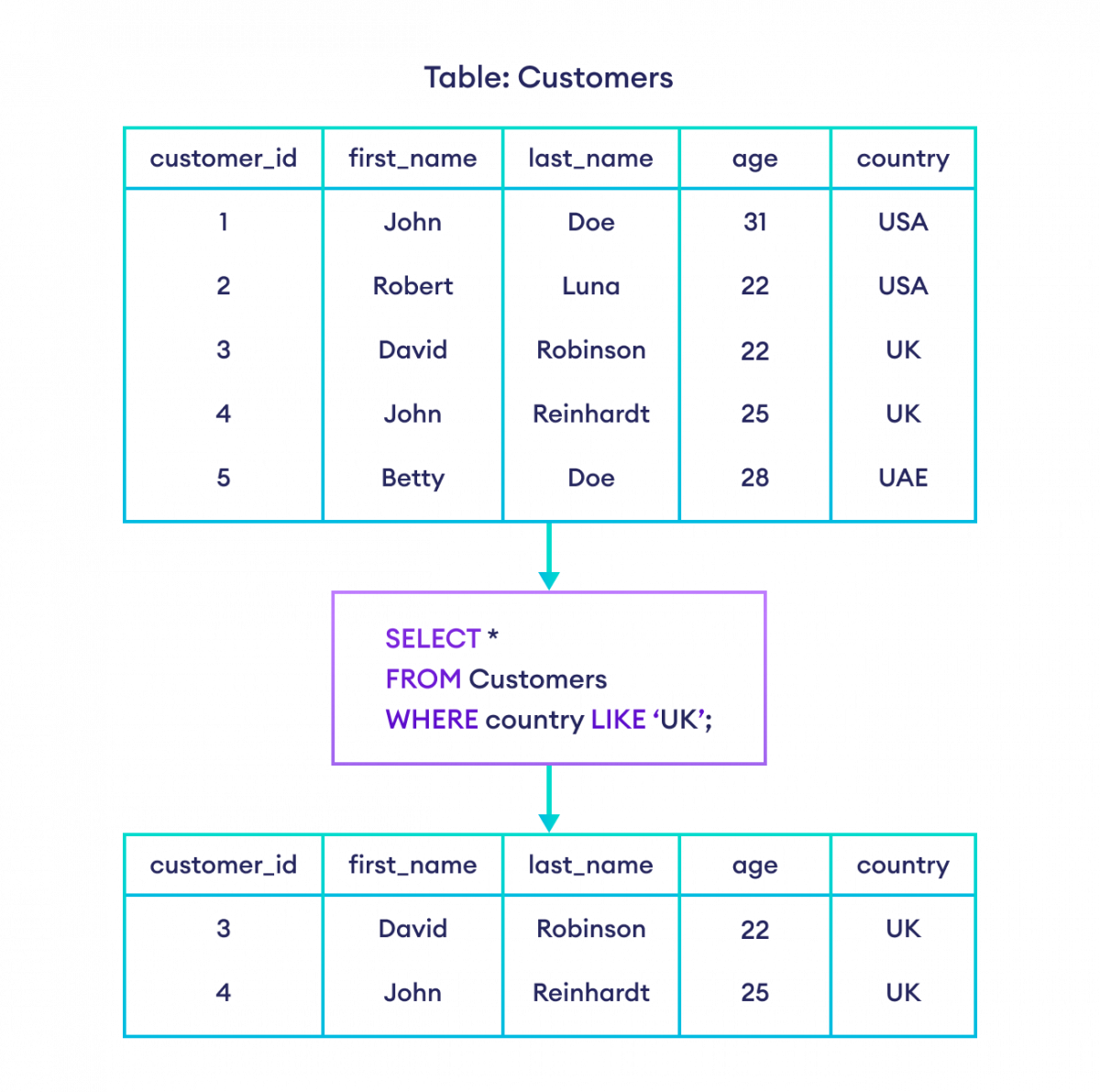
The diagram uses LIKE 'UK', but for a simple exact match, prefer:
WHERE country = 'UK'
Use LIKE when pattern matching is actually required. It tells a reviewer that the filter deliberately accepts variable text.
A Snowflake-specific detail matters in reporting: LIKE is case-sensitive by default. If the business rule requires case-insensitive matching, Snowflake provides ILIKE:
WHERE customer_name ILIKE '%tech%'
Use this deliberately. A case-insensitive search can include records that a strict case-sensitive filter would omit.
SQL Lesson 3: Queries with constraints (Pt. 2)
Use this SQLBolt reference to consolidate text comparisons, membership filters, and wildcard patterns. Its table is a helpful quick reference for recognizing when a requirement calls for an exact match, a list, or a pattern.
Under “SQL Lesson 3,” read the text-filter introduction, then study the operator table directly beneath it. Pay particular attention to %, _, IN, and NOT IN. For Snowflake work, retain the pattern meanings but remember the distinction introduced above: use ILIKE rather than LIKE when you specifically need case-insensitive matching.
A complete reporting filter
Consider this reporting request:
Show completed orders from East, West, or Central; include only orders with gross revenue from 500 through 5,000; include customers whose names begin with A or B; and return the newest orders first.
A clear query is:
SELECT
    order_id,
    order_date,
    region,
    customer_name,
    quantity * unit_price AS gross_revenue
FROM PORTFOLIO_DB.RAW.SALES_ORDER
WHERE order_status = 'COMPLETED'
  AND region IN ('East', 'West', 'Central')
  AND quantity * unit_price BETWEEN 500 AND 5000
  AND (
        customer_name LIKE 'A%'
        OR customer_name LIKE 'B%'
      )
ORDER BY
    order_date DESC,
    order_id ASC;
This combines the techniques from the lesson:
=requires a completed order.INsupplies an approved list of regions.BETWEENsets inclusive lower and upper revenue limits.LIKEsearches names by prefix.- Parentheses keep the “A or B name” condition together.
ORDER BYis still separate from filtering; it only arranges rows that passedWHERE.
When reviewing such a query, turn each line of WHERE back into plain English. If you cannot state exactly what a condition includes and excludes, it is not ready to support a KPI or a QA conclusion.
A useful QA habit is to test boundary examples deliberately:
| Test row | Should it appear? | Why |
|---|---|---|
Completed East order with revenue 500 and customer Amina | Yes | Both BETWEEN endpoints are included. |
Completed West order with revenue 5,001 and customer Brian | No | Revenue exceeds the upper boundary. |
Cancelled Central order with revenue 900 and customer Aisha | No | It fails the order_status condition. |
Completed North order with revenue 900 and customer Ben | No | North is not in the region list. |
Completed West order with revenue 900 and customer Chloe | No | Name begins with neither A nor B. |
This small set of cases can expose errors in inclusive boundaries, Boolean grouping, and membership filters before they reach a report.
Key takeaways
WHERE is your row-selection logic. A strong analytical filter:
- uses comparison operators precisely, especially at thresholds;
- joins mandatory conditions with
AND; - uses
ORonly when either condition is acceptable, with parentheses to make mixed logic unambiguous; - uses
INfor a controlled list of valid values; - remembers that
BETWEENincludes its start and end values; - uses
LIKEwith%and_only when pattern matching is genuinely needed; - treats filter conditions as testable business rules, not just query syntax.
Next, you will handle NULL values correctly with IS NULL, IS NOT NULL, COALESCE, and NULL-aware conditions. That will close an important gap: filtering missing values safely rather than accidentally dropping or misclassifying them.
Can't find a good explanation? Sign up and we'll make it for you
Sign up