
Hello! Welcome to the first lesson in our module on Advanced Concurrency and Performance.
In our previous module, we focused on how data is managed between microservices, culminating in our discussion on eventual consistency and its impact on user experience. We concluded that performance and responsiveness are critical concerns. Now, we'll pivot to look inside a single microservice to understand how it can handle thousands of concurrent requests efficiently. This is a core topic in senior-level interviews, as it separates candidates who just build services from those who build high-performance, resilient services.
Our learning outcome for this lesson is to explain the thread-per-request model and its scalability limitations. This model is the foundation of traditional web applications, including most Spring Boot applications you have likely built. Understanding its limitations is the first step toward appreciating the modern, non-blocking paradigms we'll explore later.
1. The Classic Model: Thread-per-Request
When you create a standard Spring MVC application, the embedded web server (usually Tomcat) operates on a thread-per-request model. The concept is simple: for every incoming HTTP request, a thread is assigned from a dedicated thread pool to handle that request from start to finish.
Let's watch a short video that frames this model within a Spring application context.
Significant Scalability Benefits in Spring Boot 3.2 using Virtual Threads
The video 'Significant Scalability Benefits in Spring Boot 3.2 using Virtual Threads' by Dan Vega provides an excellent explanation of the traditional thread-per-request model in Spring MVC.
Watch the segment from 01:46 to 04:01. Pay close attention to how he describes the journey of a request and what happens when that request involves a 'blocking' operation like a database call.
As the video explained, a Java thread is essentially a wrapper around an operating system (OS) thread. The key steps are:
- A client sends a request.
- The server (e.g., Tomcat) picks a free thread from its limited thread pool.
- This thread is now responsible for executing all the application code for that request (controller logic, service methods, etc.).
- Once the response is sent, the thread is released back into the pool, ready to serve another request.
This diagram visually summarizes the flow:
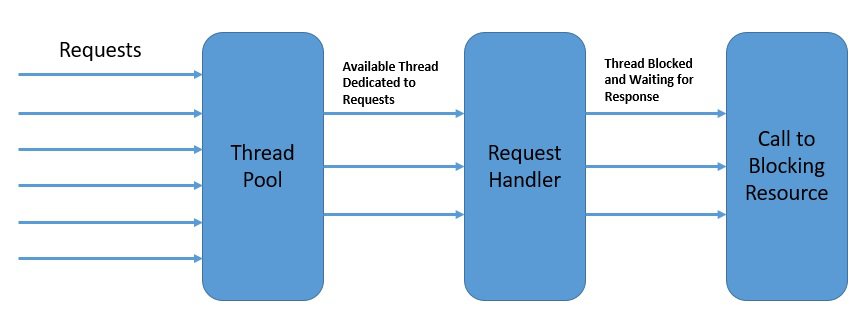
This model is simple to understand and works perfectly well for many applications. The problem arises when the work a thread has to do isn't immediate.
2. The Bottleneck: Blocking I/O
In a microservices architecture, a service rarely does all its work on its own. It communicates with other systems. These communications are typically Input/Output (I/O) operations:
- Querying a database (e.g., PostgreSQL, MongoDB)
- Calling another microservice over HTTP
- Publishing a message to a broker like Kafka or RabbitMQ
- Reading from or writing to a file system
In the traditional model, these I/O operations are blocking. This means that when a thread initiates a database query, it doesn't do anything else. It sits idle, blocked, waiting for the database to return the results. Even though it's not consuming CPU cycles, it is still occupying a thread from the limited pool and holding onto its allocated memory.
3. The Scalability Limitations
This "blocking and waiting" behavior is the root cause of the scalability limitations of the thread-per-request model. Let's break down the consequences, which are frequent topics in system design interviews.
Why Reactive? Thread per Request vs. ...
To understand these consequences in more detail, let's read an article that provides a practical example and some concrete numbers.
Please read the section 'Thread Per Request'. It uses a great e-commerce example to illustrate how a system can become overwhelmed and explains the cost associated with spawning more threads.
Based on the reading and our prior discussion, we can identify three primary limitations.
A. Thread Pool Exhaustion
Servlet containers like Tomcat have a fixed-size thread pool (the default for Tomcat is often 200). If you have 200 concurrent requests, and all of them involve a slow database query that takes 1 second, your entire thread pool will be occupied by waiting threads for that full second.
- The Problem: The 201st request that arrives during this second has to wait in a queue for a thread to become free.
- The Consequence: As traffic increases, more threads get blocked, the queue grows longer, and the application's response time skyrockets. Users experience this as latency, timeouts, and eventually, the server may start rejecting connections. The article "Spring WebFlux Explained" uses a great analogy: it's like a highway where all lanes (threads) are filled with parked cars (blocked threads), causing a massive traffic jam.
B. High Memory Consumption
You might ask, "Why not just increase the thread pool size to 1000 or 5000?" The issue is that threads are expensive resources.
- The Problem: Each thread in the JVM requires a block of dedicated memory for its stack, which typically defaults to around 1MB. This memory is allocated from the native memory of the OS, not the Java heap.
- The Consequence: A thread pool of 2000 threads would consume approximately 2GB of memory just for the thread stacks, regardless of whether they are active or idle. This can quickly lead to an
OutOfMemoryErrorand crash your application. Scaling the number of threads is not a sustainable solution for handling high concurrency.
C. High CPU Overhead (Context Switching)
Even if you have enough memory, having a large number of threads creates another problem: CPU context switching.
Why thread pools even exist? and how to implement them?
This short video from Arpit Bhayani directly addresses the overhead that comes with having a very large number of threads.
Watch the first minute (00:00 to 01:16). Focus on his explanation of memory blow-up and context switching overhead.
- The Problem: The OS scheduler must give each runnable thread a slice of CPU time. When it switches from executing Thread A to Thread B, it must save the current state (CPU registers, program counter) of Thread A and load the state of Thread B. This process is called a context switch.
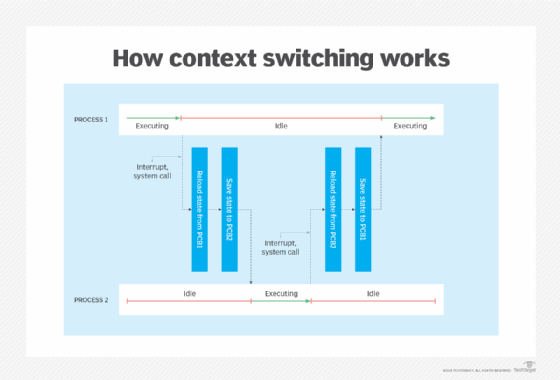
- The Consequence: With a large number of threads, the CPU spends a significant amount of its time just managing threads (context switching) instead of executing your application's business logic. This leads to diminished throughput and overall system inefficiency.
Test your understanding!
You are interviewing for a senior developer role. The interviewer says:
"We have a microservice that orchestrates calls to three other downstream services. Under normal load, its response time is about 150ms. However, during our peak sales event, the average response time shot up to over 5 seconds, and we saw many '504 Gateway Timeout' errors, even though the server's CPU usage never went above 40%. What is the most likely architectural cause of this behavior?"
How would you answer?
Show answer
A strong answer would identify thread pool exhaustion as the root cause.
"The most likely cause is thread pool exhaustion due to the blocking nature of the thread-per-request model.
Here's the breakdown:
- The service is using a traditional model where each incoming request is handled by one thread from a fixed-size pool (e.g., Tomcat's default of 200).
- Each of these threads makes three blocking I/O calls to downstream services. While waiting for those network calls to return, the thread is blocked and cannot serve any other requests.
- During the peak sales event, the rate of incoming requests exceeded the rate at which threads could complete their work and return to the pool.
- As a result, all threads in the pool became occupied, waiting on I/O. New incoming requests had to wait in a queue for a thread to become available. This queueing is what caused the response time to balloon from 150ms to over 5 seconds.
- The '504 Gateway Timeout' errors occur when requests wait in the queue for too long and are timed out by a load balancer or API gateway.
- The low CPU usage (40%) is a key symptom. It confirms that the bottleneck isn't CPU-bound processing; it's I/O-bound. The CPU is underutilized because most of the application threads are idle, waiting for network responses."
Conclusion
In this lesson, we've dissected the classic thread-per-request model and identified its fundamental scalability limitations, which are rooted in the handling of blocking I/O. For many applications, this model is perfectly adequate. But for high-throughput, latency-sensitive microservices that are common in FAANG and fintech companies, these limitations become a major bottleneck.
Key Takeaways:
- Thread-per-Request Model: A simple, synchronous model where one request is handled by one OS-backed thread for its entire lifecycle.
- Blocking I/O is the Enemy of Scale: When a thread waits for a database or API call, it wastes valuable resources (the thread and its memory).
- Scalability Limitations: This blocking behavior leads to three main problems under load:
- Thread Pool Exhaustion: Causing high latency and timeouts.
- High Memory Consumption: Due to the large memory footprint of each thread's stack.
- CPU Overhead: From excessive context switching between a large number of threads.
Understanding this problem is the motivation for the solutions we'll discuss next. If threads are the problem, how do we manage them more effectively?
Next Up
Before we jump to entirely new programming paradigms, it's crucial to understand how to manage concurrency within the traditional model. When multiple threads are running, they can interfere with each other by trying to access shared data, leading to race conditions. In our next lesson, we will identify potential race conditions in concurrent code and resolve them using thread-safe constructs. This will give you the tools to write correct concurrent code, a skill that is tested in almost every senior-level programming interview.
Can't find a good explanation? Sign up and we'll make it for you
Sign up