Hello! Welcome to your next lesson in the Voice of Customer Research module.
In our last session, you did a fantastic job learning how to mine public sources like Capterra and Reddit for "copy gold." You practiced extracting the real words B2B buyers use to describe their pains, desires, and objections regarding products they use.
Today, we move from the public square to the inner sanctum. We'll focus on how to analyze a company's internal resources—specifically customer support tickets and sales calls. This directly addresses our learning outcome: to analyze internal resources (sales calls, support tickets) to identify recurring buyer questions and objections.
While public reviews are valuable, internal sources give you an unfiltered, direct line to how your specific prospects and customers are thinking, what's confusing them, and what's stopping them from buying or succeeding.
1. The Unfiltered Goldmine: Why Internal Sources Matter
Customer support tickets and sales call recordings are treasure troves for a copywriter. They aren't polished reviews written for a public audience; they are raw, immediate, and honest expressions of a user's experience.
How to turn support tickets into product insights - User.com
The article 'How to turn support tickets into product insights' from User.com opens by perfectly capturing why this data is so valuable. It's not just noise; it's the most honest feedback you'll get.
Read the short introduction, ending at the line '...turn your ticket inbox into a goldmine of actionable product intelligence.' Focus on why these tickets are described as 'rawest, most honest feedback.'
As the article highlights, this is where real problems surface in the customer's own words. For a copywriter, this means you can:
- Identify the most common points of confusion to address in your web copy or FAQs.
- Hear the exact objections the sales team faces and craft copy that proactively disarms them.
- Discover the language customers use when they are frustrated or blocked, which you can use to write more empathetic and effective problem-focused copy.
2. Analyzing Customer Support Tickets
Support tickets are more than just problems to be solved; they are patterns waiting to be found. Your job as a copywriter isn't to fix the bugs, but to spot the trends in user confusion and frustration that your copy can help solve.
The article from User.com provides a great framework for this. While it's written for product teams, we can adapt its principles for copywriting.
How to turn support tickets into product insights - User.com
Let's dive back into the User.com article to learn a structured way to analyze tickets.
Read the sections titled '1. Stop treating support and product as two separate planets,' '2. Create a scalable tagging system for support tickets,' and '3. Build a “ticket-to-insight” pipeline.' As you read, think about how you, as a copywriter, would use this process to find themes for your copy, not to build product features.
Here's how to apply that thinking:
- Categorize What You See: Just as a support team "tags" tickets, you should categorize the issues you find. Look for themes like:
- Pricing Confusion: "I don't understand your tiers." "How much does X cost for Y users?"
- Feature Gaps: "I was looking for a way to do Z, but it seems you don't have it."
- Usability Hurdles: "I can't find the button to export my data."
- Integration Questions: "Does your product work with Salesforce?"
- Look for Frequency: One person asking a question is an anecdote. Twenty people asking the same question is a pattern. Keep a simple tally of how often a theme appears. This tells you which problems are most urgent to address in your copy.
- Summarize the "Theme": Once you spot a pattern, articulate it clearly. The User.com article gives a great example format:
Theme,Frequency,Impact. For a copywriter, this might look like:- Theme: "Users are confused by our pricing for teams over 10 people."
- Frequency: "This question appeared in 15 support tickets this month."
- Impact on Copy: "Our pricing page copy needs to be clearer. We should add a specific example for a 15-person team."
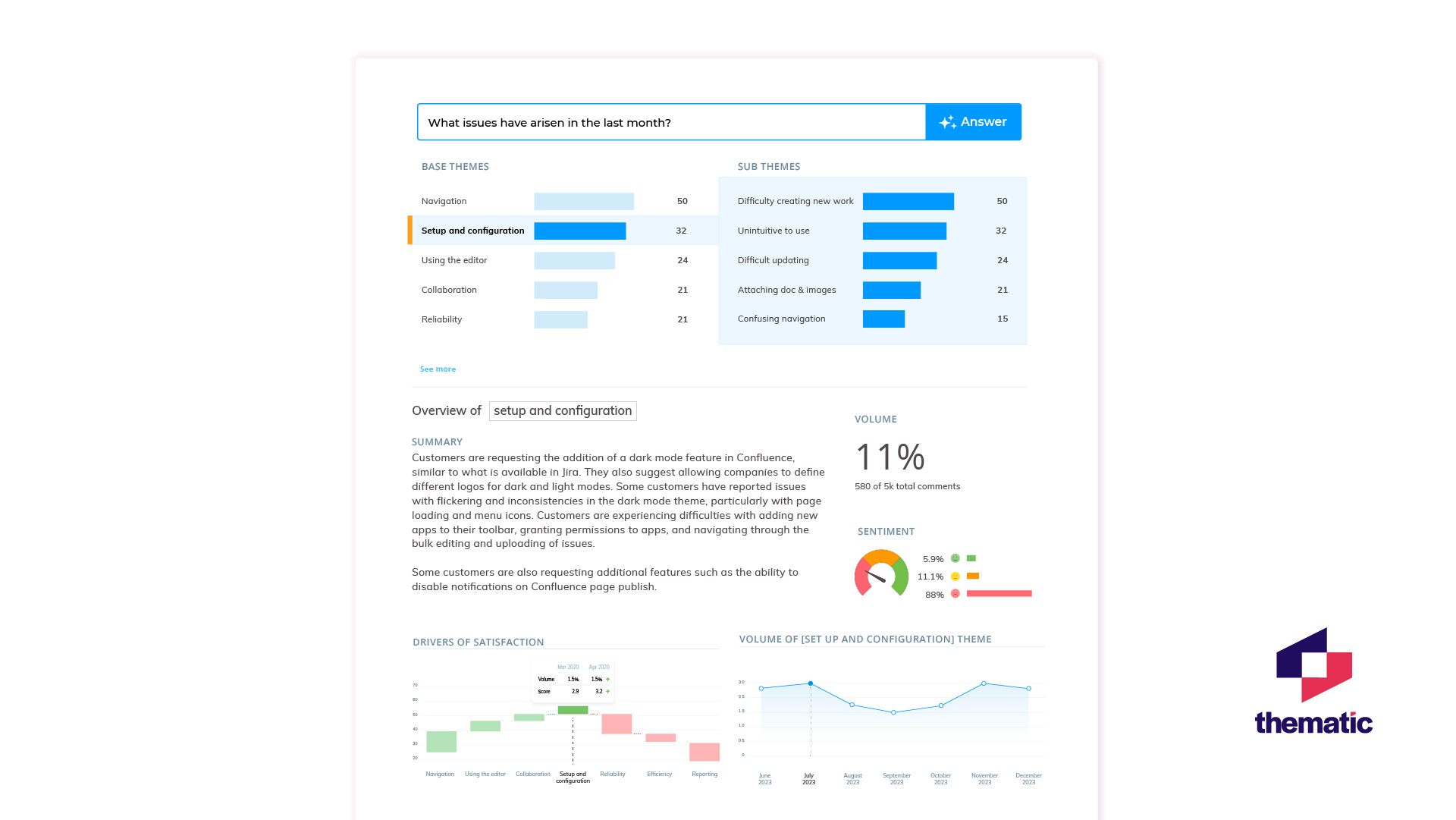
This dashboard shows what a sophisticated analysis might look like, turning thousands of comments into clear, prioritized themes.
3. Decoding Sales Call Recordings
If support tickets show you where users get stuck, sales calls show you what stops them from starting. This is where you hear objections, hesitations, and competitive questions directly from the mouths of potential buyers.
Voice of Customer: What Is It and Methods to Collect | M1-Project
The article 'Voice of Customer' from M1-Project explains how analyzing these conversations helps you identify hidden pain points and address objections.
Read section 2, 'Analyze customer conversations,' and section 3, 'Using VOC in sales.' Notice the Zappos example of finding a 'hidden' pain point in calls, and how Salesforce used VOC to address integration fears.
The process for analyzing sales calls can be straightforward.

When listening to sales calls (or reading transcripts), you're listening for:
- Explicit Objections: "It's too expensive." "We're happy with our current provider." "I'm not sure my team will adopt this."
- Revealing Questions: A question like, "So, how long does implementation really take?" isn't just a question. It reveals a fear of a long, painful setup process.
- Competitor Mentions: How do they talk about competitors? What features do they praise or complain about? This is crucial for positioning your product.
- The "So What?" Moment: When the salesperson explains a feature, what does the buyer say that indicates they understand the value? Do they say, "Ah, so that would save us time on reporting," or do they seem unimpressed?
The goal is to collect all the different ways buyers express a single objection. This gives you a rich pool of language to use when you write copy designed to overcome that specific hurdle.
4. Your Turn: Analyze the Internal Memo
Let's put this into practice. Imagine you're the copywriter for "Momentum," the project management software from our last lesson. The Head of Sales and Head of Support have sent you a brief "internal memo" with some recent customer interactions.
Your Task (10-15 minutes):
Read the three items below. For each one, identify the core question or objection. In a blank document, write down the issue and the specific customer language that reveals it.
Memo: Recent Customer Feedback
-
Support Ticket #A-451:
"Hi, I'm on the trial and trying to get my team to test this out. I can't figure out how to assign a task to more than one person. We're a design agency and many of our tasks need both a designer and a copywriter assigned. Is this not possible? This is a deal-breaker for us."
-
Support Ticket #B-103:
"Your pricing page is really confusing. The 'Pro' plan says 'up to 10 users' and then the next plan is 'Enterprise'. We have 25 people. Do we have to pay for an enterprise plan? We don't need all those advanced features. How much would it cost for just 25 users on the Pro features?"
-
Excerpt from a Sales Call with a Prospect:
Prospect: "Look, I like the Gantt chart feature, it's slicker than what we have in Asana. But my biggest concern is the switching cost. It's not just about the license fee. It's the headache of migrating all our existing projects and getting 50 people retrained on a new tool. That's a huge disruption. How can you promise me that we won't lose momentum during the switch?"
After analyzing, create a short summary list of the top 3 issues you would report back to your team, based on this memo.
Conclusion
Great work. You've now learned how to tap into the most direct sources of customer feedback a company has. By analyzing support tickets and sales calls, you move beyond guessing and start addressing the real-world questions and objections that influence buying decisions.
Key Takeaways:
- Internal sources are unfiltered. They contain the raw, honest language of customers facing real problems.
- Look for patterns, not just anecdotes. A single ticket is a data point; recurring themes are copywriting opportunities.
- Support tickets reveal confusion. Use them to identify where your copy (on your website, in your onboarding, etc.) is failing to provide clarity.
- Sales calls reveal objections. Use them to understand the fears and hesitations that your copy must overcome to persuade a prospect.
In our last lesson, you gathered language from public sources. Today, you gathered it from internal sources. In our next lesson, we will focus on analyzing all this data to distinguish between stated needs and the underlying motivations behind them. This is the final step in truly "thinking like a buyer."