
Welcome back. In the previous lesson, you validated the planning relationships that make collected data usable: item-organization records, customer and supplier sites, sourcing rules, and assignment sets. That work matters here because many “collection failures” are actually dependency failures: a transaction cannot be loaded or interpreted when one of its prerequisite reference records is missing or invalid.
This lesson gives you a senior-consultant diagnostic method for a collection that ends in Error, completes with Warning, or reports success while leaving expected data absent from Planning. You will use three forms of evidence together: collection status, child-process logs, and validation of the data that actually reached Plan Inputs.
A collection run is evidence, not a verdict
A collection run does not have only two outcomes: “worked” and “failed.” Treat its final status as the beginning of diagnosis, not the conclusion.
Oracle collections are submitted as a Collection Job Set. The parent job coordinates multiple child jobs that extract, transform, validate, and load particular business objects. Consequently, a parent status can conceal important differences among its child processes.
| Observed result | What it proves | What it does not prove |
|---|---|---|
| Error | At least one process could not complete. | That no data was collected; other objects may have loaded before the failure. |
| Warning | Processing completed with an exception or skipped records. | That all selected entities are available and usable in Planning. |
| Succeeded | The scheduled process completed technically. | That the correct source, filters, date range, object selection, and expected records were collected. |
| Blocked or unusually long-running | The process is waiting or experiencing a runtime issue. | That the source data is invalid; another collection load may simply be in progress. |
The practical question is therefore not, “Did the job succeed?” Instead ask:
“For the exact source system, collection type, selected entities, filters, and date range submitted, did the expected records reach the Planning Data Repository in a usable form?”
This distinction prevents a common implementation mistake: rerunning a broad collection repeatedly without first identifying whether the problem is scope, source data, dependency order, validation, or job concurrency.
The following short demonstration is useful for refreshing the monitoring path in the application.
Oracle Fusion planning training | Collection process in oracle Fusion Cloud planning central
Watch “Oracle Fusion planning training | Collection process in oracle Fusion Cloud planning central” from MY TECHNO JOURNAL to review how a submitted collection is monitored through Scheduled Processes and how output and log files are opened.
Watch job monitoring. Focus on the distinction between the collection job set and the individual background processes, then note where output and error logs are accessed after refreshing the process status.
The diagnostic sequence: status, child job, message, data
Use the same sequence for every incident. It gives you a defensible explanation in an interview and prevents trial-and-error fixes in a project.
1. Define the missing or suspect data precisely
Before opening a log, state what should have been collected at a business level.
Weak statement:
“Items are missing from Planning.”
Diagnostic statement:
“Item F100 should exist for organization DC1 in Plan Inputs after the targeted reference-data collection from the Oracle Fusion source system. DC1 was included in the organization filter, and F100 belongs to the catalog selected for collection.”
For a transaction, include the business key and date context:
“Purchase order PO-45021 for supplier SUP-A, supplier site MAIN, item R100, and receipt date within the selected horizon should appear as a supply.”
This matters because a record can be absent for valid reasons:
- the relevant organization was excluded by a collection filter;
- the object was not selected on the collection submission;
- the item is outside the selected catalog;
- the demand-history date falls outside the chosen fixed or rolling date range;
- the collection type cannot collect the data as expected;
- the record exists in the repository but is outside the plan’s own scope.
A successful job with an incorrect scope is a configuration issue, not a technical collection failure.
2. Capture the submitted parameters
Record the following from the collection submission or scheduled-process details:
| Evidence | Why it matters |
|---|---|
| Source system | Confirms that the intended Fusion or external source was queried. |
| Collection type | Distinguishes a full refresh of selected entities from an incremental update. |
| Selected reference, demand, and supply entities | Explains why a particular object should or should not exist. |
| Organization, catalog, customer, or other filters | Identifies intentional exclusions that may resemble missing data. |
| Demand-history date range | Explains why historical measures may be incomplete. |
| Submission time and request ID | Lets you connect the business report to the exact parent job and its child jobs. |
Do not infer parameters from a later collection run. A frequent support error is opening the most recent successful collection while investigating data that was expected from an earlier warning or error run.
3. Inspect the parent job, then isolate the failing child job
Navigate to Tools > Scheduled Processes and search for the parent Collection Job Set using its request ID or submission time. Review the child jobs underneath it.
Your objective is to isolate:
- The first child job with Error or Warning.
- The business object or load phase associated with that job.
- The first meaningful error message in its log or output.
- Whether later child jobs were skipped, blocked, or completed.
The first error is often the causal one. Ten later messages may simply be consequences of a missing prerequisite.
For example, if a supplier-site load reports that an internal location cannot be derived, do not start with the purchase order that is absent from Plan Inputs. The site and location dependency must be corrected first; then the supplier-related transaction can be collected.
Read Oracle’s collection troubleshooting table to connect common symptoms with likely causes and to reinforce the parent-job and child-job investigation method.
In the Collection Job Set troubleshooting table, read from the first issue concerning product catalogs through the final row on troubleshooting collection runs. Use the troubleshooting table to locate the full range. Focus especially on dependency-related warnings, calendar failures, blocked loads, the limitation of net change when no data is returned, and the instruction to inspect each child job’s log.
4. Classify the error before choosing a fix
Most collection incidents fit one of five categories.
| Category | Typical log or validation symptom | Correct diagnostic direction |
|---|---|---|
| Scope or parameter issue | Job succeeds, but the requested entity, organization, catalog, or date range was not selected. | Correct the collection parameters or filters. |
| Missing prerequisite data | A transaction is rejected because its item, organization, supplier, customer, location, or calendar is missing. | Collect or correct the prerequisite reference data first. |
| Source setup or master-data issue | Invalid item-organization combination, unusable site, expired location, invalid catalog, or unavailable calendar. | Correct source setup, then recollect the affected entities. |
| Record-level validation issue | Warning or row-level error for specific records, such as duplicate values or invalid attribute combinations. | Identify the rejected business key and correct the source record or interface payload. |
| Process or concurrency issue | Load is blocked, multiple jobs overlap, or a job takes unexpectedly long. | Check active collection loads and scheduling frequency before changing business data. |
Classification is the senior-level step. It separates a data defect from a job-management issue and avoids unnecessary changes to planning configuration.
Validate the repository, not only the log
Logs tell you why Oracle accepted or rejected records. Plan Inputs tells you whether the resulting planning data is present and usable.
Use three layers of validation.
Presence: does the record exist?
Search the appropriate Plan Inputs table or planning work area for the exact business key:
- item and organization;
- supplier and supplier site;
- customer and customer site;
- purchase order, transfer order, work order, or sales order;
- calendar, resource, bill of material, or work definition;
- demand-history measure and its dimensional context.
For a missing item, validate the exact item-organization combination. “The item exists in Product Management” does not demonstrate that it is available to Planning.
Completeness: is the required population present?
A single successful search can hide a filter issue. Compare an expected count or list from the source with the collected result.
For example:
| Object | Expected evidence | Useful validation |
|---|---|---|
| Items | All planned items in catalog DEMO-FG for DC1 | Compare the source item list to Plan Inputs filtered by DC1. |
| Suppliers | Suppliers used by open purchase orders | Confirm each supplier and site exists before validating the purchase orders. |
| Shipment history | Monthly history for the chosen date range | Compare measure totals and the number of time buckets with the source extract. |
| Calendars | Every planned organization has a usable calendar | Verify the organization and its calendar are both present. |
Usability: are attributes and relationships valid?
A record may exist but still be unusable for planning. Continue the relationship checks from the previous lesson:
- an item must be collected at both the demand and supply organizations where it is used;
- a purchase order requires valid supplier and supplier-site context;
- a transfer flow requires valid source and destination organizations;
- a sourcing rule cannot help if its item-organization or supplier-site dependency is absent;
- a transaction may exist in Plan Inputs but be outside the plan scope, plan horizon, or selected demand and supply inputs.
This is also how you avoid blaming collection for a downstream plan configuration issue. If the record is present and correct in Plan Inputs, shift the investigation to plan scope and plan options rather than rerunning collection.
Diagnose an incomplete item collection
Items are foundational. When they are missing, related structures and transactions frequently fail later in the collection sequence.
Oracle identifies a recognizable pattern: the item is absent from the Planning repository and from the Items table in Plan Inputs, and the log can report that the item-and-organization combination is invalid because the item was not collected.
Resolve the Issue About Items Not Being Collected
Read Oracle’s focused item-collection diagnostic guidance. It is particularly useful when a downstream error mentions an invalid item and organization combination.
In Resolve the Issue About Items Not Being Collected, read the opening diagnostic explanation and the listed causes through the discussion of catalog configuration and source-system enablement. Locate the diagnostic clues. Focus on the distinction between an item that is missing because of setup, catalog assignment, or source-system enablement, and an item that is merely absent from the current collection scope.
When an item is missing, diagnose in this order:
-
Verify the exact item and organization.
An item collected for the master organization is not automatically proof that the required item-organization record is available for every planned organization. -
Review the collection selection.
Confirm that the master organization, the relevant organization, and the intended catalog were included. Oracle’s troubleshooting guidance specifically notes that items may not display when the master organization was not included in collection. -
Read the item-related log message.
If the log identifies an invalid item-and-organization combination, correct the prerequisite item setup rather than recollecting unrelated transactions. -
Validate the catalog and source system.
If there is no explicit item error, investigate catalog configuration and whether the planning source system is enabled for collections. -
Rerun the smallest suitable correction collection.
First recollect the corrected reference entity. Only then recollect dependent structures or transactions if they were previously rejected.
The governing principle is simple: collect the parent reference entity before its child or dependent transaction.
Common patterns that distinguish warnings from root causes
Supplier sites or customer sites are absent
Supplier, customer, and organization sites depend on location data. A warning involving inability to derive an operation sequence, department, resource, or site-related identifier should not be treated as a supply-planning configuration issue first.
Validate:
- the internal or external location setup;
- address and geography setup;
- whether location records are active rather than expired;
- whether required geography-name references have been generated;
- whether the affected supplier or customer entity was selected as reference data.
Only after sites exist in the Supply Network Model should you expect supplier-linked purchase orders or customer-contextual demand to load reliably.
Calendar collection fails
Planning requires usable calendars, but Oracle does not collect every schedule defined in the source. The official troubleshooting guidance highlights a critical constraint: calendars collected from source schedules must use a seven-day pattern string. In addition, the calendar must be assigned to an organization or used as a shipping or receiving calendar for a supplier, customer, or carrier.
When a calendar error prevents an organization from appearing in Planning, validate the calendar first. Recollecting items or orders will not correct the missing organization.
Net change returns no data
A net change collection is not a reliable proof that historical or expected reference data is present. If no data appears after net change collection, Oracle recommends running a targeted collection to test whether the expected data can be collected.
Diagnostically, this means:
- use net change to maintain data after a stable baseline exists;
- use a controlled targeted collection when proving whether a specific object can be extracted and loaded;
- do not conclude “the source has no data” simply because an incremental run returned nothing.
Collection load is blocked or slow
Before treating a long-running load as a data issue, inspect active scheduled processes. The load may be waiting for another collection load to finish. Overlapping collections and unnecessarily frequent schedules can create avoidable backlog and performance problems.
The corrective action here is operational: remove schedule overlap or wait for the active load to finish. Changing items, sourcing rules, or transaction data would not address the cause.
Record-level errors: use the error worklist as a data-quality clue
Some collection problems do not stop the overall run. Oracle may reject individual records while allowing the parent process to complete with a warning. These are dangerous because the plan can run with silently incomplete demand, supply, or history.
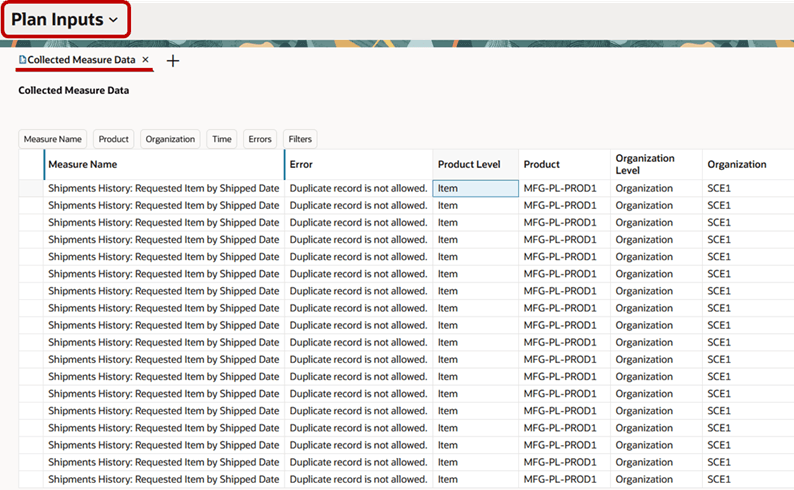
The screenshot shows repeated duplicate-record errors for a shipment-history measure. It establishes that multiple records were rejected, but it does not by itself prove the exact source cause. Diagnose it methodically:
- Filter the error worklist by measure, product, organization, and, where available, time.
- Identify the complete dimensional grain of the measure. For shipment history, this normally includes the requested item, the relevant shipped-date bucket, and additional dimensions defined for that measure.
- Compare the rejected dimensional intersection with the source extract or interface payload.
- Determine whether duplicate source records represent:
- an upstream extract duplication;
- an incorrect aggregation before loading;
- two files or processes loading the same business event;
- an unintended overlap in collection parameters.
- Correct the source or interface issue, then recollect the affected historical measure and validate the revised totals.
Do not “fix” this by deleting a random Planning record. The underlying source duplication will recur at the next collection cycle.
Hands-on lab: create a collection incident record
Reserve about 15 minutes in your practice environment. Use a harmless test organization, item, or existing historical collection run; do not alter a shared production-like collection schedule.
Part A: Select one controlled expectation
Choose one of these validation targets:
- one item at one organization;
- one supplier and supplier site;
- one open purchase order;
- one sales order;
- one demand-history measure for a defined date range.
Write the expected result in one sentence, including the business key and source context.
Example:
“Item AS54888 is expected in Plan Inputs for organization M1 after a targeted reference-data collection that includes M1 and the item’s catalog.”
Part B: Trace the collection evidence
For the collection run associated with your target:
- Record the parent Collection Job Set request ID, source system, collection type, selected entities, filters, and submission time.
- Open Scheduled Processes and list each child job with a status other than Succeeded.
- Open the first relevant output or log file.
- Capture the exact error or warning message, without paraphrasing it prematurely.
- Classify the issue as scope, prerequisite data, source setup, record validation, or process/concurrency.
If the run succeeded, still complete the same review. Your conclusion may be that there was no collection failure, but that does not remove the requirement to validate the data.
Part C: Validate the collected result
Search Plan Inputs for the target record. Then document:
| Incident-record field | What to capture |
|---|---|
| Expected data | Exact business key, organization, site, measure, and date range where relevant |
| Collection evidence | Request ID, parameters, filters, and final parent status |
| Child-process evidence | First warning or error, job name, and exact log message |
| Repository evidence | Presence, count, key attributes, and relationship validity in Plan Inputs |
| Root cause | One classified cause supported by evidence |
| Correction | Data, setup, parameter, or scheduling correction required |
| Rerun decision | The minimum collection needed after correction |
| Closure validation | Proof that the corrected record is now present and usable |
For a safe demonstration of apparent incompleteness, run a targeted collection using a deliberately narrow test-organization or catalog filter. Confirm that an excluded record is absent, then rerun with the correct filter and verify that it appears. Document this as a scope issue, not as an application defect.
How to explain collection diagnosis in an interview
A concise senior-consultant answer is evidence-led:
“I do not treat a collection status as sufficient proof of data availability. I first define the expected business record and confirm the collection parameters, including source system, selected entities, filters, and date range. In Scheduled Processes, I open the parent Collection Job Set and isolate the first child process with an error or warning. I use its log to classify the issue as scope, dependency, source setup, record validation, or job concurrency. Then I validate the result directly in Plan Inputs and, where applicable, in the Supply Network Model. If the record is missing, I correct the earliest prerequisite cause and rerun only the required targeted collection. If it is present in Plan Inputs but absent from a plan, I shift the investigation to plan scope or configuration rather than rerunning collection.”
This answer demonstrates that you can distinguish data integration, Planning repository validation, and plan-configuration troubleshooting.
Key takeaways
A robust collection diagnosis combines three kinds of evidence:
- Status identifies whether the parent Collection Job Set needs investigation, but does not prove complete usable data.
- Child-job logs reveal the object, process phase, and first causal error or warning.
- Plan Inputs validation proves whether the expected data is present, complete, and usable in Planning.
Remember these working rules:
- Define the expected record and collection scope before reading logs.
- Start with the parent job, but isolate the first relevant child job.
- Correct prerequisite reference data before recollecting dependent transactions.
- Treat warning-status runs as potentially incomplete until validated.
- Use targeted collection to test a missing-data problem when net change does not return expected data.
- Distinguish a collection issue from a plan-scope issue: data that exists correctly in Plan Inputs should not trigger an unnecessary recollection.
- For record-level errors such as duplicates, correct the source or interface grain rather than masking the rejected Planning record.
You have now completed the data-foundation module. Next, the course moves into Demand Management configuration, beginning with how to define demand-plan scope, horizon, time levels, and output granularity so that clean collected history becomes a usable forecasting model.
Can't find a good explanation? Sign up and we'll make it for you
Sign up