
Welcome back. In the previous lesson, you chose the planning capability that owns a business decision: Demand Management for the demand signal, Replenishment Planning for item-location policy decisions, and Supply Planning for feasible network supply. You also saw that connected plans exchange schedules when downstream replenishment must reflect upstream constraints.
That architecture works only if every plan has trustworthy inputs. This lesson follows one record through the operational lifecycle: from its system of record, through collection and the planning data repository, into a plan run, and finally into an execution-facing recommendation. By the end, you should be able to explain this path clearly in an interview and use it to isolate whether a discrepancy is a source-data, collection, repository, plan, or release issue.
The planning data lifecycle: a controlled copy, not a live mirror
Oracle Supply Chain Planning does not calculate directly against every operational transaction at the instant a user runs a plan. Instead, it uses a planning-specific store: the planning data repository. Collections populate that repository from Oracle Fusion source applications or from external data files.
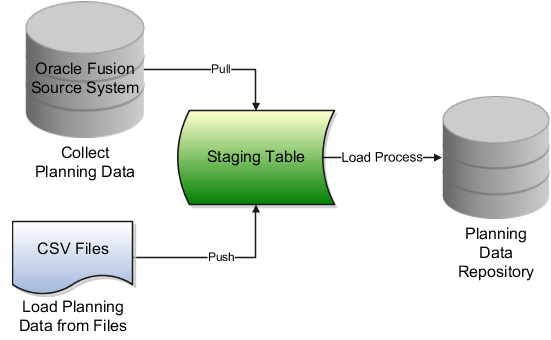
The practical lifecycle has six states:
-
A business transaction or master-data record exists in its source system.
Examples include an item in Product Management, on-hand inventory in Inventory Management, a sales order in Order Management, a purchase order in Procurement, or a work order and capacity in Manufacturing. -
Collection transfers selected source data to staging.
For a Fusion source system, the collection process pulls data. For an external source, a file-based load pushes data into staging. -
A load process validates and places data in the planning data repository.
At this point, the data is available as a planning input. It is not yet a new forecast or supply recommendation. -
A plan runs against the repository data and its plan options.
Demand, replenishment, and supply plans each interpret the same broad planning foundation differently, according to their scope, measures, policies, constraints, and configuration. -
The plan produces results.
Results might be a statistical forecast, a safety-stock-related replenishment recommendation, a planned transfer, a planned purchase order, a planned work order, an exception, or a capacity overload. -
Eligible recommendations are released or published to execution.
The planning recommendation is handed to the relevant execution application, where it becomes an actionable document or signal. Its subsequent execution status must later be collected back into planning for the next planning cycle.
The key discipline is to avoid treating these as one event. A sales order can be correct in Order Management, absent from the planning repository, and therefore absent from a Supply Plan. Likewise, data can be current in the repository but not reflected in a plan that was last run yesterday.
Study the official collection model
Overview of Data Collections for Supply Chain Planning
Read Oracle’s “Overview of Data Collections for Supply Chain Planning” to establish the official distinction between native Fusion collections and flat-file loading, and to see why the planning data repository is a prerequisite for planning.
Start with the opening overview. Read the repository rationale and identify the two supported ways to populate it. Then, in the “Collect Planning Data” section, read the Fusion collection flow, paying attention to the Reference Data, Demand Planning Data, and Supply Planning Data tabs. Finally, in the “Load Planning Data from Flat Files” section, continue from the high-level process until the file-load steps; note the required import account and scheduled process.
Two conclusions from this reading are especially important:
- The staging table is an intermediate processing area, not the place from which planners work. A successful extract into staging is not the same as a successful usable load into the repository.
- A plan run is downstream of collection. The plan cannot compensate for data that was never collected, filtered out, rejected, or left stale in the repository.
What moves into planning, and why sequence matters
A plan needs both reference data and transactional data. Reference data defines what a transaction means; transactional data describes what has happened or is expected to happen.
| Data category | Typical examples | Why planning needs it |
|---|---|---|
| Enterprise and reference structure | Organizations, calendars, units of measure, customers, suppliers, locations | Establishes where, when, and with whom planning occurs |
| Product and network master data | Items, item-organization attributes, catalogs, BOMs, work definitions, sourcing rules, lead times | Defines how an item can be made, bought, transferred, or replenished |
| Demand inputs | Sales orders, forecasts, bookings history, shipment history, demand classes | Quantifies expected or actual requirements |
| Supply and inventory inputs | On hand, reservations, purchase orders, transfer orders, work orders, resource availability | Establishes available and incoming supply |
| Planning configuration and policy | Plan scope, planning calendars, replenishment policies, planning mode, measure definitions | Tells the planning engine how to interpret the collected data |
Consider a simple supply-planning example. A purchase order for Item A at DC East may exist in Procurement. For the supply plan to use it properly, planning generally needs more than the purchase-order line:
- Item A must exist and be collected.
- DC East must be collected and included in the plan scope.
- The supplier and supplier site must be valid where the transaction depends on them.
- Relevant units of measure and calendars must be available.
- The purchase order itself must be collected as a supply transaction.
If the purchase order appears to be “missing from the plan,” the first question is not “Why did planning ignore it?” It is: At which lifecycle state did the record stop?
This dependency logic is also why an initial implementation normally begins with a deliberately broad targeted collection of required reference and transactional entities. When collecting a selective subset, the functional consultant must know which prerequisite entities are already in the repository.
Collection routes: Fusion pull versus external-file push
The collection architecture supports two broad routes.
1. Native Oracle Fusion source systems
For data maintained in connected Fusion applications, use Collect Planning Data or the relevant collection job set. The process pulls selected entities from the Fusion source system, stages them, and loads them into the planning data repository.
The functional decisions are not merely technical:
- Which source system is selected?
- Which reference, demand, and supply entities are selected?
- Which organizations, product catalogs, customer classes, or other filters limit the extract?
- Is the collection Targeted or Net Change?
- Does the selected collection cover the plan scope and business purpose?
Targeted collection refreshes the selected business objects more comprehensively. It is appropriate for initial loads, structural master-data changes, history collection, controlled corrections, and scheduled baseline refreshes.
Net Change collection is an incremental method for supported changing entities. It is useful between targeted collections when transaction data such as orders, supplies, or inventory requires more frequent refreshes. It does not replace a sound targeted-collection strategy. In particular, Oracle documents that Demand Planning Data can only be collected in Targeted mode.
A useful operational pattern is a targeted collection overnight, with carefully scheduled net-change collections for high-velocity transactional changes during the day. Actual cadence must reflect business volatility, plan schedules, data volumes, and the fact that only one collection can run at a time.
2. External source systems and CSV-based loading
When planning inputs originate outside the connected Fusion source applications, the data can be loaded through supported file-based import templates. In broad terms, the functional flow is:
- Prepare the supported CSV content from the external system.
- Upload the import file to the prescribed Planning Data Loader import account.
- Submit Load Planning Data from Flat Files.
- Monitor the load, correct any rejected data, and validate the resulting repository records.
The two routes differ in where the data starts, but they converge at the same planning repository. That is why a plan can combine, for example, Fusion inventory and orders with externally supplied forecasts or supplier data, provided source-system identification, organizations, items, and data relationships are consistent.
Watch the collection flow and monitoring behavior
Oracle Fusion planning training | Collection process in oracle Fusion Cloud planning central
Watch “Oracle Fusion planning training | Collection process in oracle Fusion Cloud planning central” from MY TECHNO JOURNAL for a concise visual walkthrough of the temporary staging step and Scheduled Processes monitoring.
Watch the two phases to reinforce the distinction between collecting or uploading into temporary staging and loading data for planning use. Then watch job monitoring to see how a submitted collection job set can be reviewed through its child processes, outputs, and logs. Focus on the evidence that proves completion rather than assuming that clicking Submit made data available.
The video uses “operational data store” as a general label for the final planning store. In current Oracle documentation for this course, use the more specific term planning data repository.
From the repository into a plan run
Once data has reached the planning data repository, it becomes eligible for use. Eligibility is not the same as use. A particular plan sees only the repository data allowed by its plan definition and options.
A plan run applies four things together:
-
Collected planning inputs
Such as demand, on hand, open supply, master data, sourcing, and capacity. -
Plan scope
The source systems, organizations, items, customers, and time horizon included in the plan. -
Plan behavior and configuration
Examples include forecast methods in Demand Management, replenishment policies in Replenishment Planning, or constraints and planning mode in Supply Planning. -
Plan-specific schedules or connected-plan inputs
For example, an approved demand forecast used by a supply plan, or a constrained supply schedule used by a replenishment plan.
This means that a plan result is never explained by “the data” alone. It is explained by data plus scope plus configuration plus the timing of the plan run.
The same repository can serve different planning decisions
Suppose the repository contains:
- Item A at a manufacturing organization, DC East, and several stores;
- current on hand and open supply;
- store sales history;
- open customer demand;
- lead times and sourcing relationships;
- resource capacity at the manufacturing plant.
Each plan uses a different subset and interpretation:
| Plan type | Main interpretation of the inputs | Typical result |
|---|---|---|
| Demand Plan | Historical demand, causal inputs, hierarchy, and forecasting configuration | Forecast and forecast-quality analytics |
| Replenishment Plan | Item-location policy, demand, inventory position, replenishment lead time, and sourcing | Replenishment quantities and dates |
| Supply Plan | Demand, supply, BOMs, capacities, sourcing, constraints, and order modifiers | Planned make, buy, transfer, and reschedule recommendations |
This is why “collection completed successfully” is necessary but insufficient as an implementation acceptance criterion. You must also validate that the right record is visible in the right plan at the right level of detail.
The four timestamps that prevent vague troubleshooting
When an interviewer describes a planning discrepancy, establish a timeline. The most useful evidence is usually these four timestamps:
| Timestamp | Question it answers |
|---|---|
| Source transaction update time | When was the order, forecast, inventory balance, or master-data change committed in the source? |
| Last successful collection time | Was that source change transferred into the planning data repository? |
| Last plan run time | Did the relevant plan run after the repository received the change? |
| Release time and status | Was a resulting recommendation actually handed to execution, and did execution accept it? |
For example, a buyer changes an open purchase order from 500 to 200 units at 10:00. At 10:30, a planner sees a supply-plan recommendation that still assumes 500 units.
That observation could have several different causes:
- No net-change or targeted collection occurred after 10:00.
- Collection ran but excluded the relevant organization or supply entity.
- Collection completed with a warning or child-job error.
- The purchase-order record is present in Plan Inputs, but the Supply Plan was last run before collection completed.
- The plan was rerun, but its scope or supply netting settings exclude the transaction.
- The displayed recommendation is an older plan result rather than the latest plan run.
A senior-functional-consultant response does not jump to plan configuration. It moves through these states in order.
Plan output is a recommendation, not yet an execution transaction
After a plan run, Oracle shows planning results such as planned orders, exceptions, projected available balance, resource overloads, forecasts, or replenishment recommendations. These are decision-support outputs.
Their meaning depends on the plan type:
- A Demand Plan commonly produces a forecast that must be reviewed, adjusted if required, and approved or made available as a downstream demand input. It does not itself create a purchase order or work order.
- A Supply Plan can recommend new supply or changes to existing supply. Depending on setup, security, and recommendation eligibility, planners can release eligible planned purchase orders, work orders, or transfer orders to execution.
- A Replenishment Plan can create policy-driven replenishment recommendations that may be released or published through the configured downstream process.
Do not describe this as planning “automatically creating operational orders” unless the implementation’s explicit release automation supports that statement. In a controlled deployment, release normally has checks:
- Is the recommendation eligible to release?
- Does the planner have the right job role and data access?
- Is the quantity, date, source, and destination acceptable?
- Are release controls and approvals satisfied?
- Did the execution application accept the release and create or update the intended document?
The release action is therefore a handoff from a planned proposal to an execution record. The newly created execution record becomes part of the next collection cycle. This closes the loop.
A complete trace: forecast-driven replenishment and supply
Use this scenario as an interview-ready narrative.
A consumer-products company has a demand forecast for Item A at DC East. DC East supplies retail stores, while a manufacturing plant supplies the DC. A supply constraint at the plant may limit what the DC can receive.
-
Source and data preparation
Historical shipments, sales orders, on hand, open purchase orders, work orders, items, organizations, sourcing, lead times, calendars, and capacity are maintained in their appropriate source applications. An approved forecast may originate in Demand Management or an approved external process. -
Collection
Required reference data is collected with the transactional demand and supply data. The forecast is also made available in the planning repository in the correct organization, customer, and time context. -
Repository validation
Before running plans, the consultant checks Plan Inputs or relevant planning tables. Item A, DC East, the manufacturing plant, its source relationships, on hand, demand, and open supply must all be present and coherent. -
Plan execution
Replenishment Planning calculates DC and store needs according to policy. Supply Planning evaluates whether manufacturing capacity, components, and sourcing can satisfy the DC requirement. In a connected design, the constrained supply output is made available to the replenishment plan. -
Recommendation review
The planner reviews shortages, exception messages, projected inventory, dates, quantities, and pegging. A recommendation to produce Item A is not accepted merely because it exists; it must be feasible and commercially appropriate. -
Release and feedback
An eligible planned work order, purchase order, or transfer order is released to execution. The execution document is later collected back into the repository, and subsequent plan runs recognize it as an existing supply rather than repeatedly proposing the same supply.
The crucial point is that planning has a feedback loop, not a one-way report. Source execution affects planning; planning recommendations affect execution; execution then becomes new planning input.
Evidence-based validation at each handoff
When validating an implementation or handling a production ticket, collect evidence at every boundary.
| Handoff | What to verify | Typical evidence |
|---|---|---|
| Source to collection | Source record exists, is valid, and falls within the selected filter and date context | Source transaction or master-data record; collection parameters |
| Collection to repository | Parent and child collection jobs completed; no relevant warnings or errors occurred | Scheduled Process status, output, and log files |
| Repository to plan | The correct item, organization, customer, supplier, demand, supply, and master-data attributes are present | Plan Inputs searches, supply network model, data tables |
| Repository to plan result | The plan ran after collection and includes the required scope and options | Plan run status, plan options, run time, plan output |
| Plan result to execution | Recommendation is eligible, released successfully, and accepted downstream | Release status, generated document number, execution-application record |
| Execution back to planning | The released document is collected and seen as existing supply or demand on a later cycle | Follow-up collection status, Plan Inputs, refreshed plan result |
Two reminders prevent common confusion:
- A green parent collection status does not prove that every child entity loaded correctly. Review child processes and relevant warnings when data is missing.
- A visible source transaction does not prove planning has used it. Confirm repository visibility and then confirm a plan run occurred after collection.
Practice in your environment: create one trace record
In your Oracle Fusion practice environment, select one real item-organization combination and trace it through the lifecycle. Preferably use an item with on hand plus either an existing purchase order, transfer order, work order, sales order, or forecast.
Create a short evidence log with these columns:
| Lifecycle state | Your evidence to capture |
|---|---|
| Source record | Item, organization, transaction number, quantity, and source-system timestamp |
| Collection request | Collection type, selected entity or template, organization filters, submission time |
| Collection result | Parent job status, relevant child-job status, warnings or errors |
| Repository record | Screenshot or note from the appropriate Plan Inputs view showing the collected record |
| Plan run | Plan name, run time, plan scope, and whether it occurred after collection |
| Plan output | Supply, demand, forecast, exception, or recommendation that reflects the record |
| Release outcome, if applicable | Whether the recommendation is eligible and the execution document created after release |
For a fast but realistic test, change a small, non-critical quantity in the practice environment, run the appropriate collection, verify the repository record, and rerun the plan. Observe which value changes at each point. Do not use production-like data for experimental updates.
Key takeaways
- Oracle plans use the planning data repository, not a real-time query of every source transaction.
- Fusion-source collection pulls data into staging; external CSV loading pushes data into staging. Both routes then load the planning data repository.
- Reference data provides the structural context that makes transactional demand and supply usable. Missing prerequisite data is a frequent cause of incomplete collections.
- Successful collection, repository visibility, and a successful plan run are three separate checkpoints.
- Plan outputs are recommendations or planning signals. They become execution transactions only through the applicable release or publication process.
- After release, execution data must be collected again so the next plan run sees the newly created supply or demand.
- For any discrepancy, establish the source-update, collection, plan-run, and release timestamps before diagnosing configuration.
Next, you will turn this lifecycle into a practical prerequisite map: the enterprise structures, master data, transactional data, configuration, and run sequence required for a connected end-to-end planning flow.
Can't find a good explanation? Sign up and we'll make it for you
Sign up