
Good documentation begins while the request is still understandable. You have now captured, replayed, and decoded HTTP traffic in Burp; this lesson turns one of those request-response pairs into an evidence note that another tester, developer, or interviewer can follow.
An evidence note is not yet a full vulnerability finding. It is a compact, accurate record of what you did, the state in which you did it, and what the application returned. Building this habit now prevents a common junior-tester problem: discovering something interesting, then being unable to explain or reproduce it later.
By the end of this lesson, you will be able to create a sanitized evidence note from an authorized lab request-response pair, preserve the right technical details, and clearly separate observed facts from conclusions.
Evidence notes: small records with a serious purpose
A request-response pair is evidence because it ties an action to an observable result:
- Action: the exact HTTP request sent.
- Context: target, user state, and relevant preconditions.
- Result: the HTTP response and the specific detail that matters.
- Meaning: a restrained explanation of what the pair demonstrates.
“Reproducible” does not mean that every byte of a second response must be identical. Dynamic values such as timestamps, CSRF tokens, session IDs, and request IDs may change. It means a reviewer can recreate the required state, perform the stated action, and observe the same security-relevant behavior.
For example, a note can establish a baseline:
An authenticated request for product identifier
3returned an HTML product page with200 OK.
That is useful evidence, but it is not a vulnerability claim. It does not establish that another user can access the product, that authorization is missing, or that data is sensitive. A good note states only what its evidence supports.
This distinction matters in professional reports:
| Evidence note | Full finding |
|---|---|
| Captured while testing | Written after enough evidence is gathered |
| Records one action and response | Explains the weakness, impact, remediation, and severity |
| Can document a baseline, anomaly, or confirmed behavior | Should make a defensible security claim |
| Avoids speculation | Connects validated evidence to a business/security risk |
WSTG - Latest | OWASP Foundation
Read this OWASP guidance to see why technical reporting must enable an engineer to understand, verify, and act on a tester's work. The final subsection also places request-response evidence in the broader reporting process.
In Section 3.2, “Findings Details,” read from the reporting guidance. Continue through “Reproducible Test Artifacts.” Focus on the standard of usefulness: a report should contain enough detail to support remediation and retesting, not merely announce that a problem exists.
What to preserve from a request-response pair
The Repeater view below shows the raw material for an evidence note: a request on the left and its server response on the right.
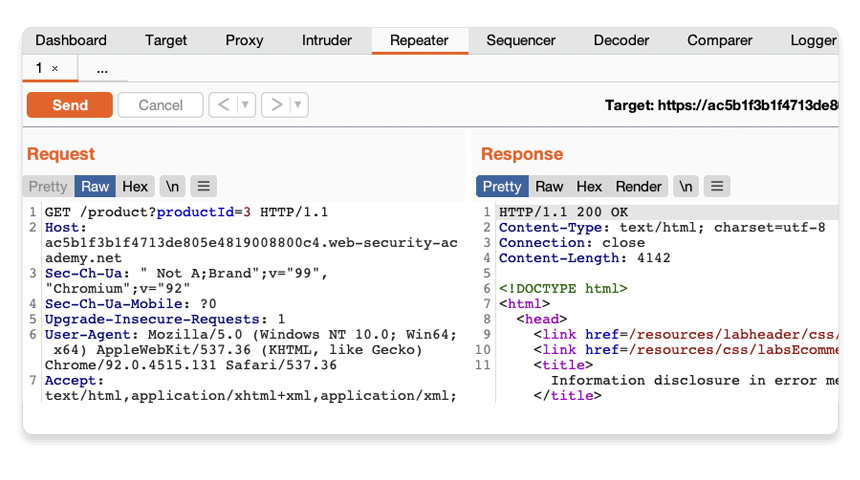
You learned how to parse these components earlier. For evidence, include the components that let someone reproduce the behavior without burying them in irrelevant browser noise.
| Component | Record it when | Example |
|---|---|---|
| Target and path | Always | https://lab.example.test/product |
| HTTP method | Always | GET or POST |
| Relevant parameters | Always when they influence behavior | productId=3 |
| Request body | When the request has one | JSON fields or form fields sent |
| Authentication state | When behavior depends on login or role | “Logged in as test user A” |
| Relevant headers/cookies | Only when they materially affect the result | Authorization, a role cookie, or Content-Type |
| Status code | Always | 200, 302, 403, 500 |
| Response content type | Usually | text/html, application/json |
| Response evidence | Always | A stable body marker, error text, JSON field, or redirect location |
| Capture provenance | Always | Burp project/tab and timestamp |
Two principles keep notes useful:
- Preserve the request as sent. If a parameter was URL-encoded, record the encoded request value, not only its decoded representation. If Decoder helped you interpret it, add the transformation separately: “URL-decoded once for inspection.”
- Quote the smallest decisive response fragment. A 50 KB HTML response is rarely useful in a note. A response status, header, and one stable body marker usually are.
For a JSON response, the decisive evidence may be a particular key-value pair. For HTML, it may be a page title, an error message, or a visible account name. For a redirect, the Location header may be the important result.
The five parts of a reproducible note
Think of each note as answering five practical questions.
1. What was tested?
Identify the authorized asset and the purpose of the request. Be precise enough to locate the endpoint, but do not make an unsupported claim.
Good:
Baseline response for an authenticated request to the product endpoint.
Too speculative:
Product endpoint has broken access control.
The second statement might later be true, but a single successful request for a product does not establish it.
2. What state was required?
Many web behaviors depend on a state that does not appear fully in the URL:
- Which test account or role was used?
- Was the user logged in?
- Was a particular item, product, or resource already created?
- Did the action require a fresh CSRF token?
- Was the request made through the authorized lab environment?
State the preconditions, including how a reviewer can recreate them. Do not paste a live session token into a shareable note. Instead, state that the reviewer should authenticate as the named authorized test role and use a newly issued session.
3. What exact action was taken?
Show the request’s method, path, relevant headers, parameters, and body. This is where controlled testing discipline matters: if you altered one parameter in Repeater, identify that parameter and its exact value.
For an important request, a sanitized raw form is often clearest:
GET /product?productId=3 HTTP/1.1
Host: [authorized-lab-host]
Cookie: session=[REDACTED - obtain a fresh session as Test User A]
Do not preserve every browser header by default. Headers such as User-Agent, client hints, and Accept-Language are normally noise unless the behavior specifically depends on them.
4. What was observed?
Record objective facts first:
Response status: 200 OK
Content-Type: text/html; charset=utf-8
Relevant body evidence: [quote one stable, non-sensitive marker from the response]
If an observation depends on a comparison, name that comparison. For example:
Compared with the baseline request from Test User A, the same object identifier returned a response containing Test User B’s profile name.
That statement is stronger because it tells the reviewer what was compared. It would normally require at least two pairs of evidence, not one.
5. Where is the original evidence?
A concise note should reference the original captured pair in your secured working materials:
Source: Burp project
training-lab, Repeater tabProduct baseline, captured 2026-03-12 14:20 UTC.
This preserves provenance without making a report reader search through a large HTTP history. Keep the original raw pair in your authorized project or evidence store under the engagement’s data-handling rules.
A reusable evidence-note template
Use this template during labs. It is deliberately short enough to complete while you are testing.
## Evidence ID: LAB-EV-001

**Purpose:** Baseline behavior for [endpoint or workflow].
**Authorized target:** [scheme, host, and path]
**Captured:** [UTC date and time]
**Source:** [Burp project and tool/tab name]

### Preconditions
- Authorized scope: [lab name or approved target].
- Authenticated as: [test role/account label].
- Required state: [for example, "product ID 3 exists"].

### Request
```http
[Sanitized request method, path, Host, relevant headers, and body]
Response evidence
- Status: [status code and reason].
- Content type: [value, if relevant].
- Relevant headers: [for example, Location or Cache-Control].
- Stable body or JSON marker:
[short exact excerpt].
Reproduction
- [Create the stated state, such as logging in as the stated test role.]
- [Send the request unchanged, using a newly issued session or token if needed.]
- [Check the stated status, header, or stable response marker.]
Result and interpretation
Observed: [only directly supported fact].
Not established by this pair: [important limitation, if applicable].
Redactions
[State what was removed and how a reviewer should obtain an equivalent value.]
The **“Not established by this pair”** line is a professional safeguard. It prevents you from unconsciously turning an observation into an overconfident conclusion.

For the Repeater product request shown earlier, the note could say:

> **Observed:** An authenticated request for `productId=3` returned `200 OK` with an HTML response containing the recorded product-page marker.
> **Not established by this pair:** Whether another user can access this object, whether the object contains sensitive data, or whether authorization is enforced server-side.

That is a complete and useful baseline note.


```grasp
{
  "type": "exercise",
  "id": "44c82b5e-cfec-42f3-8b99-71f75d95786b"
}
Sanitization: preserve reproducibility without exposing secrets
A raw request can contain much more than a report reader needs. Before adding evidence to a shareable report, job portfolio, or ticket, inspect it for:
- Session cookies and bearer tokens
- Passwords and password-reset links
- API keys
- Personally identifiable information
- Internal hostnames or IP addresses not approved for disclosure
- Customer records, uploaded files, or sensitive response fields
- CSRF tokens and one-time values
Redact values consistently and explain how they are recreated.
| Unsafe value | Better evidence-note form |
|---|---|
Cookie: session=ey... | Cookie: session=[REDACTED - authenticate as Test User A] |
Authorization: Bearer ey... | Authorization: Bearer [REDACTED - use current token for Test User A] |
email=alice@customer.example | email=[redacted test-account email] |
POST /reset?token=... | Describe the approved reset workflow; do not publish a usable token |
| Sensitive JSON response | Retain securely; quote only the field name and a non-sensitive marker in the report |
A redaction should not make the note mysterious. The reviewer needs to know whether the missing value is a fresh session, a generated anti-CSRF token, or sensitive data that only the engagement team may access.
Keep two layers when policy permits:
- A restricted raw artifact: the original Burp request-response pair, retained securely.
- A sanitized evidence note: the concise version suitable for collaboration, reporting, or a future portfolio.
Guided lab: document one safe Repeater pair
Set aside about 20 minutes. Use only an authorized, non-destructive lab request. A GET request that you already sent safely in Repeater is ideal. Do not repeat a state-changing request merely to produce documentation.
1. Choose a meaningful but safe pair
In Burp Repeater, pick one request for which you can describe the behavior plainly. Suitable examples include:
- A product or article page that returns normally.
- A search request that reflects the search term.
- A profile page viewed while logged in as an authorized test account.
- A request that returns a clear validation error for an intentionally invalid lab input.
Avoid choosing a response just because it is long or interesting. Choose one where you can identify a stable and relevant result.
2. Capture the preconditions before copying anything
Write down:
- The authorized lab target.
- The account or role used.
- Any resource that had to exist, such as a product identifier or saved profile.
- Whether the request needs a new token or session on every replay.
This is often the difference between “it worked on my machine” and a reproducible test case.
3. Extract only the relevant HTTP details
From the Request panel, record:
- Method and path
- Relevant parameter names and values
Host- Request body, if present
- Only headers or cookies that matter
From the Response panel, record:
- Status code
- Content type
- Relevant headers, if any
- One exact, stable body or JSON excerpt
If the value was encoded, preserve the sent form and add a brief Decoder note. For example:
q=red%20shoes%26sockswas URL-decoded once for analysis asred shoes&socks; the request evidence retains the original encoded form.
4. Write the note, then verify it
Complete the template using your selected pair. Then open a fresh Repeater tab or use a clean copy of the request:
- Recreate the stated preconditions.
- Obtain a fresh authorized session or token if your note says one is needed.
- Send the request as documented.
- Compare the response against your stated stable indicators.
If the behavior differs, improve the note rather than forcing the result. Common omissions are a missing role, an expired session, an unrecorded prerequisite action, or a body parameter you failed to include.
5. Apply the “fact versus conclusion” check
Before you finish, inspect the Observed sentence. It should name only:
- What you sent
- What the application returned
- What stable evidence demonstrates that result
Move broader ideas into a hypothesis or leave them for later testing. For now, accuracy is more valuable than drama.
Recording evidence in Burp
Your independent note is the primary artifact during manual testing. If your Burp edition and workflow support issue recording, Burp can also attach selected request-response evidence to a manually created issue. This is useful after you have a validated issue, rather than while you are merely documenting a baseline.
resource_id="9ba04"
sections="0,1"
title="Manually creating issues for reports"
estimated_time="4 minutes"
---
PortSwigger’s documentation shows how Burp can preserve selected message evidence alongside a manually recorded issue. Read it as a workflow reference, not as a reason to assign severity before you have validated a vulnerability.
---
Start at the article opening, then read the subsection **“To create an issue:”** and continue to **“Adding multiple request / response pairs to an issue.”** Follow <tf start="While manually testing, you may identify vulnerabilities that aren't automatically detected by Burp." end="The request / response pair is saved to the issue.">the issue recording workflow</tf>. Notice that you can select the decisive portion of a message before recording it, and that multi-step issues may need more than one request-response pair.
When you eventually record a validated issue, use highlights sparingly. Highlight the changed object ID, suspicious header, key response field, or decisive error message—not an entire page of HTML. Multiple pairs are appropriate when one request creates or stores data and a later request retrieves or demonstrates its effect.
Do not assign a severity or confidence label simply because a response looks unusual. Those labels are conclusions that require enough evidence to support them.
Key takeaways
A reproducible evidence note is a disciplined bridge between testing and reporting.
- Record the state, exact action, observable response, and source location of your evidence.
- Preserve values as sent in the request, including encoding; record any Decoder transformations separately.
- Quote only the response details that prove the observation.
- Separate facts from security conclusions. A normal
200 OKresponse may be a valuable baseline without being a vulnerability. - Redact secrets and sensitive data, while explaining how an authorized reviewer can recreate required sessions or tokens.
- Re-send a safe request under the documented conditions to verify that your note actually works.
- Keep the complete raw pair securely in Burp or your approved evidence store, and use the concise sanitized note for reporting.
In the next module, you will begin application mapping: manually browsing an authorized application to identify its reachable pages, endpoints, and user roles. The evidence-note habit from this lesson will make that mapping work traceable from the beginning.
Can't find a good explanation? Sign up and we'll make it for you
Sign up