
Welcome back. The previous lesson established the memory-management substrate that lets the kernel allocate pages and objects reliably: memblock protects early regions, buddy manages physical pages, and SLUB supplies small kernel objects such as task_struct, VFS objects, and driver-model objects.
This lesson follows the next transition. Once allocation, scheduling foundations, and core kernel subsystems are sufficiently ready, Linux must populate its device model, create the first schedulable kernel contexts, establish a usable root filesystem namespace, and finally replace the kernel-side PID 1 context with the first user-space program. This is the boundary at which a board that can print early kernel messages becomes an operating system capable of launching your gateway software.
One boot, three related transitions
It is tempting to describe the end of boot as a single event: “the kernel starts init.” In reality, three interdependent transitions overlap:
| Transition | Kernel question | Key result |
|---|---|---|
| Driver-model population | What devices and drivers exist, and which pairs bind? | Hardware becomes represented by kernel objects, drivers probe, and sysfs entries become available. |
| Scheduler activation | What execution contexts can run now? | PID 1, PID 2, and the idle task acquire distinct roles. |
| Root filesystem setup | Where is the initial filesystem namespace, and what executable should start? | The kernel has a root directory and can execute the first user-space process. |
The ordering matters. A root filesystem on eMMC cannot be mounted until the storage controller, pin multiplexing, regulators, clocks, MMC block layer, and filesystem driver are functional. In a device-tree system, each of these dependencies is represented in some form by the DTB and then materialized through the driver model.
At the same time, Linux does not wait for every possible driver probe to finish before starting user space. Some devices probe asynchronously; other drivers are modules loaded later. The important requirement is narrower: the kernel must have enough infrastructure and enough required drivers to find a root filesystem and launch a valid init program.
A useful boot-state model is:
start_kernel()establishes core architecture, memory, scheduler, interrupt, and VFS foundations.rest_init()creates the first two kernel-managed execution contexts and turns the original boot context into idle.- The PID 1 kernel context performs remaining boot work, including initcalls that register buses, devices, and drivers.
- Linux uses the VFS to expose an initial root, either an in-memory root filesystem or a storage-backed root filesystem.
- PID 1 executes an init program and continues as user-space PID 1.
The Linux driver model: objects first, driver binding second
Linux needs a uniform way to describe a UART, Ethernet MAC, MMC controller, CAN controller, regulator, USB device, or virtual device. The driver model provides that uniform structure.
At its core are three related object types:
| Object | Meaning | Typical AM62x example |
|---|---|---|
struct device | One discovered or declared hardware/function instance | A specific MMC controller or CAN controller |
struct device_driver | Software capable of controlling compatible devices | A TI MMC controller driver |
struct bus_type | A matching domain that connects devices and drivers | Platform bus, I2C bus, SPI bus, PCI bus |
A driver is not useful merely because it was compiled into the kernel. It must be registered with an appropriate bus, and a device instance must be registered on that bus. The bus supplies a matching rule. For Device Tree based platform devices, matching commonly uses the device node’s compatible property and the driver’s of_match_table.
For example, a simplified chain for an SD or eMMC controller is:
- The kernel processes the hardware description passed by U-Boot.
- Device Tree population creates a platform-device representation for an enabled controller node.
- The relevant driver registers with the platform bus.
- The platform bus compares compatible strings and finds a match.
- The driver’s
probe()routine runs. probe()obtains clocks, resets, regulators, pinctrl states, interrupts, DMA channels, and memory-mapped register ranges.- If successful, the driver registers its higher-level functionality, such as a block device.
The same relationship applies whether the driver registers first or the device appears first. The bus attempts matching whenever either side is added.
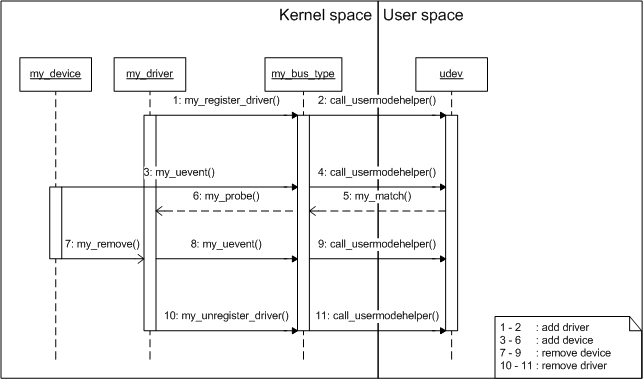
The diagram includes udev and a user-mode helper. Treat that portion as a conceptual illustration of kernel-to-user-space device events, not as an exact boot timeline. Modern systems commonly deliver kernel uevents over netlink to a user-space device manager such as systemd-udevd. That daemon cannot handle events until user space itself is running. The kernel’s device model, however, exists before the device manager starts.
Driver registration is not the same as a successful probe
A practical distinction during bring-up is:
- Registered driver: Linux knows the driver is available.
- Bound driver: the bus found a matching device and driver.
- Successful probe: the driver acquired every required dependency and initialized the device.
- Usable functional device: the driver has registered a higher-level interface, such as
mmcblk0,can0, oreth0.
A storage-controller probe may legitimately return -EPROBE_DEFER if its regulator, clock provider, PHY, or pinctrl dependency is not ready. Linux records the deferred probe and retries later. This avoids falsely treating boot ordering as a static list, but it also means a missing dependency can surface later as a root-mount failure.
For an automotive gateway, this is why a message such as “cannot mount root filesystem” may originate in a pinctrl, clock, regulator, DT status, or compatible-string problem rather than in ext4 itself.
Initcalls populate the built-in system
Built-in kernel subsystems and drivers use initcalls: functions placed into ordered linker sections and run during boot. Kernel code uses macros such as core_initcall, subsys_initcall, fs_initcall, device_initcall, and late_initcall to express broad initialization stages.
The precise ordering varies by kernel version and vendor patch set, so do not treat the macro names as a complete dependency-management system. They establish a coarse boot order. Actual hardware dependencies are resolved through mechanisms such as deferred probing, device links, and subsystem-specific registration.
Several foundational actions occur before normal user-space services exist:
- core device, bus, class, and firmware infrastructure is initialized;
- the platform bus and Device Tree population support are available;
- filesystems such as ext4 are registered with the VFS;
- storage and network drivers register and probe;
- kobjects representing devices, drivers, buses, and classes are created.
sysfs exposes many of these kernel objects in a navigable filesystem, normally mounted at /sys by the init system. Mounting sysfs makes objects visible to user space; it does not create the underlying device-model relationships from scratch.
rest_init(): PID 0, PID 1, and PID 2 acquire their jobs
Late in start_kernel(), Linux calls rest_init(). At this point the original boot context is still executing kernel code, but Linux needs three durable execution roles:
| Identity | Initial function or role | Long-term purpose |
|---|---|---|
| PID 0 | Boot CPU’s idle context | Runs the CPU idle loop when no normal task is runnable |
| PID 1 | kernel_init, later user-space init | Completes kernel boot, then becomes the first user-space process |
| PID 2 | kthreadd | Coordinates creation of many later kernel threads |
The most important subtlety is that PID 1 starts as a kernel-side execution context. It does not begin life as systemd, BusyBox init, or /sbin/init. The kernel_init function first performs remaining boot work. It later calls the kernel execution path for a user-space binary. That successful exec transforms the PID 1 task into the chosen user-space init process.
Read the current upstream source now. It is more valuable to follow the actual logic than to memorize a historical call graph.
linux/init/main.c at master · torvalds/linux · GitHub
Read the upstream Linux init/main.c implementation of rest_init(). This is the point where the kernel reserves PID 1 for kernel_init, creates kthreadd, permits scheduling, and sends the boot CPU into its idle loop.
In init/main.c, locate the rest_init(void) definition. Begin at the comment explaining why Linux must reserve PID 1 first. Then continue through the creation of kthreadd_task, the assignment of SYSTEM_SCHEDULING, completion of kthreadd_done, and the final calls to schedule_preempt_disabled() and cpu_startup_entry(). Focus on why PID 1 is created before PID 2 but initially waits for it.
Why create PID 1 before kthreadd?
The source comment answers a question that otherwise looks contradictory:
- PID 1 must be created first so it owns PID 1.
- But it must not proceed far enough to request additional kernel threads until
kthreaddexists.
rest_init() resolves this with a completion object:
- Linux creates the task that begins at
kernel_init, reserving PID 1. - It creates
kthreadd, which conventionally becomes PID 2. - It records the
kthreaddtask pointer for later kernel-thread creation requests. - It changes the system state to permit scheduling.
- It signals
kthreadd_done, allowing the PID 1 boot path to continue. - The original boot task performs a scheduling point and enters the boot CPU idle loop.
The boot CPU’s idle context is associated with PID 0, but it is not an ordinary process that you manage with signals or inspect like a normal application. It runs only when no suitable normal task is runnable. On a running system, ordinary ps output generally begins at PID 1.
kthreadd is also often misunderstood. It is not “the thread that runs all kernel workers.” Instead, it is the kernel’s central service for creating many kernel threads safely. Later you will see daemon-like kernel threads such as writeback workers, workqueue workers, and device-specific threads; their ancestry often leads back through kthreadd.
What PID 1 does before becoming user space
Once released by kthreadd_done, kernel_init() calls code commonly centered on kernel_init_freeable(). Names and exact sequencing evolve across Linux releases, but its responsibilities are stable:
- Broaden allocation and CPU-placement permissions now that the scheduler is operational.
- Bring secondary CPUs online where configured.
- Run the remaining boot-time initcalls.
- Initialize driver infrastructure and execute registered initialization routines.
- Ensure the initial console is usable.
- Determine whether an initramfs supplies
/init. - If needed, mount the configured storage-backed root filesystem.
- Free memory used only by initialization code and apply final read-only protections.
- Execute the initial user-space program.
This is also where the previous lesson’s allocator story pays off. Initcalls allocate driver objects, workqueues, block-layer data structures, dentries, inodes, request queues, and task structures. Without buddy and SLUB functioning, the kernel could not meaningfully populate the subsystems that make the root device reachable.
VFS and the two common root-filesystem paths
The Virtual Filesystem Switch (VFS) is Linux’s common filesystem layer. It provides pathname resolution, mount handling, file operations, inodes, dentries, and file descriptors independently of whether the backing filesystem is ext4, SquashFS, NFS, tmpfs, or another filesystem.
Before user space runs, Linux needs a root directory from which it can resolve paths such as:
/init
/sbin/init
/dev/console
There are two common embedded boot paths.
Path A: an initramfs provides the initial root
An initramfs is an archive unpacked by the kernel into an in-memory root filesystem, commonly called rootfs. It normally contains an executable at /init.
In this path:
- The kernel unpacks the archive into the initial root filesystem.
- The kernel checks whether
/initexists and is executable, unlessrdinit=selects another path. - PID 1 executes that program.
- The initramfs program may load additional drivers, unlock encrypted storage, run integrity checks, wait for a root device, mount the final root filesystem, and use
switch_rootor an equivalent handover. - The same PID 1 process, or a replacement process it executes, becomes the long-running system init.
This design is common when the final root is not immediately mountable or must be verified first. Later in the course, it becomes relevant to verified boot, dm-verity, encrypted data, and A/B update policies.
Path B: the kernel mounts the final root directly
For a simple embedded image, U-Boot might pass boot arguments conceptually like:
root=/dev/mmcblk0p2 rootwait rootfstype=ext4 console=ttyS2,115200
Here the kernel must wait until the configured storage device appears, mount the requested filesystem as /, and then locate an init program there.
The broad responsibilities of prepare_namespace() include waiting for required device probing, resolving the root-device specification, handling the configured root, mounting it, and making it the active root namespace. Details differ for block devices, network roots, initrds, and distribution configurations.
rootwait is particularly relevant with SD and eMMC media. It tells the kernel to wait for the root block device rather than failing quickly because a controller or card has not completed initialization.
Console setup is part of a healthy handover
Before executing init, Linux needs a usable console. The kernel normally opens /dev/console and arranges standard file descriptors:
| File descriptor | Usual initial role |
|---|---|
| 0 | Standard input |
| 1 | Standard output |
| 2 | Standard error |
A correct console= parameter is therefore more than a convenience. It determines where user-space init diagnostics and early service logs appear. On a board, the actual UART name and configuration must match the kernel’s serial driver and Device Tree. A wrong console setting can leave a fully running system apparently silent.
Selecting and executing the first user-space process
The kernel command line can explicitly name an init executable:
rdinit=<path>selects the initial program when booting through an initramfs.init=<path>selects the init executable after the final root is in place.
If no explicit final init= path is supplied, Linux tries conventional paths, typically including:
/sbin/init
/etc/init
/bin/init
/bin/sh
On a production Yocto image, /sbin/init may be systemd. On a BusyBox-based system, it may be BusyBox init. For an intentionally minimal initramfs, /init may be a static BusyBox binary or a small purpose-built static program.
A successful execution changes the nature of PID 1:
- Before execution: PID 1 is running
kernel_initin kernel context. - After execution: the same PID identity runs user-space instructions with an address space, file descriptors, and a user-space program image.
PID 1 is special. If it exits unexpectedly after user space starts, Linux cannot continue normally because PID 1 has essential process-management responsibilities. The usual visible consequence is a panic resembling “Attempted to kill init.”
The following short demonstration is useful because it turns the abstract execution boundary into observable source-level behavior.
How Linux Kernel Starts Initial Process
Watch Nir Lichtman’s “How Linux Kernel Starts Initial Process.” It packages a minimal initramfs and then traces the kernel’s attempt to execute /init under QEMU and GDB.
First watch the initramfs build. Focus on why the demonstration compiles /init statically: a minimal initial root may not contain a dynamic loader or shared C library. Then watch the execution trace. Observe the breakpoint at kernel_init, the inspection of the selected /init path, and the transition through run_init_process and the kernel execution path into the first user-space program.
Reading boot failures by phase
The serial log is the primary evidence source at this boundary. A useful triage rule is to classify the last successful milestone rather than searching immediately for one familiar error string.
| Last successful evidence | Likely failing region | First checks |
|---|---|---|
| Early kernel messages, but no storage device | Device model or driver probe | DT status and compatible strings, clocks, resets, regulators, pinctrl, MMC or NVMe driver configuration |
| Storage device appears, then “unable to mount root” | Root selection or filesystem mount | root=, partition numbering, rootwait, filesystem driver, filesystem type, corrupted image |
| Root mounts, then “No working init found” | Init executable resolution or execution | /init or /sbin/init path, execute bit, shebang, ELF architecture, dynamic loader and shared libraries |
| Init begins, then kernel panics after it exits | User-space PID 1 behavior | Init program error path, missing shell or service configuration, unintended return from PID 1 |
| Kernel messages appear but no user-space output | Console handover | console=, /dev/console, serial driver, UART DT configuration |
The phrase “No working init found” deserves care. It does not always mean the init file is absent. An ELF executable can exist and still fail with an “ENOENT”-style error if its requested dynamic loader is missing. For example, an ARM64 binary might request a runtime interpreter that the mounted root filesystem does not provide.
That failure mode is central to cross-compilation and root filesystem assembly, which you will investigate more directly in the next module.
A source and log trace routine
When you later have a kernel tree and serial output, keep this compact routine in your private bring-up repository:
cd <kernel-source>

git grep -n "rest_init" init/main.c
git grep -n "kernel_init_freeable" init/main.c
git grep -n "do_basic_setup" init/main.c
git grep -n "prepare_namespace" init
git grep -n "run_init_process" init
git grep -n "driver_init" .
On a running development image, capture:
dmesg > boot-after-userspace.log
cat /proc/1/comm
cat /proc/2/comm
cat /proc/cmdline
mount
Keep raw boot logs, exact DTB hashes, kernel revision, boot arguments, and root filesystem image hashes private. A sanitized public portfolio artifact can instead show the boot-state model, a redacted timing chart, and the diagnosed class of failure without disclosing production memory addresses, partition UUIDs, credentials, or security configuration.
Key takeaways
Linux reaches user space through coordinated device, scheduling, and filesystem transitions:
- The driver model represents devices, drivers, and buses independently of user-space device managers. Registration, matching, and successful probing are distinct events.
- Built-in drivers and subsystems are activated through initcalls; deferred probing handles dependencies that become available later.
rest_init()reserves PID 1 forkernel_init, creates PID 2 askthreadd, enables normal scheduling, and turns the original boot context into the PID 0 idle role.- PID 1 initially runs kernel code, completes late boot work, then executes an init program and becomes the first user-space process.
- The VFS supplies the initial root namespace. That root may be an unpacked initramfs or a filesystem mounted from persistent storage using parameters such as
root=androotwait. /dev/console, a valid init path, executable permissions, a compatible ELF binary, and any required dynamic loader are all part of the final handover contract.
Next, you will turn this end-to-end boot understanding into a practical failure-localization method: reading serial logs to distinguish bootloader, Device Tree, kernel, initramfs, console, root-mount, and PID 1 failures.
Can't find a good explanation? Sign up and we'll make it for you
Sign up