
Hello! Let's continue our exploration of Rust.
In the previous lesson, we established a solid foundation by learning about functions, including how to define them, pass parameters with strict types, and handle return values. A key concept we covered was the distinction between statements and expressions, and how Rust's expression-based nature allows for concise, idiomatic code, especially for returning values.
Today, we'll build directly on that foundation. We will add logic and repetition to our programs by learning how to implement control flow using if/else expressions and loops (loop, while, for). Your background in front-end development means you are very familiar with these concepts from languages like JavaScript. Our focus will be on Rust's specific syntax, its emphasis on safety, and its powerful expression-based idioms, which differ in important ways.
Making Decisions with if Expressions
The if expression is the most basic tool for decision-making in any language. You provide a condition, and the program executes different code paths based on whether that condition is true or false.
The official Rust book provides an excellent, comprehensive overview. Let's start there.
Control Flow - The Rust Programming Language
Please read the 'if Expressions' section from 'The Rust Programming Language'. This will cover the basic syntax, the use of else if for multiple conditions, and how if can be used in let statements.
Read the entire section titled 'if Expressions'. Pay special attention to two key points: the requirement that conditions must be a bool, and the example of using if to assign a value to a variable.
Key Differences from JavaScript/TypeScript
Let's emphasize two critical points from that reading that distinguish Rust from JavaScript:
-
The condition must be a
bool. In JavaScript, values like0,"",null, andundefinedare "falsy" and can be used directly as conditions. Rust does not do this. It will not automatically convert non-boolean types.let number = 3; // This code will NOT compile in Rust! // if number { // println!("This would work with a 'truthy' value in JS"); // } // The correct way in Rust is to be explicit: if number != 0 { println!("The condition is an explicit boolean expression."); }This strictness eliminates a class of bugs common in dynamically typed languages.
-
ifis an expression. As you saw in the reading and in our last lesson on functions,ifcan evaluate to a value. This allows you to use it on the right side of aletstatement, which is Rust's equivalent of a ternary operator.let condition = true; let number = if condition { 5 } else { 6 }; // number is 5Remember, because the variable (
numberin this case) must have a single, known type at compile time, both theifandelseblocks must return values of the same type.
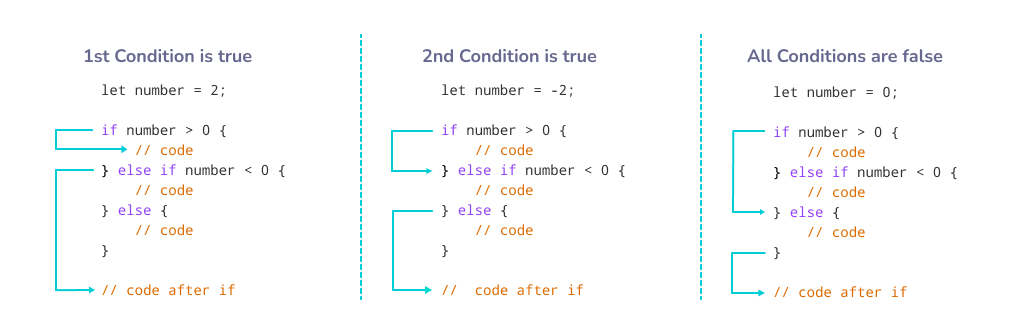
The following image provides a clear visual for how Rust evaluates an if/else if/else chain.
For a different perspective, this short video demonstrates these concepts with a practical example.
This video from the Rustfully channel walks through using if/else, both as a control structure and as an expression to return a value.
Watch the video from the beginning until 03:46. Notice how the function in the second part is refactored to return a boolean value directly from the if/else expression.
Test your understanding!
Write a function get_fee that takes one argument, is_premium_member (a bool). Using an if/else expression, the function should return a fee of 0 if the user is a premium member and 10 otherwise. The function should return a u32 and assign the result of the if/else expression to a variable before returning it.
Show answer
fn get_fee(is_premium_member: bool) -> u32 {
    let fee = if is_premium_member {
        0 // This arm returns a u32
    } else {
        10 // This arm also returns a u32
    };
    fee // Return the assigned value
}
You could also return the expression directly:
fn get_fee(is_premium_member: bool) -> u32 {
    if is_premium_member {
        0
    } else {
        10
    }
}
Repetition with Loops
Rust provides three constructs for executing code repeatedly: loop, while, and for. While you're familiar with while and for loops, Rust's loop and its idiomatic use of for are worth special attention.
The loop Keyword: Infinite Loops
The loop keyword creates a loop that runs forever until you explicitly tell it to stop with the break keyword. This is useful for situations where you want to retry an operation until it succeeds, like in a server listening for connections.
A unique feature of loop is that it can return a value when you break out of it.
Control Flow - The Rust Programming Language
Let's read about the loop keyword in the Rust book. Focus on how break is used to exit and, more uniquely, to return a value.
Read the subsections 'Repeating Code with loop' and 'Returning Values from Loops'.
Here's a quick example of returning a value from a loop:
let mut counter = 0;

let result = loop {
    counter += 1;

    if counter == 10 {
        break counter * 2; // Exits the loop and returns `counter * 2`
    }
};

println!("The result is {}", result); // Prints "The result is 20"
The while Keyword: Conditional Loops
The while loop is a conditional loop that will run as long as a condition remains true. This behaves almost exactly as you would expect from your experience with JavaScript.
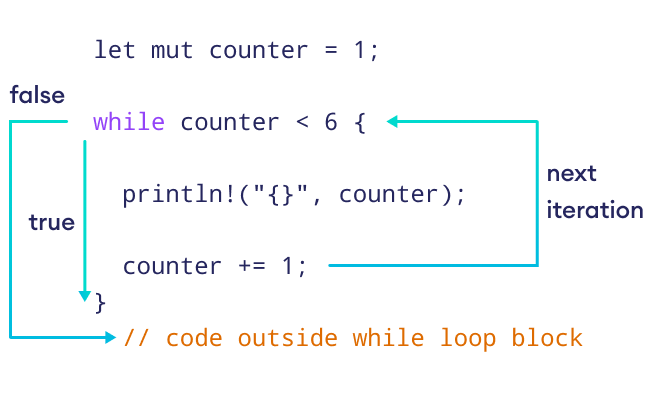
Let's read the official documentation and then watch a video on it.
Control Flow - The Rust Programming Language
This section of the Rust book quickly covers while loops.
Read the subsection 'Conditional Loops with while'.
20: While loops are cool in Rust
This Rustfully video provides a practical demonstration of a while loop and also introduces the continue keyword, which skips to the next iteration.
Watch the video until 03:39. This will cover the basic while loop structure and the usage of continue to skip an iteration.
The for Keyword: The Idiomatic Iterator
While you can iterate over a collection like an array using a while loop and an index, this approach is often cumbersome and error-prone. The idiomatic, safer, and more efficient way to do this in Rust is with a for loop.
Rust's for loop is designed to work with iterators. It functions much like JavaScript's for...of loop, not the C-style for (let i = 0; ...) loop (which doesn't exist in Rust).
Control Flow - The Rust Programming Language
This final reading from the Rust book is crucial. It explains the for loop and why it's preferred for iterating over collections.
Read the subsection 'Looping Through a Collection with for'. Pay close attention to the comparison between the while loop with an index and the much cleaner for loop. Also, note the use of a Range (like 1..4) to run a loop a specific number of times.
Here's an example that combines a for loop with an if condition:
fn main() {
    let numbers = [10, 20, 30, 40, 50];

    for number in numbers { // The `for` loop iterates over each element in the array.
        if number == 30 {
            println!("Found thirty!");
        } else {
            println!("Just another number: {}", number);
        }
    }

    // Looping a fixed number of times with a range
    for i in (1..4).rev() { // Counts down: 3, 2, 1
        println!("{}...", i);
    }
    println!("LIFTOFF!!!");
}
Test your understanding!
Given an array of integers let data = [1, 2, 3, 4, 5, 6];, write a for loop that iterates through it and prints "even" if the number is even and "odd" if the number is odd. Use the modulo operator (%) for the check.
Show answer
fn main() {
    let data = [1, 2, 3, 4, 5, 6];

    for number in data {
        if number % 2 == 0 {
            println!("{}: even", number);
        } else {
            println!("{}: odd", number);
        }
    }
}
Conclusion
Great job! You've now learned the fundamental ways to control the flow of execution in a Rust program. These building blocks are essential for writing any non-trivial application, including Solana programs.
Here are the key takeaways from this lesson:
if/elseare expressions that must evaluate to the same type in all arms. Their conditions must be strictlybool.- Rust has three loop types:
loop: Creates an infinite loop, which can be stopped withbreak. It can also return a value viabreak <value>;.while: Executes a block of code as long as a boolean condition istrue.for: The most common and idiomatic loop in Rust, used to iterate over collections or ranges. It is safer and more efficient than manual index management with awhileloop.
- The
continuekeyword skips the rest of the current iteration and proceeds to the next one, whilebreakexits a loop entirely.
In our lessons so far, we've dealt with functions, data types, and now control flow. We've mostly used simple types like i32 that are cheap to copy. But what happens when we start passing more complex data, like a String or a custom data structure, into functions or through loops? How does Rust manage the memory for this data without a garbage collector like in JavaScript?
This question brings us to Rust's most famous and powerful feature: the Ownership model. In our next lesson, we will dive deep into this system to understand how Rust guarantees memory safety.
Can't find a good explanation? Sign up and we'll make it for you
Sign up