
Good to see you again. Previously, you established two important async boundaries: cancellation must flow to work that can honor it, and resources acquired during that work must be disposed deterministically. This lesson addresses what can still go wrong when the work itself is scheduled or consumed incorrectly.
The two defects are closely related but have different failure modes. Sync-over-async blocks a thread while asynchronous work is pending, reducing server capacity and sometimes deadlocking. An unobserved task is asynchronous work whose completion and failure have no owner, so the application can proceed in an invalid state while its exception is lost from the intended error-handling path. By the end, you should be able to spot both defects in a code review, investigate their production symptoms, and refactor them without merely hiding the warning.
The async ownership rule: every operation needs a completion owner
A Task is not “a background operation”; it is a handle representing eventual completion, result, cancellation, or failure. Starting a task means someone must decide what happens when it finishes.
In backend code, there are three healthy ownership models:
- The current request needs the result. Await the task.
- Several operations may run concurrently, but the request needs all of them. Retain their tasks and await their combined completion.
- The work truly outlives the request. Hand a durable, explicitly managed work item to a background-processing component. That component owns retries, failures, cancellation policy, telemetry, and shutdown behavior.
Most bugs occur when code accidentally creates a fourth model: it starts work, discards the Task, and assumes the runtime will take care of the rest.
Microsoft Learn’s Common async/await bugs gives a compact reference for the main warning signs. Read its discussion of async void, blocking waits, and calls whose returned task is ignored.
Common async/await bugs - .NET | Microsoft Learn
Read Microsoft Learn’s “Common async/await bugs” to connect familiar code-review patterns with their actual failure modes.
At the top of the article, read the async void guidance. Then read the full section “Deadlocks from blocking on async code,” including its four-step deadlock sequence and both fixes; begin at the deadlock explanation. Finally, in “Missing await on a task-returning call,” read the example and its warning explanation, beginning with the compiler warning, through the sentence that says tasks should be awaited unless fire-and-forget behavior is intentional.
The compiler warning in that final section, CS4014, deserves attention. Code such as this starts a delay but lets the method report completion immediately:
public static async Task RefreshLeaderboardAsync(
    CancellationToken cancellationToken)
{
    Task.Delay(TimeSpan.FromSeconds(1), cancellationToken); // CS4014

    // The method continues immediately.
}
Assigning the task to _ or storing it in a local variable can suppress the warning, but neither action observes the task. The correct default is straightforward:
public static async Task RefreshLeaderboardAsync(
    CancellationToken cancellationToken)
{
    await Task.Delay(TimeSpan.FromSeconds(1), cancellationToken);

    // This code runs only after the delay completes.
}
The point is not that every task must execute serially. It is that every task needs an explicit owner and an explicit completion policy.
Sync-over-async: a blocked thread waiting for asynchronous work
Sync-over-async appears whenever synchronous code waits for an incomplete Task:
var profile = _profileClient.GetProfileAsync(playerId, cancellationToken)
    .Result;

_task.Wait();

var result = task.GetAwaiter().GetResult();
All three block the current thread. They differ in how they present exceptions, but not in their fundamental capacity problem.
Consider a synchronous game-profile method:
public PlayerProfile GetProfile(
    PlayerId playerId,
    CancellationToken cancellationToken)
{
    return _profileClient
        .GetProfileAsync(playerId, cancellationToken)
        .GetAwaiter()
        .GetResult();
}
The HTTP call is asynchronous: while the application waits for network I/O, it does not need a thread to sit idle. But GetAwaiter().GetResult() forces the calling thread to remain occupied until the operation completes. If this pattern is inside a request path, each slow dependency call ties up a worker thread that could otherwise process another request.
Under low traffic, this may look harmless. Under load, the server accumulates blocked worker threads; queued requests wait longer; thread-pool growth may lag behind demand; and latency rises sharply. This is thread-pool starvation or exhaustion. It is a capacity failure even when the dependency and CPU usage appear relatively normal.
Deadlock versus thread-pool starvation
A classic deadlock is most common in environments with a single-threaded SynchronizationContext, such as a UI application:
- The UI thread starts an async operation and blocks on its task.
- The async operation reaches an incomplete
await. - Its continuation attempts to resume on the UI context.
- The only thread able to process that context is blocked waiting for the task.
Neither side can proceed.
ASP.NET Core does not install the old ASP.NET-style request SynchronizationContext, so that exact request-thread deadlock is generally not the primary concern in a modern ASP.NET Core API. It is still important to know because shared libraries may be used in UI applications, and blocking can participate in other lock-based deadlocks.
For the game backend, the immediate risk is usually more practical: blocked request threads and poor throughput under concurrent I/O.
Correct the boundary, not just the line
The reliable correction is to make the caller asynchronous and propagate Task outward until an existing asynchronous boundary can await it.
public Task<PlayerProfile> GetProfileAsync(
    PlayerId playerId,
    CancellationToken cancellationToken)
{
    return _profileClient.GetProfileAsync(playerId, cancellationToken);
}
A minimal API endpoint can then await naturally:
app.MapGet(
    "/players/{playerId}/profile",
    async (
        string playerId,
        PlayerProfileService profiles,
        CancellationToken cancellationToken) =>
    {
        var profile = await profiles.GetProfileAsync(
            PlayerId.Parse(playerId),
            cancellationToken);

        return Results.Ok(profile);
    });
This is “async all the way” in its useful sense: if a layer depends on asynchronous I/O, it exposes asynchronous completion rather than concealing it behind a blocking wrapper.
Do not treat Task.Run as a repair:
// Still blocks a thread, and adds unnecessary scheduling.
var profile = Task.Run(
        () => _profileClient.GetProfileAsync(playerId, cancellationToken))
    .GetAwaiter()
    .GetResult();
Task.Run is not needed to make naturally asynchronous HTTP, database, file, or messaging APIs asynchronous. It schedules more work and the final blocking call still consumes the current thread. It is sometimes appropriate for isolated CPU-bound work, but it does not turn an async I/O workflow into a scalable synchronous one.
The rare synchronous boundary
Occasionally a legacy host genuinely requires a synchronous entry point. The better long-term fix is usually architectural: introduce an async API at the point you control, or move the operation out of the synchronous path.
If blocking is unavoidable at such a narrow boundary, GetAwaiter().GetResult() is generally preferable to .Result or .Wait() because it rethrows the original exception type. .Result and .Wait() wrap failures in AggregateException. This is only an exception-shape improvement; it does not make blocking safe or scalable.
In particular, never block inside:
- ASP.NET Core endpoint handlers, middleware, filters, or application services;
- static constructors;
- code holding a lock;
- UI-thread code;
- thread-pool callbacks likely to run under concurrent load.
ConfigureAwait(false) also is not a general cure. In a reusable library, it can avoid resuming on a caller’s synchronization context when the continuation does not need one. It cannot make a blocked thread available again. In ASP.NET Core application code, where there is normally no synchronization context to capture, adding it does not solve thread-pool starvation.
Diagnose sync-over-async from symptoms to the blocking call
A senior-level diagnosis should link a code pattern to measured behavior, rather than declaring every slow API to be “an async problem.”
Start with static inspection. Search a solution for:
.Result.Wait().GetAwaiter().GetResult()async voidoutside event handlersTask.Runwhose result is discarded- constructors or static constructors that initiate asynchronous work
- task-returning calls that are neither awaited, returned, nor retained intentionally
Then reproduce the issue under concurrent load. One request may complete quickly, while dozens or hundreds of concurrent requests expose starvation.
Watch the relevant portions of the .NET team’s Diagnosing thread pool exhaustion issues in .NET Core apps. It shows what thread-pool exhaustion looks like in live counters before moving to detailed debugging.
Diagnosing thread pool exhaustion issues in .NET Core apps
Watch “Diagnosing thread pool exhaustion issues in .NET Core apps” from the dotnet channel for a production-oriented view of blocking calls in an ASP.NET Core process.
First watch the starvation model for the relationship between synchronous blocking and available request-processing threads. Then watch the counters demonstration. Focus on the trend under load: rising thread-pool activity and queued work alongside worsening responsiveness are stronger evidence than any one counter value.
dotnet-counters is a useful first-pass tool for a local process or a deployed diagnostic environment. In practice, compare a healthy baseline with the failing workload and look for a combination of:
- request latency rising as concurrency rises;
- thread-pool thread count climbing;
- thread-pool queue length or queued work growing;
- poor throughput despite available CPU;
- stack traces repeatedly stopped at
Wait,Result,GetResult, or a synchronous provider call.
Counters tell you that the process is short of usable execution capacity. A dump, profiler, or debugger shows where threads are blocked. In Visual Studio, the exact tooling has changed between versions, but the Performance Profiler groups relevant analysis tools in one place.
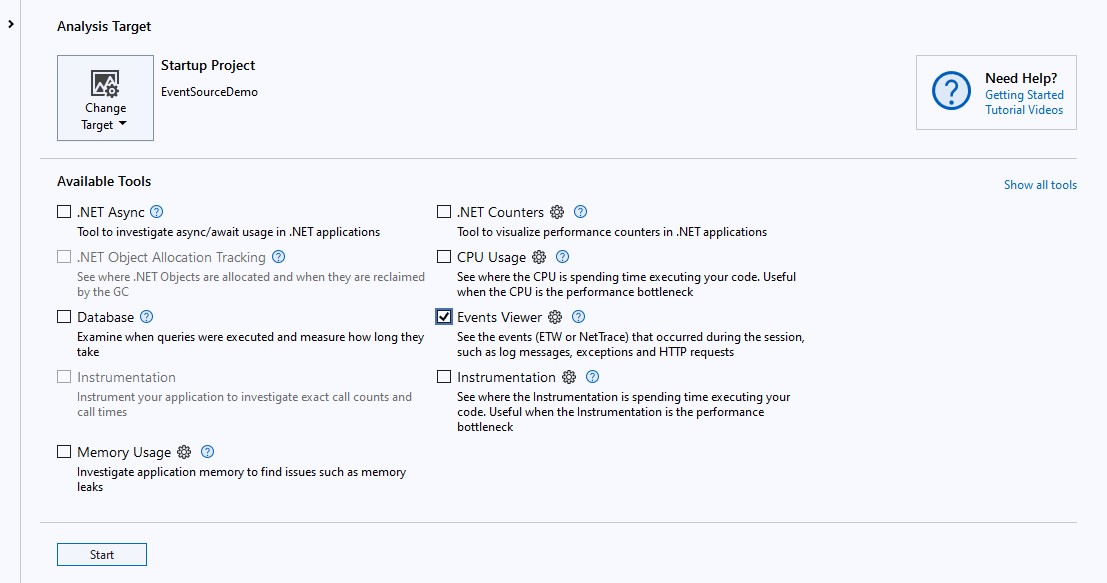
When a production-like process is genuinely stuck, collect evidence before restarting it if operational policy allows. Examine parallel stacks and thread call stacks for repeated synchronous waits. A single .Result at the end of a dependency chain can fan out into many blocked request threads under load.
Unobserved tasks: failures that have lost their error path
A task failure becomes useful only when code observes it. await does this naturally: it waits for completion and rethrows the captured exception at the await point, where ordinary try/catch behavior applies.
try
{
    await _achievementService.AwardAsync(
        playerId,
        matchResult,
        cancellationToken);
}
catch (AchievementRuleException ex)
{
    _logger.LogInformation(
        ex,
        "Achievement award was rejected for player {PlayerId}.",
        playerId);
}
Now compare a detached operation:
public async Task SubmitMatchAsync(
    MatchResult matchResult,
    CancellationToken cancellationToken)
{
    _ = _achievementService.AwardAsync(
        matchResult.PlayerId,
        matchResult,
        cancellationToken);

    await _matchRepository.SaveAsync(matchResult, cancellationToken);
}
The _ = says only that the compiler should discard the returned task. It does not say:
- whether awarding completed before the request returned;
- what happens if it fails;
- whether it uses services that will be disposed when the request scope ends;
- whether the request’s cancellation token will be cancelled immediately after the response;
- whether a retry is required;
- how the failure will be logged, measured, or recovered.
This is especially dangerous in ASP.NET Core. A detached task may capture a scoped DbContext, scoped service, or request-specific data. Once the endpoint finishes, the request scope is disposed. The background task can then fail with ObjectDisposedException, often after the request has already returned a success response.
async void creates the same ownership failure
Outside a top-level UI event handler, async void should be treated as a defect:
// Do not use this in services, endpoints, or domain/application code.
public async void RecalculateRankings()
{
    await _leaderboardService.RecalculateAsync();
}
The caller cannot await it, cannot determine whether it succeeded, and cannot reliably catch failures that occur after the first incomplete await. Return Task instead:
public Task RecalculateRankingsAsync(
    CancellationToken cancellationToken)
{
    return _leaderboardService.RecalculateAsync(cancellationToken);
}
For the exceptional UI event-handler case, async void is required by the framework signature. Treat the handler itself as the error boundary: await its work and catch, report, or otherwise handle meaningful failures inside the handler.
Concurrent work is not fire-and-forget
Sometimes the request needs two independent I/O operations, but they may occur in parallel. Keep both tasks and await their combined completion:
var playerTask = _playerClient.GetAsync(playerId, cancellationToken);
var inventoryTask = _inventoryClient.GetAsync(playerId, cancellationToken);

await Task.WhenAll(playerTask, inventoryTask);

var player = await playerTask;
var inventory = await inventoryTask;
Both calls begin before either result is awaited. Task.WhenAll establishes that the method does not complete until both operations have succeeded, been cancelled, or faulted. It also gives one place to handle a combined failure policy.
If several operations can fail independently and every failure matters, retain the task collection and inspect the results deliberately in your error handler. Do not depend on whichever exception happens to surface first to tell the full operational story.
Intentional background work needs infrastructure, not discarded tasks
If awarding an achievement genuinely should not delay match submission, do not launch it from the request and forget it. Instead, submit a work item to a component with a defined lifecycle:
await _achievementWorkQueue.EnqueueAsync(
    new AwardAchievementsCommand(
        matchResult.MatchId,
        matchResult.PlayerId),
    cancellationToken);
The queue consumer, not the HTTP request, then owns execution. It needs its own service scope, cancellation policy, logs, metrics, retries, and failure handling. An in-memory queue may be acceptable for noncritical, best-effort work, but it loses pending work when the process restarts. Later in the course, you will make this distinction explicit with reliable integration events and Azure Service Bus.
The key design question is not “can this run later?” It is: what is the business consequence if this task fails after the request has returned? If the answer is “a player may permanently miss an earned achievement,” the work requires a durable design, not fire-and-forget code.
What “unobserved” means at runtime
Modern .NET does not normally terminate the process just because a faulted task was garbage-collected without its exception being observed. It can raise TaskScheduler.UnobservedTaskException, then continue execution.
That behavior is intentionally not a safety net. The timing depends on garbage collection and finalization, so it is nondeterministic. Handling that event can add diagnostic telemetry in a host process, but it cannot restore the missing business action or provide normal request-level error handling.
Use it as a smoke detector, not as a fire-suppression system:
- Correctness: await tasks or transfer them to a properly managed background owner.
- Operational visibility: log and measure failures at the task’s owning boundary.
- Last-resort diagnostics: record
UnobservedTaskExceptionif it occurs, then find the code path that detached the task.
A focused refactoring pass for the game backend
Use this sequence during an async reliability pass through the portfolio project:
- Find blocking waits. Replace blocking request-path code with
asyncmethods andawait; propagate the signature outward. - Trace each task’s owner. For every task-returning call, identify whether it is awaited, returned, combined with other tasks, or intentionally handed to a managed background component.
- Remove accidental detachment. Treat bare task calls,
_ = SomeAsync(), andasync voidas suspicious until the lifecycle is demonstrated. - Preserve cancellation semantics. Request cancellation belongs to request-bound work. Do not pass it automatically to work meant to survive the request.
- Protect resource lifetimes. Never allow detached request work to use scoped services after the scope ends.
- Validate under concurrency. A successful single request is insufficient evidence. Exercise a slow dependency with concurrent calls and check latency, throughput, and thread-pool behavior.
For a compact implementation task, review the earlier GameCatalogClient and every caller of it. Ensure no caller uses .Result, .Wait(), or a discarded task. If a controller, endpoint, or application service needs its result, make that method asynchronous and await the call. If a notification really outlives the request, record it as an explicit background-work design decision rather than adding Task.Run.
Key takeaways
- Sync-over-async occurs when
.Result,.Wait(), orGetAwaiter().GetResult()blocks a thread waiting for asynchronous work. - In ASP.NET Core, the major practical risk is typically thread-pool starvation under load, even though classic synchronization-context deadlocks are less common.
- Propagate
asyncandTaskoutward to an asynchronous boundary; do not useTask.RunorConfigureAwait(false)as a blocking-workaround. - A task must have an owner. Await it, return it, combine it with retained tasks, or hand its work to an explicitly managed background component.
async voidis normally only appropriate for framework-required UI event handlers; backend code should returnTaskorTask<T>._ = SomeAsync()suppresses a compiler warning but does not provide exception handling, lifecycle management, or reliability.TaskScheduler.UnobservedTaskExceptionis diagnostic evidence of a defect, not a replacement for normal async error handling.
This completes the Modern C# and .NET Upgrade module. Next, you will shift from language and runtime reliability into pragmatic backend architecture, beginning by deriving functional requirements and quality attributes for the game backend from a product scenario.
Can't find a good explanation? Sign up and we'll make it for you
Sign up