
Hello! Welcome back to our module on testing strategies for microservices.
In our last lesson, we laid the foundation by mastering unit tests with JUnit and Mockito. We learned how to test components in complete isolation, which is crucial for verifying business logic quickly and reliably. However, unit tests, by design, can't tell us if our service correctly integrates with its external dependencies—a common source of bugs in the real world.
Today, we move up the testing pyramid. Our learning outcome is to implement integration tests using Testcontainers to validate interactions with external dependencies like databases or message brokers. This skill is a hallmark of a senior developer and a frequent topic in interviews at top tech companies because it demonstrates your ability to build and validate truly production-ready services. We will explore how to write tests that are both reliable and closely mirror your production environment.
Let's start with a high-level view of where Testcontainers fits into our testing strategy.
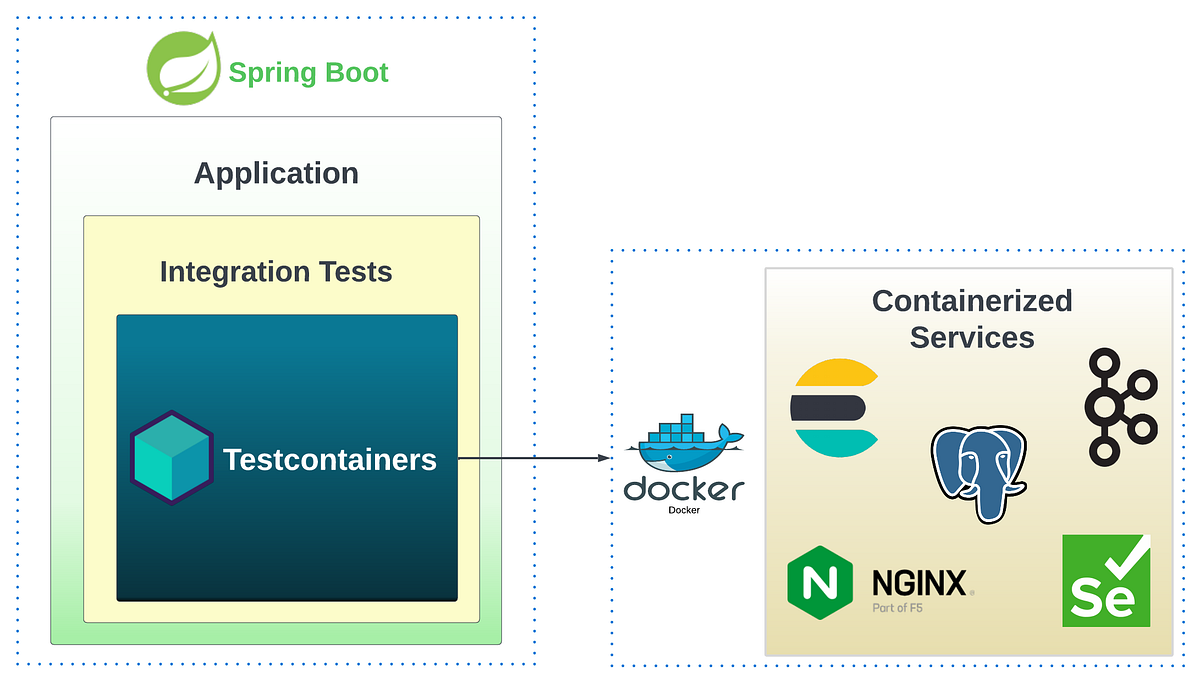
1. The Case for High-Fidelity Integration Testing
In the previous lesson, we used mocks to isolate our code. But what happens when you need to verify that your Spring Data repository method actually works with a PostgreSQL database, or that your Kafka consumer correctly deserializes a message from a real broker? This is the job of an integration test.
Historically, teams have used several approaches for this, each with significant drawbacks.
Integration tests with Testcontainers and Spring Boot 3.1+
To understand the 'why' behind Testcontainers, it's essential to first grasp the limitations of other methods. This article, 'Integration tests with Testcontainers and Spring Boot 3.1+', provides a great breakdown of the problem.
Read the introduction and the sections 'Integration tests' and 'Use case'. Pay close attention to the critique of using mocks, in-memory databases (like H2), and shared test databases.
As the article points out, the common alternatives are flawed:
- Mocks: They don't test the integration at all. You're just testing that you called a method, not that the method works with the real technology.
- In-Memory Databases (e.g., H2): These can be useful, but they are not the same as your production database. A query that works on H2 might fail on PostgreSQL due to differences in SQL dialects, data types, or functions. This creates a gap between your tests and production reality.
- Shared, Static Databases: Managing a shared test database across a team is a nightmare. Tests can interfere with each other, state must be constantly cleaned, and schema management becomes complex.
Testcontainers solves these problems by providing ephemeral, lightweight, and programmable instances of real services inside Docker containers, directly from your test code.
Mastering Testcontainers for Better Integration Tests
Let's hear a concise explanation of what Testcontainers is and why it has become so crucial for modern microservice development.
Watch the section from 06:28 to 13:07. The speaker, from the company behind Testcontainers, explains how the shift to microservices has increased the importance of integration tests and how Testcontainers addresses this need.
2. Integration Testing with a Database (PostgreSQL)
Let's get practical. The most common integration test you'll write is one that involves a database. We will build an integration test for a Spring Data JDBC repository against a real PostgreSQL database.
Since you're using a modern stack, we'll focus on the streamlined approach introduced in Spring Boot 3.1.
Setting up the Dependencies
First, you need to add the necessary dependencies to your pom.xml.
Spring Boot Testcontainers - Integration Testing made easy!
This video from Dan Vega, 'Spring Boot Testcontainers - Integration Testing made easy!', clearly shows which dependencies are required.
Watch from 14:12 to 15:10. The key dependencies are spring-boot-testcontainers (for the Spring Boot integration), testcontainers-junit-jupiter (for JUnit 5 lifecycle management), and testcontainers-postgresql (the specific module for PostgreSQL).
Writing the Test: The Modern @ServiceConnection Approach
With the dependencies in place, writing the test is surprisingly simple. Spring Boot 3.1 introduced the @ServiceConnection annotation, which automates almost all the configuration.
Spring Boot Testcontainers - Integration Testing made easy!
Let's continue with the same video to see a complete, modern example of a repository integration test.
Watch the segment from 15:10 to 23:50. This is the core of this section. Pay close attention to these key elements: @DataJdbcTest: A slice test that loads only the persistence layer, making the test faster. @Testcontainers: Enables Testcontainers support in the JUnit 5 test lifecycle. @Container: Marks the PostgreSQLContainer field, so Testcontainers manages its lifecycle (start/stop). @ServiceConnection: This is the key. It tells Spring Boot to automatically configure the DataSource to connect to this container, eliminating manual property overrides. @AutoConfigureTestDatabase(replace = NONE): Crucial for telling Spring Boot not to replace our container-backed DataSource with an in-memory one.
Here's a summary of the code structure from the video, which is the pattern you should use:
@DataJdbcTest
@Testcontainers // Activates Testcontainers extension for JUnit 5
@AutoConfigureTestDatabase(replace = AutoConfigureTestDatabase.Replace.NONE) // Disables in-memory DB
class PostRepositoryTest {

    @Container
    @ServiceConnection // Magic! Auto-configures the DataSource for this container
    static PostgreSQLContainer<?> postgres = new PostgreSQLContainer<>("postgres:16-alpine");

    @Autowired
    PostRepository postRepository;

    @Test
    void connectionEstablished() {
        assertThat(postgres.isCreated()).isTrue();
        assertThat(postgres.isRunning()).isTrue();
    }

    @Test
    void shouldFindPostByTitle() {
        // ... test logic that interacts with postRepository ...
    }
}
The "Classic" Way: @DynamicPropertySource
Before Spring Boot 3.1 (or for containers that don't yet support @ServiceConnection), you had to configure the connection details manually. It's important to recognize this pattern, as you'll encounter it in many existing projects.
This is done using the @DynamicPropertySource annotation, which allows you to programmatically add properties to the Spring Environment after the container has started and has been assigned a random port.
Integration tests with Testcontainers and Spring Boot 3.1+
Let's look at the 'old' way for comparison. The article we reviewed earlier shows this pattern clearly.
Scroll to the final code block in the article. Notice how the @DynamicPropertySource method retrieves the JDBC URL, username, and password from the running container and manually registers them as Spring properties.
The key takeaway is that @ServiceConnection is a powerful convenience wrapper around the @DynamicPropertySource pattern.
3. Integration Testing with a Message Broker (Kafka)
Testing asynchronous flows, like a service that listens to a Kafka topic, is another critical use case. The challenge here is that the action (publishing a message) and the result (e.g., a database write) are decoupled in time.
To handle this, we combine Testcontainers with a library called Awaitility, which provides a fluent API for asserting asynchronous conditions.
Testing Spring Boot Kafka Listener using Testcontainers
The official Testcontainers documentation provides a perfect, step-by-step guide for testing a Spring Kafka listener. We'll walk through its main components.
Read the section 'Write Test for Kafka Listener' and study the ProductPriceChangedEventHandlerTest class. This is an excellent, production-grade example. Focus on: Setup: How both KafkaContainer and a MySQL database are started. Configuration: The use of @DynamicPropertySource to set the spring.kafka.bootstrap-servers property. Test Logic: How KafkaTemplate is used to send a message to the topic. Asynchronous Assertion: The use of await().atMost().untilAsserted(...) from Awaitility to poll the database and verify the price was updated.
Let's break down the essential pattern from that guide:
@SpringBootTest
@Testcontainers
class ProductPriceChangedEventHandlerTest {

    @Container
    static final KafkaContainer kafka = new KafkaContainer(DockerImageName.parse("confluentinc/cp-kafka:7.6.1"));

    // Here we use the special 'tc' JDBC URL prefix, another way to integrate Testcontainers
    // and a database without @ServiceConnection or @DynamicPropertySource for the DB.
    @Container
    static final MySQLContainer<?> mysql = new MySQLContainer<>("mysql:8.0.32")
                                                .withDatabaseName("testdb");

    @DynamicPropertySource
    static void overrideProperties(DynamicPropertyRegistry registry) {
        // Configure Kafka connection
        registry.add("spring.kafka.bootstrap-servers", kafka::getBootstrapServers);
        // Configure DataSource connection
        registry.add("spring.datasource.url", mysql::getJdbcUrl);
        registry.add("spring.datasource.username", mysql::getUsername);
        registry.add("spring.datasource.password", mysql::getPassword);
    }

    @Autowired
    private KafkaTemplate<String, Object> kafkaTemplate;

    @Autowired
    private ProductRepository productRepository;

    @Test
    void shouldHandleProductPriceChangedEvent() {
        // 1. Arrange: Create an event to send
        ProductPriceChangedEvent event = new ProductPriceChangedEvent("P100", new BigDecimal("14.50"));

        // 2. Act: Send the event to the Kafka topic
        kafkaTemplate.send("product-price-changes", event.productCode(), event);

        // 3. Assert (asynchronously): Use Awaitility to wait for the side effect
        await()
            .pollInterval(Duration.ofSeconds(1))
            .atMost(10, SECONDS)
            .untilAsserted(() -> {
                Optional<Product> optionalProduct = productRepository.findByCode("P100");
                assertThat(optionalProduct).isPresent();
                assertThat(optionalProduct.get().getPrice()).isEqualByComparingTo("14.50");
            });
    }
}
This pattern of "Act -> Await -> Assert" is fundamental for testing any asynchronous, event-driven interaction in your microservices.
Test your understanding!
You are tasked with testing a LoyaltyService. This service listens to an OrderCompletedEvent on a Kafka topic. Upon receiving the event, it calculates loyalty points (e.g., 1 point per dollar) and saves a LoyaltyAccount entity to a PostgreSQL database.
Outline the key components and steps you would write in a @SpringBootTest class to test this entire flow.
Show answer
-
Annotations: The test class would be annotated with
@SpringBootTestand@Testcontainers. -
Containers: You would declare two
@Container-annotated static fields:- A
KafkaContainer. - A
PostgreSQLContainer.
- A
-
Configuration: You would use
@ServiceConnectionfor the PostgreSQL container and@DynamicPropertySourceto configure thespring.kafka.bootstrap-serversproperty from the Kafka container. -
Dependencies: You would
@AutowiretheKafkaTemplateand yourLoyaltyAccountRepository. -
Test Method (
@Test):- Arrange: Create an
OrderCompletedEventobject (e.g., for a $100 order). - Act: Use
kafkaTemplate.send(...)to publish the event to the appropriate topic. - Assert: Use
await().untilAsserted(...)from Awaitility. Inside the lambda, you would use yourLoyaltyAccountRepositoryto fetch the account for the user from the event and assert that it now has 100 points.
- Arrange: Create an
Conclusion
Today, we've taken a significant step toward writing tests that provide real confidence in your application's stability. By testing your code against actual dependencies running in Docker, you close the gap between your test environment and production, catching integration bugs early.
Key Takeaways:
- Integration tests validate the collaboration between your service's components and real external dependencies like databases and message brokers.
- Testcontainers is the industry standard for managing these dependencies programmatically, providing clean, ephemeral, and production-like environments for every test run.
- For database tests in Spring Boot 3.1+, the combination of
@Testcontainers,@Container, and@ServiceConnectionprovides a highly streamlined setup. - For other services like Kafka, or in older Spring Boot versions,
@DynamicPropertySourceis the standard pattern for injecting container connection details into the Spring context. - Testing asynchronous flows requires a specialized approach. The
Awaitilitylibrary is the perfect tool for polling for an expected outcome.
Next Up
We've now covered the two most important layers of testing: unit tests and integration tests. But how do they fit together? How much of each should you write? In our next lesson, we will formalize this by exploring the Test Pyramid concept and discussing how to apply it to build a balanced and effective testing strategy for a microservices architecture.
Can't find a good explanation? Sign up and we'll make it for you
Sign up