
Hello! Welcome to the next lesson in our module on Operational Security.
In our previous lesson, we established the core principle of OpSec: your security is not just about the tools you use, but the discipline with which you use them. We saw how simple behavioral mistakes, like mishandling files in Qubes OS or linking identities online, can completely undermine sophisticated technical defenses.
Today, we will examine one of the most subtle and powerful threats to online anonymity: browser fingerprinting. This is a perfect example of a risk that requires diligent OpSec to mitigate. Even when you're using tools like Tor or a VPN to hide your IP address, your browser can still broadcast a wealth of information that can be used to create a unique identifier, allowing you to be tracked across the web.
This lesson will explain what browser fingerprinting is, how it works by leveraging statistical uniqueness, and precisely how it can de-anonymize users, even when they are behind the Tor network.
1. What is Browser Fingerprinting?
At its simplest, browser fingerprinting is a technique used by websites to collect information about your browser and device. This isn't just one piece of information, but dozens or even hundreds of data points: your operating system, browser version, installed fonts, screen resolution, language settings, and much more. When combined, this collection of attributes creates a "fingerprint" that is often statistically unique to you.
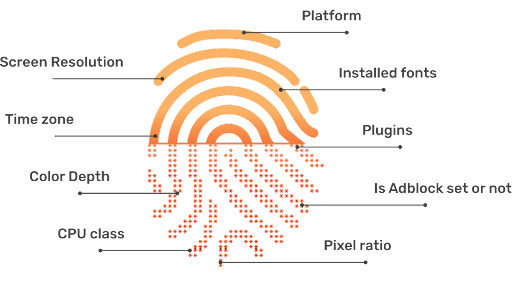
Unlike cookies, which are small files stored on your computer that you can delete, a fingerprint is generated from information your browser willingly provides to websites for legitimate reasons, like rendering pages correctly. This makes it a "stateless" tracking method—there is nothing to store or clear on your end.
To understand the concept and its historical context, let's start with an article from the Tor Project's blog, written by a researcher in the field.
Browser Fingerprinting: An Introduction and the Challenges Ahead
This article, 'Browser Fingerprinting: An Introduction and the Challenges Ahead,' provides a clear definition of browser fingerprinting, explains its origins, and outlines why it poses a threat to online privacy.
Please read the first two sections, 'What is browser fingerprinting?' and 'What makes fingerprinting a threat to online privacy?'. Focus on how websites collect configuration information and why this process, which requires no special permissions, can be used for tracking.
As the article explains, the core threat is that if your combination of attributes is unique enough, it becomes a reliable identifier that can follow you across the internet, linking your activity on different sites without your consent or knowledge.
2. The Uniqueness of a Fingerprint: An Entropy Perspective
You might assume that your setup (e.g., a Windows machine running Chrome) is very common. While true, fingerprinting derives its power from the combination of many different attributes.
Given your background in statistical science, you'll immediately appreciate that we can quantify the uniqueness of each attribute using the concept of entropy. An attribute with high entropy (like the precise list of all fonts installed on your system) has many possible values and is thus a powerful identifier. An attribute with low entropy (like whether cookies are enabled) has very few possible values and contributes little to uniqueness.
The Electronic Frontier Foundation's "Panopticlick" study was one of the first to measure this. The MozillaWiki page on fingerprinting provides a concise table of their findings.
This wiki page from Mozilla discusses fingerprinting from a browser developer's perspective. It includes a table that is highly relevant to our discussion.
Please review the table titled 'Entropy of various pieces of browser information' at the top of the page. Note the high entropy values for plugins and fonts compared to something like cookies being enabled.
The key insight is that by combining these attributes, a tracker multiplies their identifying power. Even if you share your User Agent with millions of others and your screen resolution with thousands, you might be the only person with that specific combination of User Agent, screen resolution, timezone, installed plugins, and system fonts.
To see this in action, the following video provides an excellent summary and demonstrates the concept with a practical experiment.
The Hidden Tracking Method Your VPN Can't Block
This video, 'The Hidden Tracking Method Your VPN Can't Block,' clearly explains how fingerprinting works and uses a real-world test to show how unique devices are, even when they have similar hardware.
Please watch the video from the beginning until 06:37. Pay close attention to: Why VPNs don't stop fingerprinting. The experiment with 83 laptops and the concept of canvas/WebGL fingerprinting. The explanation of Shannon entropy and how even a reduced set of attributes can maintain uniqueness.
The video effectively demonstrates two crucial points:
- Hardware/Software Nuances: Techniques like canvas and WebGL fingerprinting are extremely powerful. They ask your browser to render a hidden image or 3D graphic. Tiny variations in your GPU, graphics drivers, and operating system cause the rendered output to be slightly different, creating a very high-entropy signature.
- No Single Point of Failure: Your uniqueness doesn't come from one single attribute. It's the intersection of many mundane characteristics that makes you identifiable. This is also what makes fingerprinting so difficult to defend against.
3. De-anonymizing Tor Users
This brings us to the central question: how does this affect anonymity tools like Tor?
Tor is designed to anonymize your connection by hiding your real IP address. However, fingerprinting operates at a different layer. It identifies the browser and device making the connection. If your fingerprint is unique, an adversary can link your activities even if you connect from different Tor circuits (and thus different IP addresses) each time.
For example, an adversary controlling two different websites could see the same unique fingerprint visit both sites. They wouldn't know your real IP, but they would know that the same person visited both sites, destroying the unlinkability that Tor aims to provide.
The Tor Project has been aware of this threat since its inception. Their primary defense is not to hide the fingerprinting information, but to make every Tor Browser user's fingerprint identical. This strategy is called standardization.
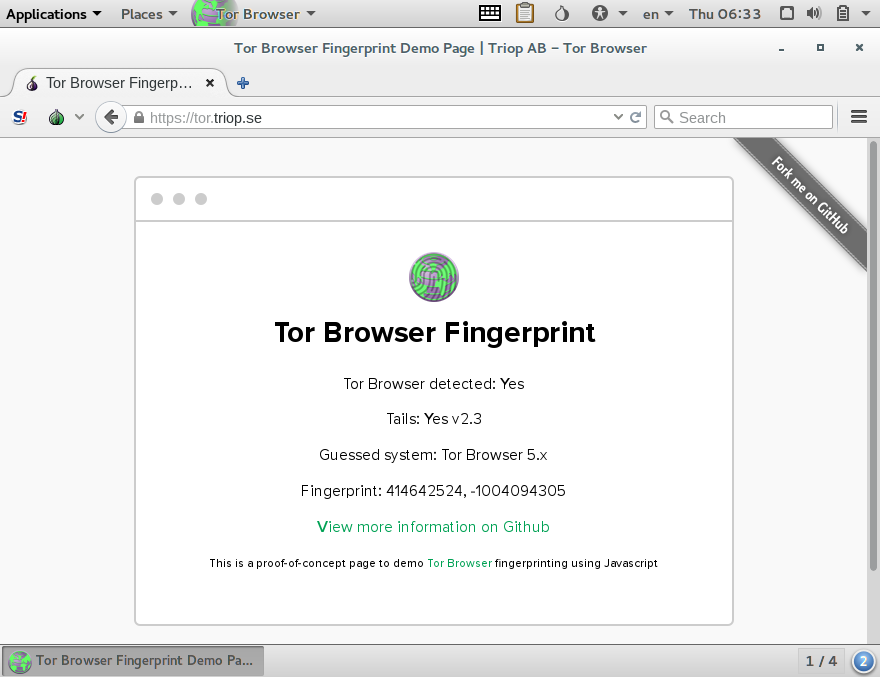
Let's return to the Tor Project blog post to understand their defense strategy in more detail.
Browser Fingerprinting: An Introduction and the Challenges Ahead
This section of the 'Browser Fingerprinting' article explains the Tor Project's strategy for combating fingerprinting.
Please read the section titled 'Tor + Fingerprinting'. Focus on the core idea of making all users look the same and the specific examples given (User-Agent, timezone, screen resolution warning).
Tor Browser's goal is to place all its users into one large, uniform anonymity set.
- It reports the same User Agent (pretending to be Firefox on Windows).
- It reports a UTC timezone.
- It bundles a standard set of fonts.
- It warns you against maximizing your browser window to avoid revealing your unique screen resolution.
By doing this, Tor Browser attempts to make your fingerprint non-unique. However, as the image above shows, this is an ongoing cat-and-mouse game. New fingerprinting techniques are constantly being developed, and any small deviation from the standard Tor Browser configuration can make you stand out.
4. Mitigation Strategies and Trade-offs
So, how do we practically defend against fingerprinting? As we've seen, there's no single perfect solution, but rather a spectrum of strategies with different trade-offs between privacy and usability.
The Techlore "Masterclass" video provides an excellent, in-depth overview of the different approaches taken by various privacy-conscious browsers.
Browser Fingerprinting Masterclass: How It Works & How To Protect Yourself
This video offers a comprehensive look at practical defense strategies against fingerprinting, comparing different browser philosophies.
Please watch the segment from 11:04 to 15:03. This section covers: The two primary strategies: Standardization (Tor/Mullvad) vs. Randomization (Brave). The pros and cons of each approach. The highly effective third strategy: blocking third-party scripts that perform the fingerprinting in the first place.
To summarize the key strategies:
-
Standardization (Tor Browser, Mullvad Browser): Aims to make you look identical to a large group of other users.
- Pros: The gold standard for anonymity. When it works, you are truly part of a crowd.
- Cons: Can break website functionality. Being one of the few users employing these strong defenses can, paradoxically, make you stand out in some contexts.
-
Randomization (Brave Browser): Aims to give you a slightly different fingerprint on each visit or session, disrupting long-term tracking.
- Pros: Significantly better website compatibility and usability.
- Cons: Does not prevent you from being fingerprinted within a single browsing session. The randomization itself can be detected.
-
Blocking (uBlock Origin, NoScript): Prevents the third-party JavaScript that performs fingerprinting from ever running.
- Pros: Highly effective, as research shows most fingerprinting is done by third-party trackers. Also improves performance and blocks ads.
- Cons: Can break sites that rely heavily on third-party scripts for functionality.
For our project, we will be using the Tor Browser within Qubes-Whonix, which relies on the standardization approach. Understanding this is crucial for maintaining your OpSec: any changes you make to the Tor Browser's configuration can compromise its effectiveness by making your fingerprint unique.
Conclusion
This lesson has delved into the complex and persistent threat of browser fingerprinting. It's a prime example of why technical tools alone are insufficient and must be paired with disciplined operational security.
Key Takeaways:
- Browser fingerprinting builds a unique identifier by collecting dozens of browser and device attributes, such as fonts, plugins, and canvas rendering.
- The statistical power of fingerprinting comes from combining many high-entropy attributes to create a profile that is unique across millions of users.
- Fingerprinting can de-anonymize users of tools like Tor by linking their activity across different sites and sessions, even if their IP address changes. It identifies the user, not the location.
- The primary defense against fingerprinting is standardization—making your browser's fingerprint identical to that of a large group of other users, which is the strategy employed by Tor Browser.
- A crucial practical step is to block the third-party scripts that conduct most fingerprinting.
In this lesson, we focused on how data can be leaked by our browser. In our next lesson, we will continue this theme by looking at another form of covert data leakage: the metadata hidden inside the files we create, download, and share.
Can't find a good explanation? Sign up and we'll make it for you
Sign up