
Good to see you again. In the previous lesson, you learned to read a finite sum as “apply a rule repeatedly, then add the results,” and you used Python’s sum() and range() to check it. Now we complete this algebra module by making a broader connection: an algebraic expression is a precise calculation rule; Python is a way to execute that rule.
By the end of this lesson, you will be able to translate common algebraic expressions into correct Python code, including multiplication, fractions, powers, roots, parentheses, and finite sums. This is a practical bridge toward data-science formulas: later, model predictions and losses will be written mathematically first, then implemented in Python.
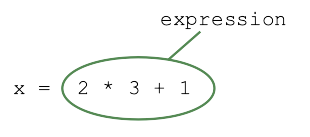
Algebra notation and Python notation
Mathematics is compact because it leaves some operations implied. Python must be explicit: every operation needs a Python symbol, and every grouping decision must be unambiguous.
For example, in algebra:
In Python:
x = 2 * 3 + 1
Both calculate . But notice an important distinction:
- In algebra, an equals sign usually states that two quantities have the same value, or defines a relationship.
- In Python,
=is an assignment statement: Python evaluates the expression on the right and stores its value under the name on the left.
So this code:
score = 10 + 5
means: calculate 10 + 5, then store 15 in score.
A Python expression can contain literal numbers, variable names, operators, parentheses, and function calls. If its variables have numerical values, it produces a numerical result.
Read the relevant parts of Mathematical Expressions from Runestone Academy for a compact review of Python expressions, arithmetic operators, and precedence.
In Subsection 1.7.1, read from the introduction to expressions. Focus on the separation between a variable on the left of an assignment and an expression on the right. Then, in Subsection 1.7.3, read Table 1.7.1 and Table 1.7.2, beginning at the operator tables. Finally, read the paragraph immediately before Activity 1.7.6, from the precedence guidance. Treat extra parentheses as a communication tool as well as a safety tool.
The translation dictionary
Most translations are direct once you know the few notation differences.
| Algebraic notation | Python code | Meaning |
|---|---|---|
a + b | addition | |
a - b | subtraction | |
a * b | multiplication | |
3 * x | multiplication must be explicit | |
a * (b + c) | multiplication and grouping | |
a / b | ordinary division | |
x**2 | exponentiation | |
math.sqrt(x) | square root | |
math.pi * r**2 | use the math module constant |
Three rules prevent most translation mistakes.
1. Write every multiplication sign
In algebra, multiplication is often invisible:
In Python, write the multiplication explicitly:
5 * x
2 * (x + 3)
a * b
Python cannot infer that two neighboring values should be multiplied. For instance, 5x is not valid Python.
2. Use ** for powers, not ^
In standard algebra, the notation means “ squared.” In Python, write:
x**2
Do not write:
x^2
In Python, ^ has a different meaning called bitwise exclusive OR. It is not exponentiation.
For example:
becomes:
(3 + 1)**2
The parentheses are essential. Without them:
3 + 1**2
Python squares only 1, then adds 3.
3. Preserve the structure of fractions with parentheses
A horizontal fraction bar groups the entire numerator and denominator. Python’s / applies only to its immediate expressions unless you add parentheses.
For example:
translates to:
z = (3 * x - 5) / 2
Suppose x = 7:
x = 7
z = (3 * x - 5) / 2

print(z)
The result is:
8.0
The parentheses ensure that Python calculates the complete numerator 3 * x - 5 before dividing by 2.
A dependable translation process
When an expression becomes longer, translate it in stages rather than trying to type it all at once.
- Identify the output quantity. Decide which Python variable will store the result.
- Choose names for mathematical variables. Use meaningful Python names where possible.
- Make implied multiplication explicit.
- Translate powers and roots.
- Use parentheses to preserve the numerator, denominator, and intended groups.
- Check the code with one set of values for which you can calculate the answer by hand.
Here is an example involving a prediction rule:
This expression is often read as “predicted equals an intercept plus a coefficient times an input.” For readable Python, we can choose descriptive variable names:
intercept = 2.5
slope = 0.8
feature = 10

y_pred = intercept + slope * feature
print(y_pred)
The renaming is:
| Mathematical symbol | Python name |
|---|---|
intercept | |
slope | |
feature | |
y_pred |
This code has the same algebraic structure as the formula. Choosing clear names makes it easier to inspect a calculation and much easier to debug later.
Powers, roots, and the scope of operations
Earlier in this module, you worked with exponents and roots numerically. In Python, the main translation choices are:
square = x**2
cube = x**3
and, for a square root:
import math

root = math.sqrt(x)
Consider the algebraic expression:
A faithful Python translation is:
import math

d = math.sqrt((x_2 - x_1)**2 + (y_2 - y_1)**2)
Read the code from the inside outward:
- calculate each coordinate difference;
- square each difference;
- add the two squared values;
- take the square root of the entire total.
A common incorrect version is:
d = math.sqrt((x_2 - x_1)**2) + (y_2 - y_1)**2
This takes the square root of only the first squared difference. The outer parentheses in the correct version specify that everything inside is under the root.
There is also a compact power-based form:
d = ((x_2 - x_1)**2 + (y_2 - y_1)**2)**0.5
It is mathematically valid, but math.sqrt(...) is usually clearer when the formula contains a square root.
Translating a data-science loss expression
A small but important data-science expression is the squared error:
Here, is an actual observed value and is a model’s prediction. The squared error measures how far the prediction is from the actual value while ensuring negative and positive differences do not cancel.
In Python:
y = 12
y_pred = 9.5

loss = (y - y_pred)**2
print(loss)
The parentheses are not optional for the intended meaning. This code:
loss = y - y_pred**2
means something different: it squares the prediction first, then subtracts that square from y.
The correct code mirrors the formula’s grouping:
loss = (y - y_pred)**2
This habit matters whenever you implement a formula: do not merely convert symbols individually; preserve the structure of the expression.
From finite sigma notation to Python
The previous lesson already introduced the closest Python equivalent of sigma notation: sum().
Consider:
The equivalent Python code is:
S = sum(i**2 for i in range(1, n + 1))
Each part has a role:
| Mathematical part | Python part |
|---|---|
sum(...) | |
i**2 | |
| lower limit | range(1, ...) |
| upper limit | n + 1 inside range |
The + 1 is necessary because range(start, stop) stops before stop.
For a concrete case:
write:
total = sum(2 * i + 1 for i in range(1, 5))
print(total)
This produces 24, matching:
So algebraic sigma notation states the rule compactly, while the Python expression tells the computer how to repeat and aggregate that rule.
Common translation errors
Use this list as a final inspection checklist when converting a formula.
Missing multiplication
Algebra:
Correct Python:
4 * x - 1
Not:
4x - 1
Using the wrong symbol for a power
Algebra:
Correct Python:
r**2
Not:
r^2
Losing a fraction’s grouping
Algebra:
Correct Python:
(a + b) / (c - d)
Not:
a + b / c - d
Squaring the wrong quantity
Algebra:
Correct Python:
(a - b)**2
Not:
a - b**2
Treating ordinary division as floor division
For an ordinary algebraic fraction, use /:
average = total / count
Python’s // means floor division, which discards the fractional part for positive values. It is useful in some programming tasks but usually does not represent an ordinary algebraic fraction.
Watch a formula become code
The following short practical segment shows the same translation habits applied to geometry formulas: explicit multiplication, exponentiation, math.pi, math.sqrt, and careful parentheses.
Watch Math in Python is easy! by Bro Code to see complete formulas translated into working Python statements.
Watch the circumference example to review a formula using math.pi, multiplication, input values, and rounding. Then watch area and hypotenuse. Focus especially on how the presenter writes a squared radius and puts the complete sum of squares inside math.sqrt(...).
Key takeaways
Translating algebra into Python means preserving the calculation’s meaning, not simply copying its characters.
- Use
*for every multiplication that algebra may leave implicit. - Use
**for exponents; Python’s^is not a power operator. - Use
/for ordinary division, with parentheses around full numerators and denominators. - Use
math.sqrt(...)for square roots andmath.pifor , afterimport math. - Parentheses are the most reliable way to preserve a formula’s intended grouping.
- For finite sums,
sum(...)corresponds to sigma notation, whilerange()supplies index values. - Confirm a translation by testing it with values whose result you can calculate manually.
You have now completed the essential algebra module. Next, the course moves from expressions that calculate values to functions, which describe how an output changes when you supply different inputs.
Can't find a good explanation? Sign up and we'll make it for you
Sign up