
Hello! Welcome back to our course on distributed systems architecture.
In our previous lesson, we compared a manual event sourcing implementation with the eventsourcing library. We concluded that for non-trivial systems, the library's abstractions for persistence, snapshotting, and notifications provide significant advantages in productivity and long-term maintainability.
Today, we will build directly on that foundation by focusing on one of the most critical features for distributed systems: event notification. This lesson addresses the learning outcome:
Set up the 'eventsourcing' library with a message broker integration for event notification.
We will explore the library's core mechanism for propagating events—the NotificationLog—and see how it enables communication between different parts of a system. This is the fundamental pattern for building event-driven architectures, where services can react to state changes in others without being tightly coupled. We will first understand the library's internal communication model and then bridge that concept to integrating with an external message broker like RabbitMQ or Kafka.
1. The NotificationLog: The Application's Public Record
At the heart of the library's notification system is the NotificationLog. Conceptually, it is a single, append-only, totally-ordered log of every event that occurs across all aggregates within an application. This log serves as the definitive source of truth for any downstream system that needs to react to state changes.
The Application class, which we explored previously, automatically maintains this log. Every time you call application.save(), the new events are atomically persisted to their aggregate's stream and recorded in the application's notification log.
To understand the mechanics, let's look at the documentation.
The 'eventsourcing' documentation explains how the Application class provides access to this log and its structure.
Please read sections 1.5.2 ('Application objects') and 1.5.5 ('Notification log'). Focus on how the Application class exposes a log attribute and how this log presents a sequence of Notification objects in linked sections.
As you read, note these key points:
- The
Applicationclass has alogattribute, which is an instance ofLocalNotificationLog. - This log contains
Notificationobjects, each with a unique, sequential integer ID. - The log is read in "sections" (e.g.,
application.log["1,10"]), which is a design pattern for efficiently pulling batches of events over a network.
The performance and scalability of this log are critical. The library uses a clever data structure called BigArray to ensure that appending and reading from the log remain efficient even as it grows to contain billions of events.
Projections and notifications - Event Sourcing in Python
The 'Projections and notifications' user guide provides deeper insight into the design principles and the underlying data structure of the application log.
Please read the section 'Application log'. You don't need to memorize the code, but understand the problem it solves: creating a scalable, append-only log with near-constant time read/write operations. The description of BigArray as a 'tree of arrays' is particularly insightful.
This design, which uses a globally ordered sequence of events, is fundamental. It provides a reliable mechanism for other components, or "projectors," to consume the event stream without missing events. A consumer simply needs to track the ID of the last event it processed and ask the log for all subsequent events.
2. The System Pattern: In-Process Event-Driven Communication
Before integrating an external message broker, it's essential to understand the library's native model for inter-service communication. The eventsourcing library provides a System class that wires together multiple Application objects, allowing them to communicate via their notification logs.
This pattern introduces two key roles:
Leader: An application that produces events and publishes notifications.Follower: An application that listens for notifications, pulls events from aLeader's notification log, and processes them. AFollowerimplements apolicy()method that decides how to react to each incoming event.
An application that both consumes and produces events is often called a ProcessApplication.
This Leader/Follower setup forms a processing pipeline. Let's examine how this is implemented.
The documentation provides a complete example of a System that connects a primary application with a 'projector' application.
Please read section 1.7, 'system — Event-driven systems', up to and including 1.7.2, 'Single-threaded runner'. Pay close attention to how WorldsApplication (the leader) and Counters (the follower) are defined and then wired together in the System constructor. Also, review the class definitions in section 1.7.4 to solidify your understanding of Leader, Follower, and ProcessApplication.
The System class, combined with a Runner (like SingleThreadedRunner), effectively creates an in-memory message bus.
- The
WorldsApplicationsaves aWorld.SomethingHappenedevent. - The
Runnerdetects this and "prompts" theCountersapplication. - The
Countersapplication pulls the new event from theWorldsApplication's notification log. - It processes the event in its
policy()method, finds or creates aCounteraggregate, and increments it.
This architecture allows you to build complex, decoupled systems where one service (e.g., Counters) builds its state entirely by reacting to events published by another (WorldsApplication).
3. Bridging to an External Message Broker
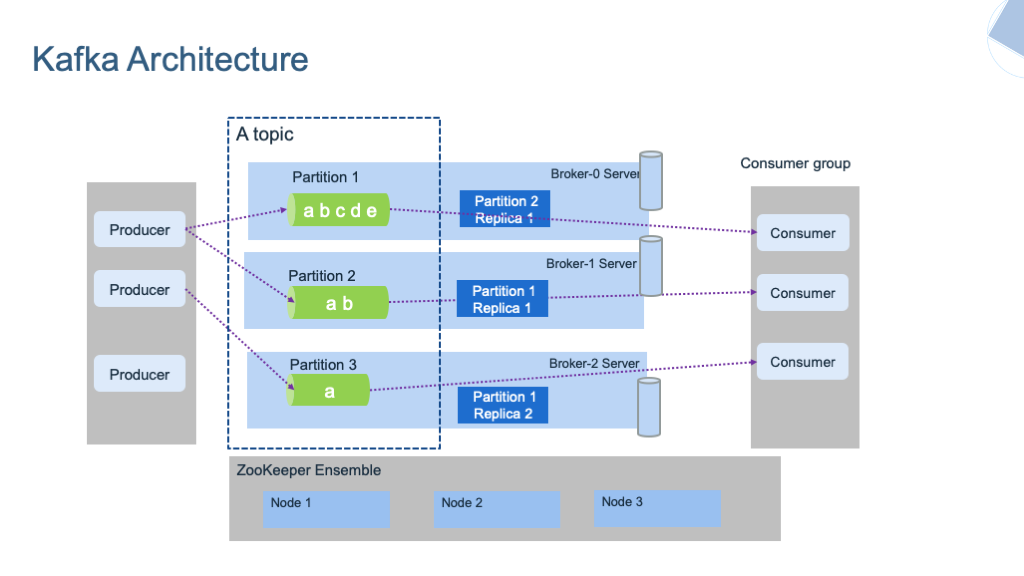
The System class is perfect for applications running within the same process or on the same machine. However, in a true distributed system, services run independently and communicate over a network. This is where a message broker like RabbitMQ or Kafka comes in.
The eventsourcing library does not provide a direct, built-in adapter for a specific broker. Instead, it provides the essential primitive—the NotificationLog—and you build the integration around it. This is a deliberate design choice that keeps the library decoupled from any specific messaging technology.
The process involves two main components: a Publisher and a Subscriber.
The Publisher: Reading the Log and Sending to the Broker
The publisher is a dedicated process whose job is to tail the NotificationLog of your primary application and publish each new event notification to the message broker.

This publisher would look something like this in pseudocode:
import time
from eventsourcing.application import Application
from eventsourcing.interface.notificationlog import NotificationLogReader
# Assume 'message_broker_client' is a pre-configured client for RabbitMQ, Kafka, etc.

def run_publisher(application: Application):
    # Get the application's notification log
    notification_log = application.log

    # Create a reader to poll the log
    reader = NotificationLogReader(notification_log)

    # Persistently store the ID of the last processed notification
    # (e.g., in a file, database, or Redis)
    last_seen_id = load_last_seen_id()

    while True:
        # Read all new notifications since the last one we saw
        notifications = reader.read(start=last_seen_id + 1)

        new_notifications = list(notifications)
        if new_notifications:
            for notification in new_notifications:
                # Publish the notification to the broker
                # The notification object can be serialized (e.g., to JSON)
                message_broker_client.publish(
                    topic='domain_events',
                    message=notification.serialize()
                )

                # Update the last seen ID
                last_seen_id = notification.id

            # Persist the latest processed ID
            save_last_seen_id(last_seen_id)
        else:
            # If no new events, wait a bit before polling again
            time.sleep(1)
This "pull-then-push" model is highly resilient. If the publisher process crashes, it can restart, read the last successfully published ID, and resume from that exact point in the NotificationLog, ensuring no events are lost.
The Subscriber: Consuming from the Broker
The subscriber is a standard consumer for your chosen message broker. It listens on the appropriate topic or queue, receives the serialized event notification, and processes it. This processing could involve:
- Updating a denormalized read model (for CQRS).
- Triggering a command in another bounded context.
- Calling an external API.
This architecture cleanly separates the event-producing application from the event-consuming services, which is a hallmark of robust distributed systems.
Conclusion
In this lesson, we have demystified how the eventsourcing library enables the creation of event-driven systems. We've seen that it provides the fundamental building blocks for reliable event propagation, which can be used both for in-process communication and for integration with external, network-based message brokers.
Key Takeaways:
- The
NotificationLogis the library's core primitive for event propagation. It is a scalable, totally-ordered, append-only log of all events in an application. - The
Systemclass with itsLeader/Followerpattern provides a powerful way to compose event-driven applications that communicate in-process. This is ideal for building projectors and other coupled services. - To integrate with an external message broker, you create a separate publisher process. This process uses a
NotificationLogReaderto poll for new events and publishes them to the broker, bridging theeventsourcingapplication with the wider distributed system. - This "pull-from-log, push-to-broker" pattern provides high-fidelity event delivery, as consumers are decoupled and the publisher can reliably resume after failures.
Preview of the Next Lesson:
We've now established the architectural pattern for connecting our event-sourced application to a message broker. In the first lesson of the next module, we will get practical and set up the broker itself. The lesson will be: "Install and run a RabbitMQ instance locally using Docker." This will prepare our environment for implementing the publisher/subscriber patterns we've discussed today.
Can't find a good explanation? Sign up and we'll make it for you
Sign up