
Hello! Welcome to your next lesson.
In our first module, you learned the fundamentals of retrieving data from a single table using SELECT and FROM. You now know how to pick specific columns (SELECT column_name), rename them for clarity (AS), and get a quick look at the data (LIMIT).
Today, we'll build on that foundation. Instead of just selecting columns, we'll learn how to select specific rows. This is one of the most powerful skills in SQL, as it allows you to zero in on the exact information you need.
Lesson Goal: By the end of this 60-minute lesson, you will be able to use the WHERE clause with comparison operators (=, !=, >, <) to filter for specific users or events. This is fundamental for any product analysis, whether you're investigating a bug report for a single user or analyzing the behavior of users who signed up after a specific date.
Let's get started.
1. The WHERE Clause: Your Data Filter
Imagine you have a table with millions of user actions. Trying to find anything meaningful by looking at all of it would be impossible. You need a way to filter it down to just the rows that matter. In SQL, the WHERE clause is your primary tool for this.
You add the WHERE clause after FROM to specify a condition. The database will then return only the rows that make that condition true.
The basic structure looks like this:
SELECT column_name(s)
FROM table_name
WHERE condition;
This infographic provides a great visual overview of the WHERE clause and the different ways you can use it to filter data. We'll be focusing on the "Comparison Operators" today.
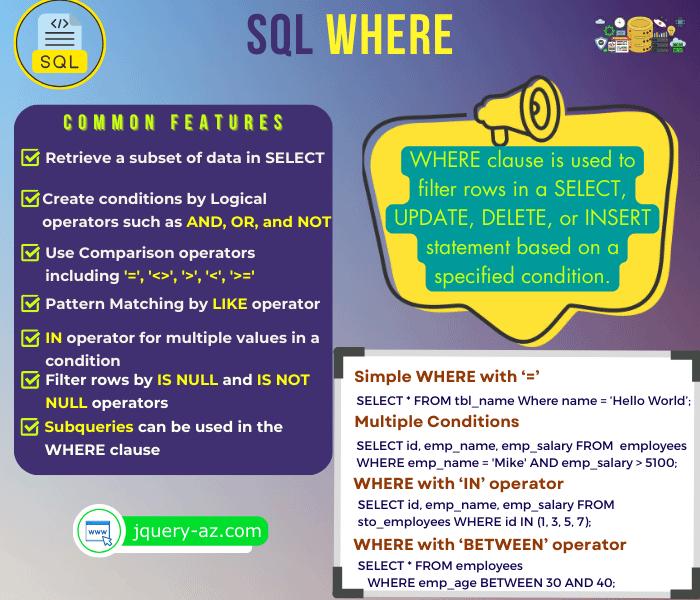
2. Filtering with Comparison Operators
Comparison operators are the building blocks of your WHERE conditions. They let you compare a column's value to another value.
To see these operators in action, let's watch a short video. It provides a clear, step-by-step demonstration of how the WHERE clause and comparison operators work together.
Where Clause in MySQL | Beginner MySQL Series
This video from Alex The Analyst provides a great introduction to the WHERE clause and demonstrates the most common comparison operators. We'll watch a few key sections.
Please watch the following segments: Introduction to WHERE and '=': from the beginning to 01:04. Greater/Less Than: from 01:16 to 02:57. Not Equal To: from 03:10 to 03:44. Filtering Dates: from 03:44 to 04:23. Focus on the syntax and the difference between filtering text, numbers, and dates.
Now, let's break down each operator with product design-focused examples.
A. Equality: =
This is the most common operator. You use it to find rows where a column has an exact value.
- When to use it: Finding a specific user, isolating a single event type, or filtering for users in a particular country.
Important Note: When you are filtering for text (known as a string) or a date, you must enclose the value in single quotes (e.g., 'completed_onboarding'). Numbers do not need quotes.
Example 1: Finding a specific user's events
Imagine a user with user_id = 582 has reported a bug. You want to see all the actions they've taken to investigate.
SELECT *
FROM events
WHERE user_id = 582;
Example 2: Finding all 'signup' events
You want to see the raw data for every signup event in your product.
SELECT *
FROM events
WHERE event_name = 'user_signup';
B. Inequality: != or <>
Use this operator to find rows that do not match a specific value. Most SQL versions accept both != and <>.
- When to use it: Excluding internal test users from an analysis, or looking at all user actions except for low-value ones like 'page_view'.
Example: Excluding test users
Your team uses emails ending in @yourcompany.com for testing. You want to analyze real user behavior, so you exclude them.
SELECT *
FROM users
WHERE email_domain != 'yourcompany.com';
C. Greater Than > and Less Than <
These operators are essential for working with numbers and dates.
>: Greater than<: Less than>=: Greater than or equal to<=: Less than or equal to
As you saw in the video, the distinction between > and >= is important. > excludes the value itself, while >= includes it.
- When to use them: Finding power users (e.g.,
purchase_count > 10), identifying users who churned quickly (e.g.,session_duration_minutes < 1), or analyzing activity before or after a specific date.
Example 1: Finding users who signed up after a feature launch
You launched a new onboarding flow on February 15, 2024. You want to see all users who signed up on or after that date.
SELECT user_id, signup_date
FROM users
WHERE signup_date >= '2024-02-15';
Note the standard YYYY-MM-DD format for dates.
Example 2: Identifying highly engaged users
You want to identify users who have triggered more than 50 events to invite them for a user interview.
SELECT user_id, event_count
FROM user_summary
WHERE event_count > 50;
3. Practice: Answering Product Questions
Let's solidify this with a practical exercise. Imagine you are a product designer at a subscription-based streaming service. You have access to a users table with the following structure:
users table:
| user_id | signup_date | last_seen_date | subscription_tier | country |
|---|---|---|---|---|
| 101 | 2023-11-20 | 2024-03-15 | 'premium' | 'USA' |
| 102 | 2024-01-05 | 2024-03-10 | 'free' | 'UK' |
| 103 | 2024-02-10 | 2024-03-16 | 'premium' | 'USA' |
| 104 | 2023-12-15 | 2024-01-02 | 'free' | 'DE' |
Write down the queries you would use to answer the following questions. Then, check your answers below.
Question 1: Find all information about users from the 'USA'.
Question 2: Find the user_id for all users who are not on the 'free' subscription tier.
Question 3: Find the user_id and signup_date for all users who signed up in 2024 (i.e., on or after January 1, 2024).
Click to see the answers
Answer 1:
You need to find an exact match for the text 'USA' in the country column.
SELECT *
FROM users
WHERE country = 'USA';
This would return the rows for user_id 101 and 103.
Answer 2:
You need to exclude rows where the subscription_tier is 'free'.
SELECT user_id
FROM users
WHERE subscription_tier != 'free';
This would return the user_ids 101 and 103.
Answer 3:
You need to find users where the signup_date is on or after '2024-01-01'.
SELECT user_id, signup_date
FROM users
WHERE signup_date >= '2024-01-01';
This would return the rows for user_id 102 and 103.
For more examples and a concise summary, this article is a good reference.
The article "SQL Comparison Operators" from GeeksForGeeks provides a handy table of the operators and very clear, self-contained examples for each one.
First, review the table in the "Common SQL Comparison Operators" section. Then, look at the examples under "SQL Comparison Operator Examples". You can ignore the CREATE TABLE code, just focus on the SELECT queries and their outputs.
Conclusion
Excellent work! You've just learned one of the most fundamental and frequently used components of SQL. Being able to filter data precisely is the first step toward uncovering powerful insights about your users and product.
Key Takeaways:
- The
WHEREclause is used to filter rows based on a condition. - Comparison operators (
=,!=,>,<,>=,<=) are used to create these conditions. - Text and date values must be enclosed in single quotes (e.g.,
'USA','2024-01-01'). - Numeric values do not need quotes.
Next Lesson Preview:
What if you want to find users from a list of countries, say 'USA', 'UK', and 'DE'? You could write WHERE country = 'USA' OR country = 'UK' ..., but there's a much cleaner way. In the next lesson, we'll cover the IN operator, which is designed for exactly this scenario.
Can't find a good explanation? Sign up and we'll make it for you
Sign up