
Welcome. This first lesson begins Week 1A by establishing the vocabulary used in nearly every cybersecurity scenario question. These terms can look similar because they often appear in the same sentence, but they describe different roles in a chain of events.
By the end, you should be able to take a short workplace scenario and distinguish:
- what needs protection,
- who or what could cause harm,
- the weakness that makes harm possible,
- the route used to reach the weakness,
- the possible harm before it happens,
- the safeguard intended to reduce it, and
- the event that has actually occurred.
This is particularly useful for BTEC answers: rather than listing security words, you will be able to link them with evidence from the scenario.
The core idea: a chain, not a list
Cybersecurity terms make most sense when connected:
- An organisation has something valuable: an asset.
- A threat could harm it.
- A vulnerability provides a weakness.
- An attack vector is the route or method used to reach that weakness.
- Before harm occurs, there is a risk.
- A control is put in place to reduce that risk.
- If harmful or potentially harmful unauthorised activity actually occurs, it is a security incident.
The same real-world event can contain all seven. However, each label answers a different question.
| Term | The key question | Example |
|---|---|---|
| Asset | What is valuable and needs protecting? | Student records, a laptop, customer data, an online booking system |
| Threat | Who or what could cause harm? | Cybercriminals, malware, fire, a malicious insider |
| Vulnerability | What weakness could be exploited? | No multi-factor authentication, an unpatched system, weak staff procedures |
| Attack vector | How does the attack get in or reach the target? | Phishing email, infected USB drive, malicious website, brute-force login attempts |
| Risk | What might happen, how likely is it, and how serious would it be? | Criminals may obtain student data through a phishing attack, causing a data breach |
| Control | What reduces likelihood or impact? | MFA, staff training, access controls, backups, alarms |
| Security incident | What harmful or potentially harmful event has actually happened? | An attacker logs in without permission and downloads personal data |
A useful memory aid is:
Threats exploit vulnerabilities through attack vectors, creating risks to assets. Controls reduce those risks. A successful or imminent harmful event is an incident.
Threats, vulnerabilities, exploits and controls
The IBM Technology video gives a useful foundation for separating a threat, weakness, and protection.
Threats Vulnerabilities and Exploits
Watch “Threats Vulnerabilities and Exploits” by IBM Technology. It uses a physical-security comparison before applying the same reasoning to IT systems, which helps make the distinctions precise.
Watch threats for the basic idea of something capable of disrupting normal operations. Then watch vulnerabilities and exploits. Focus on the difference between a weakness that exists and the action or code used against it. Finish with risk and controls, noting that controls can include technical measures, staff education, and procedures.
Threat: the source of possible harm
A threat is a person, group, event, or thing capable of adversely affecting a system or organisation.
Examples include:
- a cybercriminal trying to steal data;
- ransomware that could stop access to files;
- a disgruntled employee deleting records;
- a fire damaging a server room;
- a power cut stopping a service.
In many BTEC scenarios, it helps to distinguish the threat actor from the method:
- Threat actor: an external cybercriminal.
- Attack method/vector: phishing email.
- Possible result: stolen credentials and data.
Calling the phishing email “the criminal” would be inaccurate; calling the criminal “the phishing email” would be equally inaccurate.
Vulnerability: the weakness
A vulnerability is a weakness in people, processes, physical arrangements, software, hardware, or network configuration that could be exploited.
Examples:
- staff have not been trained to identify suspicious emails;
- a server has not been patched;
- a shared administrator account is used;
- a server-room door is left unlocked;
- staff can access folders they do not need for their work.
A vulnerability does not itself cause damage. It creates an opportunity for a threat to do so.
For example:
- “The operating system has a known unpatched flaw” = vulnerability.
- “A criminal uses code to take advantage of that flaw” = exploit or attack.
- “The criminal” = threat actor.
- “The malicious link sent by email” = attack vector.
Attack vector: the route in
An attack vector is the route, channel, or method through which an attacker attempts to gain access or deliver an attack.
Common vectors include:
- email phishing messages and attachments;
- fake websites;
- malicious downloads;
- compromised Wi-Fi;
- removable media such as USB drives;
- password guessing or brute-force attempts;
- physical access to an unlocked device.
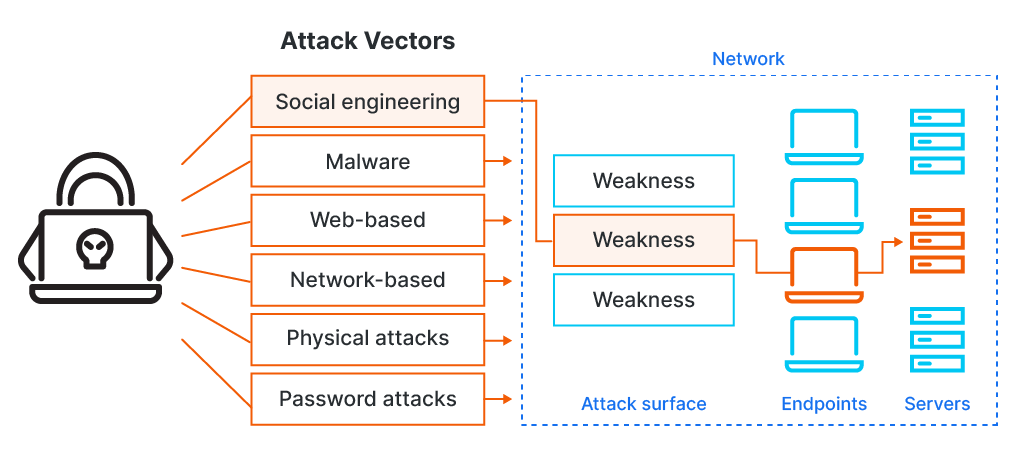
The diagram is useful, but apply it carefully in scenario answers. For example, social engineering describes deceptive manipulation of a person, while an email may be the specific vector used to deliver that social-engineering attempt. Similarly, malware can be delivered through different vectors: an email attachment, a web download, or an infected USB drive.
Control: the safeguard
A control is a measure used to manage risk. It may prevent an attack, make it harder, detect it sooner, limit its impact, or support recovery.
Controls can be:
- Technical: firewalls, anti-malware software, encryption, MFA, patches, access permissions.
- Administrative: acceptable-use policies, staff training, security audits.
- Physical/procedural: locks, CCTV, visitor procedures, incident-response plans.
A strong answer explains how a control addresses the weakness or threat. For example:
- “Introduce MFA” is a control.
- “MFA reduces the likelihood that a stolen password alone can be used to access the account” is an explanation.
Controls reduce risk; they rarely remove all risk. Staff can still approve fraudulent MFA prompts, and software can still contain unknown vulnerabilities.
Assets, risks and incidents: potential harm versus actual events
The UK National Cyber Security Centre describes assets as the things an organisation cares about and needs to protect. This includes much more than physical equipment: information, people, systems, software, services, and important business processes can all be assets.
A basic risk assessment and management method
Read the selected parts of the UK National Cyber Security Centre’s risk-management guidance. It shows how assets, threats, vulnerabilities, risks, and controls fit together in a realistic organisational risk assessment.
In Step 3 – Understand your assets and assess impact, read the asset discussion. Pay attention to the broad range of things that count as assets and why ownership and impact matter. In Step 4 - Assess the threat, read the two threat questions. Notice that the guidance separates who might cause harm from how they might act. In Step 5 – Assess your vulnerability, read the opening explanation. This reinforces that vulnerabilities are not only software bugs. In Step 7 – Assess cyber security risk, read the risk definition. Focus on risk as a future possibility with consequences, not as an attack that has already happened. Finally, in Step 8 – Prioritise risks and propose risk management action, read the risk-treatment options. Identify the role of technical and non-technical controls.
Asset: what the organisation values
An asset is anything of value to the organisation that should be protected.
For a college, assets could include:
- student personal data;
- assessment grades and coursework;
- staff email accounts;
- learning platforms;
- Wi-Fi infrastructure;
- the college reputation;
- the ability to deliver lessons and assessments.
An asset does not have to be expensive to be important. A small spreadsheet containing safeguarding information may have a much higher security value than a costly printer because disclosure could harm students and create legal consequences.
When identifying assets, consider the three main security properties:
- Confidentiality: only authorised people can read information.
- Integrity: information is accurate and cannot be changed without permission.
- Availability: systems and information are accessible when needed.
Risk: a possible future harm
A risk is the possibility that a threat will exploit a vulnerability and cause harm to an asset.
Risk is usually judged by considering:
At this stage, do not treat the formula as an exact calculation. It is a reasoning tool:
- Likelihood increases if a vulnerability is easy to exploit, exposed, or frequently targeted.
- Impact increases if the affected asset is valuable, sensitive, or critical to operations.
A weak answer might say:
“Phishing is a risk.”
Phishing is more accurately an attack vector or attack method. A stronger risk statement connects all parts:
“There is a risk that cybercriminals could use phishing emails to exploit staff who have not received security training, gain access to staff accounts, and disclose student personal data.”
This tells the reader:
- the threat: cybercriminals;
- the vector: phishing;
- the vulnerability: insufficient training;
- the affected asset: student data and staff accounts;
- the possible impact: unauthorised disclosure.
Security incident: the risk has become real or imminent
A security incident is an occurrence that actually jeopardises—or is about to jeopardise—the confidentiality, integrity, or availability of information or systems. It can also involve a breach of an organisation’s security policy.
Federal Incident Notification Guidelines | CISA
Read these selected sections from CISA’s incident-notification guidance. Although the guidance is written for United States federal organisations, its definitions and attack-vector examples are useful for recognising the difference between a potential risk and a reportable security incident.
In the introduction, read the incident definition. Focus on the words “actually or imminently”: an incident is not merely a hypothetical possibility. Then go to Attack Vectors and Attack Vectors Taxonomy. Read the purpose of the taxonomy, then examine the table. In particular, compare the Email/Phishing, Web, External/Removable Media, and Attrition rows. Use the phishing example to see how a vector describes delivery or entry rather than the weakness being exploited.
Examples of security incidents include:
- an attacker successfully logging in using stolen credentials;
- ransomware encrypting files;
- a staff member emailing personal data to the wrong recipient;
- a laptop containing unencrypted customer information being stolen;
- an employee deliberately deleting records;
- a denial-of-service attack making a website unavailable.
A suspicious email that is blocked by filtering software may be recorded as a security event. It may not be an incident if it has not jeopardised a system or breached policy. However, organisations may still ask staff to report it, because it could form part of a larger attack.
Worked scenario: classify every term accurately
Consider this scenario:
Greenfield College stores student names, addresses, grades, and safeguarding information in its cloud management system. A member of staff receives an email pretending to be from Microsoft 365 and enters their password into the linked website. The staff account does not use multi-factor authentication. An external cybercriminal uses the password to log in to the real college account and downloads a spreadsheet containing student details. The college’s monitoring system identifies the unusual login.
Here is how to classify it.
| Term | Evidence from the scenario | Why it fits |
|---|---|---|
| Asset | Student details, safeguarding information, cloud management system, staff account | These are valuable information and services that the college must protect. |
| Threat | External cybercriminal | The criminal is capable of causing harm by gaining unauthorised access and stealing data. |
| Vulnerability | No multi-factor authentication; staff member was deceived by the email | These weaknesses make account compromise more likely. |
| Attack vector | Fake Microsoft 365 email and linked website | The phishing email is the route used to obtain the password. |
| Risk | Criminals could steal student data by using phishing to compromise accounts | This describes possible future harm before the criminal logs in. |
| Control | MFA, phishing-awareness training, email filtering, login monitoring, least-privilege access | These measures could prevent, limit, or detect compromise. |
| Security incident | Unauthorised login and download of student information | The confidentiality of the student data has actually been jeopardised. |
Notice the importance of timing:
- Before the staff member enters their password, the college faces a risk.
- The fake email is an attempted attack vector.
- After the criminal logs in and downloads data, there is a security incident.
The monitoring system is a control, even though it did not stop the initial compromise. It detected unusual activity and could reduce the eventual impact by allowing the college to respond quickly.
How to write stronger scenario answers
For distinction-level reasoning, avoid simply attaching labels. Use a short chain of explanation based on the scenario’s evidence.
A reliable answer structure is:
- Name the term.
- Identify evidence from the scenario.
- Explain its role and consequence.
- Link it to another relevant term where appropriate.
For example:
The lack of multi-factor authentication is a vulnerability because a password alone can be sufficient for access. The phishing email is the attack vector because it provides the route through which the criminal obtains the password. This creates a risk that the criminal could access the cloud account and disclose sensitive student data. MFA would be an appropriate control because a stolen password would not normally be enough to log in.
This is stronger than writing:
“The vulnerability is no MFA. The vector is phishing. Use MFA.”
Common classification mistakes
| Mistake | Better interpretation |
|---|---|
| Calling “weak passwords” a threat | Weak passwords are a vulnerability. A criminal attempting to guess or use them is the threat. |
| Calling “phishing” a vulnerability | Phishing is usually an attack vector. Lack of staff awareness is a vulnerability. |
| Calling “a data breach” a risk after data has been taken | Once data has been accessed or disclosed, it is a security incident. |
| Calling antivirus a vulnerability | Antivirus is a control. A missing, disabled, or outdated anti-malware system may be a vulnerability. |
| Calling a laptop only a vulnerability | The laptop is normally an asset. An unlocked or unencrypted laptop may have vulnerabilities. |
| Calling “high risk” an explanation | State the likely threat, vulnerability, asset, and impact that make the risk high. |
One detail can have different meanings depending on context. For example, a USB drive containing payroll data is an asset. If it is unencrypted, the lack of encryption is a vulnerability. If it is lost, that loss may become a security incident. If an attacker uses an infected USB drive to install malware, the USB drive is an attack vector.
The key is not memorising one label for every object. It is identifying the object’s role in the particular scenario.
Key takeaways
- An asset is something valuable that needs protection.
- A threat is a source of potential harm, such as a cybercriminal, malware, or fire.
- A vulnerability is a weakness that could be exploited.
- An attack vector is the route or method used to reach a target, such as phishing email or an infected USB drive.
- A risk is a possible future event, judged by likelihood and impact.
- A control is a technical, administrative, physical, or procedural safeguard that reduces risk.
- A security incident is an event that has actually, or imminently, jeopardised systems, information, or security policy.
In the next lesson, you will build on this vocabulary by classifying threats according to whether they are internal or external and intentional or accidental.
Can't find a good explanation? Sign up and we'll make it for you
Sign up