
Good to see you again. In the previous lesson, you established the switch’s basic behavior: it learns source MAC addresses, then forwards, filters, or floods according to the destination MAC and VLAN. ARP is one of the most common reasons that broadcast flooding occurs in an otherwise healthy Ethernet network.
This lesson traces a complete ARP resolution inside one subnet, distinguishes ARP’s Ethernet and protocol-address fields, and builds a practical method for recognizing normal versus suspicious ARP activity in Wireshark. The architectural point is important: IPv4 routing decides the next IP hop; ARP supplies the local Ethernet MAC address needed to reach that hop.
ARP’s job: resolve a local next hop
An IPv4 host needs two distinct decisions before it can transmit an Ethernet frame:
-
Where should the IP packet go?
The host checks its own address and prefix, then consults its routing table. The result is either:- the destination host itself, if it is on-link; or
- a next-hop router, usually the default gateway, if the destination is remote.
-
What Ethernet MAC address should the frame use?
The host consults its ARP cache for the chosen local next-hop IPv4 address. If the mapping is absent or unusable, it uses ARP.
ARP therefore does not resolve the MAC address of every ultimate IP destination. If a workstation at 10.10.10.10/24 sends traffic to a server at 198.51.100.20, it normally ARPs for its gateway, perhaps 10.10.10.1, not for 198.51.100.20.
ARP is carried directly in an Ethernet frame with EtherType 0x0806. There is no IPv4 header wrapped around a conventional ARP request or reply. This is a useful packet-analysis checkpoint: an ARP frame has an Ethernet header followed by the ARP payload, whereas the later application traffic will have Ethernet, IP, and usually TCP or UDP headers.
Analyzing ARP Requests and Responses using Wireshark
Watch “Analyzing ARP Requests and Responses using Wireshark” by Bogdan Stashchuk for a precise field-level view of the request and reply. It reinforces the distinction between Ethernet delivery fields and ARP’s IP-to-MAC mapping fields.
Watch request decoding. Focus on the Ethernet broadcast destination, EtherType 0x0806, the absence of an IPv4 header, and the zeroed target MAC in the ARP payload. Then watch reply decoding, noting how the resolved host becomes the ARP sender and the original requester becomes the ARP target.
A normal same-subnet ARP exchange
Consider two hosts in VLAN 100:
| Device | IPv4 address | MAC address |
|---|---|---|
| Host A | 10.10.10.10/24 | 00:11:22:33:44:10 |
| Host B | 10.10.10.20/24 | 00:11:22:33:44:20 |
Host A needs to send an IP packet to Host B. It determines that 10.10.10.20 is on-link, but its ARP cache has no mapping for that address.
1. Host A sends the ARP request
Host A sends an Ethernet broadcast frame. Every device in the same Layer 2 broadcast domain receives a copy, but only the device owning the target IP should answer.
| Field | ARP request value |
|---|---|
| Ethernet destination MAC | ff:ff:ff:ff:ff:ff |
| Ethernet source MAC | 00:11:22:33:44:10 |
| EtherType | 0x0806 |
| ARP opcode | Request (1) |
| Sender hardware address | 00:11:22:33:44:10 |
| Sender protocol address | 10.10.10.10 |
| Target hardware address | Usually 00:00:00:00:00:00 |
| Target protocol address | 10.10.10.20 |
Wireshark often renders this request in human terms:
Who has
10.10.10.20? Tell10.10.10.10.
The two address layers answer different questions:
- The Ethernet destination is broadcast because Host A does not know which unicast MAC owns the target IP.
- The ARP target protocol address identifies precisely which IPv4 host is being queried.
- The zero target hardware address is not a destination MAC to be used for forwarding; it expresses that the requested MAC is not yet known.
2. The switch floods the request within VLAN 100
This is the earlier switching algorithm applied to ARP:
- The switch receives the frame from Host A.
- It learns or refreshes
00:11:22:33:44:10on A’s ingress port in VLAN 100. - It identifies the Ethernet destination as broadcast.
- It floods the frame out eligible VLAN 100 ports, excluding the ingress port.
It does not flood the request into another VLAN. A router also does not forward the Layer 2 broadcast to another IP subnet. ARP resolution is local to a broadcast domain.
Every other host that sees the request compares the target protocol address to its own configured IPv4 addresses. Hosts that do not own 10.10.10.20 ignore it. Host B recognizes the address as its own.
3. Host B returns a unicast ARP reply
Host B responds directly to Host A.
| Field | ARP reply value |
|---|---|
| Ethernet destination MAC | 00:11:22:33:44:10 |
| Ethernet source MAC | 00:11:22:33:44:20 |
| EtherType | 0x0806 |
| ARP opcode | Reply (2) |
| Sender hardware address | 00:11:22:33:44:20 |
| Sender protocol address | 10.10.10.20 |
| Target hardware address | 00:11:22:33:44:10 |
| Target protocol address | 10.10.10.10 |
On receiving the reply, the switch learns Host B’s source MAC on B’s port. Because it already learned A’s MAC from the request, it forwards the reply as a known unicast toward Host A.
Host A now installs the mapping:
| ARP-cache entry | Value |
|---|---|
| IPv4 address | 10.10.10.20 |
| MAC address | 00:11:22:33:44:20 |
It can finally transmit the original IP packet in a unicast Ethernet frame addressed to Host B’s MAC. The IP destination remains 10.10.10.20; ARP has only enabled the local Layer 2 delivery.
Many operating systems can also learn useful sender mappings from an ARP packet they receive, including requests. Do not assume that a host must always receive a formal reply before it has any ARP-cache information. The important diagnostic evidence is the mapping each packet claims: sender IPv4 address paired with sender MAC address.
When do you need the ARP protocol? -Wireshark
Watch “When do you need the ARP protocol? -Wireshark” by danscourses to connect ARP resolution to the host’s routing decision. The contrast between an on-link host and an off-link destination is central to tracing real enterprise flows.
Watch local resolution for the broadcast request and unicast reply between two hosts in one subnet. Then watch gateway resolution and focus on the fact that a remote destination causes ARP for the default gateway’s local interface, not the remote server.
ARP across a routed path: resolve again at each Ethernet segment
Suppose Host A at 10.10.10.10/24 sends a packet to 10.20.20.20/24, with default gateway 10.10.10.1.
Host A’s local Ethernet frame has:
- destination MAC: the gateway interface’s MAC;
- source MAC: Host A’s MAC;
- IP source:
10.10.10.10; - IP destination:
10.20.20.20.
The gateway receives the frame, removes the Ethernet header, performs its Layer 3 forwarding decision, and builds a new Ethernet frame for the next local segment. If the next-hop MAC is unknown on that outgoing interface, the router itself sends ARP in that new broadcast domain.
This explains a common capture interpretation error:
An ARP request for the gateway is normal when the ultimate destination is remote.
It also explains why an ARP capture at one access VLAN cannot reveal all ARP activity along an end-to-end routed path. Each Layer 2 segment has its own ARP cache entries, broadcast scope, and Ethernet framing.
Reading an ARP capture with intent
A capture on an endpoint interface, a switch SPAN port, a firewall inside interface, or a virtual-switch port provides a different perspective:
- An endpoint capture usually sees that host’s own ARP traffic and local broadcasts, but not unicast ARP replies exchanged by two other hosts.
- A SPAN capture for the relevant VLAN can show requests, replies, and gratuitous announcements from many endpoints.
- A capture at a routed boundary sees ARP only for that interface’s connected subnet, not for remote networks beyond it.
The Wireshark Wiki provides a concise reference for ARP’s mapping role and Wireshark’s detection support.
Address Resolution Protocol (ARP) - Wireshark Wiki
Read the Wireshark Wiki’s “Address Resolution Protocol (ARP)” page to consolidate ARP cache behavior and learn the relevant Wireshark detection settings and generated fields.
At the beginning of the page, read the ARP overview. Focus on ARP as a cached local mapping, not a substitute for routing. Then go to Preference Settings, Expert Information messages, and Display Filter. Read the storm and duplicate-IP settings, then note the generated fields for announcements, gratuitous ARP, probes, duplicate IP detection, and ARP storms.
A good first display filter is simply:
arp
Do not begin a difficult incident by capturing only ARP unless ARP itself is the narrow question. A broader capture lets you verify whether ARP resolution was followed by the expected DNS, ICMP, TCP, or application traffic.
Useful display filters include:
arp.opcode == 1
arp.opcode == 2
arp.isgratuitous
arp.isannouncement
arp.isprobe
arp.duplicate-address-detected
arp.packet-storm-detected
To investigate a particular claimed IP address, filter on both sender and target protocol addresses:
arp.src.proto_ipv4 == 10.10.10.20 || arp.dst.proto_ipv4 == 10.10.10.20
For every request and reply, inspect both the Ethernet and ARP sections. A repeatable analysis record looks like this:
| Check | What to establish |
|---|---|
| Scope | Is the capture point in the target host’s broadcast domain and VLAN? |
| Request | Which sender IP/MAC pair asks for which target IP? Is it broadcast or unicast? |
| Reply | Does the reply claim the requested target IP? Does its Ethernet destination match the requester? |
| Mapping | Which MAC address is claiming each IP address over time? |
| Outcome | Does expected traffic proceed after resolution, or do requests repeat without replies? |
Normal variations that can look alarming
Not every ARP packet is a simple broadcast request followed by a unicast reply.
Unicast ARP requests
A host may send an ARP request directly to a MAC address it already has in cache, rather than broadcasting it. This can be a cache-refresh or reachability behavior intended to reduce broadcast traffic.
The request opcode is still 1, but the Ethernet destination and often the target hardware address identify one known unicast peer. A unicast ARP request is therefore not automatically malicious or malformed.
Gratuitous ARP and ARP announcements
A gratuitous ARP is an unsolicited assertion of an IP-to-MAC mapping. It is commonly used when a host starts, an interface changes state, a VM moves, or an HA device assumes a virtual IP address. It gives peers an opportunity to refresh stale ARP-cache entries promptly.
Wireshark can label several related patterns as gratuitous ARP or ARP announcement. Field details vary by operating system and platform, but a common sign is that the sender IP and target IP are the same. Treat the overall message as: “this IP address is now reachable at this MAC address.”
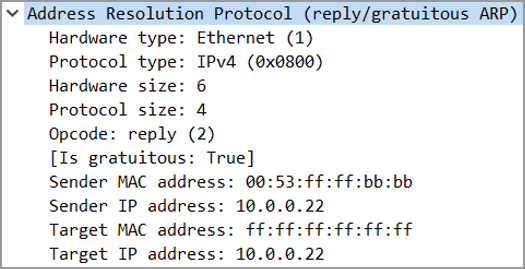
A gratuitous ARP reply can legitimately appear with broadcast Ethernet delivery, as in the image. Its presence alone is not an attack indicator. In a first-hop redundancy design, for example, an active device may announce a virtual gateway IP following a role transition so clients quickly direct traffic to the correct active device.
ARP probes
An ARP probe checks whether an IPv4 address is already in use before a host configures it. A recognizable probe normally has:
- Ethernet destination
ff:ff:ff:ff:ff:ff; - ARP opcode request;
- sender protocol address
0.0.0.0; - target protocol address equal to the candidate address.
The zero sender IP avoids prematurely teaching other hosts that the candidate address belongs to the probing host. Probes are particularly relevant in IPv4 link-local address selection and address-conflict detection.
Recognizing abnormal ARP behavior
ARP was designed for cooperative local networks and does not authenticate claims. As a result, the right question in an investigation is not simply, “Is this packet gratuitous?” It is:
Is this mapping, rate, timing, and delivery pattern consistent with the topology and service behavior we expect?
Duplicate IP claims
The most significant pattern is a single IPv4 address being claimed by multiple distinct MAC addresses in the same broadcast domain.
For example, these two messages close together merit investigation:
10.10.10.1 is at 00:aa:aa:aa:aa:01
10.10.10.1 is at 00:bb:bb:bb:bb:02
Possible explanations include:
- accidental duplicate static addressing;
- a host impersonating a gateway or another endpoint;
- stale configuration after a migration;
- a legitimate HA, clustering, or first-hop redundancy event;
- a capture point observing an intended virtual IP transition.
The distinction comes from context. A normal active/standby gateway design should use an expected virtual IP and MAC behavior, with an identifiable role change. Alternating MAC claims from unrelated endpoint ports, especially when users report intermittent connectivity, is much more concerning.
Wireshark’s duplicate-IP warning is useful triage evidence, not final proof. Confirm the claims against interface inventories, virtual MAC design, DHCP lease records, switch MAC tables, and the timing of HA events.
Repeated requests with no replies
A few ARP retries are normal when a host or gateway is unavailable. Persistent repeated requests for the same target with no matching response can indicate:
- the target is offline or its interface is down;
- the sender and target are placed in different VLANs;
- an incorrect mask makes a host treat an off-link address as local;
- the target IP is not actually configured;
- the response is being blocked, suppressed, or missed by the capture point.
The packet capture tells you that resolution failed; it does not, by itself, prove which device or policy caused the failure. Combine it with VLAN membership, interface state, MAC-table learning, and endpoint addressing.
Excessive broadcast ARP
A large volume of broadcast ARP can indicate an ARP storm, but rate alone needs interpretation. Look for a combination of:
- many requests in a short period;
- repeated requests for the same addresses;
- broad impact within one VLAN;
- concurrent MAC moves, broadcast growth, or interface errors;
- no successful replies, or replies that do not stop the requests.
Potential causes include a Layer 2 loop, an endpoint fault, a scanning tool, address misconfiguration, or a large number of hosts simultaneously recovering after a disruption. A short burst after a switch or virtual environment failure can be expected; sustained broadcast pressure is not.
Unexpected unsolicited mapping changes
An unsolicited ARP reply or gratuitous ARP that says “the gateway IP is at a new MAC” may be exactly what is needed after HA failover. It can also be an ARP-poisoning attempt.
Investigate the mapping change when:
- the new MAC is not an expected gateway, virtual MAC, load balancer, or cluster member;
- competing claims recur;
- client traffic begins flowing through an unexpected system;
- the announcement is accompanied by frequent connectivity changes;
- the packet originates from an access port where a gateway should never reside.
From a security-architecture perspective, the important risk is that an attacker able to send accepted ARP assertions within a VLAN may redirect local traffic. Segmentation reduces the blast radius; later security design choices can add validation and monitoring controls. For now, concentrate on identifying the packet-level evidence accurately.
A compact EVE-NG capture workflow
In a small EVE-NG topology, place two hosts and a gateway interface in one VLAN. Attach Wireshark to an appropriate link or use a switch capture method that shows VLAN-wide traffic.
- Clear Host A’s neighbor or ARP entry for Host B or the gateway.
- Start a broad capture, then generate one ping from Host A.
- Apply the
arpdisplay filter. - Identify the request and reply using sender and target protocol addresses.
- Remove the ARP filter and confirm that the subsequent ICMP frame uses the resolved unicast destination MAC.
- Clear the entry again and ping an unused IP address. Compare the repeated unanswered ARP requests with the successful exchange.
- If your lab supports it, change a host to use another host’s IP temporarily and observe duplicate claims and Wireshark expert information. Restore the address immediately after the observation.
This workflow creates a reliable baseline. Once you can recognize the expected request, reply, cache entry, and follow-on unicast packet, abnormal patterns become much easier to isolate.
Key takeaways
- ARP maps an IPv4 next-hop address to a MAC address within one local broadcast domain.
- A normal ARP request is typically an Ethernet broadcast with a target IP known but target MAC unknown.
- The host owning the target IP normally returns a unicast ARP reply, allowing the requester to cache the mapping.
- A switch learns the requester’s MAC from the broadcast request, floods that request within the VLAN, then commonly forwards the reply as known unicast.
- For off-subnet traffic, a host ARPs for the default gateway, not the remote destination.
- Unicast ARP requests, gratuitous ARP, announcements, and probes can be normal; their meaning depends on field values, timing, topology, and device roles.
- Strong ARP warning signs include unexplained IP-to-MAC changes, duplicate claims, persistent unanswered requests, and excessive broadcast request rates.
Next, you will extend this Layer 2 analysis to 802.1Q tagging, VLAN IDs, trunk links, and native-VLAN handling.
Can't find a good explanation? Sign up and we'll make it for you
Sign up