
Hello! Welcome back to our course on system design.
In our last lesson, we explored how to choose the right database (SQL, NoSQL, or NewSQL) by analyzing the data model, query patterns, and consistency requirements. A key factor in that decision was scalability—the system's ability to handle growth. We learned that some databases are designed to scale horizontally, meaning across multiple servers.
Today, we'll dive into the "how" of horizontal scaling. When your data becomes too large or your traffic too heavy for a single database server, you need to split that data across multiple machines. This process is called data partitioning.
Our learning outcome for this lesson is to design data partitioning strategies including horizontal sharding and vertical partitioning. We'll explore what these strategies are, why and when to use them, and the critical trade-offs you'll need to consider.
1. Why Partition Data?
Before we get into specific techniques, let's understand the fundamental reasons for partitioning data. When a single database server can no longer keep up, simply buying a more powerful server (vertical scaling) becomes prohibitively expensive and eventually hits a physical limit. Partitioning allows us to scale out (horizontally) by distributing the data and the load across a cluster of more affordable servers.
Data partitioning guidance - Azure Architecture Center
This article from the Microsoft Azure Architecture Center provides an excellent summary of the motivations behind data partitioning. It goes beyond just scalability.
Please read the introductory section and the list under 'Why partition data?'. As you read, think about how these benefits—like improved performance, availability, and operational flexibility—relate to designing a robust and efficient product.
As the article highlights, the key benefits of partitioning are:
- Scalability: Overcome the limits of a single server.
- Performance: Queries run faster because they operate on smaller data sets.
- Availability: An outage of one partition (server) may only affect a subset of the system, not the entire application.
- Operational Flexibility: You can manage, monitor, or back up different partitions independently.
2. The Main Partitioning Strategies
There are two primary ways to split up your data: horizontal partitioning (more commonly known as sharding) and vertical partitioning. There is also a higher-level concept called functional partitioning.
Let's look at a visual representation of the two main strategies.
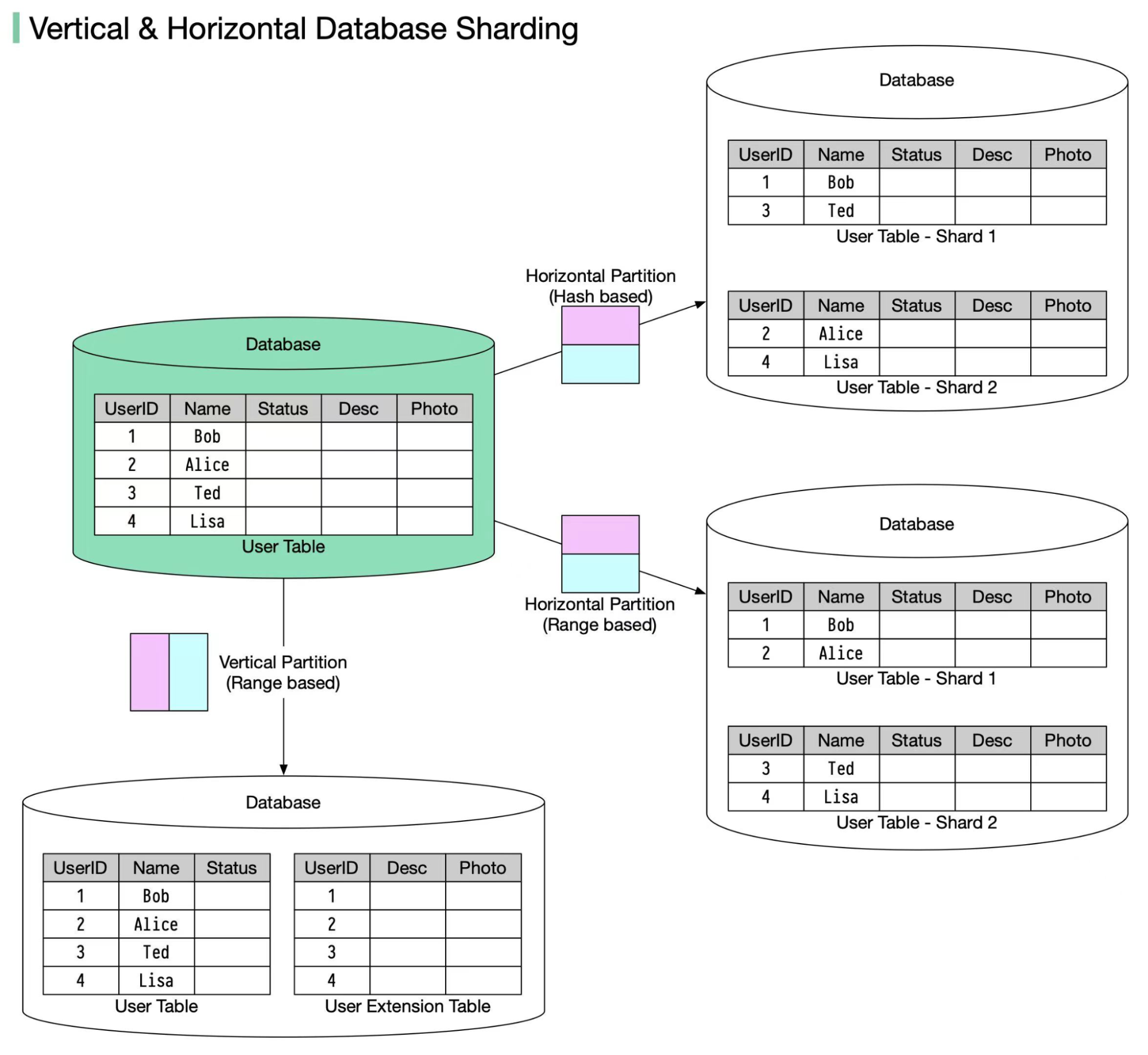
We will now explore each of these in detail.
3. Horizontal Partitioning (Sharding)
Horizontal partitioning, or sharding, involves dividing a database table by its rows. Each partition, or shard, contains a subset of the rows but maintains the same schema as the original table. All shards are essentially smaller versions of the same table, but with different data.
To get an intuitive understanding of sharding, let's start with a short video.
This video from Gaurav Sen uses a simple pizza analogy to explain the concept of sharding.
Watch the following segments: Introduction to Sharding: 00:53 - 02:22 Choosing a Shard Key and Benefits: 03:56 - 04:38 Challenges of Sharding: 04:25 - 05:10 Focus on what a shard is, the role of the 'key' in deciding how to split the data, and the main problems that sharding introduces.
The Shard Key
As the video explained, the most critical decision in a sharding strategy is choosing the shard key. This is the attribute (or column) in your data that the system uses to determine which shard a particular row belongs to. A good shard key distributes data and query load evenly across all shards, preventing "hotspots" where one shard becomes overloaded while others are idle.
Let's explore the common strategies for using a shard key.
This article from Hazelcast details the different types of sharding, which are essentially different strategies for choosing and using a shard key.
Read the section 'Types of Sharding'. Pay close attention to the descriptions of Range-Based, Hash-Based (Key-Based), and Directory-Based sharding, including their advantages and challenges.
Here's a summary of the main sharding strategies:
| Strategy | How it Works | Pros | Cons |
|---|---|---|---|
| Range-Based | Data is partitioned based on a range of values of the shard key (e.g., User IDs 1-1000 on Shard 1, 1001-2000 on Shard 2). | Simple to implement. Efficient for range queries (e.g., "find all users who signed up in May"). | Can lead to hotspots. If User IDs are sequential, all new writes go to the last shard. |
| Hash-Based | A hash function is applied to the shard key, and the result determines the shard. (e.g., shard_id = hash(user_id) % num_shards). | Distributes data evenly, avoiding hotspots. | Range queries become inefficient, as they must be sent to all shards. |
| Directory-Based | A lookup table (the "directory") explicitly maps each shard key value to a shard. | Very flexible; you can move data by just updating the lookup table. | The lookup table can become a performance bottleneck and a single point of failure. |
Challenges of Horizontal Partitioning
Sharding is a powerful technique, but it introduces significant complexity:
- Cross-Shard Joins: If you need to join data that lives on different shards, the query must go to multiple servers and the results must be aggregated at the application layer. This is slow and expensive.
- Rebalancing: What happens when you need to add or remove shards? Moving data between shards (rebalancing) is a complex and resource-intensive operation. Techniques like consistent hashing (which we'll cover in a later lesson) are designed to solve this.
- Hotspots: An uneven distribution of data or traffic can overload a single shard, negating the benefits of partitioning.
4. Vertical Partitioning
Vertical partitioning takes a different approach. Instead of splitting data by rows, it splits a table by its columns. You would group frequently accessed columns into one table and less frequently accessed or large-sized columns (like text blobs or user profile images) into another. Both new tables would share the same primary key to link the data for a single record.
Data partitioning guidance - Azure Architecture Center
Let's return to the Azure article for a clear explanation of vertical partitioning.
Read the section 'Vertical partitioning'. Focus on the example given and the advantages listed, particularly how it can reduce I/O costs.
The primary motivation for vertical partitioning is performance optimization. When you query for a user's name and email, you don't want the database to also have to read their 5MB profile picture from the disk. By separating them, queries on the frequently accessed data become much faster because less data is read.
While the concept is simple, the implementation can be complex. Let's look at a practical walkthrough to understand the engineering effort involved.
How to Implement Vertical Sharding
This video by Arpit Bhayani walks through the practical steps of implementing vertical partitioning by moving a table to a different database server. This is a common task when evolving a monolithic system towards microservices.
Watch the following segments: Introduction: 00:00 - 01:58 (What is vertical sharding and why do it?) Meta Information Management: 02:10 - 07:20 (Why do you need a tool like Zookeeper?) Practical Steps: 07:20 - 14:42 (What are the high-level steps to move the data?) Your goal here is not to memorize the commands, but to appreciate the process and the components involved (like a configuration store and a replication job) to achieve the migration with minimal downtime.
As you saw, moving data isn't as simple as copy-paste. It requires careful orchestration to ensure data consistency and to update the application's configuration so it knows where to find the data. This highlights a key trade-off: vertical partitioning can improve performance, but at the cost of increased operational complexity.
5. Functional Partitioning
Finally, it's worth mentioning functional partitioning. This is less about how you split a single table and more about how you organize your entire data landscape. In this strategy, data is partitioned according to the business function or domain it serves.
For example, in an e-commerce application, you might have:
- A database for Product Catalog data.
- A separate database for Customer & Order data.
- Another database for Inventory data.
This approach aligns very well with a microservices architecture, where each service owns its own data. It improves isolation between different parts of the system, so a problem in the inventory system doesn't bring down the customer login service.
Conclusion
Today we've explored the primary strategies for partitioning data to build scalable and performant systems. The choice of strategy is a classic design trade-off, balancing performance gains against operational complexity.
Key Takeaways:
- Partitioning is necessary when a single database server is no longer sufficient for your data volume or traffic load.
- Horizontal Partitioning (Sharding) splits data by rows. It is a powerful technique for distributing write and read load, but the choice of a shard key is critical to avoid hotspots. It also makes cross-shard operations like
JOINs very expensive. - Vertical Partitioning splits data by columns. It is primarily used to optimize query performance by separating frequently accessed "hot" data from infrequently accessed "cold" data. It requires the application to reconstruct the full record when needed.
- Functional Partitioning splits data by business domain. It provides strong isolation between different parts of a system and aligns naturally with microservices.
Preview of the Next Lesson:
We've split our data across multiple servers for scalability. But what happens if one of those servers fails? We'd lose a chunk of our data and part of our application would become unavailable. In the next lesson, we will address this by learning how to apply replication patterns to create copies of our data, ensuring high availability and further improving read performance.
Can't find a good explanation? Sign up and we'll make it for you
Sign up