
Hello! Welcome back to your system design course.
In our last lesson, we explored how to design denormalization strategies to optimize read-heavy workloads. We focused on structuring data for fast access. Today, we'll look at the other end of the data lifecycle: what happens to data when it's no longer actively needed?
Your background in product design has taught you to consider the entire lifecycle of a product, from creation to disposal or recycling. Data has a similar lifecycle. Failing to plan for its "end-of-life" can lead to slow, expensive, and insecure systems.
This lesson addresses the learning outcome: Design data retention and archival strategies for large-scale systems. We will cover why this is crucial, define the key concepts, walk through the process of creating a policy, and explore the technical strategies for implementing it.
1. Why We Can't Keep Everything Forever
In any large-scale system, data accumulates rapidly. While it might seem easiest to store all data indefinitely, this approach is unsustainable. Let's start by understanding the core reasons why a data retention strategy is not just a good idea, but a necessity.
Data Retention: Designing for the Right Memory Span
The article 'Data Retention: Designing for the Right Memory Span' provides a concise explanation of why managing the data lifecycle is so important.
Please read the first three sections: 'Data retention governs...', 'Why Data Retention Matters', and 'What You’re Responsible For'. Focus on the four main drivers for data retention.
As the article highlights, a thoughtful data retention strategy is essential for:
- Cost Management: Storing and managing massive datasets is expensive. "Hot" storage (fast, active databases) is far more costly than "cold" storage (slower, archival systems).
- System Performance: Large database tables slow down queries, indexing, and backup processes. A leaner database is a faster database.
- Legal and Regulatory Compliance: Laws like GDPR (Europe's General Data Protection Regulation) and HIPAA (in US healthcare) mandate strict rules about how long personal data can be stored and when it must be deleted. Non-compliance can lead to severe penalties.
- Security and Risk Reduction: The less data you hold, the smaller your risk exposure in the event of a data breach. Data that you have already purged cannot be leaked.
2. Core Concepts: Archiving, Purging, and Backups
To design a strategy, we first need a clear vocabulary. People often use terms like "archiving" and "backups" interchangeably, but they serve very different purposes.
Data Retention: Designing for the Right Memory Span
Let's return to the 'Data Retention' article to precisely define these key terms. Understanding their distinct goals is fundamental to good system design.
Please read the sections 'What Do Archival and Purging Really Mean?' and 'Data Retention vs. Data Backup — A Quiet but Crucial Distinction'.
Let's summarize the key distinctions:
| Term | Purpose | State of Data | Accessibility |
|---|---|---|---|
| Backup | Disaster Recovery. It's an insurance policy to restore the system after data loss or corruption. | A point-in-time copy of the live system. | Not meant for direct access. Used only for system restoration. |
| Archive | Long-term storage. For compliance, historical analysis, or business record-keeping. | Data is moved from active ("hot") storage to cheaper ("cold") storage. | Retrievable, but access is slow and may require a special process. |
| Purge | Permanent deletion. To comply with privacy laws ("right to be forgotten") or to remove data with no further value. | Data is irreversibly removed from all systems. | Gone forever. |
A retention policy is the set of rules that governs when data transitions between these states (e.g., "archive after 1 year, purge after 7 years").
3. How to Design a Data Archiving Strategy
Creating a robust archiving strategy is a structured process that involves more than just technical decisions. It requires input from business, legal, and engineering stakeholders.
The following image outlines a typical five-step process for developing and implementing an archiving strategy.
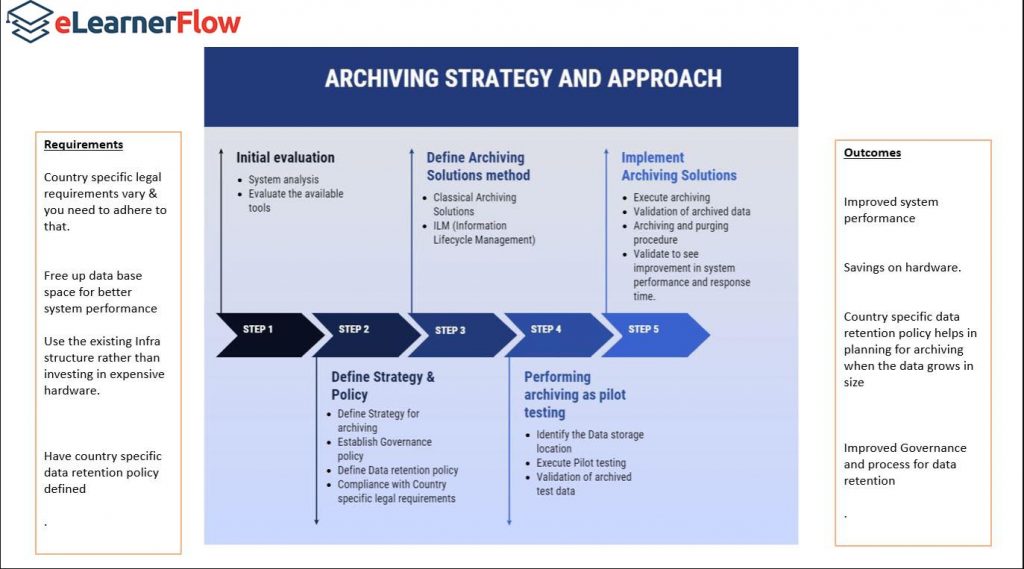
Let's watch a short video that walks through similar best practices for creating a data archiving policy.
How to Create a Strong Data Archiving Policy
This video from Eye on Tech, 'How to Create a Strong Data Archiving Policy', provides a quick, high-level overview of the key steps involved in creating a formal policy.
Watch the entire video (it's short!). As you watch, notice how the steps align with the process diagram above, covering data identification, lifecycle, compliance, and formalization.
Combining these ideas, here is a practical workflow for designing your strategy:
-
Identify and Categorize Data: Not all data is created equal. Group data based on its function and importance. A good starting point is the categorization from the
Data Retentionarticle (441f7):- Transactional Data: Orders, payments, etc. Often subject to long-term legal retention rules.
- User-Generated Data: Profiles, posts, uploads. Subject to user deletion requests and privacy rules.
- Operational Logs & Metrics: Debug logs, performance metrics. Tend to have very high volume and short-term value.
- Cache & Ephemeral Data: Temporary data that should expire automatically in minutes or hours.
-
Define the Retention Policy: For each category, define the rules. Ask questions like:
- How long does this data need to be in the active system for good performance? (e.g., 90 days)
- After that, does it need to be archived for compliance? If so, for how long? (e.g., 7 years)
- When can (or must) it be purged permanently?
-
Select the Implementation Strategy: Choose the technical method for archiving the data. We will cover these in the next section.
-
Formalize and Implement: Document the policy and build the automated jobs or processes that enforce it.
4. Technical Implementation Strategies
Once you have a policy, you need to implement it. There are three common patterns for managing data archival within a database.
Optimizing Data Archiving Strategies: A Comprehensive ...
The article 'Optimizing Data Archiving Strategies' by Pipedrive Engineering provides an excellent, practical guide to the most common technical approaches.
Please read the first three main sections: 'Partitioning for Archiving' 'Separate Tables for Archiving' 'Archive Flag with Index for Data Separation' Focus on understanding the core concept of each strategy and its main advantages and challenges.
Let's summarize and compare these three powerful techniques.
Strategy 1: Partitioning
- Concept: The database table is physically split into smaller segments (partitions) based on a key, most commonly a date range (e.g., a partition for each month).
- How it works for archiving: To archive a month's worth of data, you simply detach the corresponding partition from the live table and move it to cheaper storage. Your application queries only hit the recent, active partitions.
- Pros: Very efficient. Archiving is a fast metadata operation, not a slow, row-by-row data move. Queries on active data remain fast.
- Cons: Can add management complexity. Not all database systems support partitioning equally well.
Strategy 2: Separate Archive Tables
- Concept: You create a second table with an identical structure, e.g.,
ordersandorders_archive. - How it works for archiving: A scheduled background job periodically runs, copying data older than a certain date from the
orderstable to theorders_archivetable, and then deleting it from the source. - Pros: Conceptually simple and keeps the active table lean. The archive table can even live in a different, cheaper database.
- Cons: The data movement process can be resource-intensive. Queries that need both active and archived data become complex (requiring
UNIONs).
Strategy 3: Archive Flag
- Concept: You add a boolean column to your table, such as
is_archived. - How it works for archiving: Instead of moving data, a background job simply updates old rows, setting
is_archived = true. - Pros: Very simple to implement. No data is moved, avoiding complex data transfer logic.
- Cons: The table continues to grow indefinitely, which can still slow down performance and increase storage costs for the primary database. Every query against active data must include
WHERE is_archived = false.
Conclusion
Today, we've seen that managing the data lifecycle is a critical aspect of designing robust, scalable, and compliant systems. Just as a product designer plans for a product's end-of-life, a system designer must plan for data's eventual archival and deletion.
Key Takeaways:
- Data retention and archiving strategies are driven by the need to control cost, maintain performance, ensure compliance, and reduce security risks.
- It is crucial to distinguish between backups (for recovery), archives (for long-term retention), and purging (for permanent deletion).
- Designing a strategy involves categorizing data, defining a policy with business and legal input, and then choosing a technical implementation.
- Common technical patterns for archiving include database partitioning, using separate archive tables, or adding an archive flag. Each comes with its own set of trade-offs regarding performance, complexity, and cost.
Preview of the Next Lesson:
We've now covered how to organize data (normalization/denormalization) and how to manage it over the long term (retention/archiving). In the next module, we'll shift our focus to speed. Our first lesson will be on how to design multi-tier caching strategies. Caching is the opposite of archiving: instead of moving old data to slow storage, we'll be keeping frequently used data in extremely fast, temporary storage to make our systems feel instantaneous.
Can't find a good explanation? Sign up and we'll make it for you
Sign up