
Namaste! Pichhli lesson mein aapne JavaScript values—numbers, strings, booleans, aur null—ke saath expressions aur checks banana seekha. Ab unhi values ko ek-ek alag variable mein rakhne ke bajay ordered collection mein organize karenge.
Aaj aap JavaScript array create karenge, uske elements ko index se read karenge, aur kisi specific position ki value update karenge. GEE workflows mein arrays later band names, selected years, class IDs, colour palettes, seasonal windows, aur parameter lists ko manageable banayenge. Filhaal hum standard JavaScript arrays par focus kar rahe hain, jinka code Code Editor mein turant run aur print() se inspect hota hai.
Array: related values ki ordered list
Sochiye aapko Sentinel-2 ke selected bands store karne hain. Alag variables likhna possible hai:
const bandOne = 'B2';
const bandTwo = 'B3';
const bandThree = 'B4';
const bandFour = 'B8';
Lekin yeh approach scale nahin karti. Agar bands ki list change ho, aapko multiple variable names track karne padenge. Is situation mein array better hai:
const selectedBands = ['B2', 'B3', 'B4', 'B8'];

print('Selected bands:', selectedBands);
Array ek single variable ke andar values ki ordered list hai. Array banane ke liye:
- square brackets
[]use hote hain; - items commas se separate hote hain;
- order preserve hota hai.
const landCoverClasses = [
  'Water',
  'Built-up',
  'Cropland',
  'Forest'
];

const analysisYears = [2019, 2020, 2021, 2022, 2023];

print('Classes:', landCoverClasses);
print('Years:', analysisYears);
Aap array mein technically different types ki values bhi rakh sakte hain:
const mixedValues = ['Pune', 2023, true, null];

print('Mixed array:', mixedValues);
Lekin professional GIS scripts mein normally ek array mein same type ke related values rakhna clearer hota hai. For example, band-name array mein strings, year array mein numbers, aur class-ID array mein numbers.
Short video: array ka structure, index, aur update
Introduction to Arrays | JavaScript Tutorial in Hindi #16
CodeWithHarry ki “Introduction to Arrays | JavaScript Tutorial in Hindi #16” array syntax, zero-based indexing, length, aur in-place updates ko Hindi mein visually explain karti hai. GEE ke print() output ke context mein yeh core JavaScript behavior same rahega.
Pehle array creation dekhiye: square brackets, comma-separated values, aur indexes 0, 1, 2, 3 par focus kijiye. Phir element access dekhiye, especially missing index par undefined result. array length mein count aur final valid index ka relation note kijiye. Finally, array updates dekhiye to understand how assigning a value to one index changes only that element.
GEE Code Editor mein console.log() ke place par print() use kijiye:
const months = ['June', 'July', 'August', 'September'];

print(months);
Index: array mein position ka address
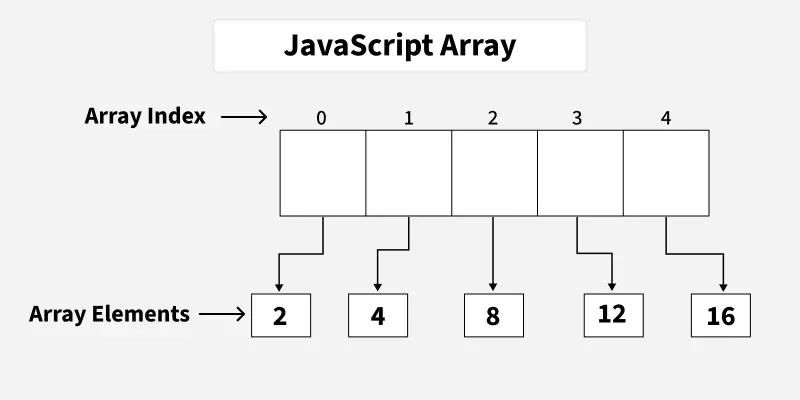
Array ke har element ka ek index hota hai. JavaScript array indexing 0 se start hoti hai, 1 se nahin.
const indices = ['B2', 'B3', 'B4', 'B8'];
| Position in human counting | JavaScript index | Value |
|---|---|---|
| First | 0 | 'B2' |
| Second | 1 | 'B3' |
| Third | 2 | 'B4' |
| Fourth | 3 | 'B8' |
Isliye first band retrieve karne ke liye:
const selectedBands = ['B2', 'B3', 'B4', 'B8'];

print('First band:', selectedBands[0]);
print('Second band:', selectedBands[1]);
print('Third band:', selectedBands[2]);
print('Fourth band:', selectedBands[3]);
Square brackets ka second use dhyan se dekhiye:
const selectedBands = ['B2', 'B3', 'B4', 'B8'];
Yahan brackets array create kar rahe hain.
selectedBands[2]
Yahan brackets array ke andar stored element ko access kar rahe hain.
GIS use case mein order important ho sakta hai. Example:
const falseColourBands = ['B8', 'B4', 'B3'];

const redDisplayBand = falseColourBands[0];
const greenDisplayBand = falseColourBands[1];
const blueDisplayBand = falseColourBands[2];

print('Red display band:', redDisplayBand);
print('Green display band:', greenDisplayBand);
print('Blue display band:', blueDisplayBand);
Later, jab aap false-colour visualization banayenge, band order—red, green, blue display channels ke liye—directly result ki appearance affect karega. Abhi focus sirf itna hai: index 0 always first stored item ko refer karta hai.
Array length aur last index
.length array mein total elements count karta hai:
const seasons = ['Kharif', 'Rabi', 'Zaid'];

print('Number of seasons:', seasons.length);
Output 3 hoga because three items hain. Lekin valid indexes 0, 1, aur 2 hain.
Useful rule:
const seasons = ['Kharif', 'Rabi', 'Zaid'];

print('Last valid index:', seasons.length - 1);
print('Last season:', seasons[seasons.length - 1]);
Is example mein seasons.length is 3, so seasons[3] last item nahin hai. Last item seasons[2] hai.
Agar aap unavailable index access karte hain, JavaScript error necessarily throw nahin karega; usually undefined milega:
const seasons = ['Kharif', 'Rabi', 'Zaid'];

print('Missing item:', seasons[3]);
undefined ka matlab: us index par koi value exist nahin karti. Yeh often silent bug ban sakta hai, especially jab incorrect band position ya date-list index use hua ho. Isliye index aur .length ko inspect karna useful habit hai.
Index par value update karna
Array mutable hota hai: aap existing index par nayi value assign karke item replace kar sakte hain.
let cloudThresholds = [10, 20, 30];

print('Before update:', cloudThresholds);

cloudThresholds[1] = 15;

print('After update:', cloudThresholds);
Yahan:
- original index
1par20tha; cloudThresholds[1] = 15;ne sirf second item replace kiya;- final array
[10, 15, 30]hoga.
Is statement ko break karke samajhiye:
cloudThresholds[1] = 15;
cloudThresholds[1]means: array ki second position select kijiye.=means: us position par new value assign kijiye.15replacement value hai.
Aapke remote-sensing workflow ka realistic example:
let classNames = [
  'Water',
  'Agriculture',
  'Builtup',
  'Forest'
];

print('Initial classes:', classNames);

// Standardized output label.
classNames[2] = 'Built-up';

print('Updated classes:', classNames);
print('Updated third class:', classNames[2]);
Index 2 third item hai; therefore 'Builtup' change hokar 'Built-up' hoga. Baaki elements unchanged rahenge.
const array aur updating elements
Previous lesson ka rule yaad rakhiye: const variable ko aap completely reassign nahin kar sakte. Lekin JavaScript arrays ke elements mutable hote hain.
const bands = ['B2', 'B3', 'B4', 'B8'];

bands[3] = 'B8A';

print('Updated bands:', bands);
Yeh valid hai. Aapne bands variable ko naya array nahin diya; existing array ke fourth element ko update kiya hai.
Lekin yeh invalid hoga:
const bands = ['B2', 'B3', 'B4', 'B8'];

// bands = ['B2', 'B3', 'B4', 'B8A'];
Comment wali line ko run karenge to error aayega, because it tries to assign an entirely new array to a const variable.
A practical convention:
constuse kijiye jab array ka variable name aur whole array reference replace nahin karni hai.letuse kijiye jab aap array ko later completely new list se replace karna expect karte hain.- Element update, such as
bands[3] = 'B8A',constarray par bhi allowed hai.
Reading: Earth Engine tutorial mein lists ka basic syntax
Introduction to JavaScript for Earth Engine - Google for Developers
Google for Developers ka “Introduction to JavaScript for Earth Engine” Code Editor-oriented tutorial hai. Is short portion mein Earth Engine documentation JavaScript arrays ko “lists” ke roop mein introduce karti hai, including number aur string arrays.
“Lists” subsection mein sentence “Define lists with square brackets” se number-list example padhiye. Uske turant baad string-list example bhi padhiye, jo “Lists can also store strings” se shuru hota hai. Notice kijiye ki tutorial legacy var syntax use karta hai; is course mein new code ke liye hum normally const ya let prefer karenge.
Ek important future-facing distinction: abhi jo ['B2', 'B3', 'B4'] hai, woh normal client-side JavaScript array hai. Module 2 mein aap ee.List seekhenge, jo Earth Engine ka server-side object hai aur different methods/rules use karta hai. Dono ko prematurely mix nahin karna hai.
Guided Code Editor practice: band configuration ko inspect aur correct kijiye
Apne existing script ki copy save kijiye:
04_arrays_and_indexing
Phir yeh complete script paste karke Run kijiye:
// An ordered list of Sentinel-2 bands.
const spectralBands = ['B2', 'B3', 'B4', 'B8'];

// An ordered list of labels for a classification output.
let landCoverClasses = [
  'Water',
  'Cropland',
  'Builtup',
  'Forest'
];

// Inspect the whole arrays.
print('Spectral bands:', spectralBands);
print('Land-cover classes:', landCoverClasses);

// Access particular elements using zero-based indexes.
print('First spectral band:', spectralBands[0]);
print('Third spectral band:', spectralBands[2]);
print('Fourth class before update:', landCoverClasses[3]);

// Check total count and retrieve the last value.
print('Number of spectral bands:', spectralBands.length);
print('Last spectral band:', spectralBands[spectralBands.length - 1]);

// Correct one class label by updating its index.
landCoverClasses[2] = 'Built-up';

print('Land-cover classes after update:', landCoverClasses);
print('Updated third class:', landCoverClasses[2]);
Console mein verify kijiye:
spectralBands[0]should print'B2'.spectralBands[2]should print'B4', not'B3'.spectralBands.lengthshould print4.spectralBands[spectralBands.length - 1]should print'B8'.- update ke baad third class
'Built-up'honi chahiye.
Ab is code ko deliberately modify karke result observe kijiye:
spectralBands[1]print kijiye. Expected value'B3'hai.landCoverClasses[0] = 'Open water';add karke first class update kijiye.print(spectralBands[4]);run kijiye. Console meinundefinedaaye to explain kijiye: array mein 4 items hain, lekin valid indexes only0through3hain.spectralBands[3] = 'B8A';add karke fourth stored band update kijiye, phir full array print kijiye.
Ek useful debugging pattern yeh hai:
print('Bands:', spectralBands);
print('Band count:', spectralBands.length);
print('Requested band:', spectralBands[requestedIndex]);
Later, jab aap .select() ke liye band arrays use karenge, yeh three prints quickly reveal karenge ki wrong index, missing element, ya unexpected order problem create kar raha hai.
Key takeaways
- Array related values ki ordered collection hoti hai:
['B2', 'B3', 'B4', 'B8']. - Array create karne ke liye square brackets
[]aur comma-separated elements use hote hain. - JavaScript array indexing 0 se start hoti hai: first item
array[0], third itemarray[2]. .lengthtotal items count karta hai; final valid index generallyarray.length - 1hota hai.- Nonexistent index access karne par JavaScript
undefinedreturn kar sakta hai, so Console output inspect kijiye. - Specific item replace karne ke liye
array[index] = newValue;likhiye. constarray ke elements update ho sakte hain, though entire variable ko new array se reassign nahin kar sakte.
Next lesson mein hum objects cover karenge. Arrays ordered positions ke liye useful hote hain; objects named properties ke liye—jaise a single analysis configuration mein startDate, endDate, cloudThreshold, aur regionName.
Can't find a good explanation? Sign up and we'll make it for you
Sign up