
Hello! Welcome back to our course on RxJS.
In our last lesson, we explored how to combine streams using merge, concat, zip, and combineLatest. We saw how these operators allow us to either flatten multiple streams into one or pair their values to create new, derived streams. This gave us a powerful toolkit for coordinating asynchronous events.
Today, we will focus on a specific, highly practical combination operator that addresses a very common need: running multiple asynchronous tasks in parallel and waiting for all of them to finish. This lesson covers the learning outcome: Execute and collect a group of Observables in parallel using forkJoin.
You'll find that forkJoin is the RxJS equivalent of Promise.all, a pattern you are likely very familiar with from your front-end development experience. We will explore its core behavior, critical "gotchas" regarding stream completion and error handling, and a powerful real-world pattern for fetching related data.
1. The Core Concept: Promise.all for Observables
At its heart, forkJoin is straightforward. It takes a collection of source observables, subscribes to all of them at once, and waits. Once all of the source observables have completed, forkJoin emits a single value. This value is an array (or an object) containing the last emitted value from each of the source streams.
This animated diagram provides a perfect visual intuition for this process.
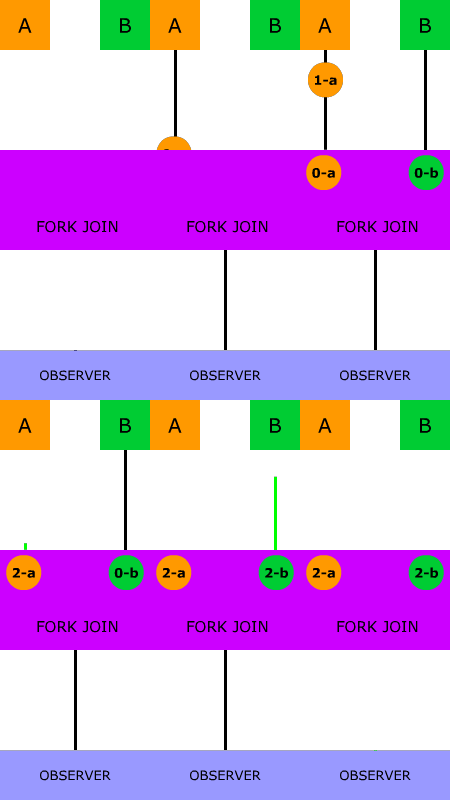
To get started, let's read a short introduction that directly compares forkJoin to Promise.all.
Combining Observables with forkJoin in RxJS
The article 'Combining Observables with forkJoin in RxJS' from Ultimate Courses provides a clear introduction to the operator and its relationship with Promise.all.
Read the beginning of the article, from the top down to just before the 'Order and parallel execution' section. This will solidify the basic concept and the Promise.all analogy.
2. Key Characteristics of forkJoin
While the basic idea is simple, there are a few key behaviors to understand to use forkJoin effectively.
Parallel Execution and Order Preservation
forkJoin subscribes to all source observables concurrently, meaning they execute in parallel. However, the output array is not dependent on the completion order. The results are mapped to their original positions. The first observable in the input array corresponds to the first value in the output array, regardless of when it completes.
Output Format: Array vs. Object
Since RxJS v6.5, you can pass forkJoin an object (or dictionary) of observables instead of an array. This can make your code much more readable, as you can destructure the results by name instead of accessing them by index.
Let's read about these two characteristics.
Combining Observables with forkJoin in RxJS
Let's continue with the same Ultimate Courses article to explore these behaviors.
Read the sections 'Order and parallel execution' and 'Alternative output options with forkJoin'. The code examples clearly demonstrate both points.
Here's a quick comparison of the two output formats:
Array Input (classic):
forkJoin([
  this.http.get('/user'),
  this.http.get('/settings')
]).subscribe(([user, settings]) => {
  // ...
});
Object Input (recommended for readability):
forkJoin({
  user: this.http.get('/user'),
  settings: this.http.get('/settings')
}).subscribe(({ user, settings }) => {
  // ...
});
3. The Critical Gotcha: Stream Completion
This is the single most important rule to remember about forkJoin: if any source observable does not complete, forkJoin will never emit a value.
This is a major difference from combineLatest, which emits as soon as it has one value from each source. forkJoin waits for the complete notification from every single source.
This is why forkJoin is perfect for finite streams like HTTP requests (which emit one value and then complete), but will cause silent failures if used with infinite streams like fromEvent (e.g., button clicks) or a raw interval unless you explicitly force them to complete.
Combining Observables with forkJoin in RxJS
The Ultimate Courses article has an excellent section that demonstrates this exact problem and its solution.
Read the section 'Inner observable lifetime and forkJoin'. Pay close attention to the example using interval and how the take operator is used to solve the problem by making the stream finite.
4. Error Handling Strategies
What happens if one of the parallel requests fails? By default, if any source observable errors, the entire forkJoin immediately errors out, and you lose the results from any other observables that might have completed successfully.
There are two primary strategies for handling this:
- Outer
catchError: Place acatchErroron theforkJoinstream itself. This is an "all or nothing" approach. If anything fails, you handle the error, but you get no results. - Inner
catchError: Place acatchErroron each individual source observable that might fail. This is the more robust approach. It allows you to handle a failure within one stream (e.g., by returning a default value likenullor a specific error object) while still allowing theforkJointo complete successfully with the results from the other streams.
Let's see how this works in practice.
Combining Observables with forkJoin in RxJS
We'll read one more section from the Ultimate Courses article to understand these two error handling patterns.
Read the section 'Error handling with forkJoin'. Compare the output of the 'outer catch' example with the 'inner catch' example to see the difference in behavior.
For most UI applications where you want to display as much data as possible, even if one API call fails, the inner catchError strategy is almost always the correct choice.
5. Advanced Pattern: Fetching Related Data
Now let's look at a common, real-world scenario that perfectly demonstrates the power of forkJoin. Imagine you fetch a primary resource (like a product), and that resource contains an array of IDs pointing to related resources (like a list of supplier IDs). To display the full product details, you must then make a separate API call for each supplier.
This is a "one-to-many" data fetching pattern. forkJoin is the ideal tool for this. You can map the array of IDs into an array of observables (API calls) and then pass that array to forkJoin.
The following video demonstrates this pattern beautifully. The presenter first implements it using a more complex chain of operators (mergeMap and toArray) and then refactors it to a clean, single forkJoin, which is a powerful illustration of its utility.
RxJS in Angular: Terms, Tips, and Patterns
In this clip from 'RxJS in Angular: Terms, Tips, and Patterns', Deborah Kurata demonstrates exactly how to handle fetching multiple related data items.
Watch the segment from 36:13 to 40:22. Focus on the problem setup (a product with an array of supplierIds) and the final, elegant solution using forkJoin.
This pattern of mapping an array of items to an array of observables and then using forkJoin is extremely common and powerful. It declaratively expresses "for this list of things, perform an async action for each, and notify me when they are all done."
6. Quick Summary
To wrap up our exploration, let's watch a very quick summary that recaps the main idea of forkJoin.
RxJS Quick Start with Practical Examples
This short clip from Fireship's 'RxJS Quick Start with Practical Examples' provides a concise summary of forkJoin's behavior.
Watch the clip from 11:30 to 12:09. It's a quick and effective reinforcement of what we've learned.
Conclusion
In this lesson, we've taken a deep dive into forkJoin, the RxJS solution for parallel execution. You've seen that while it's conceptually similar to Promise.all, its observable nature requires careful attention to stream completion and error handling.
Key Takeaways:
- Parallel Execution:
forkJoinis used to run a group of observables in parallel. - Waits for Completion: It only emits a value after every single source observable has completed. If one never completes,
forkJoinnever emits. - Last Value Only: The final emission contains only the last value from each source.
- Error Handling is Key: An unhandled error in any source will cause the entire
forkJointo fail. UsecatchErroron inner observables to build more resilient data-fetching logic. - Primary Use Case: Ideal for making multiple, independent API requests and combining their results to prepare the initial state for a component or view.
In our next lesson, we will shift our focus to a different, but equally powerful, set of operators: the flattening operators (mergeMap, switchMap, concatMap, and exhaustMap). While forkJoin is for running a known set of streams in parallel, flattening operators are used to handle scenarios where one stream triggers another, such as a user input event triggering a new API request. This will be a critical building block for creating interactive, real-world applications.
Can't find a good explanation? Sign up and we'll make it for you
Sign up