
Hello! Welcome back to our course on RxJS.
In our last lesson, we focused on filtering operators that control the flow and rate of emissions, specifically filter, take, debounceTime, and throttleTime. You learned how to tame high-frequency events, a crucial skill for building responsive UIs.
Today, we'll refine that control even further. This lesson addresses the learning outcome: Control emissions based on value changes or stream activity using distinctUntilChanged and sampleTime. These operators are often used in tandem with those from the previous lesson to create highly efficient and precise data streams. We'll see how to prevent redundant work by ignoring duplicate values and how to periodically sample a busy stream for updates.
1. Filtering by Value Change: distinctUntilChanged
In the previous lesson, we saw how debounceTime can prevent excessive API calls while a user types in a search box. But what if the user types "react", pauses, then types "js", and then deletes "js" to go back to "react" and pauses again?
debounceTime alone would emit "react" twice. This could lead to a redundant API call. The distinctUntilChanged operator solves this by ensuring that a value is only emitted if it's different from the immediately preceding emission.
By default, it performs a strict equality check (===).
Let's watch a video that perfectly illustrates the synergy between debounceTime and distinctUntilChanged.
debounceTime & distinctUntilChanged | RxJS TUTORIAL
This video from Academind builds directly on the search input example. It demonstrates the problem of duplicate emissions after debouncing and shows how distinctUntilChanged elegantly solves it.
Watch from 04:10 to 07:13. Pay close attention to how the stream behaves before and after adding distinctUntilChanged. Notice the importance of using map to extract the primitive value (the string) before the comparison happens.
This combination is a cornerstone of reactive UI programming:
import { fromEvent } from 'rxjs';
import { map, debounceTime, distinctUntilChanged } from 'rxjs/operators';

const searchInput = document.getElementById('search');

const searchInput$ = fromEvent(searchInput, 'input').pipe(
  map(event => (event.target as HTMLInputElement).value), // Extract the string value
  debounceTime(400),                                     // Wait for a 400ms pause
  distinctUntilChanged()                                 // Only emit if the value has changed
);

searchInput$.subscribe(searchTerm => {
  console.log(`Performing search for: ${searchTerm}`);
  // api.search(searchTerm)...
});
The Object Identity "Gotcha"
The default === comparison works perfectly for primitive types like strings, numbers, and booleans. However, it can be a source of bugs when your stream emits objects or arrays. Since === checks for reference equality, two different objects with the exact same properties will be considered "different".
{ user: 'test' } === { user: 'test' } // false
This means distinctUntilChanged() will let both emissions pass, even if their content is identical.
The following video, which is in Russian, clearly explains this common mistake and how to solve it. Given your educational background, you might find the native language explanation helpful.
This segment from Decoded Frontend's 'TOP 6 Mistakes in RxJS code' video explains the common error of using distinctUntilChanged on object streams without a custom comparator.
Watch from 12:03 to 15:06. The video demonstrates how distinctUntilChanged fails with objects and then introduces two solutions: a custom predicate function and the distinctUntilKeyChanged operator.
Solutions for Non-Primitive Types
As you saw in the video, there are two primary ways to handle this:
1. Custom Comparator Function
You can provide a function to distinctUntilChanged that takes the previous and current values and returns true if they should be considered equal.
2. distinctUntilKeyChanged Operator
If you only need to check for changes in a single property of an object, distinctUntilKeyChanged('keyName') is a convenient and readable shorthand.
This article provides excellent code examples for both approaches.
RxJS distinctUntilChanged: filtering out duplicate emissions
This article by Bryan Hannes, 'RxJS distinctUntilChanged: filtering out duplicate emissions', provides clear, concise code examples for basic usage, custom comparators, and the distinctUntilKeyChanged operator.
Read the sections 'Basic usage of distinctUntilChanged', 'Providing a custom comparison function', and 'Filtering based on 1 key with distinctUntilKeyChanged'. The code snippets clearly illustrate the concepts we've just discussed.
2. Filtering by Stream Activity: sampleTime
Now let's shift from filtering based on value to filtering based on time. Imagine you're tracking the user's mouse position. The mousemove event can fire hundreds of times per second. You probably don't need that much data. You just want a periodic snapshot of the position.
This is where sampleTime(ms) comes in. It periodically "samples" the source stream. At the end of each time interval, it emits the most recent value that the source produced during that interval. If the source didn't emit anything during the interval, sampleTime emits nothing.
Your background in radiophysics might provide a useful analogy here: sampleTime acts like a digital sampling process on an analog signal. It takes discrete measurements of a continuous stream of events at a fixed frequency to create a representative, but less dense, output.
Let's look at the official documentation for a formal definition and a helpful marble diagram.
The official RxJS documentation for sampleTime provides the definitive explanation, a marble diagram, and a simple code example.
Review the page, paying special attention to the marble diagram. It visualizes how sampleTime works. Note how it differs from throttleTime (which would emit 'b' and 'f' in the diagram) and debounceTime (which would wait for pauses).
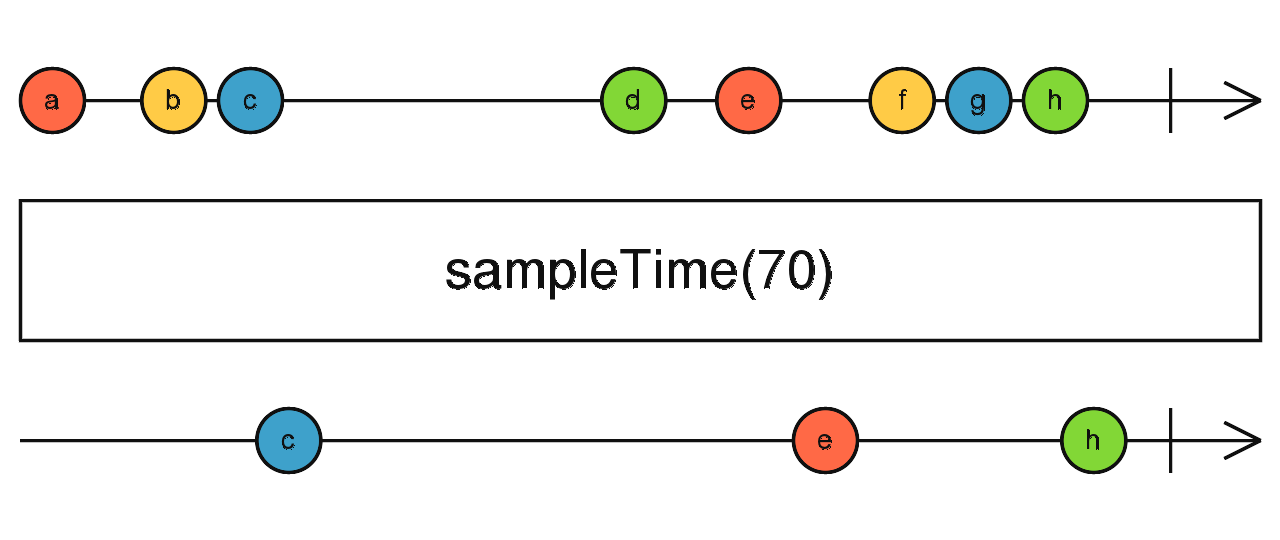 This marble diagram shows a source stream (top) emitting values 'a' through 'f'. The
 sampleTime operator (bottom) samples the stream at regular intervals (indicated by the dashes). It emits 'c' (the last value in the first interval), 'e' (the last in the second), and 'f' (the last in the third).
Use Case: Tracking Scroll Position
A great use case for sampleTime is tracking the scroll position of a page to trigger an animation or a "back to top" button. You don't need to react to every single pixel scrolled; a check every 100ms is more than enough and much more performant.
import { fromEvent } from 'rxjs';
import { sampleTime, map } from 'rxjs/operators';

const scroll$ = fromEvent(document, 'scroll');

const scrollPosition$ = scroll$.pipe(
  sampleTime(100), // Sample the scroll event every 100ms
  map(() => window.scrollY) // Get the latest scrollY position
);

scrollPosition$.subscribe(position => {
  console.log(`Current scroll position: ${position}px`);
  // if (position > 400) { showBackToTopButton(); }
});
Practice Exercise
Let's combine what you've learned. Try to implement the following in a simple HTML file or a code playground like CodePen:
- Create an observable from the
mousemoveevent on thedocument.body. - Use
mapto transform theMouseEventinto an object withxandycoordinates:{ x: event.clientX, y: event.clientY }. - Use
sampleTime(200)to get a position update every 200 milliseconds. - Chain
distinctUntilChanged((prev, curr) => prev.x === curr.x && prev.y === curr.y)to ensure you only log when the sampled position has actually changed (i.e., the mouse isn't just sitting still between samples). - Subscribe and log the coordinates to the console.
This exercise simulates a common pattern for tracking user interaction in a performant way.
Conclusion
In this lesson, we've added two more precision tools to your RxJS operator toolkit, allowing you to create highly optimized streams.
Key Takeaways:
distinctUntilChanged: Filters out consecutive, duplicate emissions from a stream. It's essential for preventing redundant operations.- By default,
distinctUntilChangeduses===for comparison, which works for primitives but not for objects by value. - For objects, you must either provide a custom comparator function or use the
distinctUntilKeyChangedhelper operator. sampleTime: Emits the most recent value from a source stream at periodic intervals. It's perfect for getting snapshots of high-frequency event streams without being overwhelmed.
You are now adept at controlling not just the rate of emissions, but also their uniqueness and timing. This level of control is what makes RxJS so powerful for managing complex asynchronous logic in modern applications.
In our next lesson, we'll move from transforming and filtering single streams to a new, exciting topic: declaratively combining multiple streams. We will explore operators like combineLatest, merge, concat, and zip to orchestrate different data sources together.
Can't find a good explanation? Sign up and we'll make it for you
Sign up