
Welcome back. In the previous lesson, you separated enterprise change into the four TOGAF architecture domains: Business, Data, Application, and Technology. That gives us the lenses through which to describe an enterprise. This lesson adds a second essential dimension: time and change.
An architecture is not useful merely because it describes the enterprise neatly. It must help people decide how to move from today’s environment to a viable future state without disrupting critical operations. TOGAF does this through Baseline Architecture, Target Architecture, and, where change cannot sensibly occur in one step, Transition Architectures.
This lesson: Foundation emphasis, with workplace application
Estimated study time: 40–45 minutes
Architecture as a set of states
A transformation begins with a practical tension:
- the enterprise has a current way of operating;
- that current state has constraints, risks, costs, and dependencies;
- leaders want a different future state that produces better business outcomes; and
- the organization must continue operating while the change is made.
TOGAF architecture states make that tension explicit.
| Architecture state | Central question | Role in transformation planning |
|---|---|---|
| Baseline Architecture | What is the relevant current state? | Establishes the factual starting point, including constraints and dependencies. |
| Target Architecture | What future state must be achieved? | Defines the intended outcome that meets the agreed business and architecture requirements. |
| Transition Architecture | What viable intermediate state can operate on the way to the target? | Makes phased, controlled change possible. |
The word architecture matters in all three terms. Each state describes a coherent combination of Business, Data, Application, and Technology Architecture—not simply a list of projects or a technology configuration.
For example, a transition that introduces Microsoft 365 for some teams but leaves document ownership, retention responsibilities, support arrangements, and identity controls undefined is not yet a strong Transition Architecture. It may be a project activity, but it is not a sufficiently described operating state.
Baseline Architecture: the relevant truth about today
The Baseline Architecture is the architecture of the enterprise as it exists at the beginning of the transformation scope. It is sometimes called the as-is architecture, but “current state” is often more helpful language: it emphasizes that the baseline must be evidence-based, scoped, and current enough to support decisions.
A baseline is not an exhaustive inventory of every server, application, process, and document in the organization. Its detail should match the decision being made.
For a hybrid-cloud transformation, a useful baseline might include:
- business capabilities affected by the change, such as collaboration, inventory operations, or customer service;
- current roles, decision rights, and governance arrangements;
- important data entities, authoritative sources, and known data-quality issues;
- applications, interfaces, duplications, and unsupported dependencies;
- on-premises platforms, Azure services already in use, Microsoft 365 usage patterns, identity arrangements, connectivity, monitoring, and recovery capabilities.
The baseline is valuable partly because it reveals uncomfortable facts. A migration plan based on assumptions such as “all applications use modern authentication,” “all integrations are documented,” or “all business data has a named owner” may fail when those assumptions prove false.
For Northstar Distribution Group, suppose the relevant baseline reveals the following:
| Domain | Illustrative baseline finding |
|---|---|
| Business | Warehouse teams manage exceptions locally, with inconsistent escalation and limited enterprise-level visibility. |
| Data | Inventory balances are reported differently across systems, and ownership of enterprise definitions is unclear. |
| Application | Legacy inventory and order applications exchange data through direct database connections and scheduled file transfers. |
| Technology | Core workloads remain on-premises; remote access depends heavily on VPN; Microsoft 365 is used inconsistently; monitoring and recovery practices vary by system. |
This baseline does not say that everything must be replaced. It establishes what must be understood before deciding what to retain, improve, retire, or introduce.
What a baseline is not
A few distinctions are useful for Foundation questions and workplace practice:
- It is not a wish list. That belongs in target requirements or the Target Architecture.
- It is not automatically a full configuration-management database. Operational inventories can contribute evidence, but architecture focuses on significant structure, relationships, constraints, and decisions.
- It is not necessarily stable forever. If the enterprise changes during a long architecture engagement, the baseline may need controlled updates.
- It is not confined to Technology Architecture. A baseline process, data-owner role, or application dependency can be just as important as a baseline server platform.
Target Architecture: an intended, testable future state
The Target Architecture describes the desired future architecture for the agreed scope and time horizon. It is the architectural destination: a coherent description of how the enterprise should operate once the transformation objectives have been achieved.
A useful target is not a slogan such as “become cloud-first” or “implement Microsoft 365.” It expresses architectural choices that can guide delivery and later be assessed for conformance.
For Northstar, a target architecture for secure hybrid work and improved operational visibility might include:
| Domain | Illustrative target state |
|---|---|
| Business | Defined accountability for information ownership, collaboration governance, and enterprise inventory exception management. |
| Data | Governed definitions for key measures such as inventory availability, named data owners, quality rules, and clear authoritative sources. |
| Application | Standard collaboration services, rationalized business applications, and managed integration patterns rather than uncontrolled point-to-point connections. |
| Technology | Approved Azure hosting patterns, integrated identity controls across cloud and on-premises services, secure connectivity, centralized monitoring, tested backup, and recovery arrangements. |
The target describes the outcome, not every delivery task. “Configure Conditional Access policy X,” “migrate server Y,” and “train 500 users” may all be necessary activities, but they are not by themselves architecture. They are implementation details or work that realizes the target state.
A well-formed target should be:
- connected to business outcomes, such as more reliable operations, secure collaboration, reduced support cost, or faster decision-making;
- bounded by scope, so it is clear which organization units, capabilities, applications, and platforms it covers;
- consistent across domains, so that a target business process is supported by suitable applications, information, and technology;
- testable, so architects and delivery teams can later determine whether a solution conforms to it.
Target does not mean “all new”
An effective target architecture normally retains useful components. A legacy application may remain temporarily or permanently if it has strategic value, manageable risk, and a suitable integration role. A target often contains a deliberate mixture of:
- retained architecture building blocks;
- modernized or reconfigured building blocks;
- newly introduced building blocks; and
- components scheduled for retirement.
The key question is not whether a component is old or cloud-based. It is whether it fits the target business and technology direction, architecture principles, requirements, cost, and risk profile.
From baseline to target: identifying the architecture gaps
Once baseline and target architectures are described, the architect compares them. This is gap analysis: identifying meaningful differences between the current and intended states.
A gap is not simply “a thing we do not have.” It is a difference that prevents the target architecture from being realized or operated successfully.
For example:
| Baseline | Target | Architecture gap |
|---|---|---|
| Several inconsistent definitions of available inventory | One governed enterprise definition with accountable ownership | No common inventory-information model, ownership model, or quality controls |
| Direct application-to-database integrations | Managed, documented integration services | Integration pattern and interface governance gap |
| Inconsistent use of collaboration platforms | Governed Microsoft 365 collaboration with controlled external sharing | Collaboration governance, information classification, and adoption gap |
| Separate monitoring practices for key systems | Central observability and defined service objectives | Monitoring, operational process, and technical-platform gap |
Gap analysis turns broad ambition into change that can be planned. It helps reveal:
- What must be introduced: for example, a centralized identity capability or an information-classification model.
- What must be changed: for example, an existing application’s authentication method or a warehouse exception process.
- What must be removed or retired: for example, a duplicate CRM component or an unsupported server platform.
- What must be retained: for example, a stable operational application that supports a critical process while other dependencies are modernized.
The gap itself is not yet a project plan. It is a structured statement of the architectural need. In later planning, gaps are consolidated, related to requirements, and addressed through solution options and work packages.
(PDF) TOGAF 9 and ArchiMate 1.0
Read The Open Group’s ArchiSurance example for a concrete visual comparison of baseline, target, gap, and transition states. This is an older TOGAF publication, but its architecture-state illustrations remain useful; focus on the concepts rather than treating it as the current certification reference.
On pp. 14–17, find the ArchiSurance application-landscape discussion beginning with the baseline and target comparison. Study Figures 10, 11, 14, and 15 and identify what is retained, what is consolidated, and what is introduced. Then move to the Phase E and F discussion on p. 20. Read the transition architecture explanation. Notice that the source presents two possible intermediary states, not one mandatory technical sequence.
Transition Architectures: viable plateaus, not halfway diagrams
A Transition Architecture is an intermediate architecture state between the baseline and the target. TOGAF often describes it as a plateau: a state stable enough for the enterprise to operate before the next increment of change.
This is more demanding than saying “we are halfway through the migration.”
A halfway point may leave systems unsupported, processes unclear, data duplicated without ownership, or users unable to perform critical work. A Transition Architecture should instead describe a viable state with enough coherence for the affected enterprise to continue operating safely and effectively.
Transition Architectures are especially useful when:
- the target is too large, risky, costly, or disruptive to deliver in one release;
- applications must coexist temporarily because of dependency or data-migration constraints;
- an operational capability must be delivered early to create value or reduce risk;
- the organization needs time for training, adoption, governance changes, or supplier transitions;
- funding and delivery capacity require staged investment;
- a target technology foundation must be established before applications can move onto it.
A transition state may contain temporary components, such as an integration service used while a legacy system is phased out. “Temporary” does not mean ungoverned. The temporary component still requires owners, security controls, operational support, and a retirement decision.
A Transition Architecture is not a work package
This distinction is central:
| Term | What it describes |
|---|---|
| Work package | A bounded set of implementation work, such as establishing a cloud landing zone, migrating an application, or introducing information-classification controls. |
| Transition Architecture | The architecture state that exists after a coherent set of changes has been completed. |
| Architecture Roadmap | The high-level plan that relates work packages, milestones, transition states, and the Target Architecture over time. |
| Implementation and Migration Plan | The more detailed plan for sequencing, dependencies, resources, and execution. |
One or more work packages may produce a Transition Architecture. Conversely, one work package can contribute to more than one transition state if it is delivered incrementally. The architect should therefore avoid treating project names as architecture states.
Introduction to TOGAF ADM: Phase E Opportunities and Solutions
Watch “Introduction to TOGAF ADM: Phase E Opportunities and Solutions” from VisualParadigm. It gives a compact explanation of the boundary between developing baseline and target architectures and planning the route that realizes them.
Watch Phase E overview to distinguish work packages, transition architectures, and the implementation and migration plan. Then skip to transition states for the explanation of intermediate architecture milestones and alternative transition patterns. Focus particularly on why an intermediate state is an architectural condition, rather than merely a calendar milestone.
A Northstar transition plan in architecture terms
Assume Northstar’s target is a secure, governed hybrid operating environment: staff collaborate through standardized Microsoft 365 services; key enterprise information has clear ownership and handling rules; applications use controlled integration patterns; and Azure and on-premises platforms operate through approved identity, connectivity, monitoring, backup, and resilience standards.
That target is too broad to implement safely in one release. The organization could define two Transition Architectures.
| State | Architectural condition | Why it is viable |
|---|---|---|
| Transition Architecture 1: secure hybrid foundation | Central identity integration and baseline security controls are in place; approved Azure foundation services are available; selected teams use governed Microsoft 365 collaboration; critical legacy operational systems remain on-premises. | Northstar gains an approved, supportable platform and can begin controlled adoption without forcing immediate replacement of critical operational systems. |
| Transition Architecture 2: governed information and integrated operations | Enterprise data ownership is established for priority information; inventory and order integrations use managed interfaces; collaboration governance is extended enterprise-wide; selected legacy services are retired or isolated. | The organization has reduced integration and information-management risk while preserving continuity for applications that still require staged modernization. |
| Target Architecture: integrated hybrid enterprise | All in-scope business capabilities, information governance, applications, and technology services operate according to the approved target design. | The intended transformation outcomes can be sustained as normal enterprise operations. |
Notice the cross-domain nature of the first transition state. “Set up Azure” alone would not be enough. The transition must include at least the business ownership and support arrangements, data and access rules, application onboarding approach, and technology controls necessary to operate the new hybrid environment.
Choosing among possible transition states
There can be more than one credible route to the same target. For example, Northstar might first modernize collaboration and identity, then address inventory integration. Alternatively, a regulatory or operational problem might require inventory-data governance and integration to be addressed earlier.
The preferred route depends on factors such as:
- business urgency and expected value;
- dependencies between applications, data, platforms, and business processes;
- security, resilience, and compliance risk;
- implementation complexity and cost;
- organizational capacity for adoption and training;
- contractual, licensing, or supplier constraints;
- the need to avoid disruption during critical business periods.
A Transition Architecture is therefore both a design decision and a planning decision. It describes a feasible state and gives decision-makers a way to assess whether the enterprise can safely occupy that state.
Baseline, transition, and target across the four domains
The previous lesson’s BDAT model remains essential. An architecture state should not be described only through technology.
Consider Northstar’s first transition state, focused on establishing a secure hybrid foundation:
| Domain | Baseline | Transition Architecture 1 | Target |
|---|---|---|---|
| Business | Local, inconsistent collaboration practices and unclear ownership for external sharing | Defined collaboration owners and support responsibilities for pilot areas | Enterprise-wide collaboration and records governance embedded in operating practices |
| Data | Inconsistent classification and handling of documents | Priority information categories and handling rules applied to pilot collaboration spaces | Governed classification, retention, ownership, and lifecycle controls across in-scope information |
| Application | Uncontrolled mix of collaboration tools and direct legacy integrations | Standard Teams and SharePoint patterns for pilot groups; legacy operational applications remain | Rationalized collaboration services and managed integration patterns across the portfolio |
| Technology | Mixed identity arrangements, VPN dependence, inconsistent monitoring | Central identity controls, approved Azure foundation, baseline monitoring and secure connectivity | Mature hybrid platform standards, resilience controls, centralized observability, and sustainable operations |
This table illustrates an important principle: a Transition Architecture may intentionally contain coexistence.
During transition, Northstar may legitimately operate both cloud and on-premises services, both old and new integration methods, or both local and enterprise governance arrangements. The architectural question is whether that coexistence is designed, controlled, and temporary where intended—not whether it looks perfectly simple.
Where the ADM uses these states
The TOGAF Architecture Development Method, or ADM, provides the overall structure in which architecture states are developed and used.
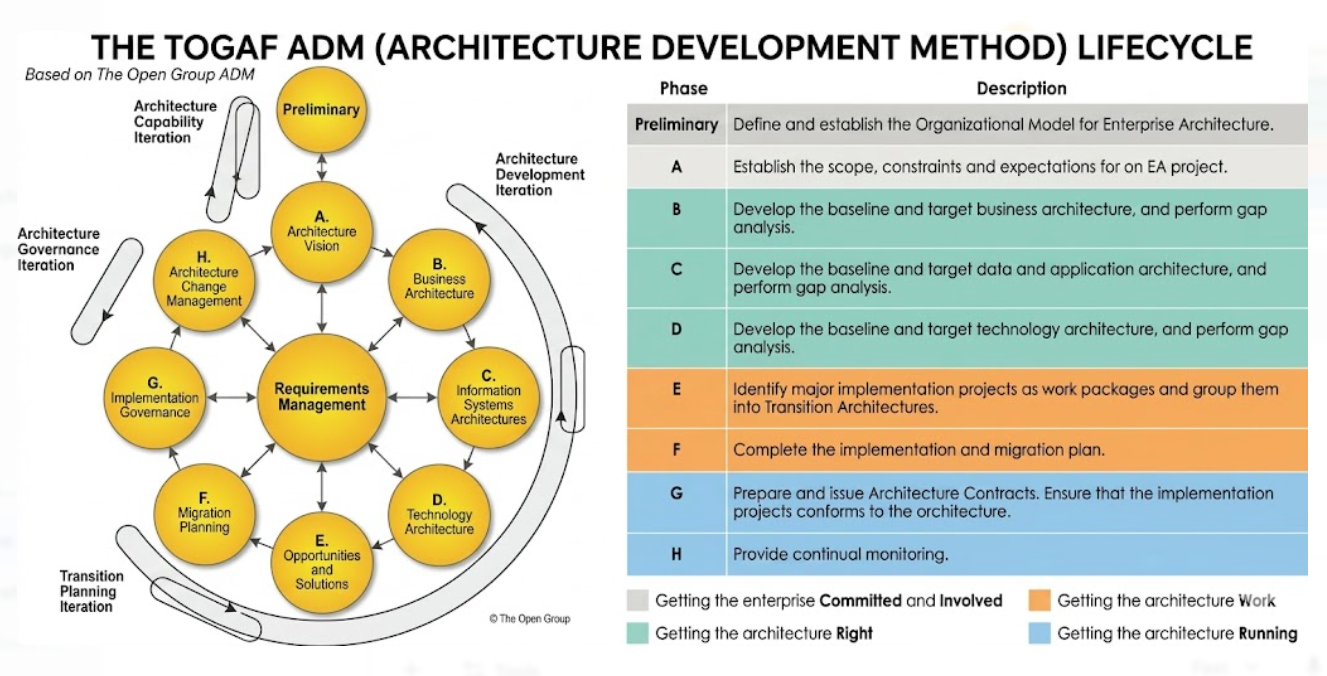
At a high level:
- Phases B, C, and D develop the architecture across the Business, Data and Application, and Technology domains. The architect documents relevant baseline and target states and performs gap analysis.
- Phase E, Opportunities and Solutions, identifies how the required changes can be grouped into solution options and work packages. Transition Architectures help define feasible increments.
- Phase F, Migration Planning, refines the implementation and migration planning, taking account of dependencies, costs, benefits, risks, and timing.
- Phase G, Implementation Governance, uses the approved architectures as a reference for implementation conformance and decision-making.
The ADM is iterative. A discovery made during delivery—such as an undocumented legacy application dependency—may require the baseline, target, transition plan, requirements, or roadmap to be revisited under governance.
For the present lesson, retain the core relationship: baseline and target define the architectural change; transition architectures make that change deliverable in coherent stages.
Foundation-style recognition cues
When reading a TOGAF scenario, identify the role played by each architecture state.
| Scenario wording | Best interpretation |
|---|---|
| “The organization’s current application portfolio includes three duplicate customer systems.” | Baseline Architecture evidence |
| “The approved future design requires one enterprise customer service with governed master data.” | Target Architecture |
| “For eighteen months, the new customer service will coexist with two legacy systems while interfaces are migrated.” | Transition Architecture |
| “The differences between current and future application services have been identified.” | Gap analysis |
| “A project will establish centralized identity and migrate selected applications.” | Work package or project activity, not automatically a Transition Architecture |
| “The planned state after the identity and initial migration work is complete.” | Potential Transition Architecture, provided it is sufficiently coherent and operable |
The most common distractor is confusing a transition architecture with a project plan. A project plan says what work will be done. A Transition Architecture says what the enterprise will look like and how it will operate after a planned increment of work.
A practical documentation habit
For each state, create a short, decision-oriented architecture statement before producing detailed diagrams. A useful format is:
| State | Statement structure |
|---|---|
| Baseline | “Today, [scope] operates through [significant current arrangements], creating [key constraints, risks, or limitations].” |
| Target | “At the target horizon, [scope] will operate through [approved capabilities and architectural choices], enabling [measurable outcomes].” |
| Transition | “At this milestone, [scope] will operate through [intermediate capabilities and coexistence arrangements], while [remaining changes] are planned for later increments.” |
For example:
At the first transition milestone, Northstar will operate with centralized identity controls, approved Azure platform foundations, and governed Microsoft 365 collaboration for priority teams. Core inventory applications will remain on-premises but will use the approved access, monitoring, and support model while later integration modernization is completed.
This is concise, but it makes the intended operational state, retained legacy elements, and later work visible. It gives business leaders, delivery teams, security specialists, and operations staff something concrete to validate.
Key takeaways
- Baseline Architecture describes the relevant current state of the enterprise. It provides evidence, constraints, dependencies, and a factual starting point for transformation.
- Target Architecture describes the desired future state. It must be connected to agreed business outcomes, requirements, and cross-domain architectural choices.
- Gap analysis identifies the meaningful differences that must be addressed to move from baseline to target.
- Transition Architectures are viable, intermediate architectural plateaus. They make large transformations safer and more manageable by defining stable operating states during phased change.
- A work package describes implementation work; a Transition Architecture describes the enterprise state resulting from coherent increments of that work.
- All three architecture states should be considered across Business, Data, Application, and Technology Architecture—not only as technology diagrams.
Next, you will begin shaping Northstar’s transformation rationale by identifying its business drivers, constraints, and intended outcomes. Those elements provide the basis for deciding what the Target Architecture must achieve and what trade-offs are acceptable on the journey there.
Can't find a good explanation? Sign up and we'll make it for you
Sign up