
In our previous lesson, you successfully created your first bot using BotFather and verified its API token with a getMe request. That simple HTTPS call was your first direct interaction with the Telegram Bot API. Now, we will build on that by deconstructing the API's architecture. Understanding this conceptual model is crucial before we start writing more complex code.
This lesson unpacks the three fundamental components that govern all bot communications: Updates, Methods, and Types. By the end, you'll grasp the complete request-response cycle between your bot's logic and Telegram's servers, which will form the foundation for everything we build moving forward.
The Bot API: A Two-Way Street
At its core, the interaction between your code and Telegram is a dialogue facilitated by the Bot API server. This is a classic client-server model, where your bot application acts as the client. The dialogue consists of two main activities:
- Receiving Updates: Your bot listens for notifications from Telegram about events, such as a user sending a message.
- Calling Methods: Your bot sends commands to Telegram, instructing it to perform actions, like replying to that message.
An article on Chatbots Life provides a clear, high-level overview of this interaction model.
Introduction to the Telegram Bot API, Part 1 | by Jiayu Yi - Chatbots Life
This article clearly separates the API's functionality into these two core concepts: receiving updates and calling methods.
Please read the sections How a bot works and The Telegram Bot API. Pay close attention to the sequence diagram, which visualizes the Bot API's role as an intermediary.
This entire exchange of information is standardized. Both the updates you receive and the methods you call use well-defined data structures. Let's examine each of these three components—Updates, Methods, and Types—in detail.
1. Updates: What Happened?
An Update is a JSON object that the Bot API sends to your application whenever a user interacts with your bot. Every action—a user sending a text, tapping a button, editing a message, or adding your bot to a group—is packaged into an Update object and sent your way.
Think of Updates as being analogous to events in a front-end application. Just as a browser dispatches a click event when a user clicks a button, Telegram dispatches a message update when a user sends a message.
Each Update object has a unique update_id and, crucially, contains exactly one of several optional fields that describes the event. For example, if the update is for a new text message, the Update object will contain a message field. If it's for a user tapping an inline keyboard button, it will contain a callback_query field instead.
This structure is shown visually in the diagram below.
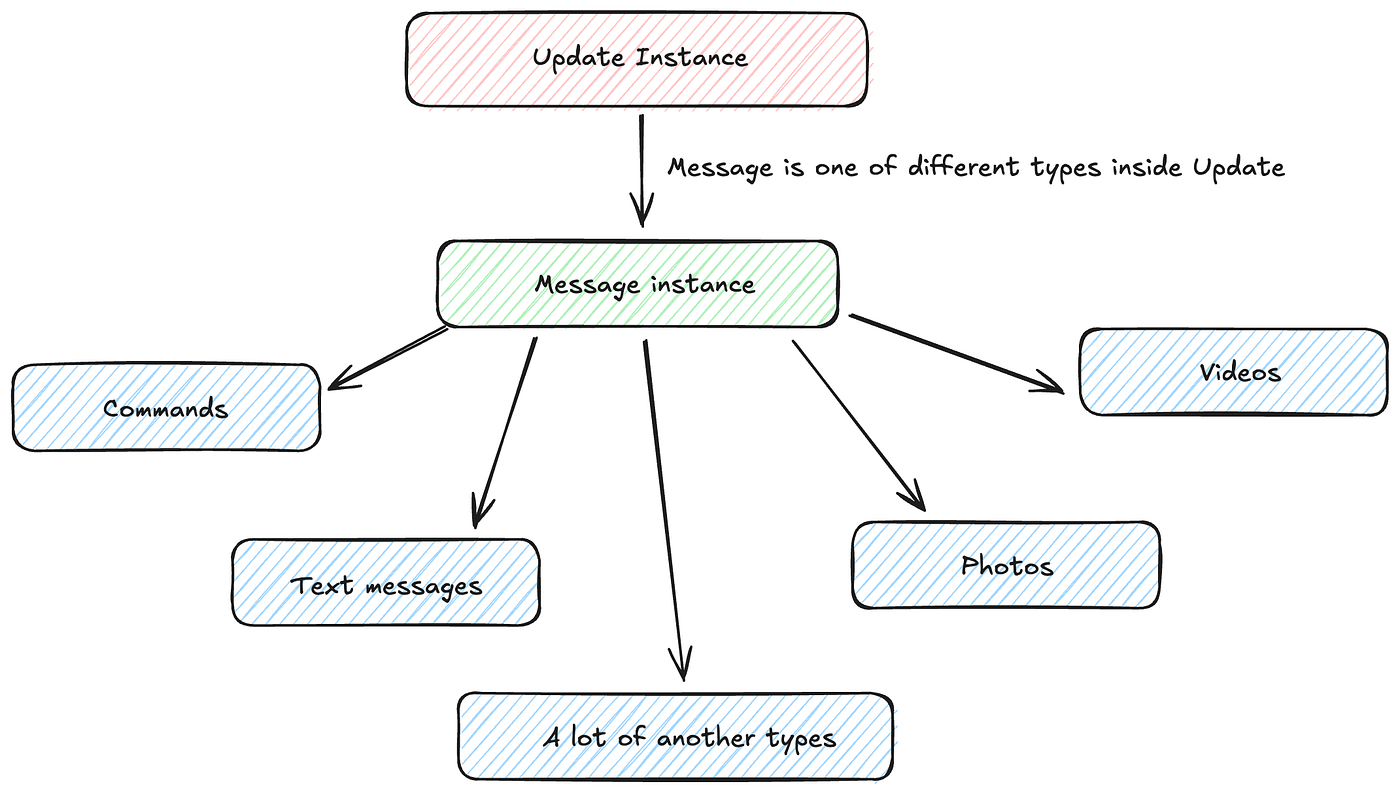
To make this concrete, let's look at the raw JSON structure of a couple of different Update objects.
Introduction to the Telegram Bot API, Part 1 | by Jiayu Yi - Chatbots Life
The "Receiving updates" section of the same article provides excellent examples of the JSON payloads you can expect.
Focus on the part of the text under the "Receiving updates" subheading. Examine the two JSON examples provided: the first for a text message and the second for an inline query. Notice how in each case, the Update object has an update_id and one other key (message or inline_query) that defines the nature of the interaction.
Your bot's primary job is to receive these Update objects, inspect their contents to understand what happened, and then decide how to react.
2. Methods: What to Do?
While Updates are how Telegram talks to you, Methods are how you talk to Telegram. A method is an action that you instruct your bot to perform. You invoke a method by making an authenticated HTTP request to a specific endpoint on the Bot API server.
You have already done this. The getMe request from the previous lesson was a call to the getMe method. Its endpoint URL followed a specific pattern:https://api.telegram.org/bot<YOUR_TOKEN>/getMe
This pattern is universal for all methods:https://api.telegram.org/bot<YOUR_TOKEN>/<METHOD_NAME>
The most common method you'll use is sendMessage, which, as the name implies, sends a message to a chat. To call it, you would make an HTTP request to .../sendMessage and include parameters in the request body, such as the chat_id of the recipient and the text of the message.
Introduction to the Telegram Bot API, Part 1 | by Jiayu Yi - Chatbots Life
This final section of the article explains how methods are invoked and what a response looks like.
Read the sections Calling methods and the subsequent examples showing how to invoke a method via HTTP. Note the different ways parameters can be passed (query string, JSON body) and the structure of the JSON response, which always includes an "ok": true/false field.
As a developer with extensive experience in client-server communication, you can think of the Bot API as a standard RESTful API. Each method is an endpoint, you pass parameters in the request, and you receive a JSON object in the response.
3. Types: The Common Language
So, we have incoming Update objects and outgoing Method calls. The data structures for all of these are rigorously defined by the API. These predefined structures are called Types.
In the Update examples you reviewed, you saw not just the Update type, but also others nested inside it, like Message, User, and Chat. Each of these is a type with its own set of specified fields. For instance, a Message object will always have a message_id and a date, and may contain fields like text, photo, or document.
This is where your TypeScript background becomes a significant advantage. The entire Telegram Bot API schema can be represented by TypeScript interfaces. Manually writing these interfaces would be tedious, but fortunately, the grammY framework (which we will start using in the next module) provides them for you.
The grammY documentation explains how it provides complete type coverage for the entire API.
This documentation page highlights one of grammY's key features for TypeScript developers: providing a comprehensive set of type definitions for the Bot API.
Read the section titled Type Definitions. Pay special attention to the mention of the @grammyjs/types repository and the examples showing how you can <tf start="import { type Chat } from "grammy/types";" end="import { type Chat } from "grammy/types";">import types directly in your code.
Having these types means you'll get autocompletion, type-checking, and compile-time safety when handling updates and calling methods. Instead of manually parsing raw JSON and checking for the existence of fields, you'll work with fully-typed objects. This dramatically reduces a whole class of potential runtime errors and makes development faster and more reliable. For example, instead of if (update.message && update.message.text), you'll be able to work with a ctx.message.text property that the type system guarantees exists in the right context.
Conclusion
In this lesson, we've established the conceptual framework of the Telegram Bot API. You now understand that all interactions are governed by a clear, structured dialogue.
Key Takeaways:
- API Architecture: The bot interaction model is a two-way communication flow: Telegram sends your application Updates, and your application calls Methods on the API.
- Updates: These are JSON objects representing user interactions. Each
Updateobject wraps a specific event type, like a new message or a button click. - Methods: These are actions your bot can perform, invoked via HTTP requests to specific API endpoints (e.g.,
sendMessage). - Types: The entire API is strongly-typed. Every piece of data, from an
Updateto aUserobject, conforms to a predefined structure. For us, these will map directly to TypeScript interfaces, providing safety and developer convenience.
We've covered what is being communicated. The next logical question is how. In our next lesson, we will explore the two different mechanisms for receiving updates from Telegram: long polling and webhooks. We will then write our first piece of code to actively listen for updates using a basic long polling loop.
Can't find a good explanation? Sign up and we'll make it for you
Sign up