
Hello, and welcome to the first lesson in your DevOps career-transition course.
This first module establishes the workflow that ties the rest of the course together: Git changes, automation, deployments, and operational feedback. The tools will come later—GitHub Actions, AWS, Docker, Terraform, Kubernetes—but the essential idea comes first: a production release should be a repeatable, observable system, not a sequence of high-pressure manual actions.
By the end of this lesson, you should be able to trace a change from an idea through code, automated checks, deployment, and production monitoring—and point to the practices that make failures visible earlier and safer to handle.
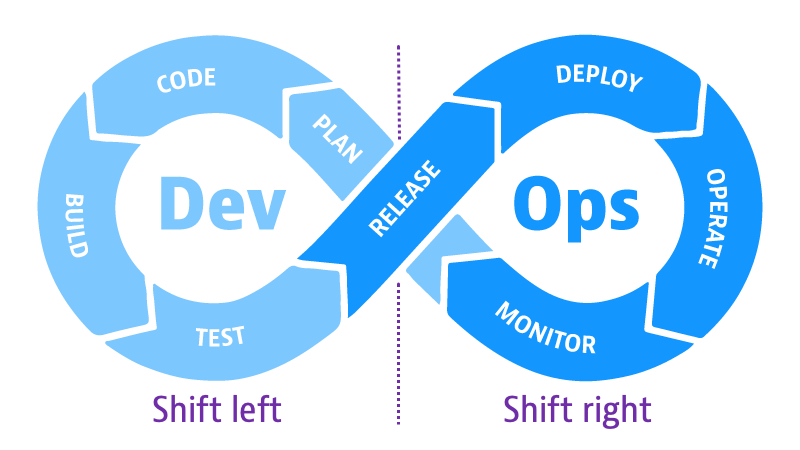
DevOps is a delivery-and-learning loop
A useful starting point is to separate DevOps from a collection of products. DevOps is not “using Docker” or “running Kubernetes.” It is an operating model in which development and operations share responsibility for delivering software safely and learning quickly from its real behavior.
For a DBA, the contrast may feel familiar. A manually executed database change can work perfectly in one environment but fail in production because of data volume, permissions, connection behavior, locking, or an overlooked dependency. The operationally mature response is not simply “be more careful.” It is to make the change process repeatable, validate assumptions at appropriate points, preserve evidence of what ran, and monitor the live result.
Software delivery follows the same principle.
A feedback loop is the time between:
- Making or proposing a change.
- Receiving evidence about whether it works.
- Acting on that evidence.
A long feedback loop might look like this: a developer works on a feature for two weeks, merges it with several other changes, QA discovers a failure late in a release cycle, and the team must work backward through a large set of possible causes.
A short feedback loop is different: a small commit triggers a test within minutes, the failing test identifies the change involved, and its author fixes it while the work is still fresh.
The goal is not merely to deploy more often. It is to make each release less mysterious: known source revision, known build output, known checks, known deployment procedure, and known production signals.
Learn How Companies Deploy Code to Production Environment [In 5 Mins!]
Watch “Learn How Companies Deploy Code to Production Environment [In 5 Mins!]” by Cloud Champ for a compact first view of the end-to-end workflow, from planned work through post-deployment monitoring.
Watch planning and local work to see how a requirement becomes a small unit of engineering work and then a repository change. Continue with review and automation for the role of feature branches, pull requests, and automated workflows. Finish with environments and monitoring, focusing on why production-like testing and post-release observation matter. The video presents separate Git branches for dev, staging, and production as one possible workflow. Keep the larger principle rather than treating that branch model as universal: teams need controlled environments and promotion rules, but many modern teams use one main branch and promote the same built artifact across environments.
The path from a change to production
The exact tooling varies across organizations, but a healthy delivery path has a recognizable structure. A change may be application code, a configuration update, a deployment manifest, or eventually infrastructure code. Whatever its form, it should travel through a traceable path.
1. Plan a small, testable change
Work normally begins with a ticket, user story, defect report, or operational requirement. The important DevOps question is: what observable result will show that this change worked?
For example:
- “Add a health endpoint” can be verified by an HTTP request returning the expected status.
- “Reduce slow database requests” can be evaluated with a latency target and database metrics.
- “Allow a service to read a bucket” can be verified by a controlled permission test.
This matters because automation needs concrete pass/fail criteria. Vague goals such as “make it more reliable” become useful only when translated into measurable behavior.
2. Develop and validate locally
A developer makes the change in an isolated workspace, usually a Git branch. Before sharing it, they run fast checks locally: formatter, linter, unit tests, or a small local instance of the application.
This is the first example of shifting left: moving validation closer to the moment and person creating the change. A syntax error or an obvious failing unit test should not wait for a remote pipeline, a staging environment, or a production incident.
Local checks are valuable, but they are not sufficient. A developer’s laptop does not reliably reproduce the shared build environment, dependencies, credentials, operating system behavior, network conditions, or interactions with other changes. That is why the change next moves into shared, automated systems.
3. Push the change and request review
The branch is pushed to a central Git repository. A pull request gives other team members a structured place to inspect:
- what changed;
- why it changed;
- automated-check results;
- design or security concerns;
- whether the change is ready to merge.
Review is a feedback loop too. It catches misunderstanding and operational risk before code reaches the shared main branch. But review should complement automation, not replace it. A reviewer cannot reliably spot every broken dependency, regression, or deployment error by reading a diff.
4. Run continuous integration checks
Continuous integration (CI) means integrating small changes into the shared codebase frequently and validating them automatically.
A workflow is triggered by a push or pull request. It runs in a controlled environment and commonly performs checks such as:
- dependency installation;
- application build or compilation;
- unit tests;
- linting and formatting checks;
- static analysis;
- test coverage checks;
- early security scans.
A pull-request check can tell the author, “this proposed change appears safe to merge.” After the merge, CI should generally validate the integrated main branch again. Passing tests on two separate branches do not prove that the combined result works.
If CI passes, it creates a build artifact: the output that will actually be deployed. Depending on the application, this may be a package, binary, compressed application bundle, or Docker image.
This distinction is critical:
A release should promote the same tested artifact, rather than rebuilding separately for every environment.
Rebuilding for staging and then rebuilding again for production makes it possible to deploy something that was never tested. A versioned artifact gives you traceability: “Production is running image 1.4.2, built from this commit, after these checks passed.”
5. Deploy to a test or staging environment
The artifact is deployed to an environment that is sufficiently similar to production for meaningful validation. This may be called development, test, integration, QA, staging, or pre-production depending on the organization.
Here, the system can be tested as a system rather than as individual functions. Typical checks include:
- integration tests against supporting services;
- API or end-to-end tests;
- smoke tests after deployment;
- configuration validation;
- security testing against a running application;
- performance or load tests when appropriate.
A unit test might confirm that an application function constructs a valid SQL query. A staging integration test can reveal that the database migration did not run, a required secret is missing, a security group blocks access, or the query performs poorly against realistic data.
This is why an environment is not just “another server.” It is a controlled place to test the behavior created by the interaction of application code, configuration, infrastructure, and dependencies.
6. Pass a release gate and deploy to production
A quality gate is a rule that must be satisfied before a release can continue. Gates should be proportionate to risk.
| Delivery point | Typical gate | Why it exists |
|---|---|---|
| Pull request | Unit tests, linting, review | Stops obvious defects before integration |
| Main branch build | Build, test suite, artifact creation | Establishes a releasable version |
| Staging | Integration, smoke, security, performance checks | Tests the running system in a controlled environment |
| Production promotion | Required checks, approval if needed, deployment policy | Controls the risk of customer impact |
| After release | Health checks, metrics, logs, synthetic checks | Detects real production behavior quickly |
Continuous delivery means the software is kept in a state where it can be released safely and repeatably. Production promotion may include a deliberate approval gate—for example, when a product owner must approve a customer-visible change or when compliance requires it.
Continuous deployment is the stronger practice in which every change that passes the required automated gates is deployed to production automatically. It requires mature, trustworthy automation and strong operational safeguards. Neither is inherently “better” in every context; the right choice depends on the impact of a failed release and the team’s ability to detect and reverse it.
The key DevOps improvement is that even when a human approves production promotion, the deployment mechanics remain automated and repeatable. No one should need to SSH into a server, edit an untracked file, and hope they remembered every step.
A pipeline is evidence, not just automation
It is tempting to define a pipeline as “a script that deploys things.” That is incomplete. A well-designed pipeline creates evidence that a particular release met defined conditions.
For a given production version, a team should be able to determine:
- Which Git commit produced it?
- Which artifact was deployed?
- Which checks ran, and did they pass?
- Which environment received it, and when?
- Who approved it, if approval was required?
- Which deployment configuration was used?
- What did the health checks and production telemetry show afterward?
This is valuable during routine releases, but it becomes essential during incidents. If latency rises immediately after a release, the team needs to connect the operational symptom to the exact artifact and change set—not search through hand-edited server history.
Continuous integration and continuous delivery - AWS Prescriptive Guidance
Read AWS Prescriptive Guidance’s concise explanation of how repository events trigger pipelines, why validation should move earlier, and how monitoring completes the delivery loop. It is a useful AWS-oriented reference point for the practices you will later implement with GitHub Actions and AWS services.
In “Adopt software component management” and “Create CI/CD pipelines,” read from the explanation of version control through the pipeline description. Focus on pipeline triggers: a repository change initiates consistent build, test, and deployment instructions. Then read “Deploy automated testing.” Start at the paragraph beginning “Modern practices recommend shifting left,” and pay particular attention to fast developer feedback. Notice that early testing lowers both troubleshooting cost and pipeline usage. In “Advance,” read the subsection “Integrate monitoring and logging.” Focus on the operational loop. Finally, in “Capture post-deployment behavior,” read from the first paragraph through the next paragraph, especially post-deployment correction. Connect this to the idea that a deployment is not complete merely because it succeeded technically.
Shift left: make cheap failures happen early
“Shift left” refers to moving feedback earlier in the lifecycle—toward planning, coding, local development, and early CI checks.
The phrase does not mean that every test must run on a laptop. An end-to-end test needs an integrated environment, and a load test may need dedicated infrastructure. Instead, it means putting each check at the earliest point where it can provide reliable evidence.
Consider a progression of checks:
- A developer’s editor catches a formatting or syntax error immediately.
- A local unit test catches incorrect logic before code is pushed.
- A pull-request pipeline catches a dependency or build failure before merge.
- A staging test catches a real service-integration failure before production.
- Production monitoring catches conditions that cannot be fully reproduced beforehand, such as real traffic patterns or unexpected user behavior.
Earlier detection usually has three advantages:
- Lower diagnosis cost: fewer changes are candidates for the cause.
- Lower repair cost: the author still understands the context.
- Lower blast radius: fewer users and systems are affected.
Frequent, small commits and merges support this model. A huge, long-lived branch creates an integration problem that is difficult to reason about. Small changes are easier to test, review, revert, and observe.
Shift right: learn from running software
No pipeline can prove that a production release will behave perfectly. Production has real user traffic, data distributions, external dependencies, failure modes, and scale. That is why DevOps also shifts right: it treats production telemetry as feedback for engineering rather than as information only for an operations team.
A monitored production release should answer two different questions:
-
Is the service technically healthy?
Examples include process status, CPU or memory saturation, error logs, container restarts, database connection failures, and failed health checks. -
Is the service healthy from the user’s perspective?
Examples include availability, request error rate, response latency, successful transactions, and synthetic requests that simulate a user action.
A deployment can be technically successful while the application is functionally unsuccessful. For example, a new service version may start correctly, pass a simple health endpoint, and still return errors when users attempt an important workflow. This is why post-deployment checks and user-visible signals matter.
Monitoring shortens the final feedback loop only when it is actionable. An effective signal has:
- a defined normal or acceptable range;
- a meaningful alert threshold;
- an owner or response path;
- enough context to relate the issue to a service and release;
- a safe response, such as rollback, traffic reduction, or investigation.
A concrete release scenario
Imagine a release that introduces a new application query and a related database migration.
- Local tests verify the application logic.
- CI builds a versioned artifact and runs automated checks.
- Staging deploys that artifact and validates the migration plus the application’s database interaction.
- The same artifact is promoted to production using an automated procedure.
- After deployment, synthetic checks verify a key endpoint, while dashboards track error rate, request latency, and database connection behavior.
- If errors or latency cross the release threshold, the team can identify the deployed version, pause or reverse the release according to its deployment policy, and create a focused corrective change.
The value is not that failures disappear. The value is that the team discovers them sooner, limits the impact, and has evidence to investigate.
A practical way to map any delivery workflow
When looking at a real organization’s process—or later, when building your own portfolio pipeline—use this compact map:
| Question | What you should identify |
|---|---|
| What starts the process? | Commit, pull request, merge, tag, or manual approval |
| What is being validated? | Code quality, behavior, security, configuration, performance |
| What is the deployable unit? | A versioned, immutable artifact such as a package or container image |
| Where is it deployed first? | Development or staging environment |
| What permits production promotion? | Automated checks, approval, policy, or a combination |
| How is the release identified? | Commit ID, version tag, artifact digest, release record |
| How is success measured afterward? | Health checks, synthetic tests, logs, metrics, and user-facing indicators |
| How does learning return to engineering? | Alert, incident, ticket, dashboard observation, or user feedback |
Keep this map in mind throughout the course. Each later tool fills in part of it: Git preserves change history; Bash and Python automate tasks; AWS provides the runtime; Docker packages the artifact; GitHub Actions runs the pipeline; Terraform and Ansible define environments; Kubernetes deploys workloads; and observability tools close the loop.
Key takeaways
A DevOps workflow carries a small, traceable change from planning through Git, automated validation, a versioned build artifact, controlled environment deployments, production release, and monitoring.
The central practices that shorten feedback loops are:
- small, frequent changes and integration;
- local validation and automated CI checks;
- pull-request review plus repeatable pipelines;
- staging or production-like system tests;
- promotion of the same tested artifact;
- automated, auditable deployment procedures;
- production metrics, logs, synthetic checks, and actionable alerts.
Most importantly, production deployment is not the end of delivery. The release is complete only when the team can observe its behavior, respond to unexpected outcomes, and feed what it learned into the next change.
Next, you will begin the practical foundation for this workflow by creating and configuring a Git repository, including a useful .gitignore file and a clear commit history.
Can't find a good explanation? Sign up and we'll make it for you
Sign up