
Good to see you again. In the previous lesson, you distinguished configuration, memory, and message requests, and learned that a Completion TLP is an end-to-end response for non-posted requests. Configuration requests need a way to name their destination function in the PCIe hierarchy. On Linux, that name is usually written as a domain:bus:device.function identifier.
This lesson makes that identifier operational. You will decode a BDF address, distinguish it from a physical slot or vendor/device ID, and use it to find a NIC, storage controller, or switch port in lspci and sysfs. Plan for about 40 minutes, including a short video and read-only exploration on your system.
The address of a PCIe function
Linux commonly identifies a PCI function using this full form:
DDDD:BB:DD.F
For example:
0000:03:01.1
Every number is hexadecimal. Read this particular identifier as:
| Field | Value | Meaning |
|---|---|---|
| Domain | 0000 | Linux PCI domain, also called a PCI segment |
| Bus | 03 | The logical PCI bus containing the function |
| Device | 01 | Device number on that bus |
| Function | 1 | One logical function of that device |
The complete identifier names one PCI function, not necessarily one physical chip, adapter, or slot.
A device number ranges from 00 through 1f, giving up to 32 device numbers on one bus. Each device can expose functions 0 through 7. A common single-function device appears as function 0, such as 0000:03:00.0. A multifunction device may expose several logical functions, such as:
0000:03:01.0
0000:03:01.1
Those two functions share the same domain, bus, and device number, but differ in the final function number. They can represent separate capabilities of one physical device, such as a controller function and a management function.
Domain: the part Linux adds for uniqueness
The Bus:Device.Function portion is encoded in PCIe transaction headers as a Requester ID or destination ID where appropriate. Linux adds the domain because a system can contain more than one independent PCI segment, potentially with overlapping bus numbers.
For example, both of these can validly exist:
0000:03:00.0
0001:03:00.0
They are different functions because they belong to different domains. On many ordinary single-socket systems, all devices are in domain 0000; lspci often suppresses that prefix unless you request it with -D.
Use the full form in software, logs, inventory records, sysfs paths, and operational runbooks. It avoids ambiguity and remains correct if the platform later gains another PCI segment.
What a BDF does not tell you
A BDF is a logical location established during PCI enumeration. It is not:
- A vendor/device identifier such as
10b5:87b0. - A permanent serial number.
- Necessarily a physical slot label.
- A guaranteed indication that a device is directly attached to the root complex.
- A stable identifier across every firmware update, BIOS setting, topology change, or re-enumeration event.
For management software, use BDF as the current live location. Combine it with vendor/device IDs, subsystem IDs, serial or controller identity where available, and topology context when building persistent inventory.
Reading BDFs on a switched topology
The topology diagram below shows buses created as PCI-to-PCI bridges are traversed. Its green endpoint labels omit the Linux domain, so assume 0000 when translating them to Linux notation.
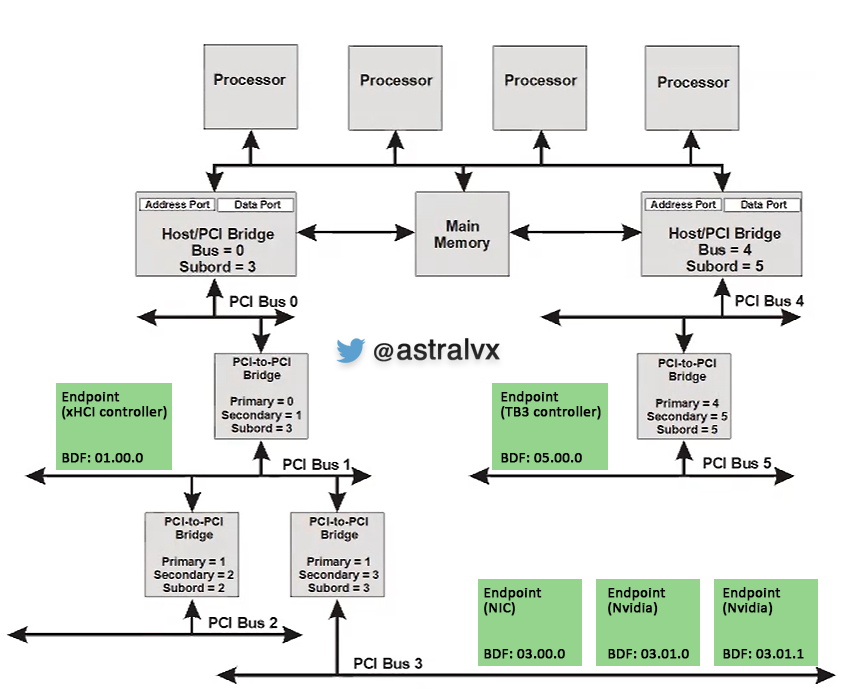
Consider the two NVIDIA-labeled functions at the bottom:
03.01.0
03.01.1
Written as Linux identifiers, these are:
0000:03:01.0
0000:03:01.1
They are on bus 03, at device 01, functions 0 and 1. They are distinct PCI functions, even though they share a device number. In a real system, you must inspect each function separately: each has its own configuration space, driver binding, capabilities, and sysfs directory.
Now compare the xHCI endpoint labeled:
01.00.0
Its Linux form is:
0000:01:00.0
The bus number 01 tells you that the function is on the bus downstream of the bridge whose secondary bus is 1 in the diagram. It does not say “first device physically installed” or identify a fixed chassis location. It says where enumeration placed that function in the current hierarchy.
This distinction is especially important with Broadcom/PLX switches. A switch is not normally represented by one magical BDF for the entire chip. Its logical ports generally appear as PCI bridge functions, each with its own BDF. Later, you will use those bridge-function BDFs to understand switch paths, link state, errors, and downstream devices.
See the identifier in Linux
Use lspci first as your inventory view. Its -D option forces the domain to appear, even when it is 0000.
lspci -D -nn
A representative line has this shape:
0000:03:01.0 Ethernet controller [0200]: Vendor Device [vvvv:dddd]
The first token is the BDF. The class description and numeric IDs following it help you decide what the function is.
GNU/Linux & PCI (Express): Part 8 - Accessing PCI(e) devices over sysfs
Watch “GNU/Linux & PCI (Express): Part 8 - Accessing PCI(e) devices over sysfs” by Johannes 4GNU_Linux. It demonstrates the crucial correspondence between a BDF shown by lspci and a device directory in Linux sysfs.
Watch BDF to sysfs. Focus on the presenter’s sequence: identify the bus, device, and function in lspci, then locate the directory with the same identifier beneath /sys/bus/pci/devices.
The lspci(8) manual documents the full selection syntax, including the fact that BDF fields are hexadecimal and can be omitted or replaced with wildcards when filtering a list.
Read the relevant lspci options in the man7.org manual. They provide the exact syntax you will use to display domains, select one function, and view a topology-oriented listing.
In “Basic display modes,” read the display modes, concentrating on -t. In “Options to control resolving IDs to names,” find the -D option and read its domain explanation. Then, in “Options for selection of devices,” read the selection rules. Finally, in the machine-readable-output discussion, note that the Slot tag uses the same location notation. Here “slot” means the logical PCI location, not necessarily a physical chassis slot.
A few high-value commands follow from these rules:
# Always show full addresses and numeric vendor/device IDs.
lspci -D -nn

# Display detailed information for exactly one function.
lspci -D -s 0000:03:01.0 -nn -vv

# Show only function 0 of device 01 on bus 03 in domain 0000.
lspci -D -s 0000:03:01.0

# Show a hierarchy-oriented view; next lesson will teach how to trace it fully.
lspci -D -t
The -s selection value is not a shell pathname. It is a PCI address filter. Its full form is safest in scripts and tools because it makes the domain explicit.
BDF and sysfs: the direct software mapping
Linux exposes every enumerated PCI function as a directory under:
/sys/bus/pci/devices/
The directory name is the full BDF:
/sys/bus/pci/devices/0000:03:01.0/
This direct mapping is useful in a management application:
- Discover a function using
lspci, libpci, or sysfs enumeration. - Retain its full BDF as the function’s current location.
- Use the same BDF to access associated attributes, resolve its real sysfs topology path, inspect driver binding, or open approved interfaces.
The Linux kernel’s PCI sysfs documentation explicitly defines this format for driver binding and unbinding. The binding operations themselves change system state, so treat the examples as format documentation only for now.
What: /sys/bus/pci/drivers/.../bind What: /sys/devices/pciX/.../bind
Read this Linux kernel ABI entry to confirm the canonical DDDD:BB:DD.F notation and its use in /sys/bus/pci/devices. This lesson is read-only: do not run the bind or unbind examples on working hardware.
In the “/sys/bus/pci/drivers/.../bind” entry, read the location-format description. Note that the documentation spells out Domain:Bus:Device.Function and gives a fully qualified example.
Try this read-only workflow on your lab host. First choose a BDF from the output of lspci -D -nn; do not copy the example BDF unless it exists on your machine.
# Replace this with an actual BDF found on your host.
BDF=0000:03:01.0

# Confirm what Linux identifies at that location.
lspci -D -s "$BDF" -nn -vv

# Confirm that the same function is represented in sysfs.
ls -ld "/sys/bus/pci/devices/$BDF"

# Resolve the sysfs symlink to see the function's hierarchy-related path.
readlink -f "/sys/bus/pci/devices/$BDF"

# Read identity attributes without modifying device state.
cat "/sys/bus/pci/devices/$BDF/vendor"
cat "/sys/bus/pci/devices/$BDF/device"
cat "/sys/bus/pci/devices/$BDF/class"
If the lspci command identifies a function but the sysfs path is absent, stop and verify the BDF character by character, including the domain and function digit. Under normal Linux PCI enumeration, an enumerated function shown by lspci has a corresponding sysfs device directory.
A small field workflow for NICs, storage, and switches
When examining your hardware, make a small read-only worksheet with one row for each relevant function:
| Role | Full BDF | Class / identity from lspci | Sysfs directory present? |
|---|---|---|---|
| NIC function | 0000:BB:DD.F | Ethernet controller or vendor-specific function | Yes / No |
| Storage-controller function | 0000:BB:DD.F | Non-Volatile memory controller, RAID bus controller, etc. | Yes / No |
| Switch bridge port | 0000:BB:DD.F | PCI bridge | Yes / No |
The “switch bridge port” row is intentional. A managed switch topology includes both the switch’s bridge functions and its downstream endpoint functions. Do not record only the NIC or storage controller; the bridge BDFs will be essential when you later correlate a link failure with the port reporting it.
A disciplined way to decode any BDF
When you see a PCIe log entry such as:
AER: Corrected error received: 0000:86:00.0
decode it mechanically:
- Domain:
0000 - Bus:
86 - Device:
00 - Function:
0 - Linux location:
/sys/bus/pci/devices/0000:86:00.0 - Inspection command:
lspci -D -s 0000:86:00.0 -nn -vv
Only after locating the function should you infer whether it is an endpoint, a root port, or a switch port from its class, capabilities, and position in the hierarchy. The BDF tells you which function; it does not by itself fully explain what role that function plays.
For software design, represent this as one structured identifier rather than scattered strings:
struct PciAddress {
    uint16_t domain;
    uint8_t  bus;
    uint8_t  device;
    uint8_t  function;
};
A formatter can produce 0000:03:01.1 for sysfs and lspci; a parser can convert kernel events or log messages back into typed fields. Keep the domain even if current hardware only uses 0000.
Key takeaways
- A Linux PCI function is located by domain:bus:device.function, for example
0000:03:01.1. - All BDF fields are hexadecimal. Bus numbers range from
00toff; device numbers from00to1f; function numbers from0to7. - Different functions may share a bus and device number, as in
0000:03:01.0and0000:03:01.1. - A BDF is a current logical location assigned through enumeration, not a permanent physical identity or a vendor/device ID.
lspci -Dreveals the full address,lspci -sselects a specific function, and/sys/bus/pci/devices/<BDF>locates its sysfs representation.- Record BDFs for both endpoints and switch bridge functions. Both matter when managing and troubleshooting switched NIC and storage systems.
Next, you will take an lspci tree and derive the actual host-to-endpoint path through root ports and bridges.
Can't find a good explanation? Sign up and we'll make it for you
Sign up