
Good to see you again. In the previous lesson, you defined the capstone’s core product contract: a customer asks a support question, the platform either produces a cited answer from organization-approved knowledge or escalates the case to a human agent. You also made organization isolation, customer-requested handoff, and evidence-based answers explicit requirements.
Now you will turn that workflow into a system architecture diagram. By the end of this lesson, you will have a C4-style container diagram that connects the React client, FastAPI service, PostgreSQL with pgvector, file storage, and replaceable model providers—and that you can later use in a portfolio architecture document or interview.
Choose the right architectural zoom level
For this stage, you do not need a diagram of Python modules, React components, tables, prompts, or deployment regions. You need a container diagram: a high-level view of the independently runnable parts of the application, what each part owns, and how they communicate.
In C4 terminology, a container is not necessarily a Docker container. It is a deployable or separately running application or data store, such as a React single-page application, an API service, a database, or object storage. A container diagram is the right level for making design choices visible without burying the reader in implementation detail.
What is the C4 Model? A Comprehensive Guide to Visualizing Software Architecture
Read the C4 Model guide from Visual Paradigm to establish what a container diagram communicates and how to label relationships clearly.
Read Section 2.2, “Level 2: Container Diagram,” in full. Focus on container relationships: each box needs a clear responsibility and technology label. Then read Section 3.2, “Relationships and Interactions,” especially the relationship-label guidance. Apply its advice by naming the protocol and purpose of each connection rather than writing vague labels such as “connects to.”
A useful test is this: a new engineer should be able to look at the diagram and answer all of the following.
- Where does the customer interact with the product?
- Which service enforces product rules and orchestrates AI work?
- Where do source files live?
- Where do conversations, tickets, and vector embeddings live?
- Which boundaries are external services?
- Which systems receive sensitive data or require secrets?
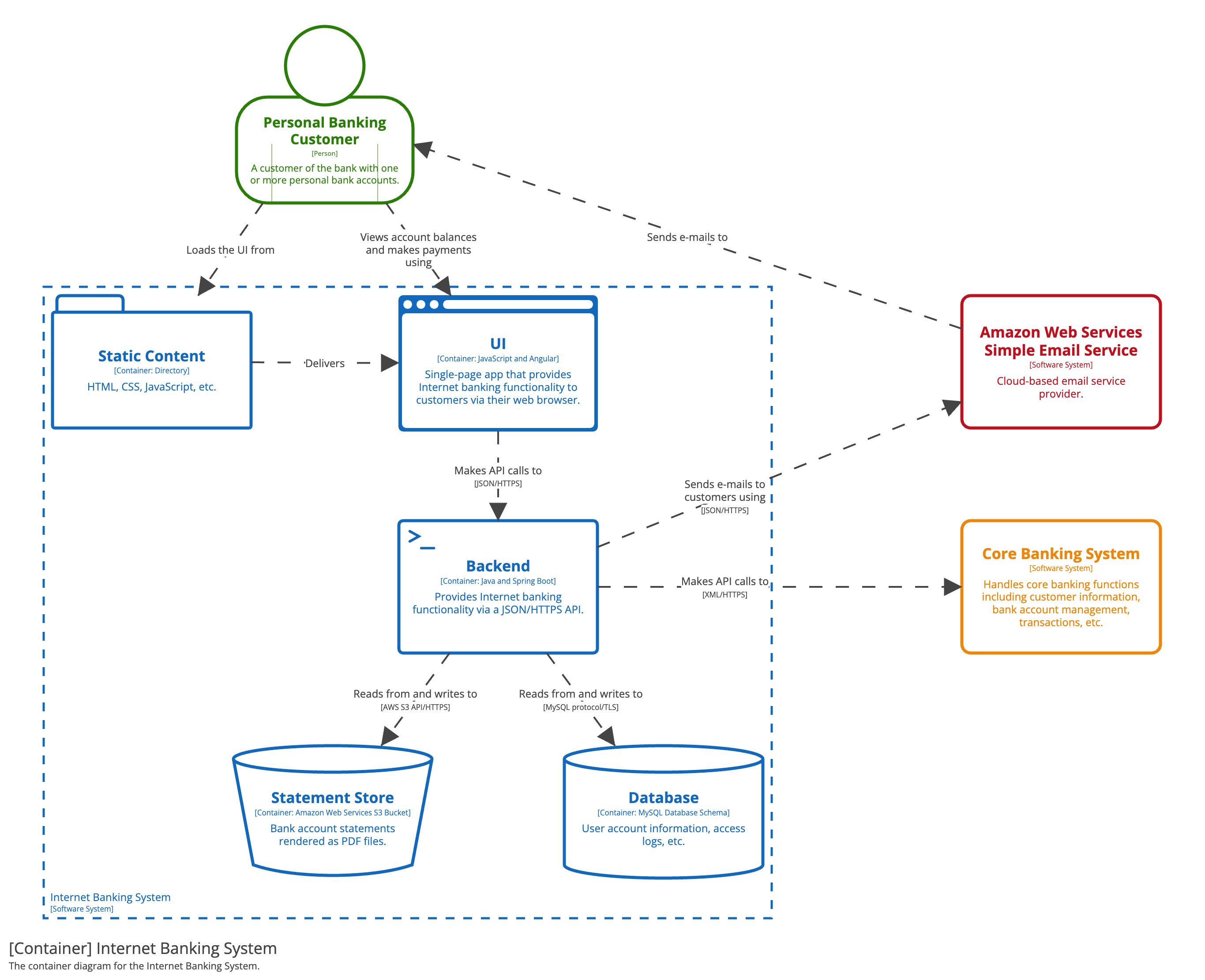
The C4 example below is not an AI application, but it demonstrates the intended level of abstraction: UI, backend, database, and external systems are separate containers with labeled relationships.
The architecture should reflect responsibility boundaries
Your capstone will have five essential technical boundaries.
| Container or external system | Technology direction | Primary responsibility | It should not own |
|---|---|---|---|
| React client | React + TypeScript | Customer chat, knowledge-source upload UI, citation display, agent inbox, recoverable UI states | Database access, model API keys, authorization decisions |
| FastAPI service | Python + FastAPI | HTTP API, validation, organization scoping, workflow rules, RAG orchestration, persistence coordination | Long-term storage of browser state or direct presentation logic |
| PostgreSQL + pgvector | PostgreSQL with the pgvector extension | Relational records and searchable chunk embeddings | Original PDF or document bytes as the primary file store |
| Object file storage | Local filesystem in development or S3-compatible object storage | Original uploaded files and possibly extracted artifacts | Conversations, tickets, or vector similarity queries |
| Model provider(s) | Hosted API or local model service | Embedding generation and text generation | Product policy, organization authorization, source-of-truth records |
The important distinction is between data that must be queried transactionally and data that is a stored object.
PostgreSQL is the system of record for structured application data:
- organizations;
- knowledge-source metadata and ingestion status;
- document chunks and their source locations;
- embedding vectors stored through pgvector;
- conversations, messages, tickets, citations, and feedback.
Object storage holds the original bytes of a source file, such as a PDF, Markdown file, or HTML export. The database stores an object key, content type, size, checksum, and ingestion state that refer to that file. It should not need to hold an entire PDF inside a large text column merely because the application can technically do so.
Likewise, pgvector is not a separate vector database in this design. It is an extension inside PostgreSQL that lets the database store and compare embedding vectors alongside ordinary relational data. This keeps source metadata, organization filters, ingestion state, and vector search close together.
The following short video gives a practical overview of this division of work in a React, FastAPI, and PostgreSQL RAG application. Its example uses a particular model provider, but the architecture pattern is provider-independent.
Python AI System Design: FastAPI, RAG & MCPs
Watch “Python AI System Design: FastAPI, RAG & MCPs” by sayed.developer for a concrete view of a document-chat product and the main connections between its UI, API, database, and models.
Watch the product overview to see document upload, chat, and citations as user-facing capabilities. Then watch the API boundary, focusing on why the React application sends requests to the backend rather than accessing internal services itself. Finish with PostgreSQL and vectors to connect chunk embeddings with retrieval. Treat the “vector database” language as an architectural role: in your capstone, PostgreSQL plus pgvector fulfills that role.
Draw the capstone container diagram
The diagram below is the baseline architecture for the product you scoped. It is intentionally small: it contains only the containers required to support the primary workflow. There is no web-search integration because web search is outside the first product slice, and there is no message queue yet because the project has not demonstrated a workload that requires one.
This is a static diagram. Its lines state structural dependencies and the kind of communication allowed; they are not a chronological account of one request. The next section supplies that operational interpretation.
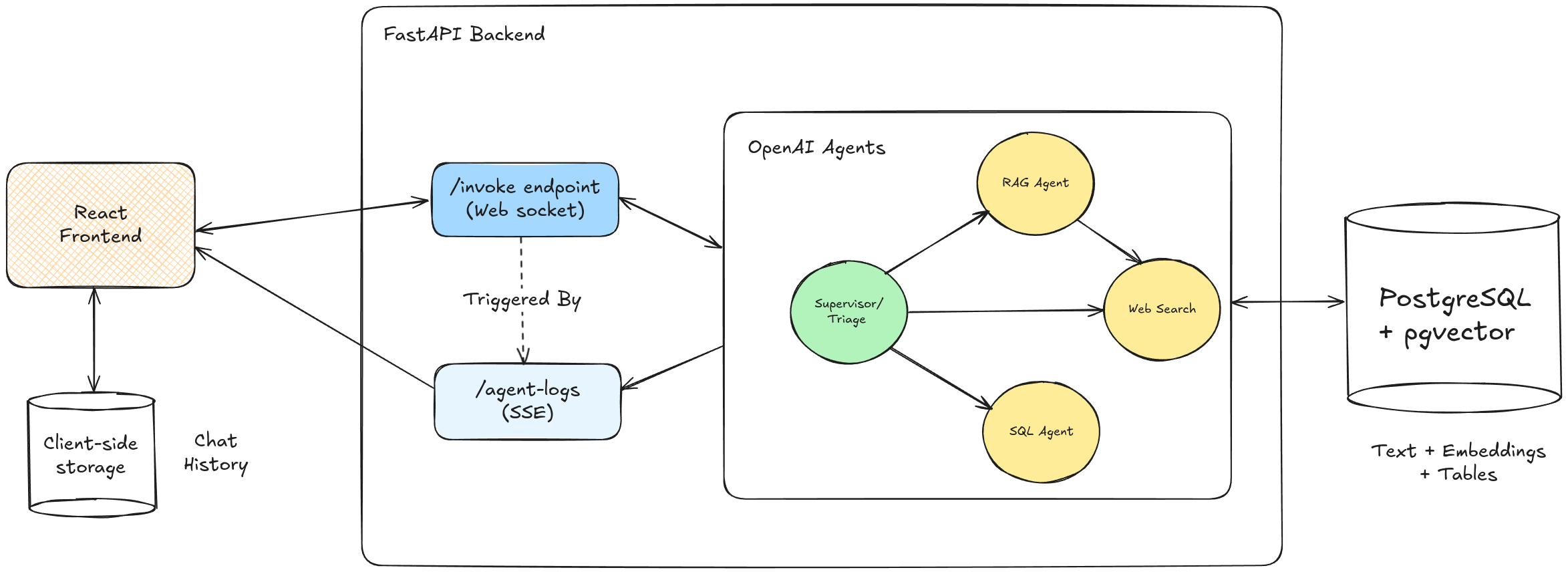
The image below shows another AI customer-support sketch. It is useful for noticing the separation between frontend, backend, agent orchestration, and a pgvector-capable database. For your capstone, however, make file storage explicit and avoid drawing web search because it is deliberately out of scope.
Read the diagram from the outside in
Customers and support agents both use the React client, but they see different capabilities. A customer submits support questions and views cited answers. A support agent sees escalated conversations, their reasons, and the ability to record a resolution. These are roles in the product, not separate backend services.
The React client calls only the FastAPI service. It must never connect directly to PostgreSQL, object storage credentials, or a model provider with a secret API key. A browser is an untrusted environment: users can inspect its network calls and compiled JavaScript.
The FastAPI service is the application boundary. It receives requests, validates them, establishes organization context, enforces deterministic workflow rules, and coordinates access to all internal and external dependencies. For example, it decides that an explicit request for a human must create an escalation rather than asking a model to decide whether the request is important enough.
The database holds the product’s durable state. A support answer may be generated by a model, but the conversation, its citations, its organization, and the resulting ticket must be recorded in PostgreSQL. The same applies to knowledge sources and their ingestion state.
The model provider is external and replaceable. You will later create an interface so that a free-tier hosted provider can be swapped for another hosted provider or a local model service without rewriting every route. For now, the architecture makes the key rule clear: only FastAPI talks to the provider.
Connect the diagram to the two core workflows
A diagram becomes useful when it can explain observable product behavior. The architecture supports two related paths: knowledge-source ingestion and customer support.
Knowledge-source ingestion
When an organization uploads a support document, the React client sends the file to FastAPI as a multipart HTTP request. FastAPI validates the file, writes the original bytes to object storage, and creates a knowledge-source record in PostgreSQL.
During ingestion, the FastAPI application retrieves the stored file, extracts and normalizes its text, divides it into chunks, and requests embeddings from the model provider. PostgreSQL stores each chunk, its source and position metadata, and the resulting embedding vector. The source record’s ingestion state tells the UI whether it is pending, processing, ready, or failed.
At this stage, do not assume that a separate worker, queue, or serverless function already exists. The diagram says FastAPI owns ingestion orchestration. If document volume or processing time later justifies an independently deployed worker, that worker should become a new container and be added to the diagram then.
Customer question and cited answer
When a customer sends a chat message, the React client calls FastAPI. The API records the incoming message and identifies the organization that owns the conversation.
FastAPI obtains an embedding for the customer’s question through the embedding-model capability of the provider. It uses pgvector to retrieve relevant chunks while filtering by organization and eligible source metadata. The API then sends the customer’s question and selected evidence to the text-generation capability of the provider.
Finally, FastAPI persists the generated message and citations, or creates an escalation ticket when evidence is insufficient or a human was requested. The React client receives an answer with citations or an actionable handoff state. In a later lesson, this response will be streamed incrementally to the browser; for now, a normal HTTP response is enough for the architecture.
Why there are usually two model operations
“Call the LLM” is too imprecise for an architecture explanation. RAG applications commonly have two different model operations:
| Model capability | Input | Output | Used for |
|---|---|---|---|
| Embedding model | A text chunk or customer question | A fixed-length numeric vector | Indexing source chunks and retrieving relevant chunks |
| Text-generation model | System rules, question, conversation context, retrieved evidence | Natural-language response, ideally structured data | Producing a grounded customer-facing answer or a support summary |
A provider may offer both models, or you may use different providers. The diagram groups them as “Model provider(s)” because the crucial architectural boundary is the same: FastAPI calls the model service over an authenticated API, and the client does not.
Add the rules that make this a support system rather than a generic chatbot
The most valuable architectural decisions are not framework names. They are constraints that preserve the product promise from the previous lesson.
Organization scoping is an architectural invariant
Every relevant record in PostgreSQL belongs to an organization, directly or through a parent record. Every retrieval query must filter by organization before results can become model context.
This means a retrieval operation is not merely “find the nearest vectors.” It is “find the nearest eligible vectors for this organization.” Otherwise, the application could return another organization’s private support documentation as a citation.
At the architecture level, document this rule alongside your diagram:
FastAPI derives organization context for each request and applies it to all reads and writes. The React client may provide identifiers, but it is not the authority that decides cross-organization access.
A full authentication and authorization mechanism comes later in the course. You do not need to choose it today, but you should not draw an architecture that implies organization isolation will be added as an afterthought.
File storage is not automatically trusted
Uploaded PDFs and HTML files are user-controlled input. Storing them separately does not make them safe. FastAPI must validate file type, filename, and size before storing or processing them; later, the ingestion pipeline will also treat their content as untrusted text rather than instructions for the system.
Models are useful services, not policy owners
The system can ask a model to generate an answer from retrieved evidence. It should not ask the model to decide whether it may bypass a customer’s request for a human agent. Workflow requirements such as customer_requested_human and insufficient_evidence belong in deterministic application logic within FastAPI.
Create your architecture artifact
Now create your own draft container diagram in a diagram editor, Markdown document, or notebook. Redraw the baseline diagram rather than treating it as something to paste without understanding. Your version should use the names you expect to keep in the project and should fit on one page.
Use this checklist while drawing.
| Diagram requirement | What to show |
|---|---|
| System boundary | A boundary named AI Customer Support Platform around React, FastAPI, PostgreSQL/pgvector, and file storage |
| People | Customer and support agent using the React client |
| React container | React + TypeScript; chat, upload, citations, agent inbox |
| FastAPI container | Python + FastAPI; API boundary, workflow rules, orchestration |
| Database container | PostgreSQL + pgvector; relational application data, chunks, embeddings |
| File-storage container | Original uploaded documents, distinct from database records |
| External model system | One or more providers for embedding and text generation |
| Relationship labels | Protocol and purpose, such as JSON/HTTPS for API calls and SQL for database access |
| No forbidden shortcuts | No direct React-to-database, React-to-storage, or React-to-model-provider connection |
| Scope boundary | No web search, autonomous account actions, queue, or agent framework unless you can explain why the first workflow needs it |
Add a short legend or set of notes beneath the diagram:
Architecture notes

1. PostgreSQL is the system of record for organization-scoped application data.
2. pgvector stores embeddings alongside chunk metadata for semantic retrieval.
3. Object storage holds original knowledge-source files; PostgreSQL stores their metadata.
4. FastAPI is the sole service allowed to access databases, object storage, and model providers.
5. Model providers are replaceable external dependencies.
6. A customer-requested human handoff and insufficient-evidence path are enforced by application rules.
This is an intentionally provider-neutral design. In local development, file storage might be a local mounted directory and PostgreSQL might run through Docker Compose. In deployment, they may become managed services. The logical responsibilities and boundaries should remain stable even when the hosting choice changes.
Key takeaways
A container diagram is the correct architecture artifact for this point in the capstone: it names the main deployable systems, their responsibilities, their boundaries, and their communication paths without pretending that internal implementation is already decided.
Your baseline system has five essential technical parts:
- a React client for customer and agent experiences;
- a FastAPI service that enforces workflow rules and coordinates dependencies;
- PostgreSQL with pgvector for durable relational records and embedding search;
- object storage for original knowledge-base files;
- external, replaceable providers for embeddings and text generation.
Most importantly, the browser communicates only with FastAPI. FastAPI owns organization scoping, policy enforcement, and access to storage, databases, and model providers.
Next, you will compare free-tier services for these boundaries, considering quotas, storage limits, and fallback options before committing to specific providers.
Can't find a good explanation? Sign up and we'll make it for you
Sign up