
Hello. The PostgreSQL server is now running, the app_runtime database role is restricted to the app schema, and its connection string is stored in Key Vault rather than in Git or Terraform state. This lesson deploys the FastAPI backend image from your private Azure Container Registry (ACR) into Azure Container Apps (ACA), while preserving that boundary.
The deployment uses one user-assigned managed identity for two narrowly defined jobs: pulling the backend image from ACR and resolving the database-url secret from Key Vault. The container receives the URL only as its DATABASE_URL runtime environment variable. Terraform manages the identities, permissions, and Container Apps configuration, but never reads the secret value.
The deployment path and its trust boundaries
The overview below shows the general Azure Container Apps workflow: a container image is stored in ACR, deployed to Container Apps, and connected to PostgreSQL. The tutorial diagram also shows GitHub Actions and Service Connector; we will not use those pieces yet. GitHub-based delivery arrives in Module 6, and we will configure the connection explicitly rather than delegate it to Service Connector.
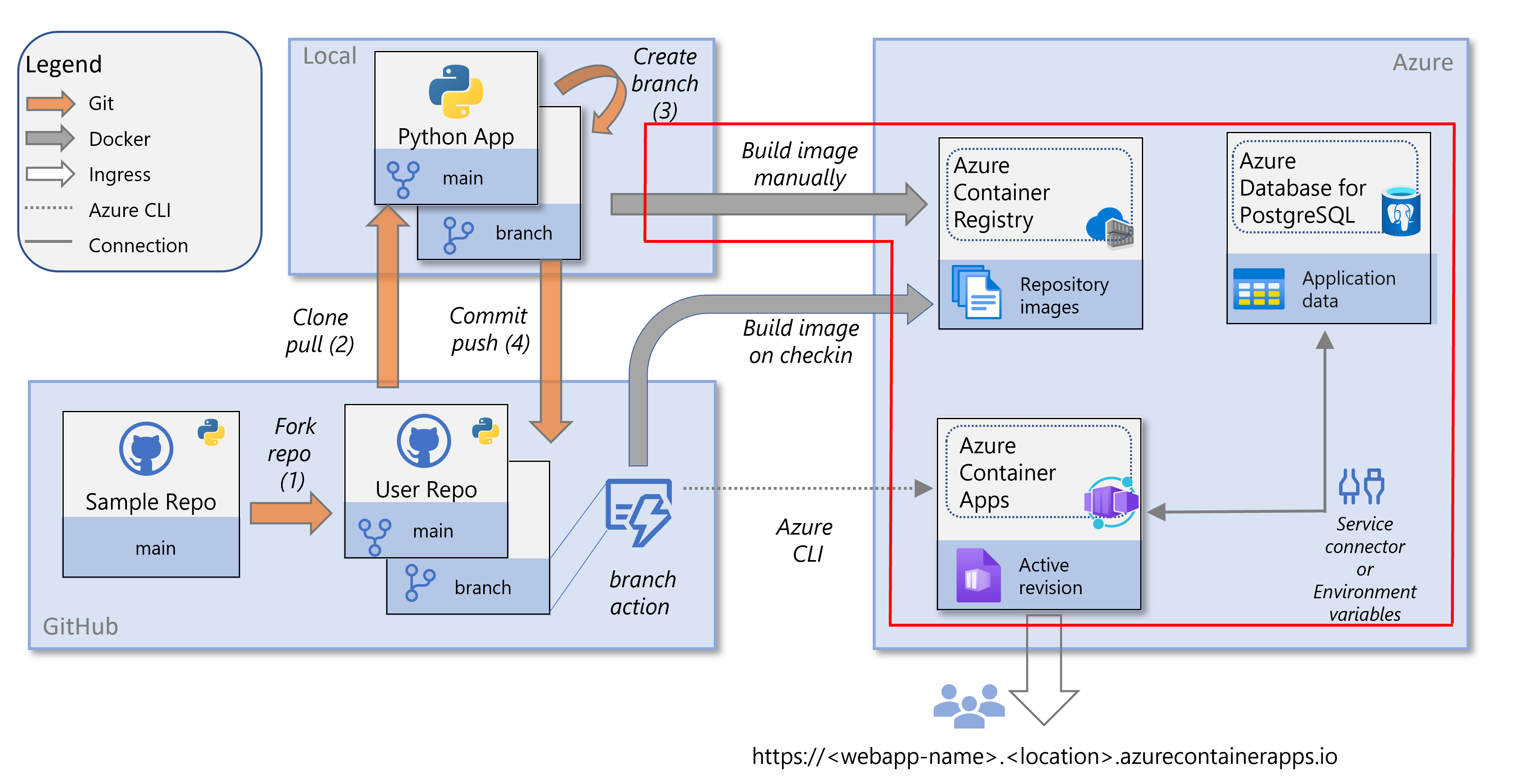
For this lab, the important security model is:
| Component | Responsibility | Permission it needs |
|---|---|---|
| Terraform identity | Creates Azure infrastructure and RBAC assignments | Permission to manage resources in the resource group |
| Backend managed identity | Represents the running Container App | AcrPull on the registry; Key Vault Secrets User on the vault |
| Azure Container Apps | Pulls the image and resolves the Key Vault-backed app secret | Uses the backend managed identity |
| FastAPI container | Uses DATABASE_URL to reach PostgreSQL over TLS | Database role and password already embedded in the injected URL |
| PostgreSQL Flexible Server | Authenticates app_runtime and enforces schema permissions | Existing app_runtime role permissions |
This keeps three sensitive values out of Terraform configuration and state:
- the application database password;
- the complete
DATABASE_URL; - any ACR administrator credential.
The Container Apps documentation supports private-registry credentials, but credentials are not required here. A managed identity is preferable because it avoids creating a long-lived registry password with a broad operational lifetime.
Containers in Azure Container Apps
Read Microsoft Learn’s “Containers in Azure Container Apps” to understand where image, environment-variable, resource, and private-registry settings live in a Container App definition.
In the Configuration section, read the container configuration. Focus on the distinction between a normal environment-variable value and a secret reference, and note that changing the template creates a revision. Then read the vCPU and memory allocation requirements section, from the Consumption allocations. We will select the smallest permitted allocation rather than guess a CPU and memory pair. Finally, in the Container registries section, read private registry authentication. Compare the password-based example with the managed-identity alternative that we will use.
Preflight: application, image, and cost decisions
This lesson assumes the preceding module has already given the backend image these characteristics:
- It listens on
0.0.0.0, not only127.0.0.1. - It listens on port
8000. If your Dockerfile uses another port, substitute that port consistently below. - It reads the database connection string from
DATABASE_URL. - Its readiness endpoint performs a real database connectivity check. In the examples below, that endpoint is
/health/ready; use your actual path if you chose a different name. - Its image has already been pushed to your private registry with a unique tag.
Confirm the available image tags before selecting one:
export ACR_NAME="$(terraform output -raw acr_name)"

az acr repository show-tags \
  --name "$ACR_NAME" \
  --repository backend \
  --orderby time_desc \
  --output table
Choose a tag such as git-a1b2c3d or 2025-03-08.1, not latest. A unique tag ties a deployed revision to one identifiable build and removes ambiguity during debugging or rollback.
Cost guardrail
We will use a Consumption-based Container Apps environment, a backend allocation of 0.25 vCPU and 0.5Gi memory, and:
min_replicas = 0
max_replicas = 1
With zero minimum replicas, the backend can scale down when it receives no HTTP traffic. The first request after scale-down can have a cold-start delay, which is acceptable for this lab.
We will also create a small dedicated Log Analytics workspace with a 0.1 GiB daily quota. This supports basic deployment diagnostics while limiting the chance that verbose logs become a surprise expense. A quota is a guardrail, not a reason to log secrets or high-volume request bodies.
Cost of this preflight action: USD 0. The ACR tag listing and Key Vault configuration checks do not provision billable resources. Existing ACR image storage and the running PostgreSQL Flexible Server continue to have their own costs.
Before applying, check that your Key Vault uses Azure RBAC authorization:
export KEY_VAULT_NAME="$(terraform output -raw key_vault_name)"

az keyvault show \
  --name "$KEY_VAULT_NAME" \
  --query "properties.enableRbacAuthorization" \
  --output tsv
The expected result is true. The Terraform below assigns the built-in Key Vault Secrets User role, which works when RBAC authorization is enabled.
If the result is false, your vault uses legacy access policies instead. Do not apply both authorization models indiscriminately. Either migrate the vault deliberately to RBAC or add a narrowly scoped Get secret permission for the managed identity using the access-policy model established in your Key Vault lesson.
Give the backend a workload identity
A user-assigned managed identity is a first-class Azure resource with its own stable principal ID. Unlike a system-assigned identity, it is not tied permanently to one Container App’s lifecycle. For this course, that makes the permission model easier to inspect and later reuse in a deployment workflow.
Add the following resources to your Terraform root. This example assumes these existing local resource names:
azurerm_resource_group.labazurerm_container_registry.appazurerm_key_vault.lab
Rename only those references if your Terraform root uses different names.
resource "azurerm_user_assigned_identity" "backend" {
  name                = "id-backend-runtime"
  resource_group_name = azurerm_resource_group.lab.name
  location            = azurerm_resource_group.lab.location

  tags = {
    project     = "grasp-azure-lab"
    environment = "lab"
    managed_by  = "terraform"
    purpose     = "backend-runtime"
    cleanup     = "after-container-apps-module"
  }
}

# Allows the Container App to pull its private backend image.
resource "azurerm_role_assignment" "backend_acr_pull" {
  scope                = azurerm_container_registry.app.id
  role_definition_name = "AcrPull"
  principal_id         = azurerm_user_assigned_identity.backend.principal_id
}

# Allows the Container App to resolve only secrets in this vault.
# It does not give the workload permission to create, modify, or delete secrets.
resource "azurerm_role_assignment" "backend_key_vault_secrets_user" {
  scope                = azurerm_key_vault.lab.id
  role_definition_name = "Key Vault Secrets User"
  principal_id         = azurerm_user_assigned_identity.backend.principal_id
}
The AcrPull role is scoped to one registry, while Key Vault Secrets User is scoped to one vault. Neither assignment makes the identity an Azure subscription contributor, database administrator, or Key Vault secret writer.
There is an important distinction here:
- ACR authentication is used before the container starts, so ACA can fetch the image.
- Key Vault authentication is used when ACA resolves the Key Vault-backed secret.
- PostgreSQL authentication occurs after FastAPI starts and uses
app_runtimeplus the password within the injectedDATABASE_URL.
The managed identity is not becoming the PostgreSQL user in this design. The previous lesson deliberately created a limited PostgreSQL password role and placed that credential in Key Vault. Azure Database for PostgreSQL can also use Microsoft Entra identities directly, but changing to that model would require a different database principal and application authentication implementation. Keep the current design consistent while learning the Container Apps deployment path.
Reference the Key Vault secret without reading it
Do not add this Terraform data source:
# Do not use this for database-url.
data "azurerm_key_vault_secret" "database_url" {
  name         = "database-url"
  key_vault_id = azurerm_key_vault.lab.id
}
Although convenient, this data source reads the secret value. If Terraform uses the value, it can enter state.
Instead, retrieve only the secret’s opaque Azure resource ID. The identifier contains the vault name, secret name, and version, but not the connection-string value.
export DATABASE_URL_SECRET_ID="$(
  az keyvault secret show \
    --vault-name "$KEY_VAULT_NAME" \
    --name "database-url" \
    --query id \
    --output tsv
)"

printf '%s\n' "$DATABASE_URL_SECRET_ID"
The command prints an identifier shaped like this:
https://your-vault.vault.azure.net/secrets/database-url/secret-version
It must not print a value beginning with postgresql://.
Add this identifier to your ignored local variables file, such as container-apps.local.auto.tfvars:
database_url_secret_id = "https://your-vault.vault.azure.net/secrets/database-url/secret-version"

container_app_environment_name = "cae-grasp-lab"
backend_container_app_name     = "ca-backend-grasp-lab"
backend_image_repository       = "backend"
backend_image_tag              = "git-a1b2c3d"
Keep this file covered by the existing .gitignore rule for *.local.auto.tfvars. The secret identifier is not a password, but it is environment-specific deployment metadata and does not need to be published.
Cost of this practical action: USD 0. Reading secret metadata does not create a new billable resource. It does not reveal the secret value.
Define the Container Apps environment and backend deployment
Add container-apps.tf. The workspace is intentionally separate and small; it is used only as the Container Apps environment’s logging destination.
variable "container_app_environment_name" {
  description = "Name of the Azure Container Apps environment."
  type        = string
}

variable "backend_container_app_name" {
  description = "Name of the FastAPI Container App."
  type        = string
}

variable "backend_image_repository" {
  description = "ACR repository containing the FastAPI image."
  type        = string
}

variable "backend_image_tag" {
  description = "Unique, immutable-in-practice tag for the FastAPI image."
  type        = string
}

variable "database_url_secret_id" {
  description = "Key Vault secret URI for database-url. This is an identifier, not the secret value."
  type        = string
}

locals {
  backend_image = join("", [
    azurerm_container_registry.app.login_server,
    "/",
    var.backend_image_repository,
    ":",
    var.backend_image_tag,
  ])
}

resource "azurerm_log_analytics_workspace" "container_apps" {
  name                = "log-grasp-container-apps"
  resource_group_name = azurerm_resource_group.lab.name
  location            = azurerm_resource_group.lab.location

  sku               = "PerGB2018"
  retention_in_days = 30
  daily_quota_gb    = 0.1

  tags = {
    project     = "grasp-azure-lab"
    environment = "lab"
    managed_by  = "terraform"
    cleanup     = "after-container-apps-module"
  }
}

resource "azurerm_container_app_environment" "lab" {
  name                       = var.container_app_environment_name
  resource_group_name        = azurerm_resource_group.lab.name
  location                   = azurerm_resource_group.lab.location
  log_analytics_workspace_id = azurerm_log_analytics_workspace.container_apps.id

  tags = {
    project     = "grasp-azure-lab"
    environment = "lab"
    managed_by  = "terraform"
    cleanup     = "after-container-apps-module"
  }
}

resource "azurerm_container_app" "backend" {
  name                         = var.backend_container_app_name
  resource_group_name          = azurerm_resource_group.lab.name
  container_app_environment_id = azurerm_container_app_environment.lab.id
  revision_mode                = "Single"

  identity {
    type         = "UserAssigned"
    identity_ids = [azurerm_user_assigned_identity.backend.id]
  }

  # ACA uses the identity to pull from the private registry.
  registry {
    server   = azurerm_container_registry.app.login_server
    identity = azurerm_user_assigned_identity.backend.id
  }

  # Terraform submits a Key Vault URI, never the connection-string value.
  secret {
    name                = "database-url"
    identity            = azurerm_user_assigned_identity.backend.id
    key_vault_secret_id = var.database_url_secret_id
  }

  ingress {
    external_enabled = true
    target_port      = 8000

    traffic_weight {
      latest_revision = true
      percentage       = 100
    }
  }

  template {
    min_replicas = 0
    max_replicas = 1

    container {
      name   = "backend"
      image  = local.backend_image
      cpu    = 0.25
      memory = "0.5Gi"

      env {
        name        = "DATABASE_URL"
        secret_name = "database-url"
      }
    }
  }

  tags = {
    project     = "grasp-azure-lab"
    environment = "lab"
    managed_by  = "terraform"
    cleanup     = "after-container-apps-module"
  }

  depends_on = [
    azurerm_role_assignment.backend_acr_pull,
    azurerm_role_assignment.backend_key_vault_secrets_user,
  ]
}

output "backend_url" {
  description = "Public URL of the FastAPI backend, without credentials."
  value       = "https://${azurerm_container_app.backend.ingress[0].fqdn}"
}

output "backend_identity_principal_id" {
  description = "Principal ID granted ACR and Key Vault access."
  value       = azurerm_user_assigned_identity.backend.principal_id
}
A few choices are worth making explicit:
secret_name = "database-url"means the container receives the secret asDATABASE_URL. It does not expose the Key Vault URI to application code.external_enabled = trueis required for the direct HTTP validation in this lesson. It does not yet solve browser CORS or WebSocket routing; those are frontend deployment concerns in the next lesson.revision_mode = "Single"gives the initial revision all traffic. Revision validation and traffic rollback are the focus of a later lesson.- The
0.25vCPU and0.5Gipair is a valid Consumption allocation. Do not select a smaller arbitrary pair. max_replicas = 1limits this lab to one backend replica. This is a cost and simplicity choice, not a production availability design.- The PostgreSQL server is still public within the limited lab design. TLS, the restricted database role, and Key Vault-backed secret handling protect the connection path, but private networking would be the stronger production architecture.
Cost of this practical action: Creating the environment, workspace, identity, RBAC assignments, and Terraform plan has no meaningful compute cost by itself. After deployment, the backend consumes Container Apps resources only while it has replicas; min_replicas = 0 allows scale-to-zero. Log Analytics can incur ingestion charges, which is why this lab uses a dedicated low daily quota. The running PostgreSQL Flexible Server remains the primary predictable cost.
Apply and validate the complete connection
Format, validate, and review the plan:
terraform fmt -recursive
terraform validate
terraform plan -out container-apps.tfplan
In the plan, confirm all of the following:
- one user-assigned managed identity;
- two role assignments, specifically
AcrPullandKey Vault Secrets User; - one Log Analytics workspace and one Container Apps environment;
- one Container App using an image ending in your unique image tag;
- no ACR username or password;
- no literal value beginning with
postgresql://; - a Container App secret that contains a Key Vault secret ID;
DATABASE_URLreferring todatabase-url, rather than containing a connection string.
Then apply the reviewed plan:
terraform apply container-apps.tfplan
Azure RBAC assignments can take a few minutes to propagate. If the Container App creation fails with a Key Vault authorization or registry pull authorization error, do not add a registry password or copy the database URL into Terraform. Wait briefly, verify the two role assignments exist, and run terraform apply again.
Retrieve the URL:
export BACKEND_URL="$(terraform output -raw backend_url)"

printf '%s\n' "$BACKEND_URL"
Because the application may have scaled to zero, the first request can take longer than usual. Call the readiness endpoint:
curl --fail --silent --show-error \
  --retry 5 \
  --retry-all-errors \
  --retry-delay 5 \
  "$BACKEND_URL/health/ready"
A successful response demonstrates that:
- ACA pulled the image from the private registry.
- The image started and accepted traffic on port
8000. - ACA resolved the Key Vault-backed secret using the managed identity.
- The secret was mapped to
DATABASE_URL. - FastAPI could establish a TLS-protected connection to PostgreSQL.
- PostgreSQL accepted
app_runtimeand allowed its application-level connectivity query.
Inspect the deployed configuration without printing secret values:
az containerapp show \
  --name "$(terraform output -raw backend_container_app_name)" \
  --resource-group "$(terraform output -raw resource_group_name)" \
  --query "{
    image:properties.template.containers[0].image,
    environmentVariables:properties.template.containers[0].env,
    identity:identity.userAssignedIdentities,
    fqdn:properties.configuration.ingress.fqdn
  }" \
  --output json
If you do not already have the two safe outputs used above, add them:
output "backend_container_app_name" {
  value = azurerm_container_app.backend.name
}

output "resource_group_name" {
  value = azurerm_resource_group.lab.name
}
The environment-variable output should show DATABASE_URL referencing a secret. It must not show the actual PostgreSQL URL.
Focused troubleshooting
| Symptom | Likely cause | First check |
|---|---|---|
| Deployment fails before a revision starts | Missing AcrPull permission or incorrect image name/tag | Confirm repository and tag with az acr repository show-tags; inspect the AcrPull role assignment scope |
| Revision cannot resolve the Key Vault secret | Missing Key Vault Secrets User, RBAC propagation delay, or vault uses access policies | Check enableRbacAuthorization, the identity principal ID, and the role-assignment scope |
| HTTP request receives a connection failure | Container does not listen on 0.0.0.0:8000, or ingress target port differs from the application port | Check the Dockerfile or startup command and make both port values match |
| Readiness endpoint returns an error | FastAPI started but cannot reach or authenticate to PostgreSQL | Confirm the database is running and that database-url remains the current valid secret |
| First request is slow | Expected scale-from-zero behavior | Retry after the first request has activated one replica |
Avoid opening an interactive shell merely to run printenv: it is too easy to expose DATABASE_URL in terminal history, screenshots, or support logs. Your readiness endpoint and the non-secret configuration inspection above provide a safer first validation path.
Pause and clean up deliberately
After validating the backend, the Container App can scale down automatically because min_replicas is zero. The PostgreSQL Flexible Server does not automatically disappear; stop it between sessions if needed, and destroy it when this module is complete as described in the prior lesson.
When you eventually clean up this Container Apps lab, remove these resources together:
azurerm_container_app.backendazurerm_container_app_environment.labazurerm_log_analytics_workspace.container_appsazurerm_role_assignment.backend_acr_pullazurerm_role_assignment.backend_key_vault_secrets_userazurerm_user_assigned_identity.backend
Do not destroy the ACR, Key Vault, or PostgreSQL server merely because they are referenced by this configuration; they are needed by other lessons in this module. Review a targeted destruction plan before applying it.
Cost of this practical action: Destroying the Container App, environment, and dedicated workspace stops future Container Apps usage and new log ingestion from this lab. It does not remove existing log retention charges, ACR image storage, Key Vault usage, or the PostgreSQL server. Deleting the PostgreSQL Flexible Server when the module ends is the key step for ending its ongoing compute and storage charges.
Key takeaways
You now have a working, identity-based Container Apps deployment path:
- A user-assigned managed identity authenticates to ACR with
AcrPulland to Key Vault withKey Vault Secrets User. - The FastAPI image is deployed using a unique ACR image tag rather than
latest. - Terraform configures a Key Vault secret reference by URI; it never reads or stores the
DATABASE_URLvalue. - ACA maps the resolved secret into the FastAPI container as
DATABASE_URL. - The readiness endpoint validates the full path from external ingress through the running container to PostgreSQL.
- Scale-to-zero, a single maximum replica, small resource allocation, and a bounded logging workspace keep the Container Apps portion suitable for a limited personal budget.
Next, you will deploy the React frontend to Azure Container Apps and configure browser-safe REST and WebSocket routing to this backend.
Can't find a good explanation? Sign up and we'll make it for you
Sign up