
Roles of Tools in the Professional Writing Workflow
Hello, and welcome. This course builds the practical foundation for remote, part-time content writing and copywriting work, with psychology, wellness, and human behaviour as your eventual niche. Before learning how to write articles or promotional copy, it helps to understand where writing actually happens after the document is finished.
Today you will learn to identify six tool roles in a professional workflow: drafting, language editing, visual design, content management, publishing, and analytics. The important idea is that these are jobs in a process, not merely a list of apps. One app can sometimes serve more than one role, but each role produces a different kind of result.
A workflow is a sequence of decisions, not a collection of apps
A client may ask for a blog article, LinkedIn post, email, or landing-page copy. The final text is only one part of the deliverable. It must be readable, accurate, visually usable, placed correctly on the client’s platform, and assessed after publication.
For a writer working remotely, a simple professional workflow usually has these stages:
- Prepare and draft the message from a brief and research.
- Edit it for correctness, clarity, tone, and brand fit.
- Prepare visuals that support the message where needed.
- Load and organize the material in the client’s content system.
- Publish it for the intended audience.
- Review performance data and use it to improve future work.
This resembles a software workflow in one useful respect: each stage has an input, an output, and a quality check. Trying to make one tool do every job often produces rushed writing and avoidable mistakes.
A content team may divide these responsibilities among a writer, editor, subject expert, content manager, and SEO specialist. As a freelance writer, you may only own the first two stages. Still, understanding the whole system lets you deliver files that are easier for the client to publish and improve.
The Ultimate Guide to Creating a Content Marketing Workflow | Content Camel
Read this section from Content Camel to see how a professional content process separates creation, publishing, and measurement. Treat it as a broad map rather than a rigid rulebook for a solo freelancer.
In the section “How should you structure your content workflow?”, begin at “The best way to structure your workflow is to break them down into small chunks.” Read through the subsections “Ideation & research,” “Planning,” “Brief creation,” “Outlining & drafting,” “Approval,” “Publishing,” and “Performance measurement.” Follow the workflow sequence, paying particular attention to the difference between drafting, publishing, and measuring results.
The next sections turn that map into six clear tool roles.
1. Drafting tools: turn a brief into a usable first version
A drafting tool is where you develop the raw message. Its purpose is not perfection. It is to turn a brief, research notes, ideas, and an outline into words that can later be revised.
Examples include:
- A document editor such as Google Docs or Microsoft Word
- A notes or outlining app
- Voice-to-text software
- A generative AI tool used for brainstorming, outlining, or producing a rough starting point
The output of drafting is usually an outline and first draft. It may contain awkward sentences, repetition, placeholders for sources, or notes such as “[add expert source here].” That is normal.
Generative AI can be useful at this stage when you are stuck, need possible headings, or want to reorganize your own notes. But it is not a research authority. This is especially important in wellness writing: an AI-generated statement about anxiety, sleep, trauma, supplements, or treatment may be inaccurate, overconfident, or unsafe. You remain responsible for checking claims against reliable sources and for writing cautious language where evidence is limited.
A productive rule is:
Use drafting tools to help you think and express ideas; use your judgment to decide what is true, relevant, and worth keeping.
2. Language-editing tools: improve a draft that already exists
A language-editing tool examines writing that you have already drafted. Its role is to help you notice problems with spelling, grammar, punctuation, sentence length, clarity, repetition, and sometimes tone.
Grammarly and Hemingway Editor are common examples. They do not replace an editor or the writer’s judgment. Instead, they make the review process faster by highlighting places that deserve a second look.
For an intermediate English writer, this is particularly useful because it separates two demanding tasks:
- During drafting, focus on the idea and the reader.
- During editing, focus on how clearly and professionally the idea is expressed.
A language tool might flag a sentence as unclear. That does not automatically mean its replacement is better. Proper names, technical terms, Indian English usage, intentional conversational phrasing, and the surrounding context may justify keeping your original wording.
For example, consider this first-draft sentence:
Stress is a very big issue which can affect people in many different ways and it is important to deal with it properly.
An editing tool may help you notice vagueness and wordiness. A more precise revision could be:
Stress can affect sleep, concentration, mood, and daily routines. Small, consistent coping habits may help people manage it.
The improvement is not just grammatical. It makes a broad claim more specific and avoids promising a cure.
Grammarly vs. ChatGPT: Choosing the Right AI Assistant | Grammarly
Read Grammarly’s comparison to distinguish prompt-based generation from real-time language support. The distinction matters more than the brand names: a drafting assistant helps create text, while an editing assistant helps you evaluate and improve text.
First, in “Real-time writing support,” read from the sentence beginning “Instead, it quietly works in the background as you type” through the discussion of why suggestions should support improvement while writing. Then read the “Generative AI” subsection through the start of “Sentence and paragraph rewrites.” Focus on the shared drafting capabilities, then identify what makes real-time editing different.
These 8 STUPID Easy Copywriting & Content Writing Tools Will Make You A Better Writer
Watch “These 8 STUPID Easy Copywriting & Content Writing Tools Will Make You A Better Writer” from Alex Cattoni for a brief demonstration of two language-editing roles: correctness and readability.
Watch Grammarly for spelling, grammar, and punctuation support. Then watch Hemingway Editor to see how an editor can flag dense or difficult sentences. Notice that these tools point out possible improvements; they do not decide your meaning for you.
3. Visual-design tools: make the content easier to notice and use
A visual-design tool creates or adapts visual elements that accompany written content. In a writing workflow, its job is to support comprehension, branding, and attention, not to decorate every paragraph.
Typical visual assets include:
- A blog cover image
- A social-media graphic or carousel
- Simple quote cards
- Diagrams, checklists, or infographic-style summaries
- Resized images for different platforms
Canva is a common example because it provides templates, image placement, text styling, and multiple sizes in one workspace.
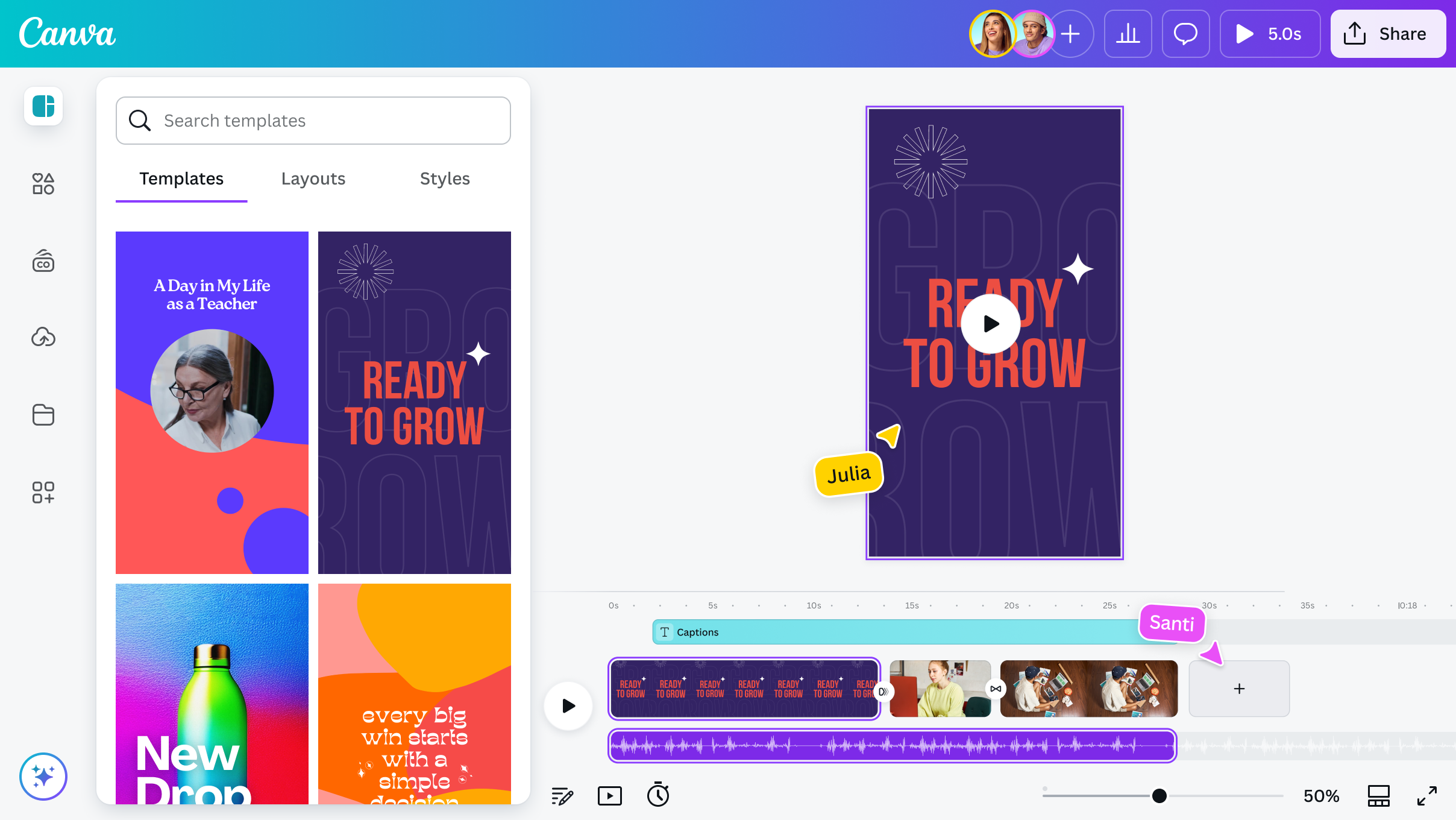
For psychology and wellness content, visuals should be especially careful. Avoid images that sensationalize distress, make a medical condition look simplistic, or imply guaranteed results. A calm, relevant visual can support the article; an unrelated “motivational” image can weaken reader trust.
If a client gives you a brand template, colours, fonts, logo rules, or stock-photo guidelines, those instructions matter more than your personal design preference. As a writer, you may only need to suggest visuals in the draft, such as:
- “Suggested cover image: person taking a quiet evening walk”
- “Add a simple checklist graphic after the section on sleep habits”
- “Use alt text describing the image for accessibility”
You do not need to become a full graphic designer to write professionally. You do need to know when written content requires a visual and how to communicate that need clearly.
4. Content-management tools: prepare the content as a web page
A content-management system, often called a CMS, is the workspace used to store, organize, edit, and maintain content on a website. WordPress is a widely used example.
A CMS does more than hold the article body. It commonly has fields for:
- The title and headings
- The URL or slug
- Categories and tags
- The featured image
- Image alternative text
- Author name
- A summary or meta description
- Internal and external links
- Publication status, such as draft, review, or scheduled
This is why a CMS is different from a drafting document. A Google Doc may be where you write “How Evening Walks Can Support Stress Management.” A CMS is where that writing is prepared as a web page that fits into the client’s site.
For a remote writing assignment, do not assume that you will receive CMS access. Often, your client or their content manager uploads the final article. In that case, deliver a clean document with clear heading levels, image suggestions, source links, and any requested metadata. This reduces their formatting work and signals professional reliability.
5. Publishing tools and platforms: make approved content public
Publishing is the act of making approved content available to readers. A publishing platform controls where the audience encounters it, how it appears, and sometimes when it becomes visible.
Publishing may happen in several ways:
- A client publishes an article through their WordPress website.
- A writer publishes a professional post on LinkedIn.
- A newsletter creator sends an issue through Substack.
- An author publishes an article on Medium.
The same product can overlap with another role. For instance, WordPress is often both a CMS and a publishing system: you organize the page in the CMS, preview it, and select Publish when it is ready. The roles remain distinct even when the button is in the same interface.
Before publishing, someone should preview the actual page, not only the draft document. A sentence that looks fine in a document can become a broken heading, an awkward image crop, or a faulty link after it is uploaded.
At this stage, a writer’s core concern is simple: Does the published page communicate the intended message accurately and comfortably to the intended reader?
The next lesson will compare Medium, LinkedIn, Substack, and WordPress in more detail, including audience access, discoverability, cost, analytics, and control over your work.
6. Analytics tools: learn what readers actually did
An analytics tool measures what happens after publication. It helps a business move beyond guesses such as “This topic seems popular.”
Google Analytics 4, usually called GA4, is a common example for websites. A dashboard can show measures such as users, new users, average engagement time, and event count.
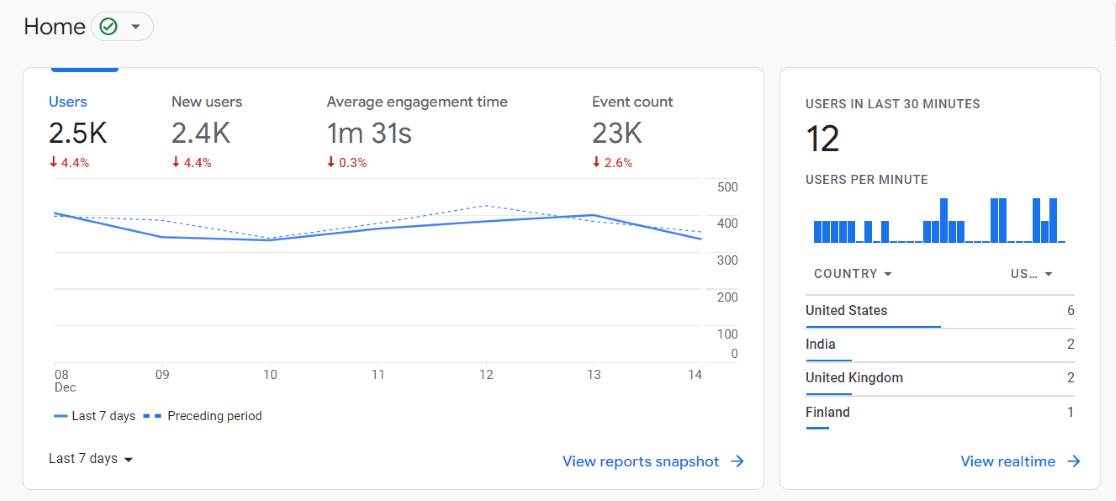
For a writer, analytics answers practical questions:
| Measure | What it can suggest | What it cannot prove by itself |
|---|---|---|
| Page views or users | How many people reached the piece | Whether they found it genuinely useful |
| Average engagement time | Whether readers spent time with the page | Whether every reader finished or agreed with it |
| Link clicks or other events | Whether readers took a tracked action | Why they chose to act |
| Search terms or traffic sources | How people discovered the content | Whether the article fully met their needs |
Suppose a stress-management article receives many page views but very little engagement time. Possible explanations include a misleading headline, a slow-loading page, an opening that does not answer the reader’s question, or traffic from people who wanted something else. Analytics raises questions; it does not supply a complete explanation.
Early in a freelance career, clients may not share analytics access. You can still ask useful questions after publication:
- Which articles have brought useful traffic or enquiries?
- Which topics should we update or expand?
- Did readers click the service, product, or newsletter link?
- Are there recurring questions from comments, support messages, or social media?
This feedback gradually improves your ability to choose topics, shape openings, and write calls to action that suit the client’s audience.
Use the “role test” when apps overlap
Modern tools increasingly overlap. A writing app may generate text, correct grammar, suggest tone changes, and store documents. Canva can include text; WordPress can include basic writing fields; an AI assistant can rewrite a paragraph.
When the software becomes confusing, classify it by the task you are performing:
| If you are doing this | The tool is acting primarily as |
|---|---|
| Developing ideas, an outline, or a first draft | A drafting tool |
| Checking and revising existing language | A language-editing tool |
| Creating images, layouts, or social graphics | A visual-design tool |
| Organizing page elements and website content | A content-management tool |
| Making approved content available to readers | A publishing tool or platform |
| Reviewing reader behaviour after publication | An analytics tool |
A sensible beginner setup can remain simple: one place to draft, one editor, one design tool when visuals are required, and enough familiarity with a CMS and analytics dashboard to communicate well with clients. Avoid paying for many subscriptions before a real project requires them. Clients often have their own preferred stack, and part of freelance professionalism is adapting to documented processes without losing control of the quality of your writing.
Key takeaways
Professional writing involves more than producing clean paragraphs.
- Drafting tools help create and organize a first version.
- Language-editing tools help improve correctness, clarity, readability, and tone, but every suggestion needs human judgment.
- Visual-design tools create supportive, on-brand visual assets.
- Content-management tools organize content as a usable web page.
- Publishing platforms make approved content available to an audience.
- Analytics tools show what readers did after publication and guide later improvements.
Most importantly, think in terms of the workflow role, not the app name. That habit will help you understand client instructions, select only the tools you need, and produce work that is easier to publish.
Next, you will compare Medium, LinkedIn, Substack, and WordPress so you can understand which platforms are useful for different writing goals and audiences.
Can't find a good explanation? Sign up and we'll make it for you
Sign up