
Hello. In the previous lesson, you used SIPOC to establish a shared, high-level view of a process: its boundary, inputs, outputs, suppliers, and customers. BPMN takes the next step. It shows what happens within that boundary, in what order, who is responsible, and where decisions or concurrent work change the flow.
For a Business Analyst or Requirements Analyst, BPMN is not decoration for a document. A well-built model exposes missing decisions, unclear ownership, unnecessary handoffs, and assumptions that need stakeholder validation. In this lesson, you will learn to use the five core BPMN elements correctly: events, activities, gateways, pools, and lanes. By the end, you should be able to read a process narrative and select the right BPMN symbol before drawing a detailed as-is model in the next lesson.
BPMN: a visual grammar for operational work
A SIPOC might summarize a service-request process as:
Validate request, classify it, assign work, fulfil it, close the ticket.
That is useful, but it leaves important questions unanswered:
- What exactly triggers validation?
- Who validates the request?
- What happens when required information is missing?
- Which activities can happen at the same time?
- Does the requester interact with the service provider, or is all work internal?
BPMN—Business Process Model and Notation—provides a standardized visual language for answering these questions. It distinguishes between:
- something that happens;
- work that someone or something performs;
- a point where the flow must be controlled;
- the participant responsible for a process; and
- the roles or teams accountable for individual steps.
This distinction is the foundation of a useful model. For example:
- “Request received” is an event.
- “Validate request” is an activity.
- “Is the request complete?” is a gateway.
- “Service Provider” may be a pool.
- “Service Desk” and “Fulfilment Team” may be lanes inside that pool.
The elements are connected using sequence flows, usually solid lines with a directional arrowhead. A sequence flow represents the order of work within one participant’s process.
Watch “BPMN diagram tutorial” from Lucid Software for a concise visual introduction to the symbols and their roles in one process model.
Watch events to see the visual distinction between start, intermediate, and end events. Continue with sequence flows and activities, focusing on the difference between an occurrence and work performed. Then watch gateways for branching logic, followed by pools and lanes for responsibility and ownership.
The annotated Basic BPMN 2.0 Symbols image below is a useful reference while you learn the notation.
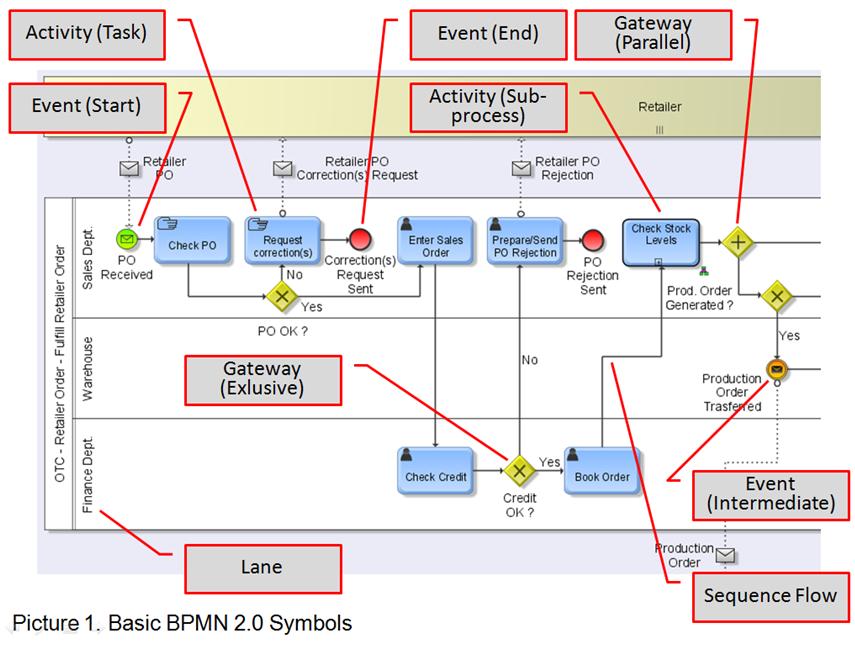
Events: occurrences, not work
An event is something that happens during a process. It may trigger a process, occur while it is underway, or mark its completion. Events use circles; the circle boundary tells you which kind of event you are viewing.
| Event type | Visual cue | Use it for | Example label |
|---|---|---|---|
| Start event | Single thin circle | The occurrence that starts the defined process | Request received |
| Intermediate event | Double circle | Something that happens after the process starts but before it ends | Customer response received; 24 hours elapsed |
| End event | Thick-bordered circle | A result that completes a path or the entire process | Request closed; Request rejected |
The most important rule is simple:
An event describes an occurrence or state change; an activity describes work.
Compare these labels:
| Label | Correct BPMN element | Why |
|---|---|---|
| “Customer submits request” | Usually a start event in the provider’s process | The submission triggers the provider’s work. |
| “Validate request” | Activity | A person or system must perform validation. |
| “Approval received” | Intermediate event | The arrival of approval is an occurrence. |
| “Send approval reminder” | Activity | A person or system performs the sending action. |
| “Request closed” | End event | It is the completed state of the process path. |
A useful naming convention is:
- Name activities with a verb and object: Check eligibility, Assign technician, Update request status.
- Name events as an occurrence or completed state: Request received, Payment confirmed, Correction received, Service target elapsed.
In a basic as-is model, a plain start and end event are usually sufficient. BPMN also provides specialized event markers, such as message and timer events. Use those markers when the trigger matters to the business interpretation:
- A message start event is useful when an external participant’s message starts the process.
- A timer intermediate event is useful when the passage of time matters, such as waiting 24 hours before a follow-up.
- An intermediate message event is useful when the process waits for a response, confirmation, or other communication.
Do not turn every status update into an event. If a service agent changes a ticket from “Open” to “Assigned,” that is normally part of an activity such as Update ticket status. Use an event when the occurrence itself changes what the process can do next.
Activities: the work that moves the process forward
An activity is work performed in a process. It appears as a rounded rectangle.
At the level of detail used in this module, the most common activity is a task. A task is “atomic” only at the level of your diagram: it means you are not showing a lower-level process inside that shape. It does not mean that the work is physically instantaneous or trivial.
For example, Validate request might involve reviewing mandatory fields, checking entitlement, confirming location details, and comparing the request against service-catalogue rules. It can still be one task in an as-is process model if stakeholders are currently discussing validation as one operational step.
Use a sub-process when the activity is important but has its own meaningful internal flow. A collapsed sub-process looks like a rounded rectangle with a small plus sign at the bottom centre. It tells the reader:
“There is a separate, more detailed process here, but this diagram is intentionally staying at a higher level.”
For example, Assess high-risk request may become a sub-process if it contains specialist review, document collection, risk scoring, and approval routing. Do not create a sub-process simply because a task takes several minutes. Use it when its internal steps are analytically useful and can be modelled separately.
BPMN supports specialized task types, including:
- User task: a person performs work through an application, such as Enter request details in a portal.
- Service task: a system performs automated work, such as Create work item or Send notification.
- Manual task: a person performs work without system support, such as Inspect damaged item.
For portfolio diagrams and interview case exercises, plain tasks are often adequate at first. Add a task-type marker only when the distinction changes the analysis. For instance, identifying Create work item as automated can reveal an integration dependency; identifying Review request as a user task can reveal a screen, access, or usability requirement.
Avoid these common activity labels:
| Weak label | Problem | Better label |
|---|---|---|
| Validation | It names a topic, not an action. | Validate request |
| Service Desk | It names a team, not work. | Record request details |
| Approval | It is unclear whether approval is requested, performed, or received. | Review approval request |
| Ticket status | It is a data item, not an action. | Update ticket status |
| Handle issue | It is too broad to be testable or analysable. | Investigate eligibility exception |
Gateways: controlling the path, not doing the work
A gateway is a diamond-shaped flow-control point. It does not perform work, make a phone call, calculate data, or send a notification. It directs the process based on conditions, rules, or events.
Use a gateway when the process must either:
- choose between alternatives;
- begin multiple paths;
- wait for multiple paths; or
- combine paths that have diverged earlier.
The most useful gateway types for business analysis are below.
| Gateway | Symbol marker | Meaning | Appropriate example |
|---|---|---|---|
| Exclusive gateway | X, or sometimes no visible marker | Exactly one outgoing path is selected | Is the request complete? |
| Parallel gateway | + | All outgoing paths proceed; a later parallel gateway can wait for all required paths | Create work item and notify fulfilment team |
| Inclusive gateway | O | One or more outgoing paths proceed when their conditions are true | Which supplementary reviews are required? |
| Event-based gateway | Event marker | The next path depends on which event happens first | Receive customer response or reach response deadline |
Exclusive gateway: one path only
An exclusive gateway, often called XOR, is appropriate when the possible outcomes are mutually exclusive. A familiar example is a validation decision:
Is the request complete and eligible?
One path may be labelled Yes, leading to Classify request. The other may be labelled No, leading to Request correction.
Only one of those paths can occur for a given request at that point in time. The gateway expresses the business rule; the activity after it expresses the work performed because of the outcome.
A strong modelling habit is to put conditions on the outgoing sequence flows, not only in the gateway label:
- Gateway: Request complete?
- Outgoing flows: [Yes] and [No]
For a data-driven decision with many possibilities, you may label paths more specifically:
- [Priority = Urgent]
- [Priority = Standard]
- [Priority missing]
Where practical, ensure outcomes are complete. If the named conditions do not cover every possible case, define a default path or record the gap as an open point. Otherwise, the model hides a potentially serious business-rule defect.
Parallel gateway: all required paths proceed
A parallel gateway indicates work that can occur concurrently. It is marked with a plus sign.
Suppose a validated request needs both of these activities:
- Create work item
- Notify fulfilment team
Neither depends on the other. A parallel gateway can start both paths. If the process cannot proceed until both are complete, a later parallel gateway joins them and waits for both.
This is particularly valuable when analysing turnaround time. A narrative may imply that activities are sequential because they are written in a list, while operationally they are performed in parallel. BPMN makes that distinction visible.
Do not use a parallel gateway merely because two tasks are performed by different teams. The question is whether they can truly proceed independently and whether both results are required before the next step.
Inclusive gateway: one or more paths may apply
An inclusive gateway is used when conditions are not mutually exclusive. At least one path is selected, but several may be selected.
For example, after assessing a service request, the process may require:
- an information-security review if sensitive data is involved;
- a finance approval if the estimated cost exceeds a threshold;
- both reviews if both conditions are true.
An exclusive gateway would be wrong here because it permits only one route. A parallel gateway would also be wrong because it would require every review even when its condition does not apply. The inclusive gateway expresses conditional combinations.
For early as-is diagrams, use inclusive gateways carefully. If stakeholders cannot explain precisely which combinations are possible and how the process waits for them, treat that as an open point. Ambiguous “as needed” logic is often a signal that a decision table will be needed later in the module.
Pools and lanes: who participates, and who is accountable?
Pools and lanes are often called swimlanes, but they serve different purposes.
A pool represents a participant in a collaboration. A participant may be an organization, customer, supplier, business unit, or external system that has its own process. A pool can show detailed internal work or remain a “black box” that shows only its participation.
A lane is a subdivision inside one pool. Lanes commonly represent internal roles, teams, or departments responsible for work.
Consider a customer service process:
| BPMN structure | Example |
|---|---|
| Customer pool | Customer or Requester |
| Service Provider pool | The organization handling the request |
| Service Provider lane 1 | Service Desk |
| Service Provider lane 2 | Fulfilment Team |
| Service Provider lane 3 | Finance Approval Team |
Use lanes to answer: Who is accountable for this activity inside the participant’s process?
Use pools to answer: Which distinct participant is interacting with this process?
This distinction avoids a common modelling error: placing an external customer, supplier, or partner in a lane within your organization’s pool. If the customer has an independent process and exchanges information with your organization, they should normally be a separate pool.
There is also an important connector rule:
- Sequence flow shows work order within one pool. It may cross lane boundaries.
- Message flow shows communication between separate pools.
- A sequence flow must not cross from one pool into another.
For example, if a customer submits a request to a service provider, the provider’s internal sequence may begin at Request received. Communication from the customer pool to the provider pool is represented as a message flow, not as a sequence flow that crosses the pool boundary.
Do not create lanes for every application, team, and database mentioned in an interview. Add lanes when responsibility or handoff matters to the process question. A diagram with ten lanes often becomes difficult to read and less useful in a stakeholder workshop.
A worked modelling pattern: standard service-request fulfilment
Return to the SIPOC process from the previous lesson. Its agreed boundary was:
Begins when a request is received for validation; ends when the outcome is recorded, the requester is notified, and the request is closed.
A first BPMN model could use the following structure.
| Order within the process | BPMN element | Location | Label and interpretation |
|---|---|---|---|
| 1 | Start event | Service Provider pool, Service Desk lane | Request received |
| 2 | User task | Service Desk lane | Validate request |
| 3 | Exclusive gateway | Service Desk lane | Request complete and eligible? |
| 4a | User task | Service Desk lane | Request correction for the no path |
| 4b | Parallel gateway | Service Desk lane | Starts work that may occur concurrently for the yes path |
| 5a | Service task | Service Desk lane or system-responsibility lane | Create work item |
| 5b | User task | Fulfilment Team lane | Review assigned work |
| 6 | Parallel gateway | Appropriate lane placement | Waits until the required parallel work is complete |
| 7 | User task | Fulfilment Team lane | Fulfil request |
| 8 | Service task | Service Desk lane or system-responsibility lane | Send outcome notification |
| 9 | End event | Service Desk lane | Request closed |
Several details matter more than the visual layout:
-
The start event uses an occurrence.
“Request received” says what happened. It does not say “Receive request,” which would suggest that the process performer is doing the receiving. -
The validation step is an activity.
It requires work by the Service Desk and may later be elaborated with field checks, entitlement rules, and error handling. -
The gateway asks a decision question.
The no path should be clearly labelled and lead to a meaningful action, such as requesting correction or recording rejection. -
The lanes make handoffs visible.
If work moves from Service Desk to Fulfilment Team, the crossing of the lane boundary makes the accountability transfer explicit. This is often where queues, delays, and unclear ownership appear. -
Automation is visible where it matters.
If notifications are automated, model Send outcome notification as a service task or add a clear note. If a coordinator manually sends them, use a user task instead. That choice affects future requirements and test scenarios. -
The end event describes the outcome.
“Request closed” is an end state. The preceding task, Send outcome notification, captures the work needed before reaching that state.
When sketching this model, first place the start event, end event, and major tasks from left to right. Next, place each activity in the responsible lane. Only then add gateways at genuine control points. This prevents a common problem: drawing gateway diamonds everywhere simply because the narrative uses words such as “if,” “then,” or “otherwise.”
A practical symbol-selection checklist
Before treating a BPMN diagram as ready for review, make a quick pass using these questions.
| Check | Question |
|---|---|
| Process boundary | Does the start event match the SIPOC trigger and does each end event represent a valid final outcome? |
| Events | Are occurrence labels used for events rather than action labels? |
| Activities | Is each task a clear verb-object action performed by a person or system? |
| Gateway need | Does every gateway control a genuine choice, combination, or synchronization of flow? |
| Exclusive logic | Can only one path occur, and are the conditions clear and complete? |
| Parallel logic | Are all parallel branches genuinely required, and does the model wait for them only where necessary? |
| Pools | Does each pool represent a distinct participant rather than an internal team? |
| Lanes | Does each lane show meaningful accountability within one pool? |
| Connectors | Do sequence flows remain within a pool, while messages between pools use message flows? |
| Readability | Can a stakeholder follow the normal path without crossing lines or decoding unexplained symbols? |
A BPMN model does not need to include every possible symbol to be correct. In fact, a strong analyst deliberately uses the simplest notation that preserves the business meaning. A model should be detailed enough to expose decisions, ownership, and handoffs—without becoming an interface specification, technical architecture diagram, or work-instruction manual.
Key takeaways
BPMN converts the high-level process definition from SIPOC into an operational model:
- Events are occurrences: start, intermediate, or end points in the process.
- Activities are units of work, usually named with a clear verb and object.
- Tasks are atomic at the selected modelling level; sub-processes contain meaningful lower-level detail.
- Gateways control flow. Use exclusive gateways for one outcome, parallel gateways for all required concurrent paths, and inclusive gateways for one-or-more conditional paths.
- Pools represent distinct participants; lanes partition responsibility within a participant.
- Sequence flows stay within a pool, including across lanes. Communication between pools is shown with message flows.
- Good BPMN models make hidden decision rules, handoffs, ownership gaps, and possible bottlenecks visible.
Next, you will apply this notation to create an as-is BPMN model from a written business scenario. The focus will shift from recognizing the symbols to extracting the real operational flow, including its roles, decisions, and assumptions.
Can't find a good explanation? Sign up and we'll make it for you
Sign up