Hello! Welcome to the first lesson in our course on designing high-load distributed systems.
Given your extensive experience in building and managing high-performance systems, you've undoubtedly worked with DNS in various capacities. The goal of this first module is to deconstruct the fundamental network infrastructure that all distributed services rely on, starting with the Domain Name System (DNS).
Today's lesson focuses on this learning outcome: Trace the DNS resolution path for a request to a globally distributed service, identifying performance bottlenecks and caching layers.
We will break down the entire journey of a DNS query, from the moment you type a domain name into your browser to the final IP address resolution. We'll examine the hierarchy of servers involved, explore how the system scales globally, and pinpoint the caching mechanisms that are critical for performance.
Let's begin.
1. The Internet's Phonebook: Why DNS is Decentralized
At its core, DNS is a distributed database that translates human-friendly domain names (like www.yandex.com) into machine-friendly IP addresses (like 5.255.255.55).
A naive approach would be a single, massive server holding all mappings. Your background in distributed systems makes it clear why this wouldn't work:
- Single Point of Failure: If the central server goes down, the entire internet becomes unreachable by name.
- Scalability Bottleneck: It would have to handle trillions of queries from across the globe, creating an impossible performance chokepoint.
- Maintenance Nightmare: A single entity managing every domain update would be unmanageable.
The solution is a hierarchical and decentralized system. To understand this architecture, let's first look at the key components and the logic behind this design.
How DNS really works and how it scales infinitely?
This video from Arpit Bhayani provides an excellent overview of the fundamental problem DNS solves and introduces the core concepts of authoritative name servers and the decentralized nature of the system.
Please watch the first two segments of the video (from 00:00 to 07:59). Focus on: The role of authoritative name servers and DNS zones. The reasons why a centralized system is impractical. The concept of a DNS resolver and where it typically runs (e.g., at the ISP or router level).
2. The Anatomy of a DNS Lookup
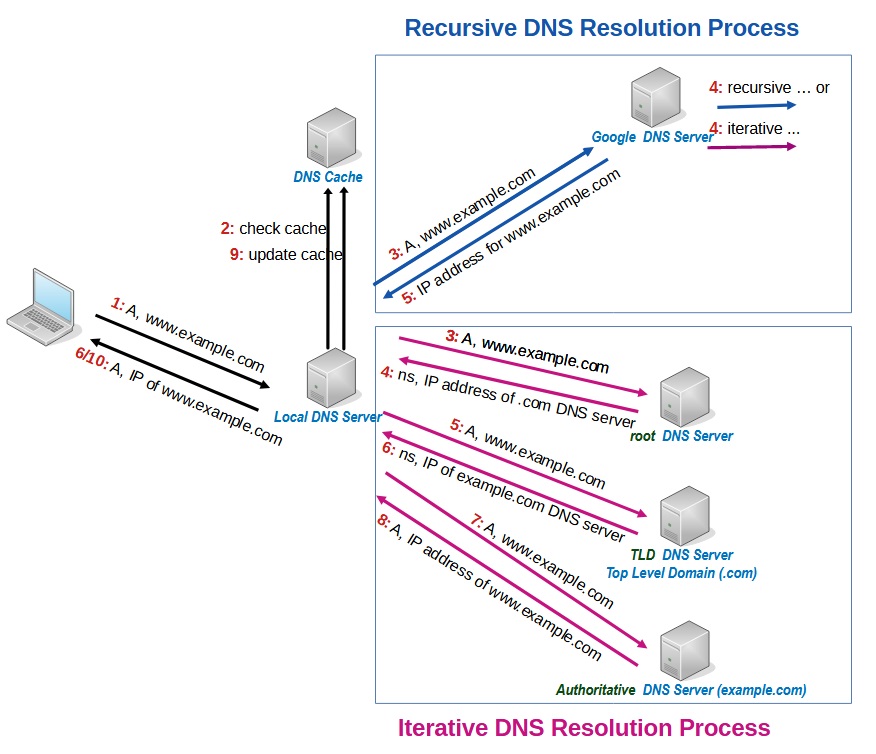
Now that we've established the 'why' of decentralization, let's trace the 'how'. When your application needs to resolve a domain name for which no information is cached locally, it kicks off a sequence of queries across the internet. This process is often called recursive resolution.
The main actors in this process are:
- DNS Recursor (or Resolver): The server that does the legwork on behalf of the client. It queries other DNS servers to find the final answer.
- Root Name Server: The first stop in the journey. It doesn't know the IP address, but it knows where to find the servers responsible for the Top-Level Domain (e.g.,
.com,.org,.ru). - TLD (Top-Level Domain) Name Server: This server manages all domains for a specific TLD. It doesn't have the final IP but knows the authoritative name server for the specific domain (e.g.,
yandex.com). - Authoritative Name Server: The final source of truth. This server holds the actual DNS records for the domain and provides the IP address.
The following article from Cloudflare provides a clear, step-by-step breakdown of this entire path.
This article, 'What is DNS?', clearly defines the roles of the four main server types and then walks through the 8 steps of a typical DNS lookup.
Please read the sections 'There are 4 DNS servers involved in loading a webpage' and 'The 8 steps in a DNS lookup'. As you read, trace the flow of the query for example.com from the recursor to the root, TLD, and finally the authoritative server.
To visualize this flow, here is a diagram illustrating the interactions between the different servers.
Scaling for a Global Audience: Anycast
A key detail for serving a "globally distributed service" is how the 13 logical root name servers handle immense traffic. It's not just 13 physical machines. Instead, they use Anycast routing.
With Anycast, hundreds of servers worldwide announce the same IP address. When your resolver queries a root IP, the network automatically routes your request to the topologically nearest server. This provides both massive scalability and low latency. This same technique is used by many global CDNs and service providers.
The video from Arpit Bhayani that you watched earlier explains this concept well.
How DNS really works and how it scales infinitely?
Let's revisit the Arpit Bhayani video to focus on the resolution path and the use of Anycast.
Please watch the segment from 07:59 to 13:30. Pay close attention to how Anycast allows the 13 logical root servers to scale globally and how the resolver iteratively queries the root and TLD servers.
3. Performance Bottlenecks and the Power of Caching
The full 8-step lookup process we just reviewed is the worst-case scenario. Each step involves a network round-trip, introducing latency. For the high-performance systems you're accustomed to, a delay of hundreds of milliseconds for a DNS lookup is unacceptable.
The primary performance bottleneck in DNS is network latency. The system mitigates this with aggressive caching at multiple layers. A cached response can short-circuit the lookup process, providing a near-instantaneous answer.
Here are the key caching layers, checked in order:
- Browser Cache: Modern browsers maintain their own small DNS cache.
- Operating System Cache: The OS has a DNS client (a "stub resolver") that caches recent lookups.
- Recursive Resolver Cache: This is the most significant cache. Your ISP's resolver, or public ones like Google's
8.8.8.8or Cloudflare's1.1.1.1, serve millions of users and maintain a large cache of popular domains. A request forgoogle.comwill almost certainly be served from this cache without needing to contact the root servers.
The following video provides a concise summary of the entire flow, with a great explanation of these caching layers.
Everything You Need to Know About DNS: Crash Course System Design #4
This video from ByteByteGo, 'Everything You Need to Know About DNS', neatly illustrates the life of a DNS query and the critical role of caching.
Please watch the segment from 02:40 to 04:04. Notice how it traces the query through the browser, OS, and resolver caches before initiating the full recursive lookup.
To dive deeper into the specifics of each caching layer, the following article provides more detail.
How DNS Works: A Guide to Understanding the Internet's ...
This freeCodeCamp article, 'How DNS Works', gives a detailed account of the initial checks an application and OS perform before forwarding a query.
Read the section 'How DNS Resolution Powers Your Application’s Network Requests', focusing on steps 2 ('Application Cache Lookup') and 3 ('Operating System Cache Check').
4. Practical Tooling: Tracing a Query with dig
To move from theory to practice, you can use the command-line tool dig (Domain Information Groper) to trace the resolution path yourself. The +trace option instructs dig to perform an iterative query, showing you each step from the root servers downwards.
The freeCodeCamp article you just looked at includes a great example of this.
How DNS Works: A Guide to Understanding the Internet's ...
Let's look at the practical output of tracing a DNS query.
Find the section with the heading 'The following image shows the dig +trace google.com output...'. Examine the output. You will see the queries to the root servers (like a.root-servers.net), then to the .com TLD servers, and finally to Google's authoritative name servers (ns1.google.com).
I encourage you to run dig +trace <domain> on your own machine for a few different domains. This provides a concrete view of the resolution path and reinforces the concepts we've discussed.
Conclusion
In this lesson, we've deconstructed the DNS resolution process. Here are the key takeaways:
- DNS is a hierarchical, decentralized system designed for scalability and resilience, avoiding the pitfalls of a centralized architecture.
- A full DNS query follows a path from a DNS resolver to root servers, then TLD servers, and finally to the authoritative name server that holds the record.
- Caching is paramount for performance. It occurs at multiple layers—browser, OS, and resolver—to minimize network latency by avoiding the full lookup path whenever possible.
- Technologies like Anycast are used to scale critical infrastructure like the root server network to handle global traffic loads efficiently.
You now have a solid foundation for understanding how a client finds your service in the first place.
Preview of the next lesson: We will build directly on this by exploring the different types of DNS records (A, AAAA, CNAME, MX). You will learn how to configure these records and, crucially, how to manage their caching behavior using Time-To-Live (TTL) values—a key lever for balancing performance and agility.