Hello! Welcome to the fifth and final lesson of our module on Network Infrastructure and DNS.
In our last lesson, we critically analyzed DNS-based load balancing. We concluded that while simple round-robin is often inadequate for high-load systems due to caching and lack of health awareness, its most powerful application is in Global Server Load Balancing (GSLB) to direct traffic between geographically distributed datacenters.
Today, we will build directly on that concept to address our final DNS learning outcome: Set up GeoDNS routing to direct traffic based on geographic location.
We will explore how GeoDNS works, walk through a practical setup using a managed DNS provider, and analyze its architectural trade-offs against other global traffic management techniques. This will complete our picture of how DNS is used to route initial user requests in a large-scale distributed system.
1. The "What" and "Why" of GeoDNS
At its core, GeoDNS is an intelligent routing policy applied at the DNS level. Instead of returning the same IP address to everyone, an authoritative DNS server with GeoDNS capabilities inspects the geographic origin of the DNS query and returns an IP address corresponding to a server that is geographically closer to the user.
The primary goals are to:
- Reduce Latency: Connecting users to a nearby datacenter significantly improves application performance and user experience.
- Enhance Availability: It enables routing traffic away from a datacenter that is experiencing an outage.
- Serve Localized Content: It allows you to present region-specific content, pricing, or language, and comply with local data regulations.
The following article provides an excellent overview of these benefits and the core scenarios where GeoDNS is most valuable.
GeoDNS In 2025 - When Should You Use It?
Let's start with the article "GeoDNS In 2025" from Potent Pages to understand the main advantages and use cases for GeoDNS.
Please read the sections "Advantages of Using GeoDNS" and "When Should I Use GeoDNS?". Focus on how the described benefits—faster load times, redundancy, and localization—align with the challenges of operating global services.
2. How GeoDNS Works
The magic of GeoDNS happens at the authoritative DNS server. When a recursive resolver forwards a user's query, the authoritative server determines the user's location. There are two common methods:
- Source IP Address: The server looks at the source IP of the recursive resolver and uses a GeoIP database to map it to a geographic location.
- EDNS0 Client Subnet (ECS): A more accurate method where the recursive resolver includes a portion of the client's IP address in the query. This allows the authoritative server to make a routing decision based on the end-user's location, not the resolver's, which is crucial as they can be far apart (e.g., using a public DNS service like 8.8.8.8).
Once the location is determined, the server consults its record set to find the appropriate IP address for that region and returns it.
This diagram illustrates the entire flow:

To understand the architectural context, it's useful to contrast GeoDNS (a form of GSLB) with another common global routing technique: Anycast.
Anycast vs Global Server Load Balancing on the Brightboard
This video from F5 DevCentral Community clearly explains the difference between GSLB (which uses DNS for routing) and Anycast (which uses network-level routing).
Watch from 02:13 to the end. Pay close attention to the distinction: GSLB (02:13 - 04:13): The DNS server is intelligent and makes a decision, returning different IPs for the same hostname depending on the client. Anycast (04:13 - 05:39): The DNS is simple, returning the same IP. The network itself (using BGP) routes the client to the nearest location advertising that IP. Comparison (05:39 - 06:09): Note the trade-off between the granular control of GSLB/GeoDNS versus the network-level elegance of Anycast.
Your experience with high-load systems likely involved services deployed across multiple regions. GeoDNS provides the application-aware intelligence to control that traffic distribution, whereas Anycast delegates that control to the underlying network protocols.
3. Practical Setup: GeoDNS with AWS Route 53
Now, let's move from theory to practice. We will walk through setting up GeoDNS using AWS Route 53, one of the most common managed DNS providers.
The following video provides a concise, step-by-step demonstration of the entire process.
This "howCode" video is a practical guide to configuring GeoDNS in AWS Route 53. It covers all the essential steps from creating records to verification.
Please watch the following segments: Delegating a Subdomain (01:23 - 02:50): This shows how to point a subdomain to Route 53 using NS records. This is a common pattern when your main domain is managed elsewhere. Configuring Geolocation Records (02:50 - 04:24): This is the core of the setup. Observe how multiple A records are created for the same name, each with a 'geolocation' routing policy targeting a specific continent. Crucially, note the creation of a default record. Verification (04:24 - 05:13): See how an external tool can be used to confirm that different geographic locations are receiving the correct IP addresses.
Let's break down the key configuration concepts:
- Routing Policy: When creating a record in Route 53, you select "Geolocation" as the policy.
- Location: You can then specify a location, from continent down to country or even a US state. Route 53 prioritizes the most specific rule (state > country > continent).
- Default Record: It is critical to create a "default" record. This record handles queries from IP addresses that cannot be mapped to a location or from regions for which you haven't created a specific record. Without a default record, these users would receive no answer.
The official AWS documentation provides more detail on these rules.
For a definitive explanation of how Route 53 handles these rules, let's consult the official documentation.
Read the main section and pay special attention to the paragraph explaining how priority goes to the smallest geographic region and the role of the default record for unidentified locations.
The final configuration in a provider's UI might look something like this, with different records targeting different regions:
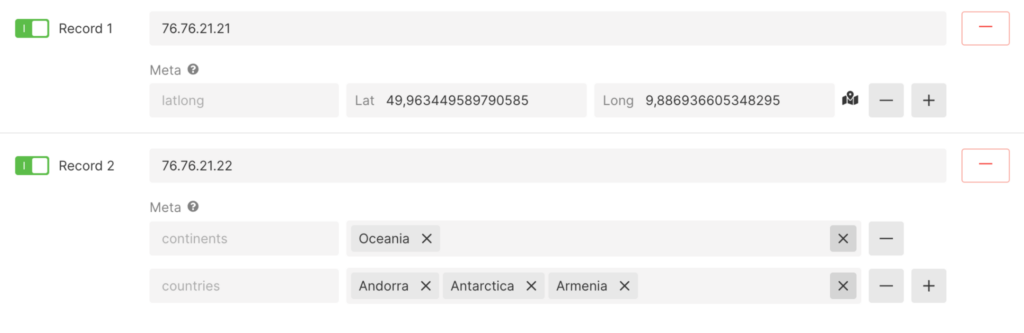
4. Advanced Considerations
While powerful, GeoDNS is not a silver bullet. A practical implementation requires awareness of its limitations and alternatives.
Accuracy and Privacy
The accuracy of GeoIP databases is not perfect, and users behind VPNs or certain proxies may be misidentified and routed to a suboptimal location. Furthermore, using location data, even from an IP address, can have privacy implications under regulations like GDPR.
Self-Hosted vs. Managed
While we focused on a managed service like Route 53, the underlying technology can be implemented on your own infrastructure. DNS servers like BIND can be configured to use GeoIP databases to create different "views" of a zone file for different geographic regions.
GeoDNS In 2025 - When Should You Use It?
To see what a self-hosted implementation looks like, this section of the "GeoDNS In 2025" article provides a configuration snippet for BIND.
Please read the sections "Considerations Before Implementing GeoDNS" and "Implementing GeoDNS With BIND". The first section covers the important real-world limitations. The second shows how the same logic is achieved with BIND's geoip ACLs and views, demonstrating that this isn't just a proprietary cloud feature.
Conclusion
This lesson completes our exploration of DNS in the context of high-load systems. We've seen how to use GeoDNS to intelligently direct global traffic, a significant step up from the simple load balancing techniques we discussed previously.
Key Takeaways:
- GeoDNS routes users to geographically proximate servers by returning a location-specific IP address from an authoritative DNS server.
- The setup involves creating multiple DNS records for the same hostname, each with a geolocation routing policy targeting a specific region.
- A default record is essential to handle traffic from unidentifiable locations.
- GeoDNS is a form of GSLB that offers more granular, application-aware control than network-level Anycast, but is subject to the limitations of DNS caching (TTL).
- Practical implementation requires considering the accuracy of GeoIP data and potential privacy regulations.
Preview of the next lesson:
We have now covered how DNS gets a user's request to the front door of the correct datacenter. In our next module, "Load Balancing and Reverse Proxies," we will step inside that datacenter. We'll start by examining the fundamental building block of network communication for any high-load service: the TCP connection lifecycle. Understanding how connections are established, maintained, and reused is critical before we can configure the powerful load balancers like nginx and HAProxy that manage traffic within our infrastructure.