
Welcome back. The LINQ lesson focused on a useful timing question: when does the work actually execute? The same question is central to async code. A method call can begin an operation and return a Task before the operation has produced its final result; await marks where code needs that result.
Priority: Must know. In this lesson, you will trace control flow through a short asynchronous C# operation, distinguish non-blocking I/O from parallel CPU work, and explain where exceptions surface. These are frequent senior .NET interview questions, especially in ASP.NET Core API discussions.
The mental model: Task is not a thread
Keep these three roles distinct:
| Construct | What it means |
|---|---|
Task / Task<T> | An object representing an operation that will eventually complete, fault, or be canceled. Task<T> can also provide a result of type T. |
async | Marks a method that can use await; the compiler builds the machinery needed to resume the method later. |
await | Waits asynchronously for a task’s completion. If the task is incomplete, the method yields control rather than blocking its current thread. |
The most important correction to a common interview answer is this:
asyncandawaitdo not create a new thread. ATaskdoes not mean “a background thread.”
For an I/O operation such as an HTTP request, the application initiates network work and need not keep an application thread blocked while it waits for bytes to arrive. When the operation completes, the remainder of the async method—the continuation—is scheduled to run.
For a CPU-heavy calculation, however, asynchronous I/O does not make the calculation faster. Task.Run can move CPU-bound work to a thread-pool thread in suitable application types, but it consumes a thread for the duration of that computation. In an ASP.NET Core request path, wrapping normal synchronous or I/O work in Task.Run is usually not a scalability improvement.
Read the following Microsoft Learn sections before proceeding. They supply the precise control-flow vocabulary interviewers expect.
The Task Asynchronous Programming (TAP) model with async and ...
Read this Microsoft Learn guide for the canonical explanation of how a task represents in-progress work, how an incomplete await suspends a method, and why async I/O is not automatically multithreaded.
In the “Async methods are easy to write” section, begin at the sample method. Focus on the difference between receiving a Task from an async call and receiving its final result after await. Then read the full “What happens in an async method” section, starting with the control flow explanation. Follow its numbered steps rather than trying to memorize compiler internals. In the “Threads” section, read the thread clarification. Finally, in “Return types and parameters,” read from the return-type discussion to connect Task, Task<T>, results, and failures.
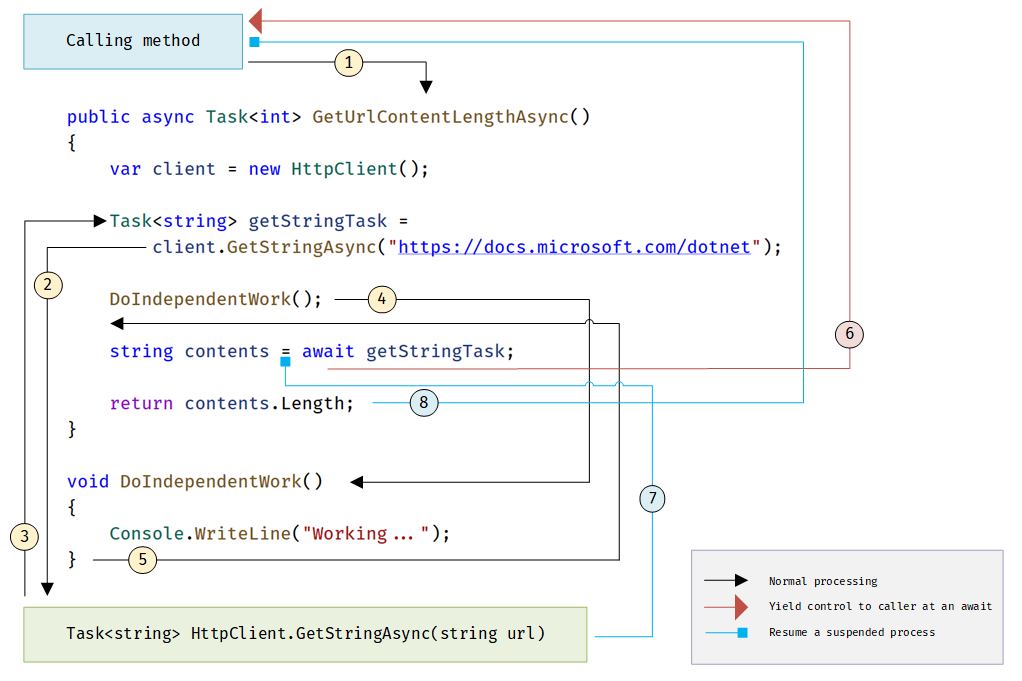
Trace one operation precisely
Consider an API service that must retrieve a customer profile. Assume GetAsync starts an HTTP request and initially returns an incomplete task.
public async Task<int> GetCustomerScoreAsync(string customerId)
{
    Console.WriteLine("A: method entered");

    Task<CustomerProfile> profileTask =
        customerClient.GetAsync(customerId);

    Console.WriteLine("B: request started");

    var rules = LoadScoringRules();
    Console.WriteLine("C: independent rules loaded");

    CustomerProfile profile = await profileTask;

    Console.WriteLine("D: profile available");
    return CalculateScore(profile, rules);
}
A caller uses it as follows:
Console.WriteLine("1: before call");

Task<int> scoreTask = GetCustomerScoreAsync("C-1042");

Console.WriteLine("2: task received");

int score = await scoreTask;

Console.WriteLine($"3: score is {score}");
Interview pause: predict the output
Before reading on, say the expected ordering aloud, assuming:
customerClient.GetAsyncreturns an incomplete task;LoadScoringRules()is fast, synchronous work;- the caller reaches its own
awaitbefore the HTTP operation finishes.
Also explain what is executing while the HTTP request is in flight.
Model answer
The output initially is:
1: before call
A: method entered
B: request started
C: independent rules loaded
2: task received
The async method begins executing synchronously, just like an ordinary method. Calling an async method does not immediately hand all its work to another thread.
At this point, profileTask represents the in-progress HTTP operation. The method can still call LoadScoringRules() because that work does not require the customer profile.
When execution reaches:
CustomerProfile profile = await profileTask;
the task is incomplete. GetCustomerScoreAsync records what it needs to resume later—such as its local variables and the continuation after await—then returns its own incomplete Task<int> to the caller. That is the task stored in scoreTask.
The caller prints 2: task received, then reaches:
int score = await scoreTask;
Since that outer task is also incomplete, the caller yields as well. No application thread needs to sit blocked waiting for the HTTP response.
Once the HTTP work completes, the continuation of GetCustomerScoreAsync runs:
D: profile available
3: score is 87
The exact thread that runs the continuation is not a contract you should rely on. In a typical ASP.NET Core application, do not assume that the continuation resumes on the same request thread. What matters is that the method resumes with its preserved logical state.
There is one important alternate case: if profileTask has already completed by the time execution reaches await, the method continues synchronously. In that case, D may appear before 2. await is therefore not inherently “a pause”; it pauses only when its task is incomplete.
A concise interview explanation is:
An async method runs synchronously until it reaches an incomplete await. At that point it returns a task to its caller and releases the current thread. When the awaited operation completes, the continuation resumes and eventually completes, faults, or cancels the outer task.
Start work early only when it is genuinely independent
A frequent performance mistake is to use sequential awaits for calls that do not depend on each other:
var customer = await customerClient.GetAsync(customerId);
var permissions = await permissionClient.GetAsync(customerId);
The permission request does not start until the customer request has finished. If each is remote I/O, total latency can approach the sum of both request times.
When the operations are independent and it is safe to issue both requests, start both first:
Task<CustomerProfile> customerTask =
    customerClient.GetAsync(customerId);

Task<CustomerPermissions> permissionsTask =
    permissionClient.GetAsync(customerId);

await Task.WhenAll(customerTask, permissionsTask);

CustomerProfile customer = await customerTask;
CustomerPermissions permissions = await permissionsTask;
This is concurrency: both operations can be in flight during overlapping periods. It reduces elapsed time for independent I/O, often toward the duration of the slower request rather than the sum of both.
It does not automatically mean parallel execution of your C# code.
- Concurrency means more than one operation is active or in progress over the same period.
- Parallelism means work executes simultaneously, commonly using multiple CPU cores.
- A network request may be concurrent with other work without consuming a dedicated application thread while waiting.
- Two CPU-bound
Task.Runoperations may execute in parallel, but they can also compete for limited CPU capacity.
For a dashboard-style endpoint that aggregates independent downstream data, concurrent starts may be appropriate. For an order workflow where payment authorization requires the validated order total, concurrent starts would be wrong: the dependency requires sequencing.
The distinction is well illustrated in the opening of this video.
C# Async/Await/Task Explained (Deep Dive)
Watch Raw Coding’s “C# Async/Await/Task Explained (Deep Dive)” for a short visual intuition about beginning external work, continuing with independent work, and awaiting only when a result is needed.
Watch the tea example. Pay particular attention to the change from waiting for the kettle immediately to starting it, preparing the mugs, and only then obtaining the water. Treat the tea setup as an analogy for external I/O, not as evidence that every Task creates a thread.
Task.WhenAll is a coordination point, not a magic speed button
Task.WhenAll waits until all supplied tasks finish. It does not make dependent operations independent, remove downstream capacity limits, or justify sending an unbounded number of requests.
A senior-level answer adds operational judgment:
- Confirm that operations are independent from a correctness perspective.
- Consider downstream rate limits, connection limits, and resource cost.
- Set a timeout and cancellation boundary at the API edge; you will cover those decisions in a later lesson.
- Coordinate and observe all started tasks. Starting a task whose failure is never observed creates poor diagnostics.
Exceptions live in tasks until you observe them
Async code can use normal-looking try/catch, but placement matters.
public async Task<CustomerProfile> GetProfileAsync(
    string customerId,
    CancellationToken cancellationToken)
{
    using var response = await httpClient.GetAsync(
        $"/customers/{customerId}",
        cancellationToken);

    response.EnsureSuccessStatusCode();

    return await response.Content.ReadFromJsonAsync<CustomerProfile>(
        cancellationToken: cancellationToken)
        ?? throw new InvalidOperationException(
            "Customer response had no body.");
}
If the HTTP operation fails after the method has yielded, the task returned by GetProfileAsync becomes faulted. The exception is held by that task until code observes it.
Catch the failure around the await:
try
{
    CustomerProfile profile = await GetProfileAsync(
        customerId,
        cancellationToken);

    return profile;
}
catch (HttpRequestException ex)
{
    logger.LogWarning(
        ex,
        "Customer service failed for {CustomerId}",
        customerId);

    throw;
}
At the await, C# rethrows the failure so ordinary exception handling works naturally.
This is unreliable:
try
{
    Task<CustomerProfile> task = GetProfileAsync(
        customerId,
        cancellationToken);

    // No await here.
}
catch (HttpRequestException)
{
    // Does not handle an asynchronous failure that occurs later.
}
The try block has ended before the later failure is observed. The task may fault after this method has moved on.
Task outcomes and async void
A task can end in one of three broad outcomes:
| Outcome | Meaning for the caller |
|---|---|
| Ran to completion | await returns normally and, for Task<T>, produces the result. |
| Faulted | await throws the captured exception. |
| Canceled | await throws an OperationCanceledException-derived exception. |
Avoid “fire-and-forget” code in request handling:
SendAuditEventAsync(auditEvent); // Risky: task is ignored
The caller has no reliable way to know whether it completed, failed, or outlived the request. Reliable background processing requires an explicit design, which the course addresses later.
Similarly, reserve async void for event handlers that require a void signature. An async void method cannot be awaited, so callers cannot coordinate its completion or catch its asynchronous exceptions in the usual way. Application and service methods should almost always return Task or Task<T>.
Faults from concurrent tasks
When several tasks are started together, keep the aggregate task so failures are observed deliberately:
Task<CustomerProfile> customerTask =
    customerClient.GetAsync(customerId);

Task<CustomerPermissions> permissionsTask =
    permissionClient.GetAsync(customerId);

Task allTasks = Task.WhenAll(customerTask, permissionsTask);

try
{
    await allTasks;
}
catch
{
    foreach (Exception exception in
             allTasks.Exception?.InnerExceptions
             ?? Enumerable.Empty<Exception>())
    {
        logger.LogError(exception, "Dashboard dependency failed");
    }

    throw;
}
await allTasks throws when the combined task is faulted. If multiple tasks fail, inspect allTasks.Exception.InnerExceptions when you need to log or classify every failure. Do not assume that the one exception surfaced by await tells the whole operational story.
Senior interview drill: improve the endpoint
Answer this aloud in about two minutes before checking the model answer.
An ASP.NET Core endpoint loads account details and entitlement data from two independent internal APIs. The current implementation awaits account details first, then starts and awaits entitlements. A developer proposes wrapping both calls in
Task.Run. How would you improve the code and explain the trade-offs?
Model answer
I would first establish that the two calls are genuinely independent and that calling both systems at once is acceptable. If so, I would invoke both async client methods directly, retain both tasks, and await their combined completion with Task.WhenAll.
I would not use Task.Run for HTTP I/O. Proper async HTTP APIs already release the request thread while network I/O is pending. Task.Run adds thread-pool scheduling and consumes a worker thread merely to initiate or wait around an operation that is already asynchronous. Under load, that can make ASP.NET Core less scalable.
I would define an endpoint timeout and pass its cancellation token to both calls, then decide the product behavior if one dependency fails. For example, the endpoint might fail as a whole, or it might return account data with an explicitly degraded entitlement section if that is a valid contract. I would also add dependency timing and error telemetry, because parallelizing the calls improves latency only if the downstream services remain healthy and within capacity.
A compact answer framework
When asked, “Explain async and await,” avoid vague statements such as “it makes code faster.” A stronger answer is:
Taskrepresents an operation and its eventual outcome. An async method runs synchronously until it reaches an incomplete await. It then yields control instead of blocking its current thread, returning a task that represents the rest of the method. When the awaited operation completes, the continuation resumes and completes, faults, or cancels that outer task. For independent I/O calls, I can start tasks before awaiting them and coordinate withTask.WhenAll; that is concurrency, not necessarily parallel threads. Exceptions are captured by faulted tasks and are normally handled where I await them.
Key takeaways
asyncdoes not create a thread, and aTaskis not a thread. For asynchronous I/O, it represents work that can continue without blocking an application thread.- An async method initially runs synchronously. It yields only at an
awaitwhose task is incomplete. awaitresumes immediately for an already-completed task; otherwise it registers a continuation and returns control to the caller.- Start independent asynchronous operations before awaiting them when concurrency is both correct and operationally safe. Use
Task.WhenAllto coordinate them. - A fault occurring during asynchronous work is stored in a faulted task and rethrown when that task is awaited. Put
awaitinside the relevanttryblock. - Prefer
TaskandTask<T>for application code. Treat ignored tasks andasync voidas warning signs unless the context specifically requires them.
Next, you will move from language-level control flow to ASP.NET Core construction: constructor injection and how the dependency-injection container resolves an object graph.
Can't find a good explanation? Sign up and we'll make it for you
Sign up