
Hello! Welcome back to the final lesson in our module on Advanced Mixing Techniques.
In our last session, we got hands-on with harmonic mixing. You learned how to set up Rekordbox to see track keys, find compatible tracks using the Camelot Wheel and the "Traffic Light" system, and, most importantly, use the Master Tempo button to preserve a track's key when changing its speed.
Today, we're addressing a common DJ dilemma: what do you do when the perfect track to play next is in a clashing key? This lesson focuses on the Key Sync feature of the CDJ-3000, a powerful tool that can change a track's key on the fly to make it harmonically compatible. Our goal is not just to learn how to press the button, but to understand how it works and critically evaluate its sonic results to decide when—and when not—to use it.
1. Understanding Key Sync and Key Shift
At its core, Key Sync is an automated function that adjusts the musical key of the incoming track to match the key of the track playing on the master deck. This is the one-button solution to a harmonic clash.
It's closely related to Key Shift, which is the manual version of the same process. On the CDJ-3000, you can use the touchscreen to manually shift a track's key up or down by semitones. Key Sync simply automates this decision for you.
First, let's get a clear overview of these features.
Pioneer DJ CDJ-3000 Full-Length Training Tutorial & Video Manual
This section from the "Pioneer DJ CDJ-3000 Full-Length Training Tutorial" by Digital DJ Tips introduces the Key Sync feature and explains why Pioneer DJ's implementation is particularly effective. It also demonstrates the manual Key Shift function.
Please watch from 01:26:07 to 01:28:15. Pay close attention to the explanation of how Pioneer's Key Sync chooses the new key. This is what sets it apart from simpler implementations.
The "Fuzzy Keymixing" Advantage
As the video and our previous readings have touched upon, many DJs are wary of "Key Sync" buttons. On older or different equipment, this function might shift a track's key by many semitones to find an exact match, often resulting in unnatural sound artifacts (sometimes called "chipmunking").
The CDJ-3000's algorithm is more sophisticated. Instead of forcing an exact match, it looks for the closest musically compatible key. This approach is often called "Fuzzy Keymixing."
Let's look at the official documentation to see exactly what this means.
The CDJ-3000's user manual provides the technical details of the Key Sync function. This will confirm what the video explained about the types of musical relationships it considers.
Please read the first paragraph under the 'Key Sync' heading on page 96. Notice the list of keys it can match to.
As the manual states, the CDJ-3000 will adjust the key to the closest option among:
- Same key
- Dominant key
- Subdominant key
- Relative key
- Relative key of the dominant/subdominant
Given your background in music production, you'll recognize these as fundamental relationships in music theory. This intelligent approach means the CDJ-3000 will make the smallest possible change to achieve a musically pleasing result, which is crucial for preserving audio quality.
2. How to Use Key Sync
Using the feature is straightforward. The real skill lies in listening to the result.
Here's the process:
- Ensure one deck is assigned as the Master deck (the
MASTERbutton should be lit). This is the track whose key will be the target. - Load your incoming track on the other deck.
- Press the KEY SYNC button on the incoming deck.
You will see the key information on the display change to reflect the new, synced key.
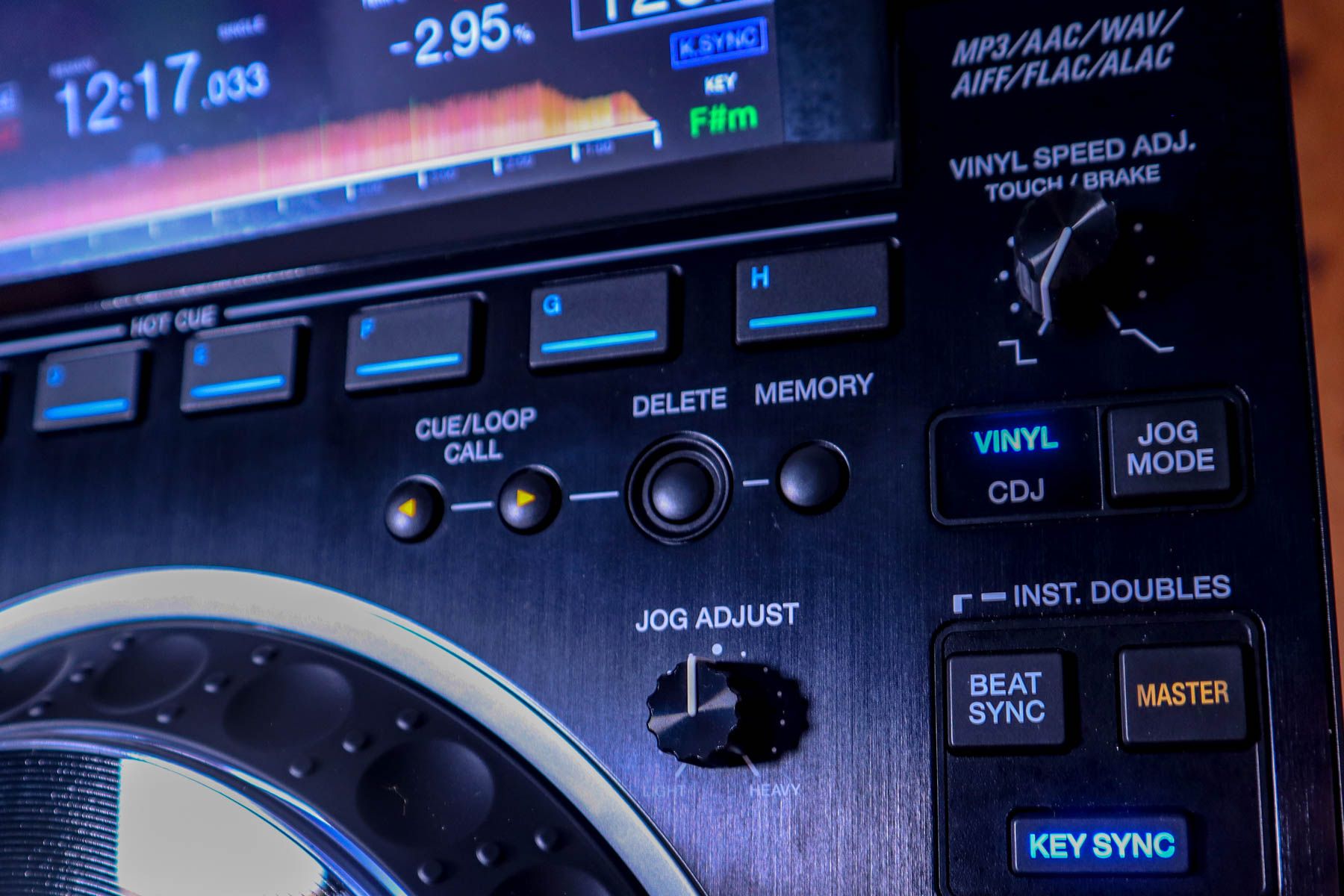
To deactivate Key Sync and return the track to its original key, you can press either the KEY SYNC button again or the MASTER TEMPO button.
Important Note: Just like in our last lesson, Master Tempo is essential. Key Sync sets the new key, and Master Tempo ensures that key stays locked, even if you adjust the tempo with the pitch fader. Always have Master Tempo engaged when using Key Sync.
3. Evaluating the Sonic Result
Using Key Sync is easy, but should you use it? This is where your ear and judgment as a DJ come into play.
The Ultimate Guide To Keymixing For DJs
This article, 'The Ultimate Guide To Keymixing For DJs', which we looked at previously, has an excellent section on this topic. It specifically praises the CDJ-3000's implementation while also providing crucial advice on when to trust your ears.
Read the section titled 'Why not use “key sync”?' Focus on why the CDJ-3000 is an exception and the final advice about trusting your ears, especially with vocal tracks.
As the article highlights, even a small shift of one or two semitones can sometimes sound "wrong," particularly on a track with a well-known vocal melody. The human brain is highly attuned to the sound of the human voice, and altering its pitch can be immediately noticeable.
The technology behind this is a pitch-shifting algorithm. You can think of it as being similar to the "Complex Pro" warp mode in Ableton Live, which is designed to preserve the formants of a sound to avoid artifacts when transposing.
CDJ-3000 | What you might not know...
This video from Pri yon Joni offers a great analogy, comparing the CDJ-3000's Key Shift algorithm to Ableton's, and demonstrates the audible effect of larger shifts.
Watch from 08:37 to 09:50. Listen for the introduction of artifacts as the key is shifted multiple semitones away from the original.
Your critical listening checklist for Key Sync:
- How far did it shift? The display will show you the original key and the new key. A shift of 1 or 2 semitones is usually fine. A larger shift of 3+ semitones requires careful listening.
- What are the core elements of the track? Key Sync tends to work best on instrumental tracks, especially percussive, bass-driven DnB. Be more cautious with tracks dominated by strong, recognizable vocals or lead synth melodies.
- Preview in your headphones! This is non-negotiable. Before you even think about bringing the track into the mix, use your headphone cue to listen to the altered track. Does it sound natural? Or does it sound thin, warbly, or artificial? If it sounds bad in your headphones, it will sound bad on the main speakers.
4. Practical Exercise: Trust Your Ears
Let's put this to the test.
- Select Your Tracks: On your CDJs, find two DnB tracks from your collection that are harmonically distant. For example, pick a track in 2A and another in 9A. According to the Camelot Wheel, these are likely to clash.
- Test the Clash: Beatmatch the two tracks and try a long, blended transition where melodic or bass elements overlap. Listen for the dissonance in your headphones.
- Engage Key Sync: Now, on the incoming deck (the 9A track), press
KEY SYNC. Note what key the CDJ shifts it to. It will likely shift it to 2A to match the master deck. - Critical Listening: Preview the altered 9A track in your headphones.
- Does the bassline still have its power?
- Do the synth stabs sound natural?
- If there are vocals, do they sound authentic or artificial?
- Perform the Mix: With Key Sync active, perform the same long transition again. Notice how the basslines and melodic parts now work together instead of fighting each other.
- Experiment: Repeat this exercise with different combinations.
- Try a track with a prominent vocal vs. a purely instrumental track.
- Try forcing a larger key shift (e.g., from 1A to 8A) and see at what point the audio degradation becomes unacceptable to you.
This exercise will build your intuition for when Key Sync is a creative lifesaver and when it's better to simply choose a different track.
Conclusion
You have now mastered the full spectrum of harmonic mixing on the CDJ-3000s, from manual track selection to automated key adjustment. Key Sync is an incredibly powerful feature, but like any advanced tool, it requires skill and judgment to use effectively.
Key Takeaways:
- Key Sync automatically adjusts an incoming track's key to be musically compatible with the master track.
- The CDJ-3000 uses a sophisticated algorithm based on "Fuzzy Keymixing," which minimizes pitch shifts and preserves audio quality better than most systems.
- The most important step is to always preview the result in your headphones and evaluate the sonic quality before performing the mix.
- Be especially critical when using Key Sync on tracks with prominent and well-known vocals.
Preview of the Next Lesson:
We've spent this module focused on the harmonic and melodic aspects of mixing. In our next lesson, we'll shift our attention to rhythm and texture by exploring the Beat FX section of the DJM-900NXS2 mixer. You'll learn how to identify and apply effects like Echo and Delay in time with your tracks to create more dynamic and exciting transitions.
Can't find a good explanation? Sign up and we'll make it for you
Sign up