
Hello! Welcome to your first lesson in the course on building a classic JRPG engine. I'm excited to get started with you on this journey.
Your goal is to create a JRPG reminiscent of the SNES era, and you have a preference for understanding the high-level architecture before diving into implementation. This is an excellent approach, as a solid architectural foundation makes development much smoother.
In this lesson, we'll begin by dissecting the architecture of a very successful tool for this genre: RPG Maker. By understanding how it's structured, we'll gain invaluable insights that will directly inform the design of our own custom engine in the upcoming modules.
Specifically, we'll analyze the three core pillars of RPG Maker's architecture: its data-driven database (using JSON), its powerful event system for scripting game logic, and its extensible plugin structure for custom functionality.
Let's begin.
The Data-Driven Philosophy of RPG Maker
Most game engines give you a blank canvas and a set of tools to build a game from scratch. RPG Maker takes a different approach. When you create a new project, it gives you a fully functional, barebones RPG. Your job is not to build the engine, but to populate it with content: maps, characters, stories, and items.
This is what we call a data-driven architecture. The core logic of the game is already in place, and it operates on the data you provide. This is a powerful paradigm that separates the "what" (the game's data) from the "how" (the engine's code). Given your background in front-end development, you can think of this as being similar to how a framework like React or Vue renders a user interface. The framework provides the rendering logic, and you provide the component definitions and the state (data) to be rendered.
To get a quick overview of this concept, let's watch a short segment from the following video.
Why You Should Learn RPG Maker
This video from BinzuDev provides a clear, high-level introduction to what RPG Maker is and its core components.
Just over a minute into the video, please watch the development workflow. Focus on how the video separates the development process into two main activities: managing the database and creating maps with events.
As the video explained, making a game in RPG Maker primarily involves two things:
- The Database: Defining all the "nouns" of your game—the characters, items, skills, enemies, etc.
- The Map Screen & Events: Visually building the world and scripting the "verbs"—the interactions, cutscenes, and logic that bring the world to life.
Now, let's break down the architecture that enables this workflow, starting with the database.
Pillar 1: The Database - Your Game's Central Nervous System
The Database in RPG Maker is the central repository for every piece of data that defines your game world. It's where you configure everything from a character's starting stats to the price of a potion or the power of a fire spell.
HELP DOCUMENTATION for version 1.7.0 / PC
The official RPG Maker documentation provides a comprehensive list of what constitutes the 'Database'. Reading this section will give you a concrete understanding of the breadth of data managed by the engine.
Please read the section titled 'What is the Database?' on page 67. Study the database overview and pay attention to the list of 15 data types, from Actors to Terms.
As you can see, the database is incredibly thorough. This structured approach ensures that all game entities are consistently defined.
In older versions of RPG Maker, this data was stored in proprietary binary files. However, modern versions like MV and MZ made a critical shift that is highly relevant to your background: they store all this data in JSON files.
RPG Maker MV Scripting First Impressions
This article from GameDeveloper discusses the implications of RPG Maker MV's switch to JavaScript and JSON. It highlights benefits that will be very familiar to you from web development.
Read the section titled 'Built for real development tools'. The author explains why using text-based formats like JavaScript and JSON is a massive improvement for developers.
The move to JSON means that the entire game's database is human-readable, editable with any text editor, and manageable with version control systems like Git. You can literally grep your project for an item name or write a script to bulk-update enemy HP values.
Here's what that looks like in practice. The image below shows map data stored as a grid of tile IDs within a JSON file.
This next image perfectly illustrates the connection between the user-friendly editor and the underlying data. On the left is the editor UI for an armor item; on the right is the corresponding entry in a JSON file.
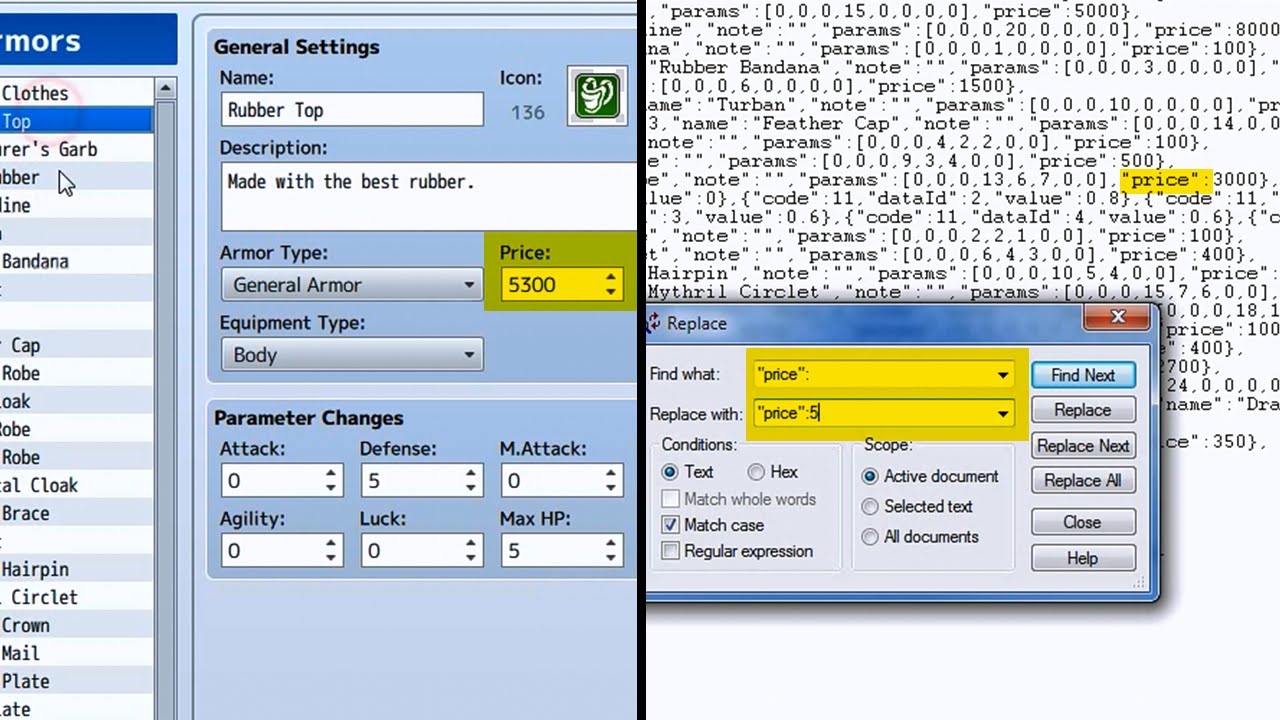
This one-to-one mapping between the editor and the JSON files is the heart of RPG Maker's data-driven architecture.
Test your understanding!
Based on this data-driven approach, how would you sketch out a simple JSON object to represent a "Potion" item? Consider attributes like its name, a description for the player, its cost, and what it does (e.g., restores 50 HP).
Show answer
An excellent question! A simple JSON representation for a Potion might look something like this:
{
  "id": 1,
  "name": "Potion",
  "description": "A simple brew that restores a small amount of health.",
  "price": 50,
  "consumable": true,
  "effects": [
    {
      "code": "hp_recover",
      "value": 50
    }
  ]
}
This structure is clear, self-contained, and easily parsed by a game engine. We define what the item is and what it does purely through data.
Pillar 2: The Event System - Scripting Game Logic
If the database contains the "nouns" of your game, the Event System provides the "verbs." It's a visual scripting tool used to create almost all dynamic sequences in the game: an NPC's dialogue, a treasure chest opening, a door transporting you to another map, or a complex, multi-stage cutscene.
An "event" is essentially a list of commands executed in sequence. These commands are simple, high-level instructions like "Show Text," "Move Character," "Play Sound," or "Change Gold."
Let's look at the documentation to see how this system is structured.
HELP DOCUMENTATION for version 1.7.0 / PC
These sections from the official documentation introduce the concept of events and the core mechanics that drive their logic: Event Pages, Conditions, Switches, and Variables.
Please read 'What Are Events?' (page 132) and 'Map Event System' (page 133). Focus on understanding the role of Event Pages and the difference between Switches and Variables for managing game state.
The key concepts to grasp here are:
- Event Pages: An event can have multiple pages, each with its own appearance and command list. The engine will only run the page with the highest number whose conditions are met. This is how an event can change over time. For example, a treasure chest has two pages: Page 1 (unopened) gives you an item and turns on a switch. Page 2 (opened) requires that switch to be ON and simply shows a "The chest is empty" message.
- Switches: These are essentially global boolean flags. You use them to track story progression and major world states (e.g.,
BossDefeated_FireCave = ON,HasMetTheKing = ON). - Variables: These store numerical values. They are used for tracking quantities like the amount of gold you have, a character's HP, or counting how many times you've spoken to an NPC.
From your perspective as a developer, this system is a simplified state management solution. Switches and Variables constitute the global state, and events are the functions (or command lists) that read from and write to this state, causing the game world to react and change.
Pillar 3: The Plugin Structure - Extending the Engine
While the database and event system are powerful, they have limits. What if you want to implement a completely new battle system, a custom menu, or a unique gameplay mechanic? This is where the third pillar comes in: the Plugin Structure.
Modern RPG Maker versions are built on JavaScript. This means not only is the game data in JSON, but the entire engine code is a collection of JavaScript files. And most importantly, the architecture is designed to be extended.
Why You Should Learn RPG Maker
Let's return to the BinzuDev video, which introduces the concept of plugins and the ability to access the underlying source code.
About five and a half minutes in, watch the plugins overview. Note how plugins are described as a way to customize or add features, and that you have full access to the game's JavaScript code.
Plugins are self-contained JavaScript files that you can add to your project to modify or extend the engine's default behavior. This is where your professional development experience becomes a massive advantage.
The plugin system is architected in a way that should feel familiar.
RPG Maker MV Scripting First Impressions
The GameDeveloper article provides a great breakdown of the plugin architecture from a developer's point of view.
Read the 'Plugin architecture' section. Below the heading, review the plugin architecture. Focus on how plugins are structured (JS files with metadata), managed in the editor, and how they execute.
A common technique used in RPG Maker plugins is aliasing. A plugin will create a reference to an original engine function, then overwrite that function with a new one. The new function can perform its own logic before or after calling the original, preserved function.
This is a powerful method for "hooking" into the engine without directly modifying the core engine files, keeping your changes modular and easy to manage. It's conceptually similar to middleware in a web server framework or higher-order components in React.
While we won't write a plugin today, you can see the practical steps involved in the video RPG Maker MV Plugin Development Tutorial - #1 - Creating Params And Windows. It shows how a developer defines parameters for the editor, reads them in code, and uses aliasing (var sm_start = Scene_Map.prototype.start;) to add a new window to the map scene. This is the mechanism that connects your custom JavaScript code to the RPG Maker engine.
Conclusion
We've now analyzed the three fundamental pillars of RPG Maker's architecture:
- Database (JSON): A data-driven design where game entities (items, characters, skills) are defined in structured, text-based JSON files, separating data from code.
- Event System: A visual scripting layer that handles game logic and state changes through a sequence of commands, managed by conditional pages, boolean "Switches," and numerical "Variables."
- Plugin Structure (JavaScript): A modular system that allows developers to extend or completely change engine functionality using JavaScript, often by "aliasing" or "hooking into" existing engine functions.
This hybrid architecture is remarkably effective. It allows non-programmers to create complex games through a visual interface, while also giving experienced developers like yourself full access to the underlying code for deep customization.
Preview of the next lesson:
In our next lesson, "Compare the data-driven architecture of RPG Maker to common front-end frameworks and custom game engines," we will build on this analysis. We'll draw more explicit parallels between these RPG Maker concepts and the architectural patterns you're already familiar with from your career in front-end development. This will solidify your understanding and prepare you to start designing the architecture for our own engine.
Can't find a good explanation? Sign up and we'll make it for you
Sign up