Hello! Welcome back to our course on designing high-load distributed systems.
In our previous lesson, we implemented the cache-aside pattern, establishing a foundational strategy for how an application interacts with Redis on a per-operation basis. We saw how to read from and write to the cache, but each action involved a separate network round-trip. In high-throughput systems, this cumulative latency can become a significant bottleneck.
Today, we'll address that inefficiency. This lesson focuses on optimizing communication with Redis by grouping commands. The learning outcome is to configure Redis pipelining and transactions for batching operations. We will explore how to significantly improve performance by reducing network overhead and how to ensure that a series of commands executes atomically, as a single, indivisible operation.
1. The Need for Batching: Performance and Atomicity
In a typical client-server interaction, every command you send to Redis incurs a network round-trip time (RTT).
Client -> Command -> ServerClient <- Reply <- Server
While fast, the latency of thousands or millions of these round-trips per second adds up. Batching operations is the key to mitigating this. Redis offers two primary mechanisms for this, which serve different purposes.
- Pipelining: This is a performance optimization. The client sends multiple commands to the server without waiting for an individual reply for each one. It then reads all the replies in a single step. This minimizes the impact of network latency by packing many commands into fewer round-trips.
- Transactions: This is an atomicity guarantee. It ensures that a sequence of commands is executed without interruption from other clients. The server queues the commands and executes them as a single atomic block.
Let's clarify the distinction.
Optimize Redis Client Performance for ...
This article from the AWS Database Blog provides excellent, clear definitions of pipelining and transactions. It sets the stage for understanding their distinct roles.
Please read the sections 'Pipelining and batching' and 'Transactions (MULTI/EXEC blocks)'. Focus on how pipelining is defined as a client-side optimization versus how transactions are handled server-side for atomicity.
As the article explains, pipelining is about network efficiency, whereas transactions are about atomic execution. The following diagram provides a helpful visual distinction.
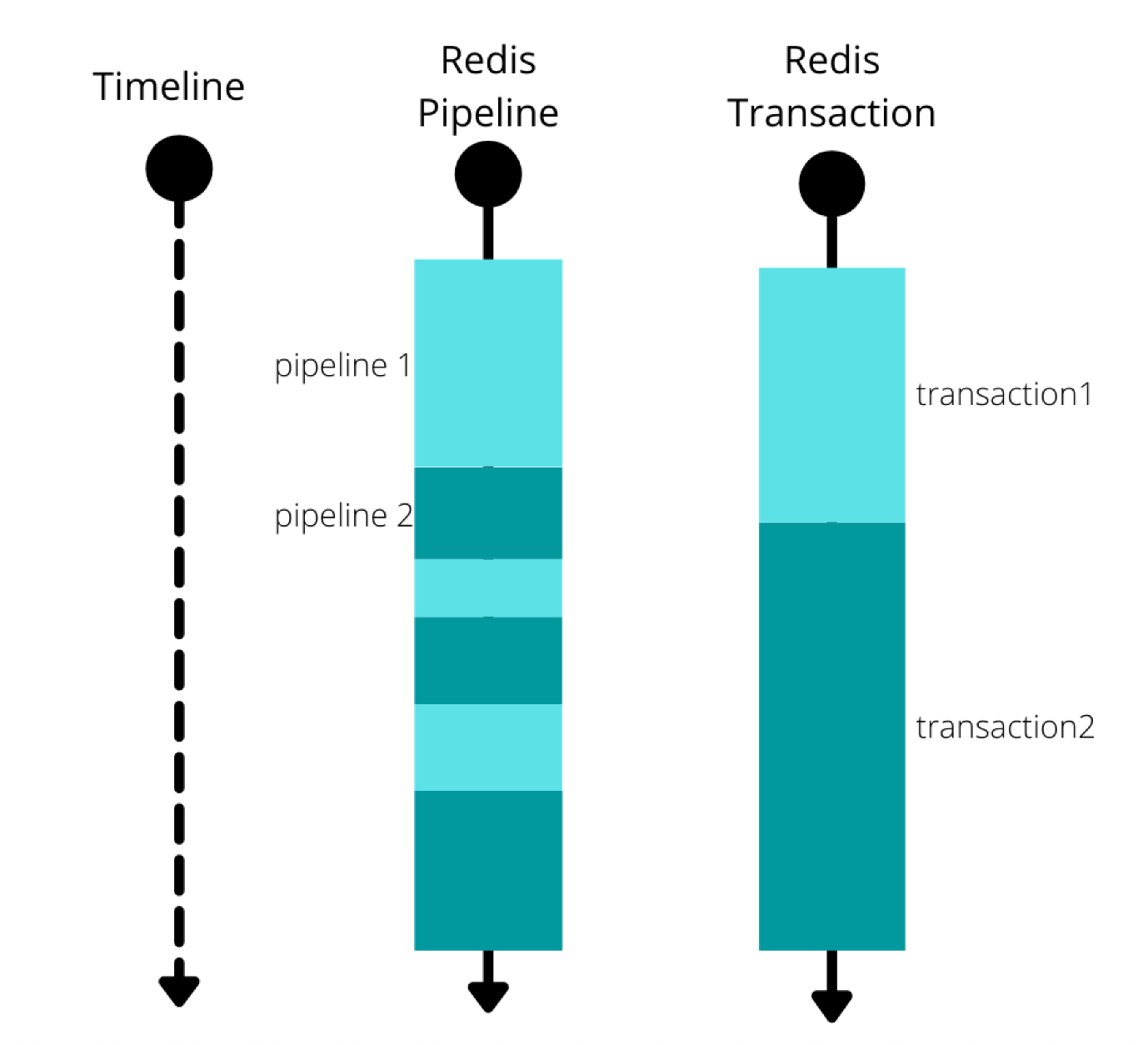
It's important to note that these concepts are not mutually exclusive. A transaction is typically sent to the server using a pipeline to gain both atomicity and network performance.
2. Pipelining for Performance
Pipelining is your primary tool for boosting throughput on bulk operations. By buffering commands on the client and sending them in a single write, you can dramatically reduce the total time spent waiting on the network.
Since your background is strong in Java, we will use the popular Jedis client library for our examples.
Pipelines and transactions | Docs
The official Redis documentation provides a concise guide on using pipelines and transactions with the Jedis client. This first part focuses specifically on pipelining.
Read the section 'Execute a pipeline'. Pay close attention to the try-with-resources block, the use of jedis.pipelined(), how commands are added to the pipe, and the role of the pipe.sync() call. Also, note how the Response<T> object is used to retrieve results after the pipeline executes.
Let's break down the key implementation steps from the reading:
- Create a Pipeline: You obtain a pipeline object from your Jedis instance, typically within a
try-with-resourcesstatement to ensure it's properly closed.try (AbstractPipeline pipe = jedis.pipelined()) { // ... } - Queue Commands: You call command methods on the
pipeobject (e.g.,pipe.set(...),pipe.get(...)). These commands are not sent immediately; they are buffered in the client. Methods that return a value will give you aResponse<T>future-like object. - Execute the Batch: The
pipe.sync()method sends all buffered commands to the Redis server in a single network request and waits for all the replies to come back. - Retrieve Results: After
sync()completes, you can call the.get()method on theResponse<T>objects to access the results. Accessing them beforesync()would lead to an error.
Performance Impact
The performance gain from pipelining is not theoretical; it is substantial.
Optimize Redis Client Performance for ...
Let's return to the AWS blog, which provides concrete performance numbers for batching with Jedis. This data clearly illustrates the benefits.
Please read the section 'Batching' under the 'Jedis' heading. Review the code example and, most importantly, analyze the performance table showing the relationship between 'Batch Size' and 'RPS' (requests per second).
The data is compelling. A single-threaded Jedis client goes from a baseline to over 380,000 RPS with a batch size of 1,000. This demonstrates that for any workload involving multiple sequential commands, pipelining should be your default approach.
3. Transactions for Atomicity
While pipelining solves the performance problem, it doesn't provide atomicity. If you need to perform a read-modify-write operation—for example, incrementing a custom counter stored in a hash—you need to ensure no other client can interfere between your GET and SET. This is what Redis transactions are for.
A Redis transaction is initiated with the MULTI command and executed with EXEC. All commands sent after MULTI are queued on the server and executed sequentially as a single, atomic block.
Let's look at the Jedis implementation.
Pipelines and transactions | Docs
The same Redis documentation page also covers transactions in Jedis. This section will show you the syntax for multi and exec.
Find the code block that starts with try ( AbstractTransaction trans = jedis.multi()). Observe the similarity to the pipeline syntax and note the use of trans.exec() to commit the transaction.
The Jedis Transaction object works similarly to the Pipeline object:
- Create a Transaction:
jedis.multi() - Queue Commands:
trans.incrBy(...) - Execute Atomically:
trans.exec()
Transaction Guarantees and Limitations
It's crucial to understand what Redis transactions do and do not guarantee, especially when comparing them to the ACID transactions you know from relational databases:
- Atomicity: All commands in the transaction are executed as one block. No other client command will run in the middle.
- Isolation: The effects of the transaction are not visible to other clients until it is complete.
- No Rollback: This is a key difference. If a command within a transaction fails during execution (e.g., trying to
INCRa string value), the server does not roll back the transaction. It continues executing the remaining commands. The application is responsible for handling such errors. However, if a command has a syntax error beforeEXECis called, Redis will refuse to execute the entire transaction.
The Performance Cost of Atomicity
This atomicity guarantee comes with a server-side overhead.
Optimize Redis Client Performance for ...
The AWS blog again provides valuable performance data, this time comparing transactional batches to non-transactional ones.
Read the 'Transactions' section under the 'Jedis' heading. Compare the RPS in this table with the one from the non-transactional batching section you just reviewed. Note the performance difference for the same batch size.
As you can see, for a batch size of 1,000, non-transactional pipelining achieves ~380k RPS, while a transaction of the same size achieves ~226k RPS. This is still a massive improvement over no batching, but the overhead is clear. The takeaway is to use transactions only when you truly need the atomicity they provide.
4. Advanced Topic: Optimistic Locking with WATCH
A common challenge in concurrent systems is the "read-modify-write" race condition. Imagine you want to implement a custom INCRBYFLOAT if the current value is below a certain threshold.
- Client A
GETs the value "95.5". - Client B
GETs the value "95.5". - Client A checks that 95.5 is below 100, calculates the new value 96.5, and
SETs it. - Client B checks that 95.5 is below 100, calculates its new value 97.0, and
SETs it, overwriting Client A's update.
Redis provides an elegant solution for this: optimistic locking using the WATCH command.
Pipelines and transactions | Docs
The final section of the Redis Jedis guide explains how to use WATCH to build safe transactions.
Read the final part of the document, which introduces WATCH. Focus on the logic: a key is WATCHed, a transaction is started, and if the watched key is modified by another client before EXEC is called, the transaction is aborted.
The pattern is as follows:
WATCH key: Tell Redis to monitorkeyfor modifications.- Read Data:
GET keyto fetch the current value. - Client-side Logic: Perform your checks and calculations in your application code.
MULTI/EXEC: Start a transaction to write the new value.
If another client modifies key between your WATCH and your EXEC, the transaction will fail, and the exec() call will return null (in Jedis). Your application can then retry the entire WATCH-read-modify-write cycle. This ensures that you only ever modify the data based on the value you actually read, preventing lost updates.
Conclusion
In this lesson, we've moved beyond single-command interactions with Redis to master two powerful batching techniques. You now have the tools to dramatically improve application performance and ensure data integrity in high-concurrency scenarios.
Key Takeaways:
- Pipelining is a client-side optimization that batches commands to reduce network RTT, significantly boosting throughput.
- Transactions (
MULTI/EXEC) are a server-side mechanism that guarantees atomic execution of a command sequence, preventing race conditions. - Performance Trade-off: Atomicity has a performance cost. Use non-transactional pipelines for bulk operations whenever possible, and reserve transactions for when atomicity is a strict requirement.
- Optimistic Locking: The
WATCHcommand provides a powerful optimistic locking mechanism to safely handle read-modify-write cycles. - Client Implementation: Libraries like Jedis provide intuitive
PipelineandTransactionobjects that abstract away the underlying Redis protocol.
Preview of the Next Lesson:
We've just optimized the communication between our application and a downstream service (Redis). In the next module, we will move up the stack to look at the layer that sits in front of our services: the proxy. Our next lesson, "Configure proxy timeouts in nginx and analyze their effect on system resilience and user experience," will explore how to manage connection lifetimes and failure modes at the network edge, a critical aspect of building resilient, high-load systems.