
Hello again! Welcome back to your journey into Tidal Cycles.
In our last lesson, you created your first drum patterns using Tidal's mini-notation. We saw how a simple string like "bd sd bd sd" organises sounds within a single, repeating unit of time called a cycle. Until now, the speed of that cycle has been fixed at a default tempo.
This lesson focuses on giving you control over that tempo. We will explore the concept of the cycle in more depth and learn how to use the setcps function to set the global speed of your music. By the end of this session, you'll be able to set your projects to precise BPMs, making it possible to create tracks in the specific electronic genres you're interested in, like techno and house.
This is the final foundational skill in this module before we move on to layering multiple sounds together.
The Heartbeat of Tidal: Cycles
In the previous lesson, we described a cycle as the main unit of time in which a pattern plays out. Let's formalize this idea. Unlike most music software that represents time as a linear timeline from start to finish, Tidal's conception of time is cyclical. A cycle ends, and a new one immediately begins, creating a continuous loop.
To understand this better, let's read the official documentation's introduction to the topic.
The following text from the official Tidal Cycles documentation introduces the core concepts of 'Cycles' and 'Cycles Per Second' (CPS), contrasting them with the more common 'Beats Per Minute' (BPM).
Please read the text under the main heading 'Cycles' down to the subheading 'Dividing the cycle'. Pay attention to the distinction between cyclical and linear time.
As the text explains, this cyclical nature is fundamental. All the patterns you write are, by default, squeezed into the duration of a single cycle.
Consider the pattern d1 $ s "bd hh bd hh". This divides the cycle into four equal parts.
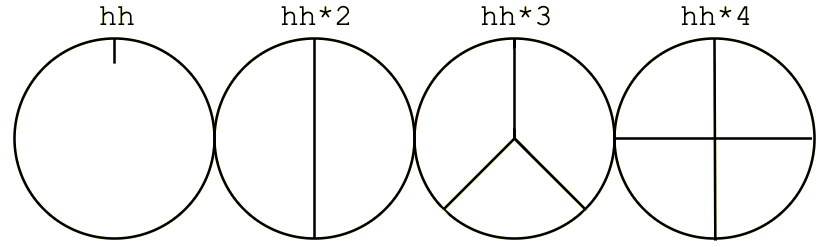
If we change the pattern to d1 $ s "bd hh hh", it now divides the same cycle into three parts. Each part is longer, so the pattern sounds slower, even though the cycle's total duration hasn't changed.
The key takeaway is that the perceived speed of a pattern depends on two things:
- How many events you fit into the string (the pattern's density).
- The actual duration of the cycle itself (the global tempo).
We've already covered the first point. Now, let's learn how to control the second.
Controlling the Global Tempo with setcps
The global tempo in Tidal is measured in Cycles Per Second (CPS). You control this value with the setcps function.
To get a complete picture, we'll consult two sections from the official documentation which explain this function.
These two resources provide a comprehensive look at the setcps function. They explain what it does, its default value, and how to use it to set the tempo in Cycles Per Second.
First, read the section titled 'Tempo' in this tutorial.
This second reading provides the crucial formula for converting from BPM, which is more common in music production, to CPS.
Now, read the section 'Convert between BPM and CPS'. Focus on the structure of the fractional expression used to set the tempo.
Let's synthesize what you've just read.
The setcps function is executed just like a pattern. You type it on its own line in your editor and run it (e.g., with Ctrl+Enter).
setcps 1: This sets the tempo to 1 cycle per second. If your pattern is"bd bd bd bd", you will hear 4 bass drum hits per second.setcps 0.5: This sets the tempo to 0.5 cycles per second, meaning one cycle takes two seconds to complete. This is slower.setcps 2: This sets the tempo to 2 cycles per second, meaning one cycle takes half a second. This is faster.
The default tempo, as you read, is setcps 0.5625.
From BPM to CPS: The Practical Conversion
Your goal is to make music in genres like techno and house, which are defined by specific tempo ranges measured in Beats Per Minute (BPM). So, how do we translate, for example, "140 BPM techno" into Tidal's CPS?
The documentation provides the key formula. Let's analyze it, given your mathematical background.
This can be written in Tidal as: setcps (BPM / 60 / BeatsPerCycle)
Let's break this down:
BPM / 60: This part is straightforward unit conversion. It converts beats per minute into beats per second./ BeatsPerCycle: This is the crucial creative step. You decide how many "beats" from the traditional music sense you want to fit into one Tidal "cycle". For 4/4 time signatures, which are dominant in electronic music, settingBeatsPerCycleto 4 is the most common and intuitive choice. This makes one cycle equivalent to one bar of music.
Example: A Classic Techno Tempo
Let's say you want a tempo of 135 BPM, and you decide that one cycle should represent a 4-beat bar.
- BPM = 135
- BeatsPerCycle = 4
The calculation is (135 / 60 / 4).
135 / 60 = 2.25beats per second.2.25 / 4 = 0.5625cycles per second.
This is exactly Tidal's default tempo! This shows that the default is set to a standard 135 BPM assuming 4 beats per cycle.
Activity (15 minutes): Experiment with Tempo
Time to put this into practice.
- Open your editor with Tidal running.
- Start a simple, continuous pattern. A four-on-the-floor kick is perfect for this:
d1 $ s "bd bd bd bd" - Execute it. You will hear it playing at the default 135 BPM.
- Now, let's change it to a typical house tempo of 125 BPM. On a new line, type and execute:
You should hear the pattern slow down to the new tempo.setcps (125 / 60 / 4) - Let's switch to a classic drum and bass tempo of 174 BPM. On another new line, type and execute:
Notice the significant increase in speed.setcps (174 / 60 / 4) - Finally, return to a driving techno tempo of 140 BPM. Calculate and execute the
setcpscommand for this yourself.
This simple exercise is the core workflow for setting the tempo for any track you create in Tidal. You can change it at any time while your patterns are running.
Conclusion
In this lesson, you've gained a deeper understanding of Tidal's unique, cyclical approach to time and, most importantly, you've learned how to control it. This bridges the gap between Tidal's internal clock and the conventional BPMs used in the music genres you want to explore.
Key Takeaways:
- Tidal's time is based on cycles, which loop continuously.
- The global tempo is set in Cycles Per Second (CPS) using the
setcpsfunction. - A pattern like
"bd sd hh cp"divides one cycle into four equal parts; the speed at which it plays depends on the duration of that cycle. - You can translate from BPM to CPS using the formula
setcps (BPM / 60 / BeatsPerCycle), whereBeatsPerCycleis typically 4 for electronic music.
You now have all the foundational elements in place: you can trigger sounds, write rhythms, and set the tempo.
Next Lesson Preview:
A single line of rhythm is a great start, but rich music is built from layers. In our next lesson, we will begin Module 2 by learning how to use stack to layer multiple patterns simultaneously. This will allow you to build a full drum kit, with the kick, snare, and hi-hats all playing their own independent rhythms to create a cohesive whole.
Can't find a good explanation? Sign up and we'll make it for you
Sign up