
Good to see you again. You have now used pandas to inspect schema and quality issues, clean invalid and missing values, combine tables, create summaries, and visualize distributions and relationships. Those notebook steps are useful exploration—but an ML workflow becomes dependable only when the decisions behind them can be rerun on fresh data without relying on notebook cell order or hidden variables.
In this closing lesson for the Python-and-tabular-work module, you will turn a representative request-telemetry cleaning workflow into:
- a reusable function with an explicit data contract, and
- a command-line script that reads raw CSV data and writes a prepared dataset.
The aim is not to abandon notebooks. It is to let notebooks remain places for exploration and communication while moving repeatable operational logic into ordinary Python files.
From notebook history to a data-preparation contract
A notebook records a history of exploration: load a file, inspect a column, patch an odd value, rerun a later cell, make a chart. That workflow is valuable while you are discovering the data.
A reusable preparation function instead states a contract:
- Input: a DataFrame with specific required columns.
- Rules: how timestamps, invalid numerical values, missing values, and duplicates are handled.
- Output: a new DataFrame that satisfies stated guarantees.
- Side effects: ideally none. The function should not read files, write files, print reports, or mutate the caller’s DataFrame.
This distinction matters in ML engineering. If cleaning logic is buried in an exploratory notebook, a training run, batch job, or teammate may accidentally use different rules. If it is in a function, the same transformation can be used from a notebook, a script, and eventually a pipeline.
Before extracting anything, make sure the original notebook is actually reproducible: restart its kernel and run every cell in order. If that fails, the notebook depends on hidden state, and exporting it will preserve the problem rather than solve it.
Structure, Coding Style, and Refactoring Jupyter Notebooks
Read this Domino article for a practical rationale and workflow for moving notebook logic into functions and scripts. Its central point is that abstraction removes duplication while making data work easier to understand and reuse.
In the section “Use of Abstractions and The Refactoring Process,” read the abstraction example, including the code and benefit list immediately following it. Then continue in the same section from the refactoring checklist. Focus on the sequence: verify the notebook, preserve a copy, export only as a starting point, and then extract meaningful functions.
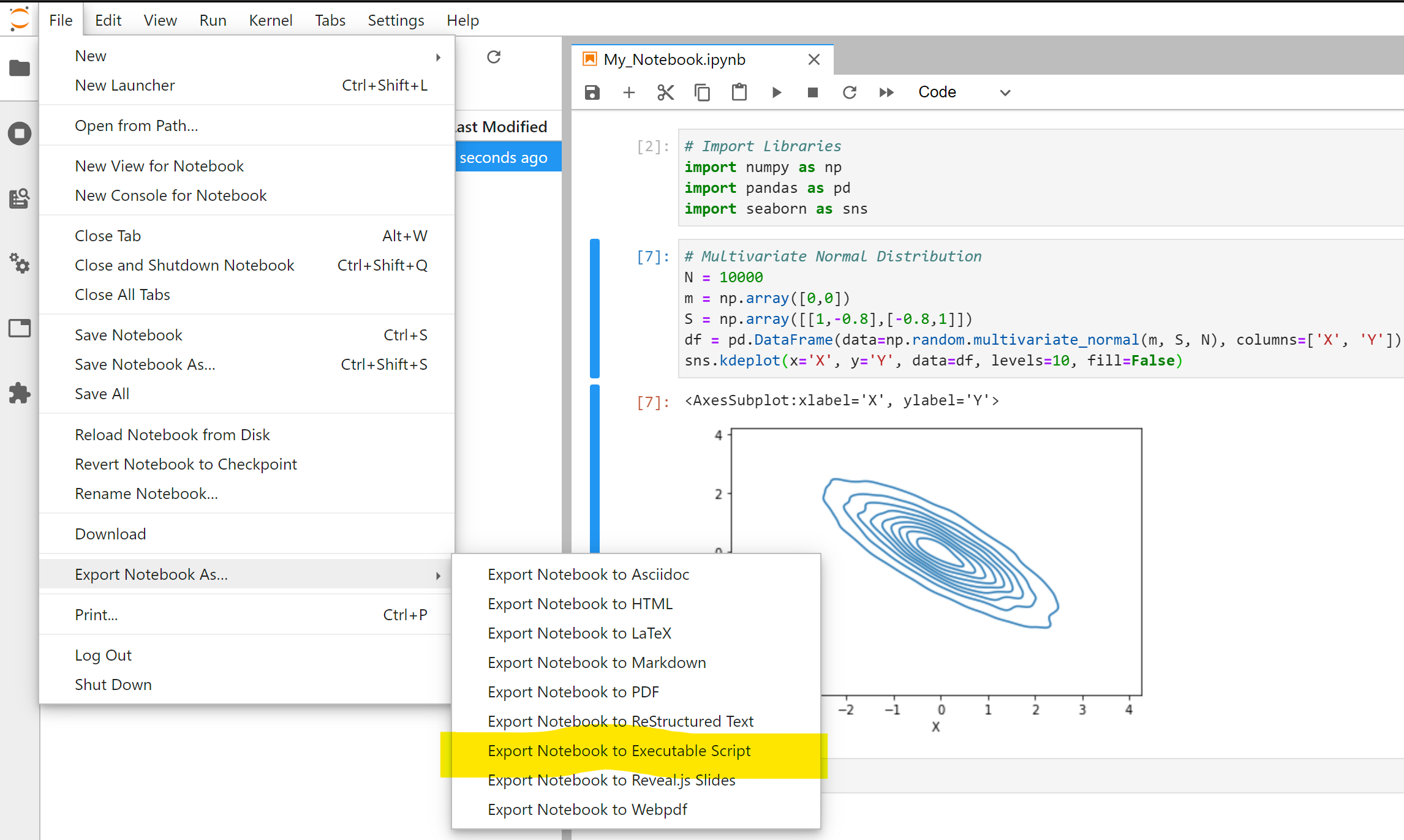
JupyterLab can export a notebook to a Python script. This is sometimes useful as a rough inventory of the code you wrote, but it is not the finished design: exported files often retain display calls, exploratory plots, temporary variables, and sequential notebook assumptions.
A practical project layout for this lesson is:
request-analytics/
├── data/
│   ├── raw/
│   │   └── request_events.csv
│   └── processed/
│       └── request_events_clean.csv
├── notebooks/
│   └── 01_request_exploration.ipynb
└── src/
    ├── __init__.py
    ├── request_preparation.py
    └── prepare_requests.py
Keep raw data immutable. A script may create or overwrite a clearly named processed output, but it should never silently overwrite the source file.
Extract one focused, reusable function
Suppose the request telemetry used in the previous lessons contains these fields:
request_idevent_timemodel_versionlatency_ms
We will encode these preparation rules:
- Required columns must exist; otherwise, stop with a useful error.
- Parse
event_timeas a UTC timestamp. - Convert
latency_msto numeric; unparseable values become missing. - Strip accidental surrounding whitespace from
model_version. - Drop rows missing a required value.
- Keep only nonnegative latency values.
- If a
request_idoccurs more than once, retain its most recent timestamp. - Return the cleaned data in chronological order.
These are example business rules, not universal truth. In another dataset, a negative value might be meaningful, duplicate request IDs might represent retries worth retaining, or missing latency might need a separate category. The important engineering habit is to make the policy explicit.
Create src/request_preparation.py:
import pandas as pd


REQUIRED_COLUMNS = [
    "request_id",
    "event_time",
    "model_version",
    "latency_ms",
]


def prepare_requests(raw: pd.DataFrame) -> pd.DataFrame:
    """Clean request telemetry into one valid row per request.

    Rules:
    - Require request ID, timestamp, model version, and latency columns.
    - Parse timestamps as UTC and latency as numeric.
    - Drop incomplete rows and rows with negative latency.
    - Keep the latest record for each request ID.
    - Return rows ordered by event time.

    Parameters
    ----------
    raw:
        Unprepared request-level telemetry.

    Returns
    -------
    pd.DataFrame
        A cleaned DataFrame. The input DataFrame is not modified.

    Raises
    ------
    ValueError
        If required columns are absent.
    """
    missing_columns = sorted(set(REQUIRED_COLUMNS) - set(raw.columns))

    if missing_columns:
        raise ValueError(
            f"Missing required columns: {missing_columns}. "
            f"Available columns: {list(raw.columns)}"
        )

    clean = raw.copy()

    clean["event_time"] = pd.to_datetime(
        clean["event_time"],
        errors="coerce",
        utc=True,
    )

    clean["latency_ms"] = pd.to_numeric(
        clean["latency_ms"],
        errors="coerce",
    )

    clean["model_version"] = (
        clean["model_version"]
        .astype("string")
        .str.strip()
    )

    clean = clean.dropna(subset=REQUIRED_COLUMNS)

    clean = clean.loc[
        clean["latency_ms"].ge(0)
    ].copy()

    clean = clean.sort_values(
        ["request_id", "event_time"],
        kind="stable",
    )

    clean = clean.drop_duplicates(
        subset="request_id",
        keep="last",
    )

    return (
        clean
        .sort_values("event_time")
        .reset_index(drop=True)
    )
A few design decisions here are worth noticing.
Copy at the boundary
clean = raw.copy()
The function’s caller retains the original raw DataFrame unchanged. This is safer than silently modifying an object that a notebook may still use for profiling, plotting, or comparing before-and-after results.
Fail early on a broken schema
If an upstream export renames latency_ms to latency, the function should fail immediately rather than silently create a misleading output. The error includes both missing and available columns, which makes debugging a changed source schema faster.
Keep I/O outside the transformation
prepare_requests() receives a DataFrame and returns a DataFrame. It does not call pd.read_csv() or to_csv().
That separation makes the logic reusable:
from src.request_preparation import prepare_requests

raw = pd.read_csv(
    "data/raw/request_events.csv",
    dtype={"request_id": "string"},
)

prepared = prepare_requests(raw)
prepared.head()
Keeping request_id as a pandas string is deliberate. IDs may contain leading zeros, and they are identifiers rather than quantities to average or model numerically.
Make duplicate handling explainable
The duplicate rule is not simply “drop duplicates.” It says: “for the same request ID, retain the record with the latest event timestamp.” Sorting before drop_duplicates(..., keep="last") encodes that policy.
If the data source guarantees one row per request, a duplicate found here may instead be a data-quality incident worth reporting. In that case, you might raise an error rather than resolve it. Code should reflect the meaning of the data, not merely suppress inconvenient rows.
Python for Data Analysts - Data Cleaning, Transformation, and Analysis
Watch “Python for Data Analysts - Data Cleaning, Transformation, and Analysis” from Absent Data for a concise example of turning DataFrame logic into a parameterized function.
Watch the function extraction. Focus on the interface design: a function receives a DataFrame and named parameters, performs one defined transformation, and returns a DataFrame that the caller can continue using.
Add a script as the runnable entry point
The reusable function answers: “How is a DataFrame prepared?”
The script answers: “How can someone run preparation on a particular file?”
Create src/prepare_requests.py:
import argparse
import sys
from pathlib import Path

import pandas as pd

from src.request_preparation import prepare_requests


def parse_args() -> argparse.Namespace:
    """Parse command-line arguments for request preparation."""
    parser = argparse.ArgumentParser(
        description="Clean raw request telemetry and write a CSV output."
    )

    parser.add_argument(
        "input_csv",
        type=Path,
        help="Path to the raw request CSV file.",
    )

    parser.add_argument(
        "output_csv",
        type=Path,
        help="Path where the cleaned CSV file will be written.",
    )

    return parser.parse_args()


def main() -> int:
    """Run the request-data preparation job."""
    args = parse_args()

    raw = pd.read_csv(
        args.input_csv,
        dtype={"request_id": "string"},
    )

    prepared = prepare_requests(raw)

    args.output_csv.parent.mkdir(
        parents=True,
        exist_ok=True,
    )

    prepared.to_csv(
        args.output_csv,
        index=False,
    )

    print(
        f"Read {len(raw):,} rows and wrote "
        f"{len(prepared):,} cleaned rows to "
        f"{args.output_csv}"
    )

    return 0


if __name__ == "__main__":
    sys.exit(main())
Run it from the repository root:
python -m src.prepare_requests \
  data/raw/request_events.csv \
  data/processed/request_events_clean.csv
Using -m runs the src.prepare_requests module in its intended package context. The two positional arguments make the input and output explicit: an execution log, shell history, or CI job can show exactly which files were used.
The final block is essential:
if __name__ == "__main__":
    sys.exit(main())
When you run the module, Python assigns its top-level environment the special name __main__, so main() executes. When a notebook or another file imports prepare_requests, Python defines the functions but does not run the command-line parsing, file reads, or CSV writes.
__main__ — Top-level code environment — Python 3.14.2 ...
Read the official Python documentation to understand why an importable module can also serve as a safely runnable script. This pattern is foundational for later training, evaluation, and inference commands.
Read the sections “name == 'main'” and “Idiomatic Usage.” In “Idiomatic Usage,” follow the main-function rationale. Pay particular attention to why the guarded block should be small and why main() is the correct place to coordinate file operations and program-level behavior.
The division of responsibility is now clear:
| Component | Responsibility | Should it be importable? |
|---|---|---|
prepare_requests() | Deterministic DataFrame transformation | Yes |
parse_args() | Interpret command-line inputs | Usually, but only called by main() |
main() | Read file, call transformation, write file, report outcome | Yes, but normally not called on import |
Guarded sys.exit(main()) block | Start the program only when executed directly | No effect on import |
Verify both notebook and script paths
After extracting the code, simplify the notebook rather than deleting it. The notebook can retain the useful context: source profiling, charts, interpretation, and decisions. Replace the long transformation cells with a short import and function call:
from pathlib import Path

import pandas as pd

from src.request_preparation import prepare_requests


raw_path = Path("data/raw/request_events.csv")

raw = pd.read_csv(
    raw_path,
    dtype={"request_id": "string"},
)

prepared = prepare_requests(raw)

prepared.info()
prepared.head()
This gives you one authoritative implementation. If a cleaning rule changes—for example, a new valid model-version label needs normalization—you update prepare_requests() once and rerun both the notebook and the script.
Perform a lightweight acceptance check after each refactor:
from src.request_preparation import REQUIRED_COLUMNS

assert prepared["request_id"].is_unique
assert prepared.loc[:, REQUIRED_COLUMNS].notna().all().all()
assert prepared["latency_ms"].ge(0).all()
assert prepared["event_time"].is_monotonic_increasing
These checks confirm the output contract:
- each retained request ID is unique;
- required values exist;
- latency is valid under the chosen rule;
- output is chronologically ordered.
Then run the script and inspect the resulting CSV:
python -m src.prepare_requests \
  data/raw/request_events.csv \
  data/processed/request_events_clean.csv
At minimum, compare the script output’s row count and a few key summaries with the notebook result. A stronger workflow later adds automated unit tests for representative clean, invalid, missing, and duplicate inputs. The important step today is that the logic is now isolated enough to test.
7 Tips To Structure Your Python Data Science Projects
Watch this segment of “7 Tips To Structure Your Python Data Science Projects” by ArjanCodes for a concise discussion of why reusable notebook logic belongs in modules.
Watch moving logic to modules. Focus on the practical payoff: shared routines can be imported by multiple notebooks or scripts, maintained in one place, and checked with ordinary Python tooling.
A practical refactoring checklist
Use this checklist whenever an exploratory notebook begins to contain logic that you expect to run again:
- Restart and run all cells. Fix hidden dependencies before extracting code.
- Identify a meaningful unit of work. Good candidates include
prepare_requests,build_features, orload_model_artifact, not vague functions such asprocess_data. - Write the input and output contract first. Define required columns, accepted types, invalid-value policy, duplicate policy, and output guarantees.
- Extract a function with no file I/O. Take objects in, return objects out, and avoid mutating inputs.
- Replace notebook implementation cells with a function call. Keep exploration and interpretation in the notebook.
- Create a small
main()script. It should coordinate reading inputs, invoking the function, writing outputs, and reporting a concise result. - Use the
__main__guard. Imports should define code, not unexpectedly execute a job. - Run the same workflow twice. First from the notebook, then from the command line, checking that both use the same logic and produce compatible output.
Key takeaways
Notebook exploration and reusable production-oriented code serve different purposes. Keep the former for investigation and communication; move repeated transformation rules into importable Python functions.
- A data-preparation function should have an explicit input schema, named cleaning policies, clear output guarantees, and minimal side effects.
- Copy the incoming DataFrame before modifying it so callers retain their original data.
- Separate DataFrame transformation from file reading and writing. That is what makes the same preparation logic reusable in notebooks, scripts, and later pipelines.
- A
main()function coordinates command-line execution, while theif __name__ == "__main__":guard prevents execution when code is imported. - Notebook export can help inventory existing code, but it does not itself create maintainable software.
- Run the script from a clean shell context and verify the output contract; repeatability is the first operational requirement of an ML workflow.
You have completed the foundational Python-and-tabular-work module. Next, the course moves into essential ML mathematics, beginning with how observations, features, and model parameters are represented as vectors, matrices, and tensors.
Can't find a good explanation? Sign up and we'll make it for you
Sign up