
Hello! Welcome to your first lesson in our course on asyncio and asynchronous iterators.
Given your extensive background in building complex financial systems and your strong foundation in programming and statistics, this course aims to provide you with a deep, practical understanding of asynchronous programming in Python, a paradigm that is essential for building high-performance, I/O-intensive applications.
We will progress through five modules:
- Foundations of Iteration in Python: The building blocks of sequential data processing.
- Introduction to Asynchronous Programming: The core concepts of
asyncio. - Managing Concurrent Operations: Practical patterns for running tasks together.
- Asynchronous Iterators and Generators: Handling streams of data asynchronously.
- Advanced
asyncioPatterns: Techniques for managing shared resources and state.
Today's lesson is the first step into the world of asynchronous programming. Our goal is to firmly establish the conceptual difference between concurrency and parallelism. This distinction is fundamental; without it, the purpose and design of libraries like asyncio can be confusing. By the end of this lesson, you will be able to differentiate between these two concepts and provide real-world analogies for each.
Let's begin.
1. The Core Concepts: Analogies for Concurrency and Parallelism
At a high level, the distinction is often summarized as:
- Concurrency: Dealing with many things at once.
- Parallelism: Doing many things at once.
This might seem subtle, but it's a crucial difference in how tasks are structured and executed. Concurrency is about managing multiple tasks by allowing them to make progress in overlapping time periods. Parallelism is about executing multiple tasks at the exact same instant.
To build a strong intuition, let's start with a couple of excellent analogies.
First, watch this short segment from a video by ArjanCodes. It introduces a clear and effective analogy using customers and cashiers.
Next-Level Concurrent Programming In Python With Asyncio
This video provides a concise explanation of concurrency versus parallelism using a customer and cashier analogy.
Watch the section from 01:13 to 02:24. Focus on how the number of cashiers (processing units) versus the number of customer lines (tasks) illustrates the difference between the two concepts.
Next, let's explore another popular analogy involving a chef in a kitchen. This video from ByteByteGo illustrates the same concepts from a slightly different angle.
This video uses a chef analogy to explain concurrency and then expands it to cover parallelism.
Watch the first two segments from 00:00 to 00:53 and 01:05 to 01:28. Pay attention to how a single chef juggles tasks (concurrency) versus how multiple chefs divide the work (parallelism).
From these videos, we can extract the core ideas:
- Concurrency is like a single chef preparing multiple dishes. The chef switches between chopping vegetables, stirring a sauce, and checking the oven. Progress is made on all dishes over time, but only one action is performed at any given moment. This rapid switching is often called context switching.
- Parallelism is like having multiple chefs in the kitchen. One chef chops vegetables while another simultaneously cooks the main course. Multiple tasks are performed at the exact same time, which requires multiple workers (or in computing, multiple CPU cores).
2. Visualizing Task Execution
Analogies are helpful, but a more formal visualization can clarify how this looks from a computer's perspective. The image below illustrates four different scenarios of task execution.
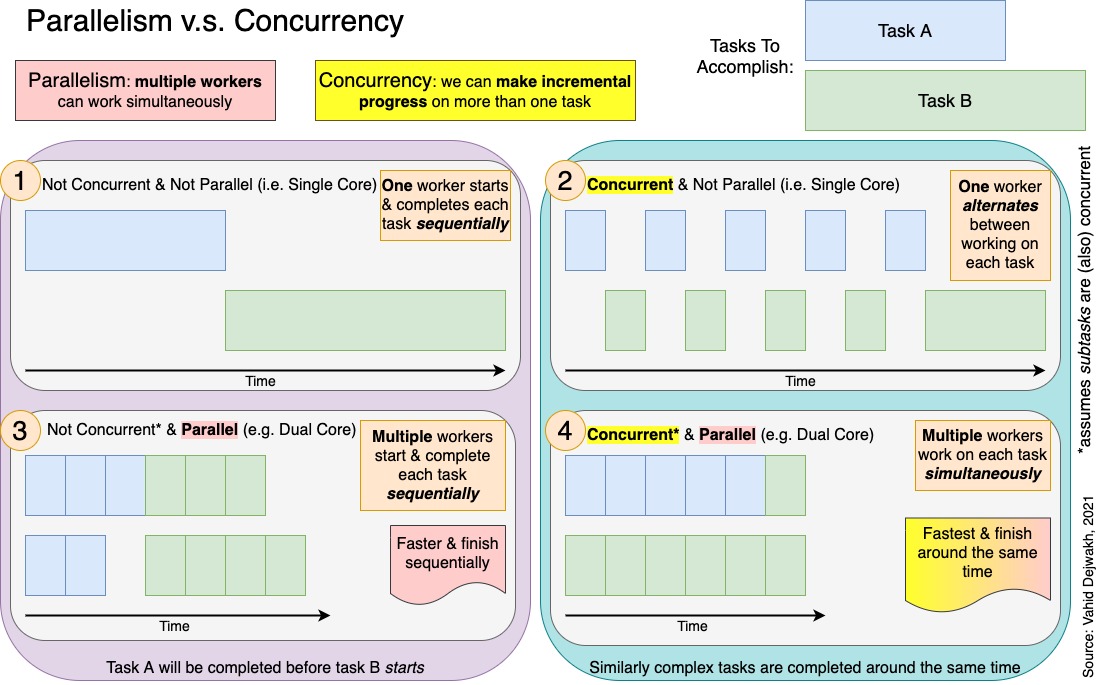
Let's focus on the most important quadrants for our discussion:
- Concurrent & Not Parallel (Top Right): This is the essence of concurrency on a single CPU core. There is only one "worker" (the core), but it makes incremental progress on both Task A (blue) and Task B (green) by switching between them. It deals with both tasks over the same period, but it isn't doing them at the same time. This is the model used by
asyncioin Python. - Concurrent & Parallel (Bottom Right): This shows true parallelism. There are multiple workers (cores), and they are executing tasks at the same time. Concurrency is also present because the system is structured to manage multiple tasks. As you can see, Worker 1 and Worker 2 are both active simultaneously.
3. A Deeper, Structured Comparison
Now that we have the conceptual and visual models, let's solidify them with a more detailed breakdown. The following reading from freeCodeCamp provides a comprehensive comparison and addresses common misconceptions.
Concurrency vs. Parallelism: What's the Difference and ...
This article, 'Concurrency vs. Parallelism: What's the Difference and ...' from freeCodeCamp, offers a detailed comparison and clarifies common points of confusion.
Please read the following sections: 'Understanding the Fundamental Concepts': This will reinforce the definitions and the kitchen analogy. 'Concurrency vs. Parallelism: A Detailed Comparison': Focus on the table in this section. It's an excellent summary of the key differences across several dimensions (goal, CPU use, use case, etc.). 'Common Misconceptions and Clarifications': This section is particularly valuable for dispelling myths, such as 'threads automatically give me parallelism'.
The table in the "Detailed Comparison" section is a crucial takeaway. It systematically contrasts the two concepts, highlighting that the choice between them depends on the nature of the problem you're solving—specifically, whether it's limited by I/O operations or by CPU computation.
4. Application to Your Experience
Your background provides a rich context for these ideas. Consider the systems you've built:
-
A concurrent system could be analogous to a single FX trader at a terminal. The trader monitors multiple news feeds, tracks several currency pairs, and manages open orders. They are context-switching rapidly between these tasks to stay responsive to the market, but they are ultimately a single agent performing one action at a time (e.g., reading a headline, placing an order).
-
A parallel system is like a full trading desk. You have a trader for EUR/USD, another for JPY crosses, and a third running algorithmic strategies. They are all operating truly simultaneously, executing trades in their respective domains. This requires multiple agents (traders) to achieve a higher volume of work in the same amount of time.
Reflect for a moment on a system you've worked on, perhaps the clearing and settlement platform at Revolut. Can you identify processes that were fundamentally concurrent (managing many outstanding transfers, waiting for network confirmations) versus those that could be parallel (batch processing of end-of-day reports for different regions)? This distinction is key to system design.
Conclusion
In this lesson, we have established the foundational difference between concurrency and parallelism.
Key Takeaways:
- Concurrency is a way of structuring a program to manage multiple tasks in overlapping time periods. It creates the illusion of simultaneous execution through rapid task switching and is ideal for improving responsiveness and efficiency in I/O-bound applications. It can be implemented on a single CPU core.
- Parallelism is the actual simultaneous execution of multiple tasks. It requires multiple CPU cores or processors and is used to increase raw computational speed for CPU-bound problems.
- A system can be concurrent without being parallel, but parallelism often relies on a concurrent design to break work into distributable tasks.
Preview of the Next Lesson:
Now that we've defined what concurrency is, our next lesson will focus on when to use it. We will explore the critical distinction between I/O-bound and CPU-bound tasks and see why asyncio is specifically designed for the former, making it a powerful tool for building applications that spend most of their time waiting for networks, databases, or files.
Can't find a good explanation? Sign up and we'll make it for you
Sign up