
Hello. In the previous lesson, you learned to overlap independent remote calls with CompletableFuture, distinguish true asynchronous I/O from merely offloading blocking work, and make failure propagation explicit.
That raised a practical question: when a dependency client is blocking, what executes that blocking work under load? This lesson answers it by comparing two designs:
- a bounded executor of platform threads, which limits both workers and queued work;
- a virtual-thread-per-task executor, which allows a synchronous task for each concurrent request while separately limiting scarce downstream resources.
By the end, you should be able to configure both approaches, explain their queueing behavior in an interview, and choose one for a realistic backend workload.
First separate the request path from the worker executor
An executor does not automatically control every thread in a backend service.
For example, a Spring MVC server has threads that accept and handle incoming HTTP requests. Separately, your code may submit work to an executor through:
CompletableFuture.supplyAsync(...)for a blocking client;- Spring’s
@Asyncsupport; - scheduled or background work;
- an explicit
ExecutorServiceused for request fan-out.
If a controller directly calls a blocking HTTP or JDBC client, it blocks the thread currently running that controller unless the application is configured differently. If the controller submits work to an executor, then the executor’s policy controls that submitted task.
This scope distinction matters. Configuring a bounded remoteIoExecutor does not by itself cap the embedded server’s request threads. Likewise, enabling a virtual-thread task executor does not mean every possible library automatically becomes non-blocking.
For the kind of imperative Spring MVC service you are moving toward, virtual threads are useful because they preserve straightforward blocking code:
Customer customer = customerClient.fetch(customerId); // blocking call
The code still appears blocked while the request is waiting. But when it runs in a virtual thread and performs supported JDK blocking I/O, the JVM can suspend that virtual thread and use the underlying OS thread for other runnable work.
Watch this short Spring-oriented explanation before we model the two executor choices.
Significant Scalability Benefits in Spring Boot 3.2 using Virtual Threads
“Significant Scalability Benefits in Spring Boot 3.2 using Virtual Threads” by Dan Vega connects virtual threads to familiar backend waits: HTTP, database, files, and messaging.
Watch the blocking limit for the platform-thread-per-request bottleneck. Continue with virtual thread behavior, focusing on why a blocked virtual thread need not occupy its carrier platform thread. Then watch the Spring setting for a concise configuration demonstration. Treat the benchmark numbers as illustrative rather than universal; downstream capacity and request mix determine production results.
Why waiting tasks create a capacity problem
Suppose a product API receives requests per second. Each request performs one blocking call to an inventory service that takes milliseconds on average.
A useful first estimate for concurrent in-flight work is:
So the service may have roughly:
requests waiting on inventory at a typical moment.
With platform threads, each of those waits consumes a relatively expensive OS-backed thread. If only eight worker threads are available, the remaining work waits in a queue. Queueing is not automatically wrong; it is often a deliberate overload-control mechanism. But queued requests accumulate latency, and an unbounded queue can eventually become a memory and latency failure.
With virtual threads, those 25 tasks can each retain their own straightforward call stack while waiting. The JVM schedules runnable virtual threads across a much smaller set of carrier platform threads. This improves throughput for I/O-bound workloads; it does not give extra CPU cores or make a slow downstream system faster.
The Oracle Java documentation gives the core model and an important operational rule.
Read Oracle’s “Virtual Threads” guide for the runtime model, the rule against pooling virtual threads, and the correct replacement for pools used only as concurrency limits.
In “What is a Platform Thread?”, read the platform-thread description. Then, in “What is a Virtual Thread?”, read the virtual-thread model. Next, find the passage beginning “The hardest thing to internalize about virtual threads.” Read the per-task rule. Finally, in “Use Semaphores to Limit Concurrency”, read the semaphore comparison. Focus on the distinction between managing scarce worker threads and protecting a limited external dependency.
Two ideas from this reading should stay separate:
- Platform threads are scarce execution resources. A pool is a sensible way to manage them.
- Virtual threads are representations of concurrent tasks. Do not create a small pool of virtual threads merely because platform-thread pooling was once necessary.
Configure a bounded platform-thread executor
A bounded platform-thread executor is appropriate when you want to control the number of OS threads and the amount of queued work. It is especially reasonable for CPU-heavy background work or for a legacy blocking workload whose concurrency you deliberately want to constrain.
Here is an explicit Java 21 configuration:
import java.time.Duration;
import java.util.concurrent.ArrayBlockingQueue;
import java.util.concurrent.ExecutorService;
import java.util.concurrent.ThreadPoolExecutor;
import java.util.concurrent.TimeUnit;

ExecutorService remoteIoExecutor = new ThreadPoolExecutor(
        8,
        16,
        10,
        TimeUnit.SECONDS,
        new ArrayBlockingQueue<>(100),
        Thread.ofPlatform().name("remote-io-", 0).factory(),
        new ThreadPoolExecutor.AbortPolicy());
This executor has four meaningful capacity settings:
| Setting | Value | Meaning |
|---|---|---|
| Core threads | 8 | The normal number of platform workers retained by the pool |
| Maximum threads | 16 | The upper worker limit when the queue is full |
| Queue capacity | 100 | The maximum number of submitted tasks waiting for a worker |
| Rejection policy | AbortPolicy | Rejects new work once all 16 workers are busy and 100 tasks are queued |
A ThreadPoolExecutor with this configuration behaves in a sequence:
- It creates workers until eight core threads are busy.
- It queues additional tasks, up to 100.
- Once the queue is full, it creates more workers, up to 16.
- Once both the queue and all 16 workers are full, it rejects new submissions.
The detail that surprises many developers is step 2: a pool does not normally grow from eight to 16 as soon as the ninth task arrives. With a queue configured, it usually queues first and expands only after the queue fills.
Use a descriptive name such as remote-io- rather than accepting anonymous thread names. Thread names make logs, thread dumps, and incident analysis substantially easier.
Using the bounded executor with blocking work
The executor is useful when wrapping a client that has no asynchronous API:
CompletableFuture<Customer> customerFuture =
        CompletableFuture.supplyAsync(
                this::fetchCustomerBlocking,
                remoteIoExecutor);
Here, fetchCustomerBlocking() might invoke a legacy SDK or a synchronous HTTP client. The platform worker remains occupied while that operation waits.
If the executor rejects work, CompletableFuture.supplyAsync can throw RejectedExecutionException at submission time. That is an overload signal, not a bug to hide with a broad catch block. At an HTTP boundary, the service should have an intentional overload policy, commonly a fast failure such as 503 Service Unavailable, possibly with a retry indication.
CallerRunsPolicy is another possible rejection policy. It makes the submitting thread run the task itself, which can provide backpressure. However, if an incoming request thread submits a slow blocking task, caller-runs transfers that wait back onto the request thread. Use it only when that trade-off is clearly acceptable.
Spring Boot configuration for the platform-thread option
When Spring Boot auto-configures a ThreadPoolTaskExecutor, its execution pool can be tuned in application.yml:
spring:
  task:
    execution:
      pool:
        max-size: 16
        queue-capacity: 100
        keep-alive: 10s
Spring Boot’s default auto-configured platform executor has eight core threads. The configuration above keeps that default core size, bounds the queue at 100 tasks, permits growth to 16 threads under queue pressure, and shortens idle-thread retention.
This configuration applies to Spring’s auto-configured task execution infrastructure, such as @Async work. It is not a replacement for explicit tuning of server request-thread limits, JDBC connection-pool size, or downstream HTTP client connection limits.
Configure virtual-thread-per-task execution
For a blocking I/O workload, virtual threads let you express concurrency directly: one concurrent task gets one virtual thread.
The lowest-level Java 21 configuration is:
import java.util.concurrent.ExecutorService;

ExecutorService virtualExecutor =
        Executors.newVirtualThreadPerTaskExecutor();
Every task submitted to this executor starts in a new virtual thread. It is intentionally not a pool.
For a short fan-out scope, Java 21’s ExecutorService can be closed using try-with-resources:
try (ExecutorService virtualExecutor =
             Executors.newVirtualThreadPerTaskExecutor()) {

    var catalogFuture = virtualExecutor.submit(catalogTask);
    var priceFuture = virtualExecutor.submit(priceTask);
    var inventoryFuture = virtualExecutor.submit(inventoryTask);

    Product product = catalogFuture.get();
    Price price = priceFuture.get();
    Availability availability = inventoryFuture.get();

    return new ProductView(product, price, availability);
}
All three tasks are submitted before get() waits for their results, so they may run concurrently. When the block closes, the executor waits for submitted tasks to finish. In real code, handle InterruptedException by restoring the interrupt status, and translate checked task failures with enough downstream context.
For a long-lived application-level executor, create it during application startup and close it during graceful shutdown. Do not create an executor that is never closed. Conversely, creating a short-lived virtual-thread executor for a bounded request fan-out is cheap and valid because the executor does not own a fixed stock of costly worker threads.
Virtual threads preserve blocking style, not unlimited capacity
Virtual threads work well when tasks spend most of their lifetime waiting for I/O:
- synchronous HTTP calls;
- JDBC queries;
- file I/O;
- blocking message or SDK operations.
They are not a better CPU executor. If 500 virtual threads all calculate hashes or compress files at once, only the available CPU cores can execute them. The excess runnable tasks compete for CPU time, increasing scheduling overhead and tail latency.
They also do not erase limits in downstream systems. A database may support only 20 connections. A legacy inventory service may safely handle only 50 concurrent calls. These are resource limits that must still be modelled directly.
Use a semaphore to limit a dependency, not a virtual-thread pool
With a platform pool, limiting the worker count incidentally limits concurrent calls. With virtual threads, that accidental limit disappears. If a specific dependency must have a cap, express that cap explicitly.
import java.util.concurrent.Semaphore;

final class LimitedInventoryClient {

    private final Semaphore permits = new Semaphore(50);
    private final InventoryClient delegate;

    LimitedInventoryClient(InventoryClient delegate) {
        this.delegate = delegate;
    }

    Inventory fetch(String productId) throws InterruptedException {
        permits.acquire();
        try {
            return delegate.fetch(productId);
        } finally {
            permits.release();
        }
    }
}
At most 50 calls can enter delegate.fetch(...) at once. Additional virtual threads wait at acquire(). Because those waiting tasks are virtual threads, the waiting itself need not consume 50 platform threads.
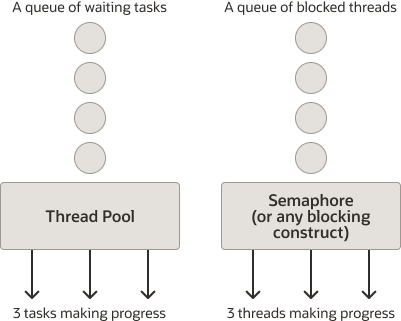
This is the key comparison:
| Concern | Bounded platform-thread executor | Virtual-thread-per-task executor plus semaphore |
|---|---|---|
| Unit held in the waiting queue | A submitted task | A blocked virtual thread |
| Main scarce resource managed | Platform threads | The downstream dependency’s permits |
| Suitable for many blocking I/O waits | Limited by worker count | Usually much more scalable |
| Suitable for CPU-bound work | Yes, with a size near available CPU capacity | No inherent benefit |
| Concurrency cap for a remote service | Indirect side effect of worker limit | Explicit semaphore or client-level limit |
| Queue and overload observation | Executor queue depth and rejections | Semaphore wait time, request timeouts, dependency metrics |
| Correct virtual-thread pattern | Not applicable | One virtual thread per task; do not pool virtual threads |
A JDBC connection pool already performs this limiting role. If the pool has 20 connections, the 21st caller waits for a connection. Adding a second semaphore with the same limit is generally unnecessary and can make diagnosis more confusing.
Enable virtual threads in Spring Boot
Spring Boot can configure its auto-configured task executor to use virtual threads when the application runs on Java 21 or later.
spring:
  threads:
    virtual:
      enabled: true
Read the relevant Spring Boot behavior and compare it with the bounded configuration.
Task Execution and Scheduling :: Spring Boot
Read Spring Boot’s “Task Execution and Scheduling” reference to see what its auto-configured executor becomes in platform-thread and virtual-thread modes.
In “Task Execution and Scheduling”, begin at the paragraph explaining Spring Boot’s behavior when no Executor bean is present. Read the executor selection rule. Note that this auto-configured executor is used by Spring mechanisms such as @Async and asynchronous MVC processing. Then find the paragraph beginning “When a ThreadPoolTaskExecutor is auto-configured.” Read the bounded-pool tuning example. Compare the meaning of max-size and queue-capacity with the earlier explicit Java configuration.
There are two practical Spring Boot rules:
- With Java 21+,
spring.threads.virtual.enabled=true, and no overridingExecutorbean, Spring Boot auto-configures aSimpleAsyncTaskExecutorthat uses virtual threads. - Pool settings such as
spring.task.execution.pool.max-sizeandqueue-capacityare not virtual-thread limits. Spring Boot ignores pooling-related properties for the virtual-thread executor.
Therefore, do not write this configuration expecting a virtual-thread pool of 16 workers:
spring:
  threads:
    virtual:
      enabled: true
  task:
    execution:
      pool:
        max-size: 16
The max-size does not become a safety boundary in virtual-thread mode. If the goal is “inventory must receive no more than 50 concurrent requests,” use an explicit semaphore, HTTP client connection limits where appropriate, or a resilience mechanism designed for that dependency.
In the Spring Boot module, you will inspect auto-configuration and define named executors where an application genuinely needs more than one execution policy. For now, recognize that this single property changes Spring Boot’s task execution default, not every thread-related setting in the application.
Decide from workload shape, then verify under load
For a typical product API that makes blocking HTTP and JDBC calls, start from this decision process:
- Identify whether the work is mostly waiting or mostly computing.
- If it is blocking I/O and the application is on Java 21, prefer virtual threads for task execution.
- Identify every scarce downstream resource: database connections, remote-service concurrency, file handles, or vendor SDK limits.
- Apply a specific limit at that resource boundary rather than pooling virtual threads.
- Keep timeouts and failure handling from the previous lesson. Virtual threads make waiting cheaper; they do not make an indefinitely waiting dependency safe.
- Load-test the actual call path, including the database and downstream services.
A bounded platform executor remains defensible when the task is CPU intensive, when a legacy operational constraint requires a strict small worker count, or when you need a transitional safety boundary around blocking work. But a thread pool should not be the default answer merely because the work happens concurrently.
For a short local experiment, create 40 tasks that perform a 250-millisecond simulated wait. Run the same workload with the eight-core bounded platform executor and with newVirtualThreadPerTaskExecutor(). Record total completion time, active platform-thread count, and whether Thread.currentThread().isVirtual() reports true inside the task.
Then repeat the virtual-thread version with a semaphore of eight permits. The total time should again show batches because the semaphore deliberately constrains the simulated dependency. That result is not a virtual-thread failure; it demonstrates that downstream protection is a separate capacity decision.
Key takeaways
- A bounded platform-thread executor controls scarce OS-backed workers and queued tasks. Configure a queue capacity and explicit rejection policy; never leave overload behavior accidental.
- Virtual threads are lightweight task representations. For blocking I/O, prefer one virtual thread per concurrent task rather than a fixed pool of virtual threads.
- Virtual threads improve throughput under I/O waiting. They do not increase CPU capacity, accelerate a slow dependency, or remove the need for timeouts.
- In virtual-thread designs, limit fragile downstream systems with semaphores, connection pools, client limits, and later resilience controls.
- Spring Boot can enable virtual-thread task execution with
spring.threads.virtual.enabled=true; pooling properties do not serve as virtual-thread limits. - Monitor the correct pressure point: executor queue depth and rejections for platform pools; downstream saturation, permit waits, connection-pool waits, latency, and errors for virtual-thread services.
You have now completed the concurrency module. Next, the course moves into Spring Boot foundations: creating a Java 21 Spring Boot 3 service with a reproducible Maven or Gradle build.
Can't find a good explanation? Sign up and we'll make it for you
Sign up