
Hello! In our previous lessons, we've built a robust template for backtracking: we choose a candidate, explore the consequences recursively, and prune branches that are guaranteed to fail. Today, we'll focus on the final, critical piece of this puzzle: the "un-choose" step.
This lesson is about ensuring the integrity of our search. As we explore different branches of the decision tree, we modify a shared state (like the current path or a grid). If we don't clean up these modifications after exploring a branch, the changes will leak into sibling branches, corrupting the entire search. Mastering state restoration is what makes backtracking reliable. By the end of this lesson, you will be able to correctly restore any mutable state after exploring a backtracking branch, a skill crucial for avoiding some of the most common and frustrating bugs in these types of algorithms.
The "Choose, Explore, Un-choose" Pattern
At the heart of every correct backtracking algorithm is a three-step dance:
- Choose: Make a decision and modify the state to reflect it. (e.g., add an element to the current path).
- Explore: Make a recursive call to explore the consequences of that choice.
- Un-choose: Undo the decision, restoring the state to exactly what it was before you made the choice.
This "un-choose" step ensures that when the for loop continues to its next iteration, the next choice is being made from a clean slate. The path taken by one recursive branch does not affect its sibling.
This article from Generalist Programmer provides a universal template that makes this pattern explicit.
Backtracking Algorithm: Complete Guide With Template and Examples (2026)
Take a look at the general template provided in this article.
Focus on the six numbered steps in the code block, particularly steps 4 (CHOOSE), 5 (EXPLORE), and 6 (UNCHOOSE). The text following the code block succinctly explains why this undo step is so critical.
Let's visualize what this means. Imagine exploring a maze.
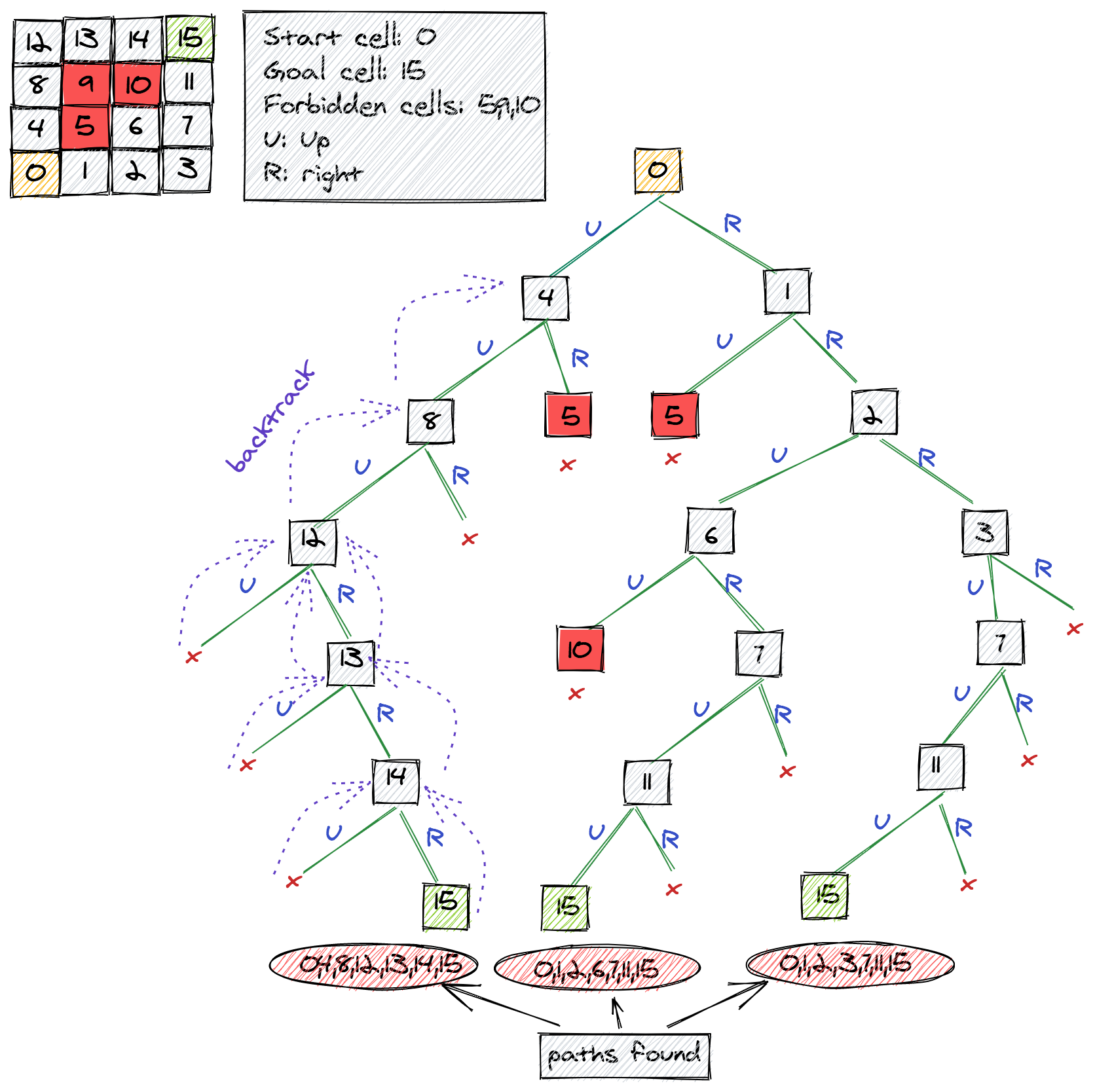
When the search reaches cell 12, it finds that both "Up" and "Right" moves are invalid. To try another path, it must "backtrack" to cell 8. This isn't just a conceptual move; the algorithm must update its state to reflect that cell 12 is no longer part of the current path. It "un-chooses" 12. Then, from 8, it might try another move. If that also fails, it backtracks again, "un-choosing" 8. This restoration is what allows the search to eventually backtrack all the way to cell 4 and try the path toward cell 5.
Common State Restoration Techniques
The "un-choose" operation depends on what kind of state you're modifying. Let's look at the most common patterns you'll implement.
1. Path Construction: push and pop
When building a sequence like a subset, combination, or permutation, the most common state is an array representing the current path. The "choose" step is push-ing an element onto the array, and the "un-choose" step is pop-ping it off.
The video "Data Structures in Javascript ( Recursion )" by RoadsideCoder has an excellent visual walkthrough of this pattern for the Subsets problem.
Data Structures in Javascript ( Recursion ) | DSA Interview Questions | Backtracking Algorithms
This segment explains the "choose or skip" logic for building subsets and then translates it directly into a JavaScript implementation.
Watch from the visual explanation where the presenter builds a decision tree, showing how each recursive path is built. Pay close attention to how he discusses either "taking" an element or "rejecting" it. Then, follow along with the coding part, where this logic is implemented with temp.push() (choose), the recursive call (explore), and temp.pop() (un-choose).
The core loop looks like this:
// Inside the recursive helper
temp.push(nums[i]);            // 1. Choose
recursiveSubsets(nums, i + 1); // 2. Explore
temp.pop();                    // 3. Un-choose
2. In-Place Modifications: Grids and Flags
For problems like Sudoku or N-Queens, you often modify a data structure in-place, like a 2D array representing the board or a boolean used array. The "un-choose" step involves resetting the value at that specific position back to its original state.
The article "Understanding Backtracking in JavaScript" demonstrates this clearly with several examples.
Understanding Backtracking in JavaScript
This article provides complete, practical JavaScript implementations for several classic backtracking problems.
First, examine the solveNQueens function. Notice how the state board is modified with board[row] = col; before the recursive call and restored with board[row] = null; after it. Next, look at the permute function. This example uses two pieces of mutable state: the current path array and the used boolean array. Both are restored after the recursive call: current.pop() and used[i] = false. You can see this pattern clearly in the backtracking loop.
This pattern of symmetrically pairing a state change with its reversal is fundamental to correct backtracking. For every state.add(x), there must be a corresponding state.delete(x) after the recursive call. For every used[i] = true, a used[i] = false.
3. In-Place Swaps
A clever way to generate permutations without an extra used array is to perform swaps on the input array itself. The "choose" step swaps an element into the current position, you recurse on the rest of the array, and then you "un-choose" by swapping it back. This restores the array to its original order for the next iteration of the loop.
This video from Andy Gala on LeetCode 46 (Permutations) illustrates this technique perfectly.
LEETCODE 46 (JAVASCRIPT) | PERMUTATIONS I
The presenter codes a solution for the Permutations problem using the in-place swap method.
Watch the implementation from this timestamp. The key sequence is the first swap before the recursive call (dfs) and the second, identical swap after the recursive call. This "re-swap" is the state restoration.
The Most Common Backtracking Bug: Forgetting to Copy Solutions
You've built a perfect backtracking function. It finds the correct solutions. You push them into a results array. But when you return the results, you find an array of empty arrays, or an array of identical, incomplete paths. What went wrong?
You forgot to copy your solution.
Your currentPath or board variable is a single, mutable object that is reused throughout the entire search. When you find a valid solution, you can't just add a reference to this object to your results. If you do, that reference will point to the same object that you continue to modify with pop and other "un-choose" operations.
You must always add a copy (a snapshot) of the state to your results.
The "Common Pitfalls to Avoid" section in the reintech.io article gives a perfect, concise example of this bug and its fix.
Understanding Backtracking in JavaScript
This section highlights two of the most frequent errors developers make when implementing backtracking.
Read the short section on "Mutating shared state". It contrasts the wrong way (solutions.push(currentPath)) with the correct way (solutions.push([...currentPath])) and explains why.
In JavaScript, creating a shallow copy of an array is simple:
[...currentPath](using the spread syntax)currentPath.slice()
Remembering this one detail will save you hours of debugging.
Conclusion
Today, we've completed our understanding of the backtracking template by focusing on the "un-choose" or state restoration step. This is the mechanism that guarantees each recursive branch of our search operates independently, preventing side effects and leading to a correct and systematic exploration of the solution space.
Key Takeaways:
- The full backtracking pattern is Choose, Explore, Un-choose. The "un-choose" step is critical for correctness.
- State restoration must mirror the state modification:
- If you
pushto an array, youpopfrom it. - If you set
board[r][c] = 'Q', you must later set it back to'.'. - If you set
used[i] = true, you must set it back tofalse.
- If you
- A very common and frustrating bug is storing references to mutable state instead of copies. Always add a snapshot of your solution to the results array, e.g.,
results.push([...currentPath]).
With this lesson, we conclude our deep dive into the mechanics of recursion and backtracking. You now have a powerful and generalizable framework for solving a huge class of problems involving permutations, combinations, subsets, and constraint satisfaction.
In our next module, we will move on to Trees. You'll find that the recursive traversal skills you've just honed—preorder, inorder, postorder—are the foundation for nearly everything we do with tree data structures.
Can't find a good explanation? Sign up and we'll make it for you
Sign up