
Welcome back! In our last lesson, we explored how to generate all subsets of a set using a "choose-or-skip" recursive pattern. For each element, we made a simple binary choice: include it or not.
This lesson tackles a related but distinct combinatorial problem: generating all permutations. While subsets are about which elements you choose (order doesn't matter), permutations are about how you arrange them (order is critical). You will learn how to adapt our backtracking template to generate all possible orderings of a set of elements by tracking which choices have already been used in the current path.
Subsets vs. Permutations: A New Decision Model
Let's start by clarifying the difference with a simple example: [1, 2].
- Subsets:
[],[1],[2],[1, 2]. The order is irrelevant;{1, 2}is the same as{2, 1}. There are subsets. - Permutations:
[1, 2],[2, 1]. The order creates distinct arrangements. For a set ofnunique elements, there are (n-factorial) permutations.
This fundamental difference means our "choose-or-skip" model won't work directly. For subsets, we decided about element i at level i of our recursion. For permutations, at each level (or position in the new array we're building), we need to be able to choose from any of the original elements, provided we haven't used it yet.
This image provides a great visual comparison of the two concepts and their corresponding decision trees.
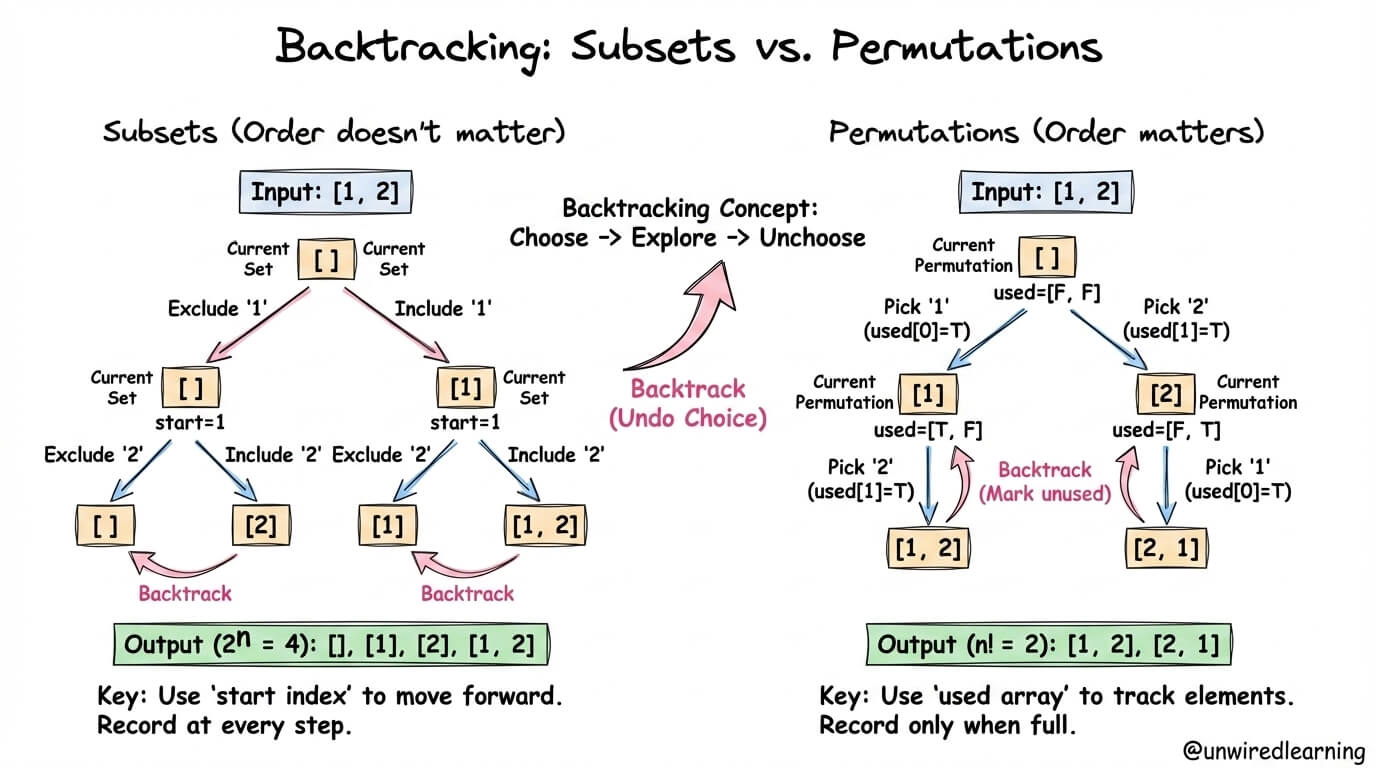
On the right side, for permutations, notice the key steps:
- Pick '1': The first choice. We mark '1' as used.
- Pick '2': The only remaining choice. The permutation
[1, 2]is complete. - Backtrack: We "un-pick" '2', and then "un-pick" '1', returning to the root.
- Pick '2': Start a new path. We mark '2' as used.
- Pick '1': The only remaining choice. The permutation
[2, 1]is complete.
This reveals the core challenge: how do we efficiently track which elements have already been "picked" for the current permutation we're building?
Tracking State with a visited Array
Since we can pick any element at any stage, simply incrementing an index through the input array is no longer sufficient. We need a separate data structure to keep track of which elements from the original array are already part of our current candidate permutation.
The standard and most intuitive way to do this is with a boolean array, often called visited or used, which has the same length as the input array.
visited[i] === truemeansnums[i]is already in ourcurrentPermutation.visited[i] === falsemeansnums[i]is available to be chosen.
This visited array becomes a crucial part of our recursive state. The "Choose, Explore, Unchoose" cycle is now updated:
- Choose: Pick an available element
nums[i], add it to the permutation, and markvisited[i] = true. - Explore: Make a recursive call to fill the next position in the permutation.
- Unchoose (Backtrack): After the recursive call returns, remove
nums[i]from the current permutation and, critically, resetvisited[i] = false. This makes the element available again for other branches of the decision tree.
The following reading from Algo.monster offers a comprehensive walkthrough of this pattern, complete with TypeScript code and a discussion of common pitfalls that are essential to internalize.
46. Permutations - In-Depth Explanation
This guide provides a complete breakdown of the permutation generation problem using the visited array backtracking method. It will solidify the concepts we've just discussed.
Please read through the following sections: Start with the Intuition section to understand the choice-based model. Next, review the Solution Approach, which details the algorithm, the roles of the vis (visited) and t (temporary) arrays, and the time/space complexity. Carefully trace the Example Walkthrough for nums = [1, 2, 3]. This will make the process concrete. Study the TypeScript implementation. Notice how the buildPermutation function maps directly to the logic we've discussed. Finally, pay close attention to the Common Pitfalls, especially the notes on creating copies and the necessity of the backtracking step. These are frequent sources of bugs.
Visualizing the Execution Flow
Let's reinforce the backtracking process. As your recursive function buildPermutation dives deeper, it creates new execution contexts. When a base case is hit (a full permutation is built), the function returns, and the context "closes out." This is when the "Unchoose" step happens, allowing the parent function to continue its loop and explore the next available choice.
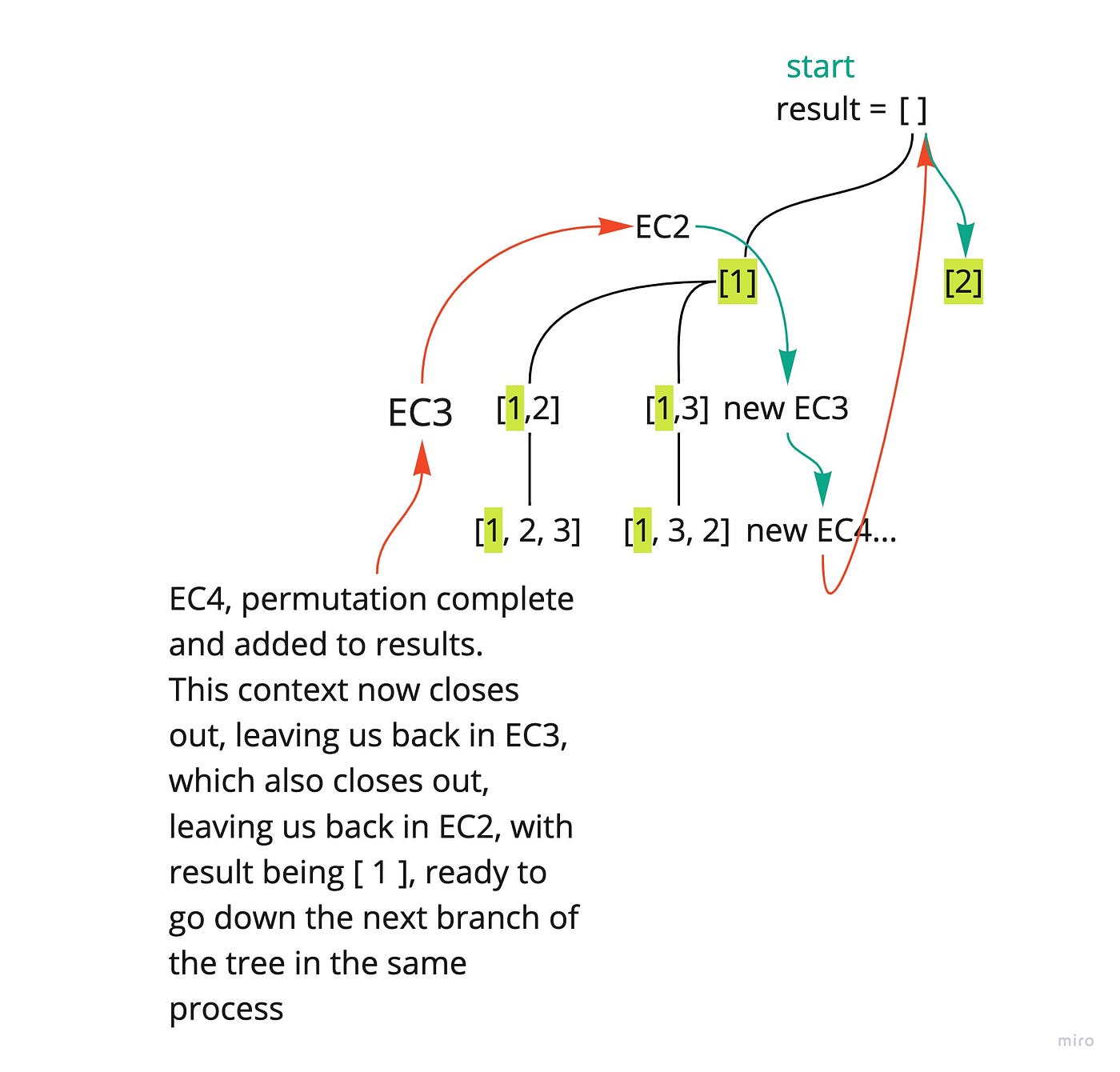
The core recursive logic you saw in the reading implements this flow:
// Inside the recursive helper function
for (let i = 0; i < nums.length; i++) {
  // 1. Check if the choice is valid
  if (!visited[i]) {
    // 2. Choose
    visited[i] = true;
    currentPermutation.push(nums[i]);

    // 3. Explore
    buildPermutation(); // Recursive call

    // 4. Unchoose (Backtrack)
    visited[i] = false;
    currentPermutation.pop();
  }
}
This loop is the heart of the algorithm. Unlike the subsets problem which had two explicit recursive calls ("include" and "exclude"), this for loop structure allows us to handle n possible choices at each level of the recursion.
Alternative Implementation: In-Place Swapping
For completeness, it's worth knowing that another common technique exists for generating permutations, which involves modifying the input array itself through swaps.
The following video demonstrates this alternative. While it's an elegant and memory-efficient approach (as it avoids the extra visited array), reasoning about the state can be more complex. For now, I recommend focusing on mastering the visited array pattern, as it's more explicit and often easier to debug when you are starting out.
LEETCODE 46 (JAVASCRIPT) | PERMUTATIONS I
This video from Andy Gala explains the in-place swap method. It's a different but valid way to solve the same problem.
Watch the initial explanation of the tree structure from the beginning to see how swapping elements at each level generates the permutations. Then, look at the code walkthrough from the recursive case to see how the swap and re-swap actions accomplish the "Choose" and "Unchoose" steps within the recursion.
Conclusion
In this lesson, you've extended your knowledge of backtracking to generate all permutations of a set. This required a conceptual shift from the "choose-or-skip" model to a more general "iterate-through-all-choices" model.
Key Takeaways:
- Permutations vs. Subsets: Permutations are ordered arrangements, while subsets are unordered selections. This changes the fundamental decision being made at each step of the recursion.
- State Tracking: To generate permutations, you must track which elements have already been used in the current path. A
visitedboolean array is a clear and effective way to manage this state. - The Backtracking Pattern: The core logic involves a loop over all possible choices. Inside the loop, you check if a choice is valid, make the choice (updating state), explore recursively, and then undo the choice (restoring state).
- Complexity: Generating permutations is computationally expensive. For
nelements, there aren!permutations, and creating each one takes time, leading to a time complexity of . The space complexity, excluding the output, is for the recursion depth and thevisitedarray.
In our next lesson, we'll look at combinations. This is a hybrid concept: like subsets, the order doesn't matter, but like permutations, you are choosing a specific number of elements (e.g., "choose 2 elements from 4"). We will see how to adapt our backtracking template once more to solve this.
Can't find a good explanation? Sign up and we'll make it for you
Sign up